Receiving an SMS
To receive an SMS, you need to:
- Rent a virtual number to receive messages
- Create a webhook endpoint using one of the code examples shown below
- Configure the webhook in your Vonage Dashboard
Prerequisites
Add the following to build.gradle:
implementation 'com.vonage:server-sdk-kotlin:2.1.1'
implementation 'io.ktor:ktor-server-netty'
implementation 'io.ktor:ktor-serialization-jackson'
Write the code
Add the following to the main method of the ReceiveMessage file:
embeddedServer(Netty, port = 8000) {
    routing {
        route("/webhooks/inbound-sms") {
            handle {
                if (call.request.contentType().equals("application/x-www-form-urlencoded")) {
                    println("msisdn: ${call.request.queryParameters["msisdn"]}")
                    println("messageId: ${call.request.queryParameters["messageId"]}")
                    println("text: ${call.request.queryParameters["text"]}")
                    println("type: ${call.request.queryParameters["type"]}")
                    println("keyword: ${call.request.queryParameters["keyword"]}")
                    println("messageTimestamp: ${call.request.queryParameters["messageTimestamp"]}")
                }
                else {
                    val messageEvent = MessageEvent.fromJson(call.receive())
                    println(messageEvent.toJson())
                }
                call.respond(204)
            }
        }
    }
}.start(wait = true)Run your code
We can use the application plugin for Gradle to simplify the running of our application. Update your build.gradle with the following:
apply plugin: 'application'
mainClassName = project.hasProperty('main') ? project.getProperty('main') : ''
Run the following gradle command to execute your application, replacing com.vonage.quickstart.kt.sms with the package containing ReceiveMessage:
Prerequisites
Add the following to build.gradle:
implementation 'com.vonage:server-sdk:9.3.1'
implementation 'com.sparkjava:spark-core:2.9.4'
Write the code
Add the following to the main method of the ReceiveSms file:
/*
 * Route to handle incoming SMS GET request.
 */
Route inboundSmsAsGet = (req, res) -> {
    System.out.println("msisdn: " + req.queryParams("msisdn"));
    System.out.println("messageId: " + req.queryParams("messageId"));
    System.out.println("text: " + req.queryParams("text"));
    System.out.println("type: " + req.queryParams("type"));
    System.out.println("keyword: " + req.queryParams("keyword"));
    System.out.println("messageTimestamp: " + req.queryParams("message-timestamp"));

    res.status(204);
    return "";
};

/*
 * Route to handle incoming SMS with POST form-encoded or JSON body.
 */
Route inboundSmsAsPost = (req, res) -> {
    // The body will be form-encoded or a JSON object:
    if (req.contentType().startsWith("application/x-www-form-urlencoded")) {
        System.out.println("msisdn: " + req.queryParams("msisdn"));
        System.out.println("messageId: " + req.queryParams("messageId"));
        System.out.println("text: " + req.queryParams("text"));
        System.out.println("type: " + req.queryParams("type"));
        System.out.println("keyword: " + req.queryParams("keyword"));
        System.out.println("messageTimestamp: " + req.queryParams("message-timestamp"));
    } else {
        MessageEvent event = MessageEvent.fromJson(req.body());

        System.out.println("msisdn: " + event.getMsisdn());
        System.out.println("messageId: " + event.getMessageId());
        System.out.println("text: " + event.getText());
        System.out.println("type: " + event.getType());
        System.out.println("keyword: " + event.getKeyword());
        System.out.println("messageTimestamp: " + event.getMessageTimestamp());
    }

    res.status(204);
    return "";
};

Spark.port(8080);
Spark.get("/webhooks/inbound-sms", inboundSmsAsGet);
Spark.post("/webhooks/inbound-sms", inboundSmsAsPost);Run your code
We can use the application plugin for Gradle to simplify the running of our application. Update your build.gradle with the following:
apply plugin: 'application'
mainClassName = project.hasProperty('main') ? project.getProperty('main') : ''
Run the following gradle command to execute your application, replacing com.vonage.quickstart.sms with the package containing ReceiveSms:
Prerequisites
Install-Package VonageCreate a file named SmsController.cs and add the following code:
{
[HttpGet("webhooks/inbound-sms")] Write the code
Add the following to SmsController.cs:
}

[HttpGet("webhooks/delivery-receipt")]
public IActionResult DeliveryReceipt()
{
    var dlr = WebhookParser.ParseQuery<DeliveryReceipt>(Request.Query);
Console.WriteLine($"Delivery receipt received for messages {dlr.MessageId} at {dlr.MessageTimestamp}");Prerequisites
composer require slim/slim:^3.8 vonage/clientCreate a file named index.php and add the following code:
use \Psr\Http\Message\ServerRequestInterface as Request;
use \Psr\Http\Message\ResponseInterface as Response;
use Slim\Factory\AppFactory;Add the following to index.php:
require 'vendor/autoload.php';

$app = AppFactory::create();Write the code
Add the following to index.php:
$handler = function (Request $request, Response $response) {
    $sms = \Vonage\SMS\Webhook\Factory::createFromRequest($request);
    error_log('From: ' . $sms->getMsisdn() . ' message: ' . $sms->getText());

    return $response->withStatus(204);
};

$app->map(['GET', 'POST'], '/webhooks/inbound-sms', $handler);

$app->run();Run your code
Save this file to your machine and run it:
Prerequisites
pip install fastapi[standard]Write the code
Add the following to receive-sms.py:
from pprint import pprint

from fastapi import FastAPI, Request

app = FastAPI()


@app.post('/webhooks/inbound')
async def inbound_message(request: Request):
    data = await request.json()
pprint(data)Run your code
Save this file to your machine and run it:
Prerequisites
gem install sinatra sinatra-contribCreate a file named receive.rb and add the following code:
require 'sinatra'
require 'sinatra/multi_route'
require 'json'

helpers do
  def parsed_body
     json? ? JSON.parse(request.body.read) : {}
  end

  def json?
    request.content_type == 'application/json'
  end
endWrite the code
Add the following to receive.rb:
route :get, :post, '/webhooks/inbound-sms' do
  puts params.merge(parsed_body)
  status 204
end

set :port, 3000Run your code
Save this file to your machine and run it:
Configure the webhook endpoint in your Vonage Dashboard
So that Vonage knows how to access your webhook, you must configure it in your Vonage account.
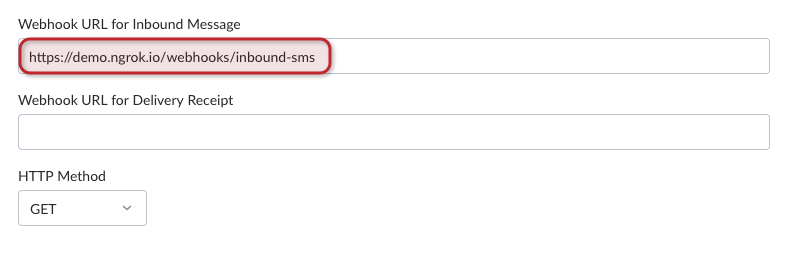
In the code snippets, the webhook is located at /webhooks/inbound-sms. If you are using Ngrok, the webhook you need to configure in your Vonage Dashboard API Settings page is of the form https://demo.ngrok.io/webhooks/inbound-sms. Replace demo with the subdomain provided by Ngrok and enter your endpoint in the field labeled Webhook URL for Inbound Message:
Try it out
Now when you send your Vonage number an SMS you should see it logged in your console. The message object contains the following properties:
{
  "msisdn": "447700900001",
  "to": "447700900000",
  "messageId": "0A0000000123ABCD1",
  "text": "Hello world",
  "type": "text",
  "keyword": "Hello",
  "message-timestamp": "2020-01-01T12:00:00.000+00:00",
  "timestamp": "1578787200",
  "nonce": "aaaaaaaa-bbbb-cccc-dddd-0123456789ab",
  "concat": "true",
  "concat-ref": "1",
  "concat-total": "3",
  "concat-part": "2",
  "data": "abc123",
  "udh": "abc123"
}