RCS Conversation Flows
This guide walks you through designing and implementing RCS conversation flows using the Messages API, with practical examples and best practices for building conversational journeys.
What is an RCS Conversation Flow?
An RCS conversation flow is a structured sequence of messages and user interactions. It guides users through a process, such as making a purchase, getting support, or receiving updates, by using rich media, suggested replies, and automated logic.
Designing Your RCS Flow
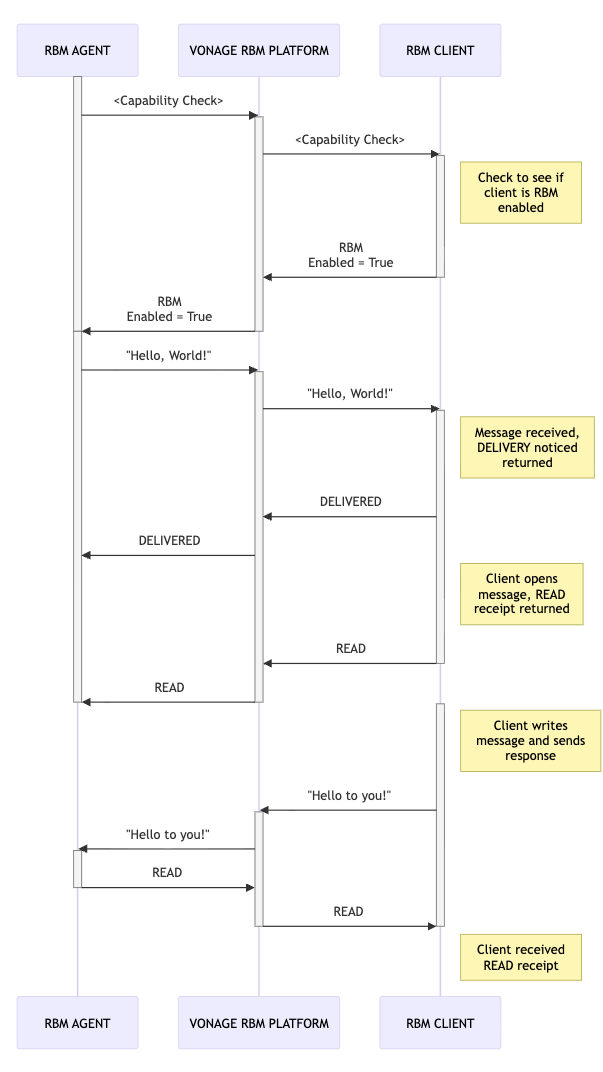
- Define the Use Case: Identify the goal (e.g., support, sales, notifications).
- Map the Journey: Outline each step, user choice, and expected outcome.
- Prepare Content: Draft messages, media, and reply options.
- Automate Logic: Use webhooks and backend logic to handle user input and trigger responses.
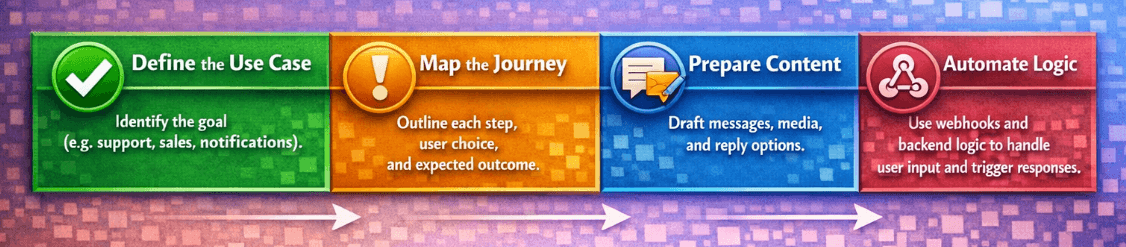
Follow these steps to implement a precise RBM-style conversation flow using Vonage endpoints and payloads.
Agent sends a capability check request
Before sending RCS, verify that the user’s device is RBM-capable.
The agent sends:
POST /v1/channel-manager/rcs/agents/welcome-bot/devices/capabilities
HTTP/1.1
Host: api-us.vonage.com
Authorization: Bearer {JWT}
Content-Type: application/json
Agent receives capability check response
The platform indicates the device can receive RBM messages.
The agent receives:
{
   "rcs_supported": true,
   "features": [
      "RICHCARD_STANDALONE",
      "ACTION_CREATE_CALENDAR_EVENT",
      "ACTION_DIAL",
      "ACTION_OPEN_URL",
      "ACTION_SHARE_LOCATION",
      "ACTION_VIEW_LOCATION",
      "RICHCARD_CAROUSEL"
   ]
}
Agent sends “Hello, World!”
Send an RCS text message via the Messages API.
The agent sends:
POST /v1/messages
HTTP /1.1
Host: api-us.vonage.com
Authorization: Bearer {JWT}
Content-Type: application/json
{
   "message_type": "text",
   "text": "Hello, World!",
   "to": "12223334444",
   "from": "welcome-bot",
   "channel": "rcs"
}
Platform sends DELIVERED event
The message is delivered to the user and a delivery event is sent to your status webhook.
The agent receives:
{
  "messageuuid": "3ca4b881-3e11-46bd-b491-76740a62639a",
  "to": "12223334444",
  "from": "welcome-bot",
  "timestamp": "2026-02-02T12:00:04Z",
  "status": "delivered",
  "channel": "rcs"
}
Platform sends READ event
The user opens the message. A read event is sent to your status webhook.
The agent receives:
{
  "messageuuid": "3ca4b881-3e11-46bd-b491-76740a62639a",
  "to": "12223334444",
  "from": "welcome-bot",
  "timestamp": "2026-02-02T12:01:10Z",
  "status": "read",
  "channel": "rcs"
}
User sends a reply
The user sends a message. Vonage delivers it to your inbound webhook.
The agent receives:
{
  "to": "welcome-bot",
  "from": "12223334444",
  "channel": "rcs",
  "message_uuid": "aaaaaaaa-bbbb-cccc-dddd-0123456789ab",
  "timestamp": "2026-02-02T12:02:23Z",
  "message_type": "text",
  "text": "Hello to you!"
}
Platform acknowledges inbound delivery
Inbound messages are delivered to your webhook (acknowledged implicitly via webhook receipt). Use the webhook payload to route the conversation and log the event.
Agent sends READ acknowledgement
Acknowledge the user’s message by marking it as read.
The agent sends:
PATCH /v1/messages/aaaaaaaa-bbbb-cccc-dddd-0123456789ab
HTTP/1.1
Host: api-us.vonage.com
Authorization: Bearer {JWT}
Content-Type: application/json
{
  "status": "read"
}