Replying Indicators
Replying indicators are conversational signals that let one party know the other party has seen a message and has started preparing a response. Commonly displayed as three animated dots, replying indicators improve the conversational experience by reducing uncertainty and making interactions feel more natural and responsive.
Replying indicators are currently available for Whatsapp only.
Replying indicators may be presented in different formats, including text and voice notes. Textual replies are known as typing indicators.
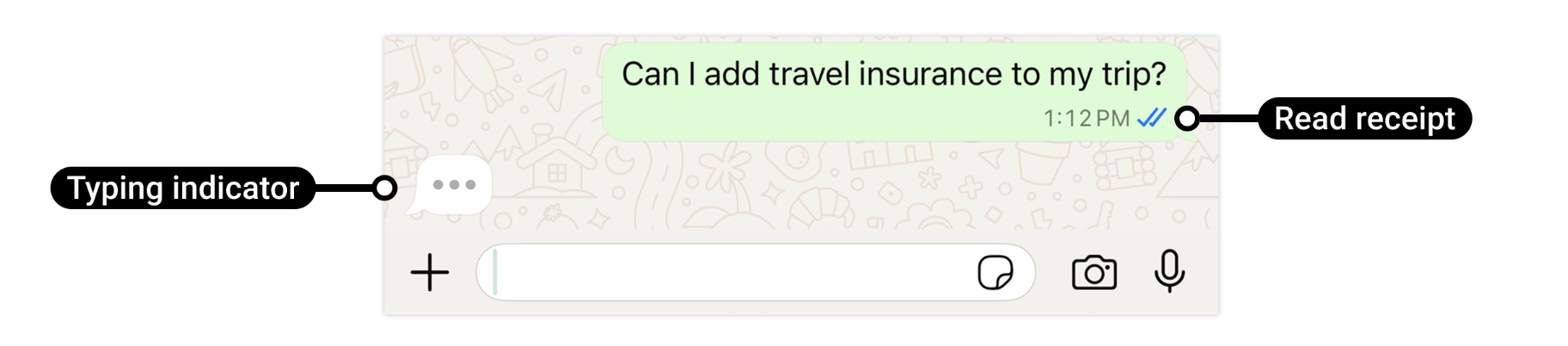
A replying indicator is automatically dismissed when a response message is sent, or after 25 seconds—whichever occurs first. To avoid a poor user experience, only send a replying indicator when you expect to reply.
After receiving an inbound message webhook, you can use the message_uuid to:
- mark the message as
read, and - display a replying indicator to the other party
This approach ensures that replying indicators are always contextual, timely, and tied to a specific message in the conversation.
To show a replying indicator, you send a PATCH request to the message resource identified by message_uuid.
The request:
- updates the message status to
read - includes a
replying_indicatorobject that controls whether the indicator is shown and what type of response is being prepared
Request Structure
curl -X PATCH "${GEOSPECIFIC_MESSAGES_API_URL}/${MESSAGES_MESSAGE_ID}" \
  -H "Authorization: Bearer $JWT" \
  -H 'Content-Type: application/json' \
  -H 'Accept: application/json' \
  -d '{
    "status": "read",
    "replying_indicator": {
      "show": "true",
      "type": "text"
    }
  }'
| Field | Description |
|---|---|
status | Updates the message state. Must be set to read to enable replying indicators. |
replying_indicator.show | Enables or disables the replying indicator. |
replying_indicator.type | Indicates the type of response being prepared (for example, text). |
Geospecific API Endpoints
The Messages API is available through geospecific base URLs. You must use the endpoint that corresponds to the region where your application is provisioned:
- Asia-Pacific (APAC):
https://api-ap.vonage.com/v1 - Europe (EU):
https://api-eu.vonage.com/v1 - United States (US):
https://api-us.vonage.com/v1
In examples, ${GEOSPECIFIC_MESSAGES_API_URL} represents one of these base URLs. To show a replying indicator, you send a
message_uuid). This UUID is provided in the inbound message webhook payload. Message ID Endpoint
The message UUID is appended to the /messages resource path. For example:
https://api-us.vonage.com/v1/messages/3ca4b881-3e11-46bd-b491-76740a62639a
This UUID uniquely identifies the customer’s inbound message that you are marking as read and responding to.
Response
When successfull:
{
  "success": true
}