
Share:

A trained actor with a dissertation on standup comedy, I came into PHP development via the meetup scene. You can find me speaking and writing on tech, or playing/buying odd records from my vinyl collection.
Sending SMS Messages with PHP
Time to read: 3 minutes
This article was updated in December 2026
In this tutorial, you will send an SMS message with PHP using the Vonage Messages API. First, you will send a message from a PHP script. Then, you will expose the same operation through a small Slim Framework application.
PHP 8.3 or later
Composer for package management
A Vonage API account
A Vonage application with a private key for JWT authentication
A phone number or sender ID that is allowed for your destination country
Create a Vonage application in the Vonage Dashboard and save its application ID and private key. The examples below also require a destination number and an approved sender value.
Set these values in your shell before running the examples. Use the country code without a leading + or 00 in phone-number values, as required by the Messages API documentation.
Create a Composer project and install the Vonage PHP SDK:
mkdir vonage-sms
cd vonage-sms
composer init
composer require vonage/client:^4.4Composer will ask you a series of questions. Accept the defaults to create a minimal composer.json file.
Create the PHP script:
touch send-sms.phpOpen send-sms.php and include Composer's autoloader:
<?php

declare(strict_types=1);

require __DIR__ . '/vendor/autoload.php';To send an SMS, you need:
Vonage application credentials
A Vonage client
A destination number, sender, and message text
Add the following code to send-sms.php:
<?php

declare(strict_types=1);

require __DIR__ . '/vendor/autoload.php';

$privateKeyPath = getenv('VONAGE_APPLICATION_PRIVATE_KEY_PATH');
$applicationId = getenv('VONAGE_APPLICATION_ID');
$toNumber = getenv('VONAGE_TO_NUMBER');
$fromNumber = getenv('VONAGE_FROM_NUMBER');

if (!$privateKeyPath || !$applicationId || !$toNumber || !$fromNumber) {
    throw new RuntimeException(
        'Set VONAGE_APPLICATION_ID, VONAGE_APPLICATION_PRIVATE_KEY_PATH, '
        . 'VONAGE_TO_NUMBER, and VONAGE_FROM_NUMBER before running this script.'
    );
}

$privateKey = file_get_contents($privateKeyPath);

if ($privateKey === false) {
    throw new RuntimeException('The private key could not be read.');
}

$keypair = new \Vonage\Client\Credentials\Keypair(
    $privateKey,
    $applicationId
);

$client = new \Vonage\Client($keypair);
$message = new \Vonage\Messages\Channel\SMS\SMSText(
    $toNumber,
    $fromNumber,
    'Hello from Vonage!'
);

$client->messages()->send($message);

echo "Vonage accepted the message request." . PHP_EOL;The SMSText constructor takes the destination number first and the sender second. The sender must be a number or sender ID that Vonage allows for the destination country.
Run the script:
php send-sms.phpA successful API response means that Vonage accepted the request. It does not confirm delivery to the handset. Use message status callbacks or delivery receipts to track delivery.
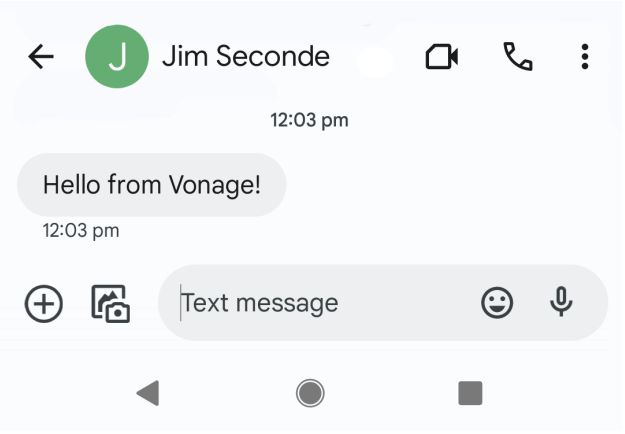 Example of a phone displaying the SMS message after the request is accepted.
The second example exposes a POST /send route that accepts a JSON body containing a message. The route validates the request before sending it.
Install Slim and its PSR-7 implementation:
composer require slim/slim:^4.15 slim/psr7:^1.8
mkdir -p public
touch public/index.phpCreate public/index.php with the following code:
<?php

declare(strict_types=1);

use Psr\Http\Message\ResponseInterface as Response;
use Psr\Http\Message\ServerRequestInterface as Request;
use Slim\Factory\AppFactory;

require __DIR__ . '/../vendor/autoload.php';

$privateKeyPath = getenv('VONAGE_APPLICATION_PRIVATE_KEY_PATH');
$applicationId = getenv('VONAGE_APPLICATION_ID');
$toNumber = getenv('VONAGE_TO_NUMBER');
$fromNumber = getenv('VONAGE_FROM_NUMBER');

if (!$privateKeyPath || !$applicationId || !$toNumber || !$fromNumber) {
    throw new RuntimeException(
        'Set VONAGE_APPLICATION_ID, VONAGE_APPLICATION_PRIVATE_KEY_PATH, '
        . 'VONAGE_TO_NUMBER, and VONAGE_FROM_NUMBER before starting the server.'
    );
}

$privateKey = file_get_contents($privateKeyPath);

if ($privateKey === false) {
    throw new RuntimeException('The private key could not be read.');
}

$keypair = new \Vonage\Client\Credentials\Keypair(
    $privateKey,
    $applicationId
);

$client = new \Vonage\Client($keypair);
$app = AppFactory::create();
$app->addBodyParsingMiddleware();

$app->post('/send', function (
    Request $request,
    Response $response
) use ($client, $toNumber, $fromNumber): Response {
    $data = $request->getParsedBody();

    if (!is_array($data) || !isset($data['text']) || !is_string($data['text'])) {
        $response->getBody()->write(json_encode(
            ['error' => 'The JSON body must contain a text string.'],
            JSON_THROW_ON_ERROR
        ));

        return $response
            ->withHeader('Content-Type', 'application/json')
            ->withStatus(400);
    }

    $text = trim($data['text']);

    if ($text === '' || mb_strlen($text) > 1600) {
        $response->getBody()->write(json_encode(
            ['error' => 'The text must contain between 1 and 1600 characters.'],
            JSON_THROW_ON_ERROR
        ));

        return $response
            ->withHeader('Content-Type', 'application/json')
            ->withStatus(400);
    }

    $message = new \Vonage\Messages\Channel\SMS\SMSText(
        $toNumber,
        $fromNumber,
        $text
    );

    try {
        $client->messages()->send($message);
    } catch (\Throwable $exception) {
        error_log('Vonage message send failed: ' . $exception->getMessage());
        $response->getBody()->write(json_encode(
            ['error' => 'The message could not be sent.'],
            JSON_THROW_ON_ERROR
        ));

        return $response
            ->withHeader('Content-Type', 'application/json')
            ->withStatus(502);
    }

    $response->getBody()->write(json_encode(
        ['message' => 'Vonage accepted the message request.'],
        JSON_THROW_ON_ERROR
    ));

    return $response
        ->withHeader('Content-Type', 'application/json')
        ->withStatus(202);
});

$app->run();Start PHP's built-in development server from the project root:
php -S localhost:8888 -t publicThe built-in server is intended for development and controlled testing. Do not expose it on a public production network.
Send a POST request to the route with an HTTP client such as Insomnia, Postman, or cURL:
curl -X POST http://localhost:8888/send \
  -H 'Content-Type: application/json' \
-d '{"text":"Hello from the Slim route!"}' Use an HTTP client to send a JSON POST request to the local Slim route.
The route returns a 202 response after Vonage accepts the message request. Use message status callbacks or delivery receipts to determine whether the SMS reached its destination.
You now have two ways to send an SMS with PHP. The first uses a standalone script. The second accepts message text through a validated Slim Framework route.
The examples keep credentials in environment variables, use separate sender and destination values, and use a public document root for local development. For a production application, add endpoint authentication, rate limiting, structured logging, and delivery-status handling.
To send messages with different sender or destination values, update the environment variables or add validated request fields. Do not accept arbitrary sender values without checking the requirements for the destination country.
For more PHP integrations, see the Vonage Laravel integration and the Vonage PHP SDK.
Want to learn, stay connected, or share what you're building?
Keep learning
Explore use cases and structured learning paths in the Vonage Learning Center
Watch tutorials on our Vonage Developer YouTube Channel
Stay connected
Subscribe to the Vonage Developer Newsletter
Follow us on X for updates
Connect with us on LinkedIn
Help us improve our developer experience by filling out our Voice of the Developer Feedback
Send an SMS message with the Vonage Messages API
Sending SMS from PHP with Failover: The Cupcake Bakery
Type Safety Done Right: PHP Array Hacking