Kotlin
Building the interface
To be able to place the call, you need to add three elements to the screen:
- A
TextViewto show the connection status - A
Buttonto start the call - A
Buttonto end the call
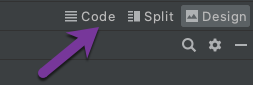
Open the app/res/layout/activity_main.xml file. Click the Code button in the top right corner:
Replace the file contents with the following:
You will control the view using code, so you have to store references to the views. Add these properties at the top of the MainActivity class:
Now you need to assign views to previously added properties. Add below code to the onCreate method inside MainActivity class (below request permissions code):
Build and Run
Run the project again (Ctrl + R).
Creating an Android chat app
Create a Android application that enables users to message each other using the Android Client SDK and Kotlin.
Steps
1
Introduction to this task2
Prerequisites3
Create a Vonage Application4
Create a conversation5
Create the users6
Add users to the conversation7
Generate JWTs8
Create an Android project9
Add permissions10
Build main screen11
Initialize the client12
Fetch the conversation13
Fetch conversation events14
Send a message15
Receive new messages16
What's next?