Share:
)
Liz Acosta is a Developer Advocate at Vonage. While her career path from film student to marketer to engineer to Developer Advocate might seem unconventional, it’s pretty typical for Developer Relations! Liz loves pizza, plants, pugs, and Python.
What Are WebSockets and How Are They Different From HTTP?
Time to read: 9 minutes
Real-time communication has become essential for modern applications. From live chats to collaborative editors to notification systems, instant in-browser updates without page refreshes have become so commonplace that it’s easy to overlook the technology that makes this feat possible. In traditional HTTP request-response cycles, the client must initiate connection with a server, and once a response is received, that connection is closed – in other words, it is stateless. This results in increased latency and inefficient resource usage. While polling is one workaround, it is still not enough to keep up with the technological needs of live data exchange over the internet.
This is where WebSocket provides a solution. WebSocket is a communication protocol that enables persistent, two-way communication between a client and a server. WebSocket powers features such as voice streaming, messaging, and live event handling in Vonage applications, transforming how developers build everything from collaborative tools to live streaming applications.
In this blog post, we’ll explore what WebSocket is and how it works, its real-world applications, and take a look at some sample code that demonstrates how WebSocket forms the foundation for live data exchange in modern web and mobile applications.
One of the most innovative features of WebSocket is its compatibility with HTTP. WebSocket uses the HTTP Upgrade header to switch protocols from HTTP to WebSocket, establishing a persistent connection between client and server that allows them to communicate back and forth continuously.
Transitioning from HTTP to WebSocket protocol occurs during the initial handshake between client and server. The handshake from the client looks like this:
GET /chat HTTP/1.1
        Host: server.example.com
        Upgrade: websocket
        Connection: Upgrade
        Sec-WebSocket-Key: dGhlIHNhbXBsZSBub25jZQ==
        Origin: http://example.com
        Sec-WebSocket-Protocol: chat, superchat
Sec-WebSocket-Version: 13Notice how the Upgrade header specifies websocket.
The server responds with the following handshake:
HTTP/1.1 101 Switching Protocols
        Upgrade: websocket
        Connection: Upgrade
        Sec-WebSocket-Accept: s3pPLMBiTxaQ9kYGzzhZRbK+xOo=
Sec-WebSocket-Protocol: chatIf the handshake is successful, the second part of the WebSocket protocol can occur.
After a successful exchange of handshakes, a connection is established that enables full-duplex interaction between a client and a server. In this connection, the client and the server can send data independently of each other. The data is sent in “messages” that are defined by a specific binary framing protocol.
To learn about the more technical aspects of WebSocket, refer to the Request for Comments (RFC) for the protocol.
Unlike HTTP, with WebSocket the connection remains open, allowing ongoing two-way communication to occur between the client and server. Here’s a comparison of HTTP and WebSocket across key characteristics:
Aspect | HTTP | WebSocket |
Connection Model |
|
|
Latency |
|
|
Data Flow |
|
|
Connection Lifecycle |
|
|
Security (Encryption) |
|
|
Port |
|
|
In other words, you can imagine the difference between HTTP and WebSocket like this:
If you were trying to talk to a friend over the phone mimicking the HTTP protocol, you would have to call your friend, your friend would have to wait until you are done speaking to respond, and you would both hang up the phone. In order to add to the conversation, you would have to call your friend again, they would have to wait to respond, and you’d both hang up the phone. Additionally, your friend would lose all recollection of what you said in the previous phone call. This is not a great way to have a real-time conversation!
With WebSocket, this metaphorical conversation occurs over a single phone call, in which you and your friend can talk at length without waiting for the other to finish (although one of you might find it rude to be interrupted!) and you each remember what the other one is talking about. In this way, WebSocket enables more fluid and natural conversation – whether that be a live chat exchange, collaborating on a document, delivering a live stream, or a multiplayer game.
The real-time bidirectional data transfer possibilities of WebSocket is part of what makes the protocol so powerful but also potentially vulnerable. Like any other form of network communication, WebSocket is susceptible to security attacks such as:
Man-in-the-Middle (MitM): An attacker intercepts the connection between the client and server, eavesdropping on communication and altering data
Cross-site WebSocket hijacking: In this kind of attack, the WebSocket implementation itself is exploited, allowing unauthorized access and stealing data
Denial-of-Service (DoS): This occurs when the server is flooded with connection requests that renders the server unresponsive and exhausts resources
Fortunately, there are methods for securing your WebSocket connections:
Using Secure WebSocket
wss://) to encrypt data being transmitted between a client and a serverImplementing proper authentication and authorization with tokens such as JSON Web Tokens (JWT) to help ensure that only authorized users are accessing the WebSocket connection
Validating input and output data to prevent injection attacks
Origin checking the header in the handshake request to make sure it’s coming from a trusted source
Rate limiting to help prevent DoS attacks and manage resources effectively
Logging and monitoring WebSocket traffic in order to detect unusual activity and intervene on potential security threats in real-time
With this in mind, let’s take a look at a sample application that uses the Vonage Voice API and the NCCO Connect action to establish and authenticate a WebSocket connection.
This sample application uses the Voice API to answer an inbound call and allow the caller to hear an echo of their own voice. It leverages the power of a WebSocket connection created with a NCCO action and authenticated with a JWT.
You can find the full code and README to run the app locally in the Vonage Community on GitHub.
The app serves up a Stats web page displaying packet and byte counts, illustrating how the data (the caller's voice) is being transmitted bidirectionally in real-time.
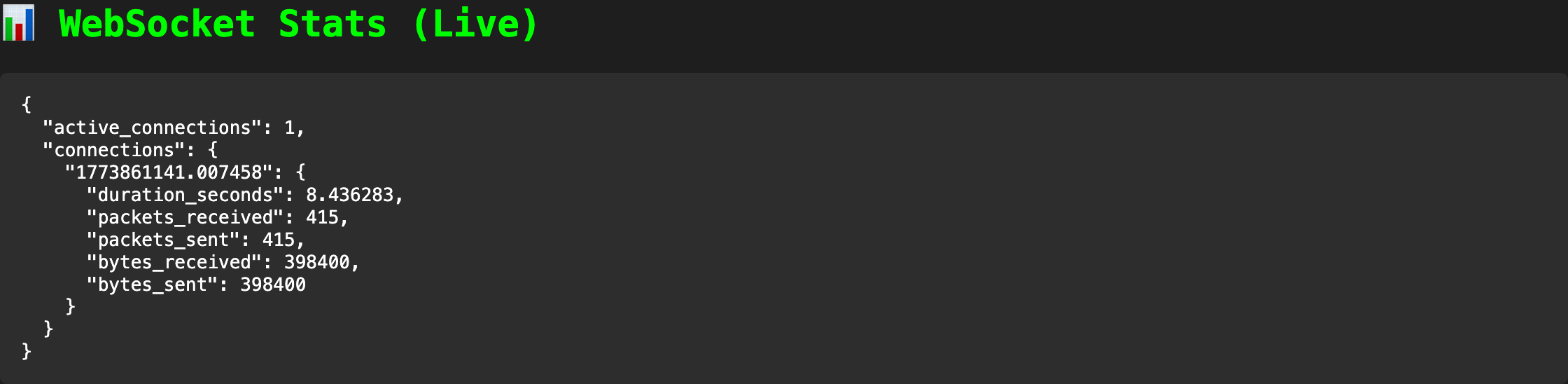 A screenshot of the stats web page showing an open connection and the amount of transmitted data. The packets and bytes received and sent are identical because the data being transmitted is an echo.Check out the repo on GitHub to try the app out for yourself. Note that in order to run the sample app end-to-end, you will need a Vonage account.
A Call Control Object (NCCO) uses JSON to dictate which actions the Voice API servers take when the webhook is reached. The following NCCO returned by the /webhooks/answer endpoint defined in the sample application uses the connect action to route to a websocket type rather than a phone number or SIP endpoint. This establishes a real-time raw audio stream over a WebSocket connection using a high fidelity 24 kHz linear PCM sampling rate:
    ncco = [
        {
            "action": "talk",
            "text": "We will now connect you to the echo server with advanced WebSocket features. Wait a moment then start speaking.",
        },
        {
            "action": "connect",
            "from": VONAGE_VIRTUAL_NUMBER,
            "endpoint": [
                {
                    "type": "websocket",
                    "uri": f"wss://{request.headers.get('host')}/socket",
                    "content-type": "audio/l16;rate=24000",  # 24 kHz audio
                    "headers": {"X-Custom-Header": "demo-value"},
                    # Authorization configuration
                    "authorization": {
                        "type": "vonage"  # Vonage will send JWT in Authorization header
                    },
                }
            ],
        },
]Furthermore, the websocket type supports an authorization header that can be configured to use a JWT provided by Vonage as a signed webhook. This header authentication option is part of the initial request handshake.
The JWT is validated by the server here:
 # Get authorization header for authentication
    auth_header = websocket.headers.get("authorization", "")

    # Validate JWT if present
    if auth_header.startswith("Bearer "):
        token = auth_header.replace("Bearer ", "")
        print("JWT validation: ===> Valid JWT token received")
        verify_signature(token, VONAGE_SIGNATURE_SECRET)
        print(
            f"Valid signature: ===> token: {token} vs. signature secret: {VONAGE_SIGNATURE_SECRET}"
        )
        if not verify_signature(token, VONAGE_SIGNATURE_SECRET):
            print("JWT validation: ===> Invalid JWT token received")
            await websocket.close(code=1008, reason="Unauthorized")
returnThis validation step prevents unauthorized clients from establishing long-lived connections. WebSockets are long-lived connections, so authentication must happen during the handshake. By verifying the JWT signature using the VONAGE_SIGNATURE_SECRET, you ensure:
The request genuinely originated from Vonage
The payload hasn’t been tampered with
Unauthorized clients are rejected immediately
If validation fails, the connection is closed with a 1008 policy violation, preventing any further interaction.
Once authenticated, the connection is accepted and begins processing two types of messages:
Text frames: Used for control events such as
websocket:connectedBinary frames: Contain raw audio data from the call
The example simply echoes audio back to the caller, but this is where your application logic would typically live:
 if "text" in message:
                # Handle text messages (JSON commands/events)
                data = json.loads(message["text"])
                print(f"Received text: ===> {data}")

                # Handle special commands
                if data.get("event") == "websocket:connected":
                    print("WebSocket: ===> Connection established with Vonage")

            elif "bytes" in message:
                # Handle binary audio data
                audio_data = message["bytes"]
                active_connections[connection_id]["packets_received"] += 1
                active_connections[connection_id]["bytes_received"] += len(audio_data)

                # Echo audio back to caller
                await websocket.send_bytes(audio_data)
                active_connections[connection_id]["packets_sent"] += 1
active_connections[connection_id]["bytes_sent"] += len(audio_data)Because the NCCO defines the audio format audio/l16;rate=24000), you can reliably process or transform the stream without additional negotiation.
While this sample code doesn’t really do much, it provides a foundational pattern for building more advanced secure streaming voice applications.
For instance, you can expand the following block of code to include logic for other types of commands and events. You could use a clear command in case you need to interrupt playback to respond dynamically to a caller or use a notify event to synchronize the application logic to start recording or play a new prompt once the audio ends:
                # Handle special commands
                if data.get("event") == "websocket:connected":
print("WebSocket: ===> Connection established with Vonage")Learn more about how Vonage implements WebSockets by reading the documentation.
WebSockets fundamentally change how we think about instant updates by enabling persistent, bidirectional connections between a client and a server. In this blog post, we explored how that shift reduces latency, improves efficiency, and unlocks modern use cases such as live chat, streaming, and collaborative applications.
We also looked at how Vonage builds on top of this protocol using the Voice API and the NCCO connect action. By leveraging the websocket endpoint, you can stream live audio directly into an application – in this case, we echo it back to the caller.
More importantly, we highlighted how to secure these long-lived connections with the Vonage authorization header, allowing the server to verify and secure the WebSocket connection during the initial handshake.
The pattern of NCCO-driven WebSocket connections with built-in authentication provides a powerful and secure foundation for building more advanced voice experiences – from AI-powered assistants to real-time audio processing pipelines.
Integrate Phone Calls to a Dialogflow Chatbot Via WebSockets: This tutorial will help you start with an example Dialogflow bot and interact with it from phone calls using provided sample reference codes using Vonage Voice API.
Creating a WebSocket Server with Spring Boot: In this tutorial, you will learn how to create a WebSocket server using Spring Boot which can receive both binary and text messages.
Improve the User Video Experience With Real-Time Quality Monitoring: MOS is an outstanding video quality metric for video calls. Learn how Vonage Video uses it to enhance user experience.
RCS Messaging with Laravel, Livewire, Reverb, and Echo: Build a real-time RCS messenger using Laravel, Livewire, and Vonage – no JavaScript required.
Have a question or want to share what you're building?
Subscribe to the Developer Newsletter
Follow us on X (formerly Twitter) for updates
Prefer video? Watch tutorials on our YouTube channel
Connect with us on the Vonage Developer page on LinkedIn
Help us improve our developer experience by filling out our Voice of the Developer Feedback
Stay connected and keep up with the latest developer news, tips, and events.