Subaccounts APIを使う
概要
このトピックでは、パートナーがSubaccounts APIを使用してエンドカスタマーをうまく管理するユースケースについて説明します。
前提条件
を熟知している必要がある。 メインコンセプト Subaccounts API に関連付けられます。
サブアカウントの作成
パートナーはエンドカスタマーごとにSubaccountを作成し、エンドカスタマーごとに異なるAPIクレデンシャルを使用し、その支出を見ることができます。これは以下の図に示されている:
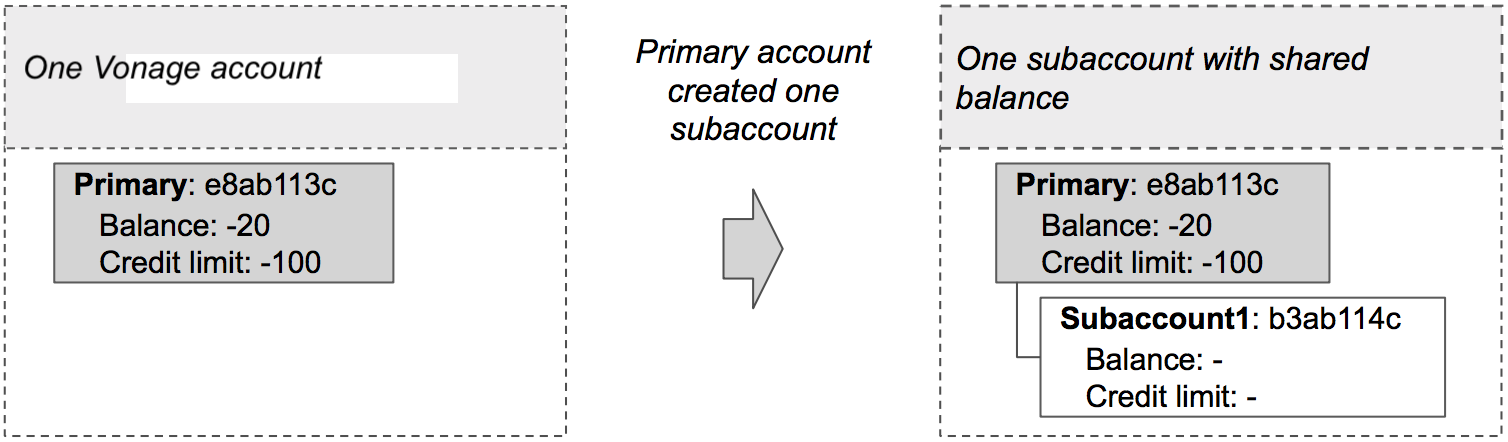
Subaccountsを作成するには、以下のコードを使用します:
Write the code
Add the following to create-subaccount.sh:
curl -X "POST" "https://api.nexmo.com/accounts/$VONAGE_API_KEY/subaccounts" -u $VONAGE_API_KEY:$VONAGE_API_SECRET   \
     -H "Content-Type: application/json"  \
-d $'{"name":"'$NEW_SUBACCOUNT_NAME'", "secret":"'$NEW_SUBACCOUNT_SECRET'"}'Run your code
Save this file to your machine and run it:
Prerequisites
npm install @vonage/subaccountsCreate a file named create-subaccount.js and add the following code:
const { SubAccounts } = require('@vonage/subaccounts');

const subAccountClient = new SubAccounts({
  apiKey: VONAGE_API_KEY,
  apiSecret: VONAGE_API_SECRET,
});Write the code
Add the following to create-subaccount.js:
subAccountClient.createSubAccount({
  name: NEW_SUBACCOUNT_NAME,
  secret: NEW_SUBACCOUNT_SECRET,
})
  .then((newSubAccount) => console.log(newSubAccount))
.catch((error) => console.error(error));Run your code
Save this file to your machine and run it:
Prerequisites
Add the following to build.gradle:
implementation 'com.vonage:server-sdk-kotlin:2.1.1'Create a class named CreateSubaccount and add the following code to the main method:
val client = Vonage {
    apiKey(VONAGE_API_KEY)
    apiSecret(VONAGE_API_SECRET)
}Write the code
Add the following to the main method of the CreateSubaccount class:
val subaccount = client.subaccounts.createSubaccount(
    name = SUBACCOUNT_NAME,
    secret = SUBACCOUNT_SECRET
)Run your code
We can use the アプリケーション plugin for Gradle to simplify the running of our application. Update your build.gradle with the following:
apply plugin: 'application'
mainClassName = project.hasProperty('main') ? project.getProperty('main') : ''
Run the following gradle command to execute your application, replacing com.vonage.quickstart.kt.subaccounts with the package containing CreateSubaccount:
Prerequisites
Add the following to build.gradle:
implementation 'com.vonage:server-sdk:9.3.1'Create a class named CreateSubaccount and add the following code to the main method:
VonageClient client = VonageClient.builder()
		.apiKey(VONAGE_API_KEY)
		.apiSecret(VONAGE_API_SECRET)
.build();Write the code
Add the following to the main method of the CreateSubaccount class:
Account subaccount = client.getSubaccountsClient().createSubaccount(
		CreateSubaccountRequest.builder()
			.name(SUBACCOUNT_NAME)
			.secret(SUBACCOUNT_SECRET)
			.build()
);Run your code
We can use the アプリケーション plugin for Gradle to simplify the running of our application. Update your build.gradle with the following:
apply plugin: 'application'
mainClassName = project.hasProperty('main') ? project.getProperty('main') : ''
Run the following gradle command to execute your application, replacing com.vonage.quickstart.subaccounts with the package containing CreateSubaccount:
Prerequisites
Install-Package VonageCreate a file named CreateSubAccountRequest.cs and add the following code:
using Vonage;
using Vonage.Request;Add the following to CreateSubAccountRequest.cs:
var credentials = Credentials.FromApiKeyAndSecret(VONAGE_API_KEY, VONAGE_API_SECRET);
var client = new VonageClient(credentials);Write the code
Add the following to CreateSubAccountRequest.cs:
var request = Vonage.SubAccounts.CreateSubAccount.CreateSubAccountRequest.Build()
    .WithName(NEW_SUBACCOUNT_NAME)
    .WithSecret(NEW_SUBACCOUNT_SECRET)
    .Create();
var response = await client.SubAccountsClient.CreateSubAccountAsync(request);Prerequisites
composer require vonage/clientCreate a file named create-subaccount.php and add the following code:
Run your code
Save this file to your machine and run it:
Prerequisites
pip install vonage python-dotenvWrite the code
Add the following to create-subaccount.py:
from vonage import Auth, Vonage
from vonage_subaccounts import NewSubaccount, SubaccountOptions

client = Vonage(Auth(api_key=VONAGE_API_KEY, api_secret=VONAGE_API_SECRET))

response: NewSubaccount = client.subaccounts.create_subaccount(
    SubaccountOptions(name=SUBACCOUNT_NAME, secret=SUBACCOUNT_SECRET)
)

print(response)Run your code
Save this file to your machine and run it:
Prerequisites
gem install vonageCreate a file named create-subaccount.rb and add the following code:
Run your code
Save this file to your machine and run it:
単位移行
パートナーは、エンドカスタマーがすべて同じ残高を共有していたため、エンドカスタマー間の支出を管理できませんでした。あるエンドカスタマーが、共有残高をすべて消費してしまうことがあり、他のパートナーのエンドカスタマーのVonage APIへのアクセスを事実上ブロックしていました。パートナーは個別の残高を設定し、そのエンド顧客にクレジット・リミットを割り当てることにしました。
注: パートナーは口座を前払いにすることもできたはずだ。
各Subaccountには、以下の図に示すように、個別の残高と与信限度額を割り当てることができる:
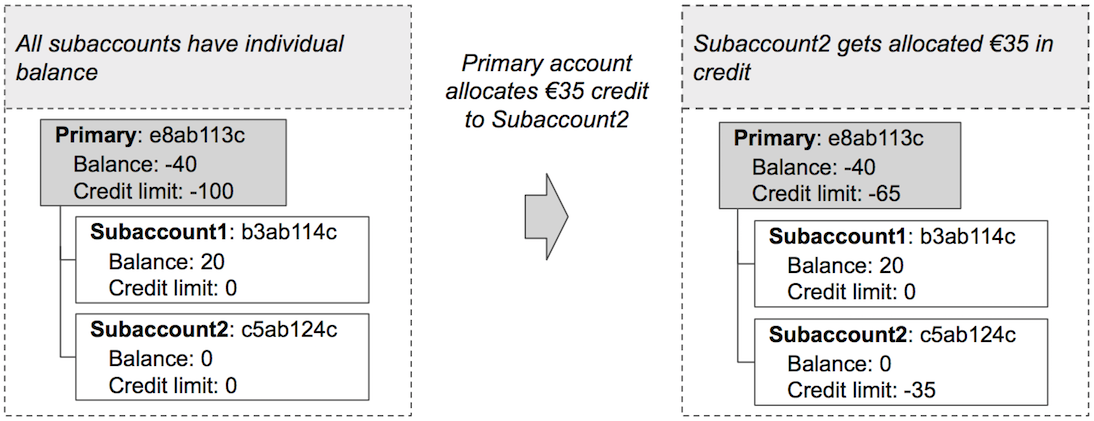
次のコード・スニペットは、指定されたクレジット額を Subaccount に割り当てる例です:
Write the code
Add the following to transfer-credit.sh:
curl -X "POST" "https://api.nexmo.com/accounts/$VONAGE_API_KEY/credit-transfers" -u $VONAGE_API_KEY:$VONAGE_API_SECRET   \
     -H "Content-Type: application/json"  \
-d $'{"from":"'$VONAGE_API_KEY'", "to":"'$SUBACCOUNT_KEY'", "amount": '$AMOUNT'}'Run your code
Save this file to your machine and run it:
Prerequisites
npm install @vonage/subaccountsCreate a file named transfer-credit.js and add the following code:
const { SubAccounts } = require('@vonage/subaccounts');

const subAccountClient = new SubAccounts({
  apiKey: VONAGE_API_KEY,
  apiSecret: VONAGE_API_SECRET,
});Write the code
Add the following to transfer-credit.js:
subAccountClient.transferCredit({
  from: VONAGE_API_KEY,
  to: SUBACCOUNT_KEY,
  amount: AMOUNT,
})
  .then((creditTransfer) => console.log(creditTransfer))
.catch((error) => console.error(error));Run your code
Save this file to your machine and run it:
Prerequisites
Add the following to build.gradle:
implementation 'com.vonage:server-sdk-kotlin:2.1.1'Create a class named TransferCredit and add the following code to the main method:
val client = Vonage {
    apiKey(VONAGE_API_KEY)
    apiSecret(VONAGE_API_SECRET)
}Write the code
Add the following to the main method of the TransferCredit class:
val receipt = client.subaccounts.transferCredit(
    from = VONAGE_API_KEY,
    to = SUBACCOUNT_KEY,
    amount = SUBACCOUNT_CREDIT_AMOUNT
)Run your code
We can use the アプリケーション plugin for Gradle to simplify the running of our application. Update your build.gradle with the following:
apply plugin: 'application'
mainClassName = project.hasProperty('main') ? project.getProperty('main') : ''
Run the following gradle command to execute your application, replacing com.vonage.quickstart.kt.subaccounts with the package containing TransferCredit:
Prerequisites
Add the following to build.gradle:
implementation 'com.vonage:server-sdk:9.3.1'Create a class named TransferCredit and add the following code to the main method:
VonageClient client = VonageClient.builder()
		.apiKey(VONAGE_API_KEY)
		.apiSecret(VONAGE_API_SECRET)
.build();Write the code
Add the following to the main method of the TransferCredit class:
MoneyTransfer receipt = client.getSubaccountsClient().transferCredit(
		MoneyTransfer.builder()
			.from(VONAGE_API_KEY).to(SUBACCOUNT_KEY)
			.amount(SUBACCOUNT_CREDIT_AMOUNT).build()
);
System.out.println("Transfer successful: "+receipt.getId());Run your code
We can use the アプリケーション plugin for Gradle to simplify the running of our application. Update your build.gradle with the following:
apply plugin: 'application'
mainClassName = project.hasProperty('main') ? project.getProperty('main') : ''
Run the following gradle command to execute your application, replacing com.vonage.quickstart.subaccounts with the package containing TransferCredit:
Prerequisites
Install-Package VonageCreate a file named TransferCreditRequest.cs and add the following code:
using Vonage;
using Vonage.Request;
using Vonage.SubAccounts.TransferAmount;Add the following to TransferCreditRequest.cs:
var credentials = Credentials.FromApiKeyAndSecret(VONAGE_API_KEY, VONAGE_API_SECRET);
var client = new VonageClient(credentials);Write the code
Add the following to TransferCreditRequest.cs:
var request = TransferAmountRequest.Build()
    .WithFrom(VONAGE_API_KEY)
    .WithTo(SUBACCOUNT_KEY)
    .WithAmount(amount)
    .Create();
var response = await client.SubAccountsClient.TransferCreditAsync(request);Prerequisites
composer require vonage/clientCreate a file named transfer-credit.php and add the following code:
Run your code
Save this file to your machine and run it:
Prerequisites
pip install vonage python-dotenvWrite the code
Add the following to transfer-credit.py:
from vonage import Auth, Vonage
from vonage_subaccounts import Transfer, TransferRequest

client = Vonage(Auth(api_key=VONAGE_API_KEY, api_secret=VONAGE_API_SECRET))

request = TransferRequest(
    from_=VONAGE_API_KEY, to=SUBACCOUNT_KEY, amount=SUBACCOUNT_CREDIT_AMOUNT
)

response: Transfer = client.subaccounts.transfer_credit(request)

print(response)Run your code
Save this file to your machine and run it:
Prerequisites
gem install vonageCreate a file named transfer-credit.rb and add the following code:
Run your code
Save this file to your machine and run it:
すべてのSubaccountの残高確認
パートナーはモニタリングを導入することを決定する。以下のコード・スニペットを使って、すべてのSubaccountの残高を定期的にチェックすることができます:
Write the code
Add the following to get-subaccounts.sh:
curl "https://api.nexmo.com/accounts/$VONAGE_API_KEY/subaccounts" -u $VONAGE_API_KEY:$VONAGE_API_SECRETRun your code
Save this file to your machine and run it:
Prerequisites
npm install @vonage/subaccountsCreate a file named get-subaccounts.js and add the following code:
const { SubAccounts } = require('@vonage/subaccounts');

const subAccountClient = new SubAccounts({
  apiKey: VONAGE_API_KEY,
  apiSecret: VONAGE_API_SECRET,
});Write the code
Add the following to get-subaccounts.js:
subAccountClient.getSubAccounts()
  .then((subAccounts) => console.log(subAccounts))
.catch((error) => console.error(error));Run your code
Save this file to your machine and run it:
Prerequisites
Add the following to build.gradle:
implementation 'com.vonage:server-sdk-kotlin:2.1.1'Create a class named ListSubaccounts and add the following code to the main method:
val client = Vonage {
    apiKey(VONAGE_API_KEY)
    apiSecret(VONAGE_API_SECRET)
}Write the code
Add the following to the main method of the ListSubaccounts class:
val subaccounts = client.subaccounts.listSubaccounts()Run your code
We can use the アプリケーション plugin for Gradle to simplify the running of our application. Update your build.gradle with the following:
apply plugin: 'application'
mainClassName = project.hasProperty('main') ? project.getProperty('main') : ''
Run the following gradle command to execute your application, replacing com.vonage.quickstart.kt.subaccounts with the package containing ListSubaccounts:
Prerequisites
Add the following to build.gradle:
implementation 'com.vonage:server-sdk:9.3.1'Create a class named ListSubaccounts and add the following code to the main method:
VonageClient client = VonageClient.builder()
		.apiKey(VONAGE_API_KEY)
		.apiSecret(VONAGE_API_SECRET)
.build();Write the code
Add the following to the main method of the ListSubaccounts class:
ListSubaccountsResponse response = client.getSubaccountsClient().listSubaccounts();Run your code
We can use the アプリケーション plugin for Gradle to simplify the running of our application. Update your build.gradle with the following:
apply plugin: 'application'
mainClassName = project.hasProperty('main') ? project.getProperty('main') : ''
Run the following gradle command to execute your application, replacing com.vonage.quickstart.subaccounts with the package containing ListSubaccounts:
Prerequisites
Install-Package VonageCreate a file named GetSubAccountsRequest.cs and add the following code:
using Vonage;
using Vonage.Request;Add the following to GetSubAccountsRequest.cs:
var credentials = Credentials.FromApiKeyAndSecret(VONAGE_API_KEY, VONAGE_API_SECRET);
var client = new VonageClient(credentials);Write the code
Add the following to GetSubAccountsRequest.cs:
var response = await client.SubAccountsClient.GetSubAccountsAsync();Prerequisites
composer require vonage/clientCreate a file named get-subaccounts.php and add the following code:
Run your code
Save this file to your machine and run it:
Prerequisites
pip install vonage python-dotenvWrite the code
Add the following to list-subaccounts.py:
from vonage import Auth, Vonage
from vonage_subaccounts import ListSubaccountsResponse

client = Vonage(Auth(api_key=VONAGE_API_KEY, api_secret=VONAGE_API_SECRET))

response: ListSubaccountsResponse = client.subaccounts.list_subaccounts()

print(response)Run your code
Save this file to your machine and run it:
Prerequisites
gem install vonageCreate a file named list-subaccounts.rb and add the following code:
Run your code
Save this file to your machine and run it:
追加クレジット配分
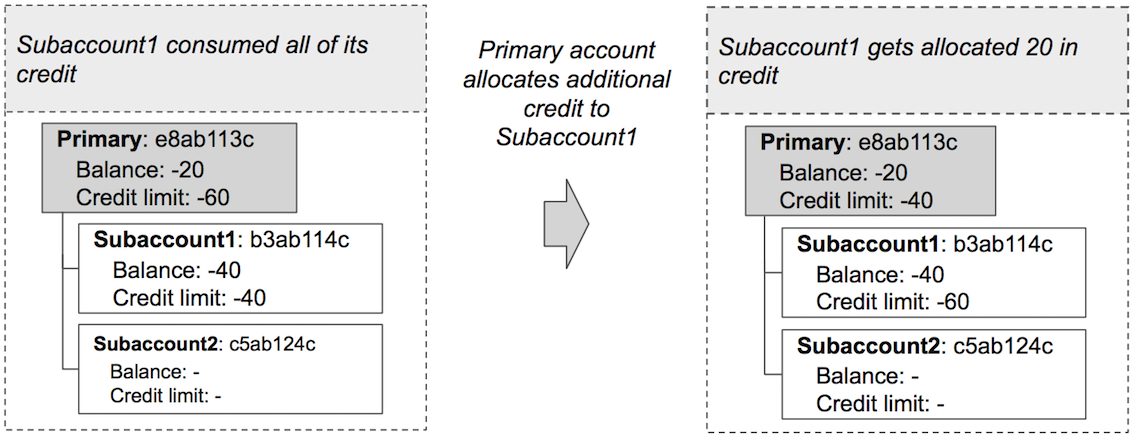
しばらくして、パートナーはエンドカスタマー1(サブアカウント1)がクレジットをすべて使い切り(40のうち40)、これ以上APIコールができないことに気づいた。パートナーは、エンド・カスタマ1が支払いを行うのを待つか(そして今度はVonageに支払いを行い、対応する残高をサブアカウントに移す)、エンド・カスタマ1がVonage APIを使い続けられるようにエンド・カスタマのクレジット・リミットを直ちに増やすかの選択を迫られた。パートナーは追加クレジットを割り当てることにした。パートナーには 40 = |-60| - |-20| の利用可能クレジットがあり、20 をサブアカウントに割り当てることにしました。これは以下の図に示されています:
月末残高振替
月末にパートナーはVonageから|-20| + |-50| = 70ユーロの請求書を受け取った(すべてのアカウントからのすべての支出に対して)。エンドカスタマ1(サブアカウント1)は、使用した50ユーロのうち45ユーロをカバーした。したがって、パートナーは€45をサブアカウント1の残高に送金した。これは以下の図に示されている:
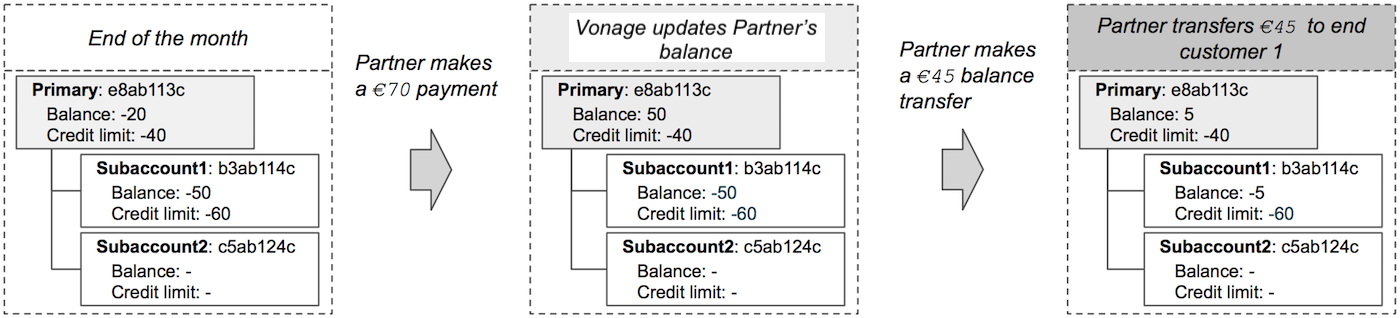
次のコードは、残高をSubaccountsに移す方法を示しています:
Write the code
Add the following to transfer-balance.sh:
curl -X "POST" "https://api.nexmo.com/accounts/$VONAGE_API_KEY/balance-transfers" -u $VONAGE_API_KEY:$VONAGE_API_SECRET \
     -H "Content-Type: application/json"  \
-d $'{"from":"'$VONAGE_API_KEY'", "to":"'$SUBACCOUNT_KEY'", "amount": '$AMOUNT'}'Run your code
Save this file to your machine and run it:
Prerequisites
npm install @vonage/subaccountsCreate a file named transfer-balance.js and add the following code:
const { SubAccounts } = require('@vonage/subaccounts');

const subAccountClient = new SubAccounts({
  apiKey: VONAGE_API_KEY,
  apiSecret: VONAGE_API_SECRET,
});Write the code
Add the following to transfer-balance.js:
subAccountClient.transferBalance({
  from: VONAGE_API_KEY,
  to: SUBACCOUNT_KEY,
  amount: AMOUNT,
})
  .then((balanceTransfer) => console.log(balanceTransfer))
.catch((error) => console.error(error));Run your code
Save this file to your machine and run it:
Prerequisites
Add the following to build.gradle:
implementation 'com.vonage:server-sdk-kotlin:2.1.1'Create a class named TransferBalance and add the following code to the main method:
val client = Vonage {
    apiKey(VONAGE_API_KEY)
    apiSecret(VONAGE_API_SECRET)
}Write the code
Add the following to the main method of the TransferBalance class:
val receipt = client.subaccounts.transferBalance(
    from = VONAGE_API_KEY,
    to = SUBACCOUNT_KEY,
    amount = SUBACCOUNT_BALANCE_AMOUNT
)Run your code
We can use the アプリケーション plugin for Gradle to simplify the running of our application. Update your build.gradle with the following:
apply plugin: 'application'
mainClassName = project.hasProperty('main') ? project.getProperty('main') : ''
Run the following gradle command to execute your application, replacing com.vonage.quickstart.kt.subaccounts with the package containing TransferBalance:
Prerequisites
Add the following to build.gradle:
implementation 'com.vonage:server-sdk:9.3.1'Create a class named TransferBalance and add the following code to the main method:
VonageClient client = VonageClient.builder()
		.apiKey(VONAGE_API_KEY)
		.apiSecret(VONAGE_API_SECRET)
.build();Write the code
Add the following to the main method of the TransferBalance class:
MoneyTransfer receipt = client.getSubaccountsClient().transferBalance(
		MoneyTransfer.builder()
			.from(VONAGE_API_KEY).to(SUBACCOUNT_KEY)
			.amount(SUBACCOUNT_BALANCE_AMOUNT).build()
);
System.out.println("Transfer successful: "+receipt.getId());Run your code
We can use the アプリケーション plugin for Gradle to simplify the running of our application. Update your build.gradle with the following:
apply plugin: 'application'
mainClassName = project.hasProperty('main') ? project.getProperty('main') : ''
Run the following gradle command to execute your application, replacing com.vonage.quickstart.subaccounts with the package containing TransferBalance:
Prerequisites
Install-Package VonageCreate a file named TransferBalanceRequest.cs and add the following code:
using Vonage;
using Vonage.Request;
using Vonage.SubAccounts.TransferAmount;Add the following to TransferBalanceRequest.cs:
var credentials = Credentials.FromApiKeyAndSecret(VONAGE_API_KEY, VONAGE_API_SECRET);
var client = new VonageClient(credentials);Write the code
Add the following to TransferBalanceRequest.cs:
var request = TransferAmountRequest.Build()
    .WithFrom(VONAGE_API_KEY)
    .WithTo(SUBACCOUNT_KEY)
    .WithAmount(amount)
    .Create();
var response = await client.SubAccountsClient.TransferBalanceAsync(request);Prerequisites
composer require vonage/clientCreate a file named transfer-balance.php and add the following code:
Run your code
Save this file to your machine and run it:
Prerequisites
pip install vonage python-dotenvWrite the code
Add the following to transfer-balance.py:
from vonage import Auth, Vonage
from vonage_subaccounts import Transfer, TransferRequest

client = Vonage(Auth(api_key=VONAGE_API_KEY, api_secret=VONAGE_API_SECRET))

request = TransferRequest(
    from_=VONAGE_API_KEY, to=SUBACCOUNT_KEY, amount=SUBACCOUNT_BALANCE_AMOUNT
)

transfer: Transfer = client.subaccounts.transfer_balance(request)

print(transfer)Run your code
Save this file to your machine and run it:
Prerequisites
gem install vonageCreate a file named transfer-balance.rb and add the following code:
Run your code
Save this file to your machine and run it:
サブアカウントの一時停止
パートナーは、サブアカウントの支出をコントロールできることを気に入り、個々の残高と30ユーロのクレジットをエンドカスタマー2(サブアカウント2)に割り当てることにした。サブアカウントの支出を監視していたパートナーは、サブアカウント2が残高の25ユーロを消費していることに気づいた。サブアカウント2の支出率に憂慮したパートナーは、サブアカウント2を一時的に停止することにした。サブアカウントを一時停止するコードをここに示す:
Write the code
Add the following to suspend-subaccount.sh:
curl -X "PATCH" "https://api.nexmo.com/accounts/$VONAGE_API_KEY/subaccounts/$SUBACCOUNT_KEY" -u $VONAGE_API_KEY:$VONAGE_API_SECRET \
     -H "Content-Type: application/json"  \
-d $'{"suspended":true}'Run your code
Save this file to your machine and run it:
Prerequisites
npm install @vonage/subaccountsCreate a file named suspend-subaccount.js and add the following code:
const { SubAccounts } = require('@vonage/subaccounts');

const subAccountClient = new SubAccounts({
  apiKey: VONAGE_API_KEY,
  apiSecret: VONAGE_API_SECRET,
});Write the code
Add the following to suspend-subaccount.js:
subAccountClient.updateSubAccount(
  SUBACCOUNT_KEY,
  { suspended: true },
)
  .then((subAccount) => console.log(subAccount))
.catch((error) => console.error(error));Run your code
Save this file to your machine and run it:
Prerequisites
Add the following to build.gradle:
implementation 'com.vonage:server-sdk-kotlin:2.1.1'Create a class named SuspendSubaccount and add the following code to the main method:
val client = Vonage {
    apiKey(VONAGE_API_KEY)
    apiSecret(VONAGE_API_SECRET)
}Write the code
Add the following to the main method of the SuspendSubaccount class:
val subaccount = client.subaccounts.subaccount(SUBACCOUNT_KEY).suspended(true)Run your code
We can use the アプリケーション plugin for Gradle to simplify the running of our application. Update your build.gradle with the following:
apply plugin: 'application'
mainClassName = project.hasProperty('main') ? project.getProperty('main') : ''
Run the following gradle command to execute your application, replacing com.vonage.quickstart.kt.subaccounts with the package containing SuspendSubaccount:
Prerequisites
Add the following to build.gradle:
implementation 'com.vonage:server-sdk:9.3.1'Create a class named DeactivateSubaccount and add the following code to the main method:
VonageClient client = VonageClient.builder()
		.apiKey(VONAGE_API_KEY)
		.apiSecret(VONAGE_API_SECRET)
.build();Write the code
Add the following to the main method of the DeactivateSubaccount class:
Account subaccount = client.getSubaccountsClient().updateSubaccount(
		UpdateSubaccountRequest.builder(SUBACCOUNT_KEY).suspended(true).build()
);Run your code
We can use the アプリケーション plugin for Gradle to simplify the running of our application. Update your build.gradle with the following:
apply plugin: 'application'
mainClassName = project.hasProperty('main') ? project.getProperty('main') : ''
Run the following gradle command to execute your application, replacing com.vonage.quickstart.subaccounts with the package containing DeactivateSubaccount:
Prerequisites
Install-Package VonageCreate a file named SuspendAccountRequest.cs and add the following code:
using Vonage;
using Vonage.Request;
using Vonage.SubAccounts.UpdateSubAccount;Add the following to SuspendAccountRequest.cs:
var credentials = Credentials.FromApiKeyAndSecret(VONAGE_API_KEY, VONAGE_API_SECRET);
var client = new VonageClient(credentials);Write the code
Add the following to SuspendAccountRequest.cs:
var request = UpdateSubAccountRequest.Build().WithSubAccountKey(SUBACCOUNT_KEY)
    .SuspendAccount()
    .Create();
var response = await client.SubAccountsClient.UpdateSubAccountAsync(request);Prerequisites
composer require vonage/clientCreate a file named suspend-subaccount.php and add the following code:
Run your code
Save this file to your machine and run it:
Prerequisites
pip install vonage python-dotenvWrite the code
Add the following to suspend-subaccount.py:
from vonage import Auth, Vonage
from vonage_subaccounts import ModifySubaccountOptions, Subaccount

client = Vonage(Auth(api_key=VONAGE_API_KEY, api_secret=VONAGE_API_SECRET))

response: Subaccount = client.subaccounts.modify_subaccount(
    subaccount_api_key=SUBACCOUNT_KEY,
    options=ModifySubaccountOptions(suspended=True),
)

print(response)Run your code
Save this file to your machine and run it:
Prerequisites
gem install vonageCreate a file named suspend-subaccount.rb and add the following code:
Run your code
Save this file to your machine and run it:
Subaccountの再有効化
サブアカウント2との協議の結果、パートナーはサブアカウント2のアカウントを再有効化することを決定します。これは以下のコードで実現できる:
Write the code
Add the following to reactivate-subaccount.sh:
curl -X "PATCH" "https://api.nexmo.com/accounts/$VONAGE_API_KEY/subaccounts/$SUBACCOUNT_KEY" -u $VONAGE_API_KEY:$VONAGE_API_SECRET \
     -H "Content-Type: application/json"  \
-d $'{"suspended":false}'Run your code
Save this file to your machine and run it:
Prerequisites
npm install @vonage/subaccountsCreate a file named reactivate-subaccount.js and add the following code:
const { SubAccounts } = require('@vonage/subaccounts');

const subAccountClient = new SubAccounts({
  apiKey: VONAGE_API_KEY,
  apiSecret: VONAGE_API_SECRET,
});Write the code
Add the following to reactivate-subaccount.js:
subAccountClient.updateSubAccount(
  SUBACCOUNT_KEY,
  { suspended: false },
)
  .then((subAccount) => console.log(subAccount))
.catch((error) => console.error(error));Run your code
Save this file to your machine and run it:
Prerequisites
Add the following to build.gradle:
implementation 'com.vonage:server-sdk-kotlin:2.1.1'Create a class named ReactivateSubaccount and add the following code to the main method:
val client = Vonage {
    apiKey(VONAGE_API_KEY)
    apiSecret(VONAGE_API_SECRET)
}Write the code
Add the following to the main method of the ReactivateSubaccount class:
val subaccount = client.subaccounts.subaccount(SUBACCOUNT_KEY).suspended(false)Run your code
We can use the アプリケーション plugin for Gradle to simplify the running of our application. Update your build.gradle with the following:
apply plugin: 'application'
mainClassName = project.hasProperty('main') ? project.getProperty('main') : ''
Run the following gradle command to execute your application, replacing com.vonage.quickstart.kt.subaccounts with the package containing ReactivateSubaccount:
Prerequisites
Add the following to build.gradle:
implementation 'com.vonage:server-sdk:9.3.1'Create a class named ReactivateSubaccount and add the following code to the main method:
VonageClient client = VonageClient.builder()
		.apiKey(VONAGE_API_KEY)
		.apiSecret(VONAGE_API_SECRET)
.build();Write the code
Add the following to the main method of the ReactivateSubaccount class:
Account subaccount = client.getSubaccountsClient().updateSubaccount(
		UpdateSubaccountRequest.builder(SUBACCOUNT_KEY).suspended(false).build()
);Run your code
We can use the アプリケーション plugin for Gradle to simplify the running of our application. Update your build.gradle with the following:
apply plugin: 'application'
mainClassName = project.hasProperty('main') ? project.getProperty('main') : ''
Run the following gradle command to execute your application, replacing com.vonage.quickstart.subaccounts with the package containing ReactivateSubaccount:
Prerequisites
Install-Package VonageCreate a file named EnableAccountRequest.cs and add the following code:
using Vonage;
using Vonage.Request;
using Vonage.SubAccounts.UpdateSubAccount;Add the following to EnableAccountRequest.cs:
var credentials = Credentials.FromApiKeyAndSecret(VONAGE_API_KEY, VONAGE_API_SECRET);
var client = new VonageClient(credentials);Write the code
Add the following to EnableAccountRequest.cs:
var request = UpdateSubAccountRequest.Build().WithSubAccountKey(SUBACCOUNT_KEY)
    .EnableAccount()
    .Create();
var response = await client.SubAccountsClient.UpdateSubAccountAsync(request);Prerequisites
composer require vonage/clientCreate a file named reactivate-subaccount.php and add the following code:
Run your code
Save this file to your machine and run it:
Prerequisites
pip install vonage python-dotenvWrite the code
Add the following to reactivate-subaccount.py:
from vonage import Auth, Vonage
from vonage_subaccounts import ModifySubaccountOptions, Subaccount

client = Vonage(Auth(api_key=VONAGE_API_KEY, api_secret=VONAGE_API_SECRET))

response: Subaccount = client.subaccounts.modify_subaccount(
    subaccount_api_key=SUBACCOUNT_KEY,
    options=ModifySubaccountOptions(suspended=False),
)

print(response)Run your code
Save this file to your machine and run it:
Prerequisites
gem install vonageCreate a file named reactivate-subaccount.rb and add the following code:
Run your code
Save this file to your machine and run it:
概要
このトピックでは、典型的なシナリオでエンドカスタマーを管理するために Subaccounts API を使用する方法について見てきました。