)
Verify Conversion Alerts in Fraud Defender
Time to read: 4 minutes
When you're building with the Vonage Verify API, you want to make sure your verification flows work as expected and that bad actors aren't exploiting them. One of the signals that something may be off is a drop in your verification conversion rate.
That's exactly what Verify Conversion Alerts are designed to catch. In this post, I'll show what these alerts are, how they work, and how you can configure them to automatically protect your platform.
Once you log in to your Vonage account, you can find “Fraud Defender“ on the left side menu. If you don’t have anything set up before, you’ll find this page quite empty for now. You have the headers for recent alerts, protection tools, pricing, and plans. Check the Fraud Defender Onboarding.
Verify Conversion Alerts are raised when your verification conversion rate falls to 35% or below. Your verification conversion rate is the percentage of OTP requests that result in a successful verification: how many users actually complete the flow by entering the correct code. A low conversion rate can be a strong indicator of fraudulent activity. For example, attackers can use your Vonage Verify API to send large volumes of OTPs to numbers that will never complete the verification flow, a practice known as SMS pumping or artificially inflated traffic (AIT).
Fraud Defender monitors your conversion rates and surfaces these alerts so you can act quickly, either manually or automatically.
Once a Verify Conversion Alert is generated, you don't have to wait to respond. Through Alert Actions, you can automatically apply network blocks as soon as an alert is triggered.
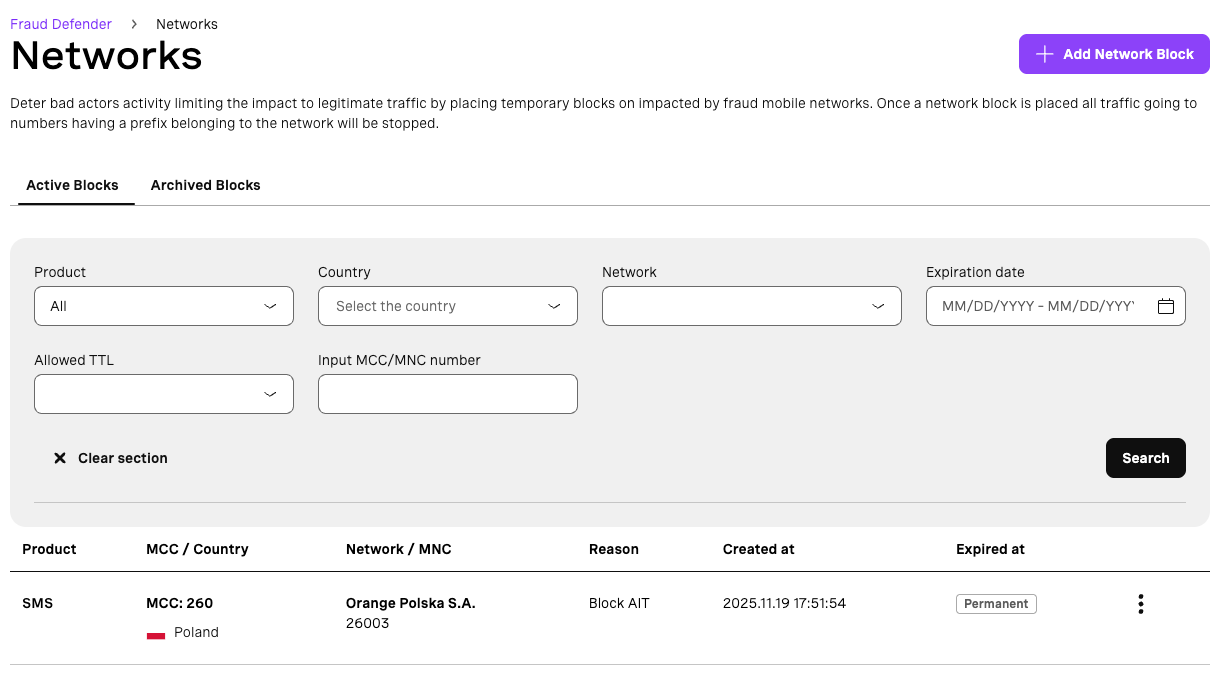 Network Blocks
You can choose the communication channel for the alert action: SMS or Voice, which lets you target the specific channel where suspicious activity is occurring.
For alert actions, you can select either SMS or Voice as your communication channel, allowing you to target the exact channel where suspicious activity is taking place.
You can define when the action should be triggered. You can trigger an action for every new Fraud Alert. The action is executed immediately for each detected alert or trigger action once volume is reached; It is triggered only when the selected threshold is met. In addition, you can set the minimum acceptable conversion rate. If the conversion rate is equal to or below this value, the alert action will be triggered.
To avoid alert fatigue, you can limit the frequency of notifications by setting a time interval. Repeated alerts for the same network and channel will not trigger additional actions unless the time interval has elapsed.
Once the alert conditions are met, you choose what happens next:
Action | Description |
Block | Automatically block the network that caused the alert |
Don't Block | The network causing the alert won't be blocked |
Review | Allows you to create a network block from the alert details |
Define how long the block remains active. A permanent block stays in place until you manually remove it.
Enable this option to receive email notifications when the action is triggered. This keeps your team in the loop without requiring them to monitor the dashboard constantly.
You can define where the action applies: globally or only to selected countries, which could come in handy if you're seeing suspicious activity concentrated in specific regions. Check the countries' management.
Once a network block is applied, you can manage your network blocks directly from the Fraud Defender dashboard. This gives you full visibility and control over which networks are currently blocked, and the ability to remove blocks when needed.
Fraudulent verification traffic isn't just a security concern. It has a direct impact on your costs. Every OTP sent to a number that will never convert is money spent on fraudulent activity.
Verify Conversion Alerts gives you an automated, configurable layer of protection that can respond in real time, without requiring manual intervention for every incident.
You can combine what you’ve seen here with other Vonage fraud prevention tools, like the Identity Insights SIM Swap Insight, which allows you to programmatically check whether a phone number's SIM card has been recently changed, adding a key layer of security to sensitive actions such as account recovery, logins, and financial transactions.
Verify Conversion Alerts in Fraud Defender are a powerful tool for detecting and responding to suspicious verification activity. You can configure Alert Actions with the right thresholds, channels, and country scopes. You can automate your fraud response and protect your platform before the damage adds up. Have a look at the Verify Conversion Alerts documentation to get started and the Fraud Defender API Reference.
Have a question or want to share what you're building?
Subscribe to the Developer Newsletter
Follow us on X (formerly Twitter) for updates
Prefer video? Watch tutorials on our YouTube channel
Connect with us on the Vonage Developer page on LinkedIn
Help us improve our developer experience by filling out our Voice of the Developer Feedback
Stay connected and keep up with the latest developer news, tips, and events.