連結されたSMSの受信
SMSメッセージ 長さを超える は、2つ以上の短いメッセージに分割され、複数のSMSとして送信される。
SMS APIを使用して、以下の情報を受信します。 インバウンドSMS SMS1通に許容されるバイト長よりも長い可能性がある場合、送信されたメッセージがあなたの ウェブフック はスタンドアロンか、複数パートのSMSの一部分です。メッセージに複数のパートがある場合、メッセージの全文を表示するには、それらを再度組み立てる必要があります。
このチュートリアルでは、その方法を紹介する。
このチュートリアルでは
このチュートリアルでは、Webhook経由で受信SMSを受信し、メッセージがシングルパートSMSかマルチパートSMSかを判断するExpressフレームワークを使用したNode.jsアプリケーションを作成します。
受信したSMSがマルチパートの場合、アプリケーションはすべてのメッセージパートを受信するまで待ち、正しい順序で組み合わせてユーザーに表示する。
そのためには、以下のステップを踏む:
- プロジェクトの作成 - Node.js/Expressアプリケーションの作成
- アプリケーションをインターネットに公開する - 使用
ngrokVonageがWebhook経由でお客様のアプリケーションにアクセスできるようにします。 - 基本アプリケーションの作成 - インバウンドSMSを受信するためのWebhookでアプリケーションを構築する。
- ウェブフックをVonageに登録する - あなたのウェブフックをVonageのサーバーに伝える
- テストSMSを送信する - ウェブフックが着信SMSを受信できることを確認する。
- マルチパートSMSの処理 - マルチパートのSMSを1つのメッセージに再構成する。
- 連結されたSMSの受信テスト - それを実際に見てみよう!
前提条件
チュートリアルを完了するには
- A Vonageアカウント - を入力してください。
- ングロク - (オプション)で、開発用ウェブサーバをインターネット経由でVonageのサーバにアクセスできるようにします。
- 米国を拠点とするすべての顧客は、以下を遵守するためにブランドとキャンペーンを登録する必要があります。 10 DLCガイドライン.
プロジェクトの作成
アプリケーション用のディレクトリを作成します、 cd ディレクトリに移動し、Node.js パッケージ・マネージャーを使用します。 npm を作成する。 package.json ファイルでアプリケーションの依存関係を指定します:
Enter]を押して、以下を除く各デフォルトを受け入れる。 entry point を入力する必要がある。 server.js.
次に エクスプレス ウェブアプリケーションフレームワークと ボディパーサー パッケージ:
アプリケーションをインターネットに公開する
SMS APIは、あなたのバーチャルナンバー宛のSMSを受信すると、アプリケーションに ウェブフック.Webhookは、Vonageのサーバーがあなたのサーバーと通信するためのメカニズムを提供します。
アプリケーションがVonageのサーバにアクセスできるようにするには、インターネット上で一般に公開されている必要があります。開発とテスト中にこれを実現する一つの方法は ングロクローカルサーバーを安全なトンネルを経由して公衆インターネットに公開するサービス。参照 このブログ記事 をご覧ください。
ダウンロードとインストール ングロクそして次のコマンドで起動する:
これは、ローカルマシンのポート5000で実行されているすべてのWebサイトのパブリックURL(HTTPおよびHTTPS)を作成します。
を使用する。 ngrok ウェブ・インターフェース http://localhost:4040 のURLをメモしておく。 ngrok このチュートリアルを完了するために必要です。
基本アプリケーションの作成
を作成する。 server.js ファイルに以下のコードを記述する:
require('dotenv').config();
const app = require('express')();
const bodyParser = require('body-parser');

app.use(bodyParser.json());
app.use(bodyParser.urlencoded({ extended: true }));

app
    .route('/webhooks/inbound-sms')
    .get(handleInboundSms)
    .post(handleInboundSms);

const handleInboundSms = (request, response) => {
    const params = Object.assign(request.query, request.body);

    // Send OK status
    response.status(204).send();
}

app.listen('5000');
このコードは次のようなものである:
- 依存関係を初期化する (
expressフレームワークとbody-parserPOST]リクエストのパース用)。 - を登録する。
/webhooks/inbound-smsルートは、GET と POST リクエストの両方を受け付ける Express を使用します。これは、Vonage の API が、私たちのバーチャルナンバーのひとつが SMS を受信したときに、私たちのアプリケーションと通信するために使用する Webhook です。 - というルートのハンドラ関数を作成します。
handleInboundSms()受信SMSを受信したことを伝えるメッセージを表示し、HTTPのsuccessレスポンスをVonageのAPIに送信します。この最後のステップは重要で、そうしないとVonageはタイムアウトになるまでSMSの配信を試み続けます。 - ポート5000でアプリケーションサーバーを実行する。
ウェブフックをVonageに登録する
Webhookを作成したら、Vonageにその場所を知らせる必要があります。あなたの Vonageアカウントダッシュボード を訪問してください。 設定 ページを参照されたい。
アプリケーションでは、Webhookは次の場所にあります。 /webhooks/inbound-sms.Ngrok を使用している場合、設定する必要がある完全な Webhook エンドポイントは次のようになります。 https://demo.ngrok.io/webhooks/inbound-smsここで demo は Ngrok が提供するサブドメインです(通常は次のようなものです)。 0547f2ad).
と書かれたフィールドにウェブフックのエンドポイントを入力します。 インバウンドメッセージ用Webhook URL をクリックし、[Save changes]ボタンをクリックします。
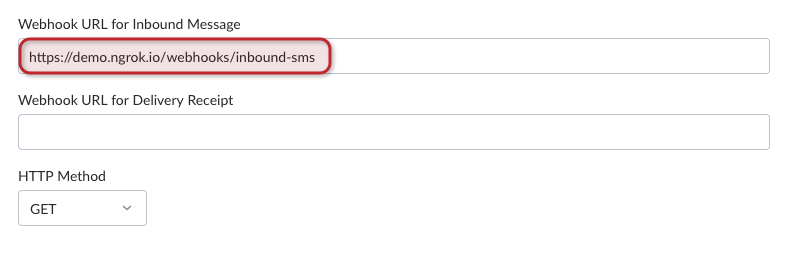
今、あなたの仮想番号のいずれかがSMSを受信した場合、Vonageはメッセージの詳細で、そのWebhookエンドポイントを呼び出します。
テストSMSを送信する
-
新しいターミナル・ウィンドウを開き
server.jsファイルで、SMSの着信をリッスンするようにする:node server.js -
携帯電話からVonage番号にテストSMSを送信します。例えば、「これは短いテキストメッセージです」。
すべてが正しく設定されていれば、次のようなメッセージが表示されるはずです。 Inbound SMS received を実行しているターミナル・ウィンドウに server.js.
では、受信したSMSを解析して、メッセージの内容を確認するコードを書いてみよう。
-
CTRL+C]を押して終了する。
server.jsApplications. -
に新しい関数を作成する。
server.jsというdisplaySms():コピーconst displaySms = (msisdn, text) => { console.log('FROM: ' + msisdn); console.log('MESSAGE: ' + text); console.log('---'); } -
また
server.jsを送信する前に204レスポンスにdisplaySms()以下のパラメータを使用する:コピーdisplaySms(params.msisdn, params.text); -
リスタート
server.jsをクリックし、モバイル・デバイスから別のショート・メッセージを送信する。今度は、ターミナル・ウィンドウに次のように表示されるはずです。server.js:Inbound SMS received FROM: <YOUR_MOBILE_NUMBER> MESSAGE: This is a short text message. -
キープ
server.jsしかし、今回は携帯端末を使って、1通のSMSで送れるよりもかなり長いメッセージを送ろう。例えば、ディケンズの「二都物語」の最初の文章:コピーIt was the best of times, it was the worst of times, it was the age of wisdom, it was the age of foolishness, it was the epoch of belief, it was the epoch of incredulity, it was the season of Light, it was the season of Darkness, it was the spring of hope, it was the winter of despair, we had everything before us, we had nothing before us, we were all going direct to Heaven, we were all going direct the other way ... in short, the period was so far like the present period, that some of its noisiest authorities insisted on its being received, for good or for evil, in the superlative degree of comparison only.' -
実行中のターミナル・ウィンドウの出力をチェックする。
server.js.以下のようなものが表示されるはずだ:コピー--- Inbound SMS received FROM: <YOUR_MOBILE_NUMBER> MESSAGE: It was the best of times, it was the worst of times, it was the age of wisdom, it was the age of foolishness, it was the epoch of belief, it was the epo --- Inbound SMS received FROM: <YOUR_MOBILE_NUMBER> MESSAGE: ch of incredulity, it was the season of Light, it was the season of Darkness, it was the spring of hope, it was the winter of despair, we had everything --- Inbound SMS received FROM: <YOUR_MOBILE_NUMBER> MESSAGE: e the present period, that some of its noisiest authorities insisted on its being received, for good or for evil, in the superlative degree of compariso --- Inbound SMS received FROM: <YOUR_MOBILE_NUMBER> MESSAGE: before us, we had nothing before us, we were all going direct to Heaven, we were all going direct the other way ... in short, the period was so far lik --- Inbound SMS received FROM: <YOUR_MOBILE_NUMBER> MESSAGE: n only. ---
何が起こったのか?メッセージがSMSの1バイトの制限を超えたため、複数のSMSメッセージとして送信されました。
このようなメッセージを意図されたフォーマットでユーザーに提示できるようにするためには、受信メッセージがこのように分割されているかどうかを検出し、その部分から再び組み立てる必要がある。
上の出力では、部品が正しい順序で到着していないことに注目してください。これは珍しいことではないので、このような事態に対応できるようにWebhookをコーディングする必要があります。
マルチパートSMSの処理
Vonageは、受信SMSが連結されるとき、4つの特別なパラメータをWebhookに渡します。(SMSがシングルパートの場合、これらはリクエストに表示されません。) あなたは、個々のパートを首尾一貫した全体に組み立てるために、これらを使用することができます:
concat:true- メッセージが連結されるときconcat-ref- 特定のメッセージパートがどのSMSに属するかを特定するための一意の参照。concat-total- SMS全体を構成するパーツの総数。concat-part- メッセージ全体における、このメッセージ部分の位置。
メッセージが連結されているかどうかを検出する
まず、メッセージが連結されているかどうかを検出する必要がある。メッセージの handleInboundSms() 関数は、シングルパートのSMSを通常の方法でユーザーに表示しますが、マルチパートのSMSに対しては特別な処理を行います:
const handleInboundSms = (request, response) => {
    const params = Object.assign(request.query, request.body);

    if (params['concat'] == 'true') {
        // Perform extra processing
    } else {
        // Not a concatenated message, so display it
        displaySms(params.msisdn, params.text);
    }

    // Send OK status
    response.status(204).send();
}
マルチパートSMSを保存して後で処理
より大きなメッセージの一部である受信SMSを保存する必要があります。
の外部で配列を宣言する。 handleInboundSms() という関数があります。 concat_sms.受信したSMSが長いメッセージの一部である場合、それを配列に格納する:
let concat_sms = []; // Array of message objects

const handleInboundSms = (request, response) => {
    const params = Object.assign(request.query, request.body);

    if (params['concat'] == 'true') {
        /* This is a concatenated message. Add it to an array
           so that we can process it later. */
        concat_sms.push({
            ref: params['concat-ref'],
            part: params['concat-part'],
            from: params.msisdn,
            message: params.text
        });
    } else {
        // Not a concatenated message, so display it
        displaySms(params.msisdn, params.text);
    }

    // Send OK status
    response.status(204).send();
}
すべてのメッセージパーツを集める
メッセージをパーツから組み立てる前に、与えられたメッセージ・リファレンスの すべてのパーツが揃っていることを確認する必要があります。すべての部品が正しい順番で届くという保証はないことを忘れないでください。 concart-part イコール concat-total.
これは concat_sms を共有するSMSオブジェクトだけが含まれるように、配列を変更する。 concat-ref を受信したSMSとして返します。フィルタリングされた配列の長さが concat-totalそうすれば、私たちはそのメッセージのためのすべてのパーツを手に入れ、それらを再び組み立てることができる:
    if (params['concat'] == 'true') {
        /* This is a concatenated message. Add it to an array
           so that we can process it later. */
        concat_sms.push({
            ref: params['concat-ref'],
            part: params['concat-part'],
            from: params.msisdn,
            message: params.text
        });

        /* Do we have all the message parts yet? They might
           not arrive consecutively. */
        const parts_for_ref = concat_sms.filter(part => part.ref == params['concat-ref']);

        // Is this the last message part for this reference?
        if (parts_for_ref.length == params['concat-total']) {
            console.dir(parts_for_ref);
            processConcatSms(parts_for_ref);
        }
    }
メッセージパーツの再組み立て
これで、すべてのメッセージパーツが揃ったことになるが、必ずしも正しい順番に並んでいる必要はない。 Array.sort() 関数を使用して、次の順序で組み立てる。 concat-part.を作成する。 processConcatSms() 関数を使用する:
const processConcatSms = (all_parts) => {

    // Sort the message parts
    all_parts.sort((a, b) => a.part - b.part);

    // Reassemble the message from the parts
    let concat_message = '';
    for (i = 0; i < all_parts.length; i++) {
        concat_message += all_parts[i].message;
    }

    displaySms(all_parts[0].from, concat_message);
}
連結されたSMSの受信テスト
走る server.js のステップ5で送信した長文のテキストメッセージを、携帯端末を使って再送信してください。 テストSMSを送信する セクションを参照されたい。
すべてが正しくコーディングされているのであれば、次のようになります。 server.js ウィンドウに個々のメッセージ・パーツが届くのが見えるはずです。すべての部分が受信されると、完全なメッセージが表示されます:
[ { ref: '08B5',
    part: '3',
    from: '<YOUR_MOBILE_NUMBER>',
    message: ' before us, we had nothing before us, we were all going direct to Heaven, we were all going direct the other way ... in short, the period was so far lik' },
  { ref: '08B5',
    part: '1',
    from: '<YOUR_MOBILE_NUMBER>',
    message: 'It was the best of times, it was the worst of times, it was the age of wisdom, it was the age of foolishness, it was the epoch of belief, it was the epo' },
  { ref: '08B5', part: '5', from: 'TEST-NEXMO', message: 'n only.' },
  { ref: '08B5',
    part: '2',
    from: '<YOUR_MOBILE_NUMBER>',
    message: 'ch of incredulity, it was the season of Light, it was the season of Darkness, it was the spring of hope, it was the winter of despair, we had everything' },
  { ref: '08B5',
    part: '4',
    from: '<YOUR_MOBILE_NUMBER>',
    message: 'e the present period, that some of its noisiest authorities insisted on its being received, for good or for evil, in the superlative degree of compariso' } ]
FROM: <YOUR_MOBILE_NUMBER>
MESSAGE: It was the best of times, it was the worst of times, it was the age of wisdom, it was the age of foolishness, it was the epoch of belief, it was the epoch of incredulity, it was the season of Light, it was the season of Darkness, it was the spring of hope, it was the winter of despair, we had everything before us, we had nothing before us, we were all going direct to Heaven, we were all going direct the other way ... in short, the period was so far like the present period, that some of its noisiest authorities insisted on its being received, for good or for evil, in the superlative degree of comparison only.
---
結論
このチュートリアルでは、連結された SMS をメッセージの構成部分から再び組み立てる方法を 示すアプリケーションを作成しました。について学びました。 concat, concat-ref, concat-totalそして concat-part インバウンドのSMSウェブフックへのリクエスト・パラメーターと、それを使って決定する方法:
- 受信SMSが連結されている場合
- 特定のメッセージ部分がどのメッセージに属するか
- 完全なメッセージを構成するメッセージ部分の数
- フルメッセージ内の特定のメッセージ部分の順序
次はどこだ?
以下のリソースは、Numbers Insightをアプリケーションで使用する際に役立ちます:
- について ソースコード このチュートリアルはGitHubにあります。
- SMS API 製品ページ
- インバウンドSMSのコンセプト
- Webhooksガイド
- SMS API リファレンス
- ngrok トンネルを使用して、ローカルの開発サーバーを Vonage API に接続します。
- その他のSMS APIチュートリアル