SMSの受信
SMSを受信するには
- バーチャル番号のレンタル メッセージを受信する
- ウェブフック・エンドポイントの作成 以下のコード例のいずれかを使用する。
- Vonage DashboardでWebhookを設定します。
前提条件
build.gradle に以下を追加する:
implementation 'com.vonage:server-sdk-kotlin:2.1.1'
implementation 'io.ktor:ktor-server-netty'
implementation 'io.ktor:ktor-serialization-jackson'
コードを書く
ReceiveMessage ファイルのmain メソッドに以下を追加する:
embeddedServer(Netty, port = 8000) {
    routing {
        route("/webhooks/inbound-sms") {
            handle {
                if (call.request.contentType().equals("application/x-www-form-urlencoded")) {
                    println("msisdn: ${call.request.queryParameters["msisdn"]}")
                    println("messageId: ${call.request.queryParameters["messageId"]}")
                    println("text: ${call.request.queryParameters["text"]}")
                    println("type: ${call.request.queryParameters["type"]}")
                    println("keyword: ${call.request.queryParameters["keyword"]}")
                    println("messageTimestamp: ${call.request.queryParameters["messageTimestamp"]}")
                }
                else {
                    val messageEvent = MessageEvent.fromJson(call.receive())
                    println(messageEvent.toJson())
                }
                call.respond(204)
            }
        }
    }
}.start(wait = true)コードを実行する
Gradle用のアプリケーション プラグインを使うことで、アプリケーションの実行を簡単にすることができます。build.gradle を以下のように更新する:
apply plugin: 'application'
mainClassName = project.hasProperty('main') ? project.getProperty('main') : ''以下のgradle コマンドを実行し、com.vonage.quickstart.kt.sms をReceiveMessage を含むパッケージに置き換えてアプリケーションを実行する:
前提条件
build.gradle に以下を追加する:
implementation 'com.vonage:server-sdk:9.3.1'
implementation 'com.sparkjava:spark-core:2.9.4'
コードを書く
ReceiveSms ファイルのmain メソッドに以下を追加する:
/*
 * Route to handle incoming SMS GET request.
 */
Route inboundSmsAsGet = (req, res) -> {
    System.out.println("msisdn: " + req.queryParams("msisdn"));
    System.out.println("messageId: " + req.queryParams("messageId"));
    System.out.println("text: " + req.queryParams("text"));
    System.out.println("type: " + req.queryParams("type"));
    System.out.println("keyword: " + req.queryParams("keyword"));
    System.out.println("messageTimestamp: " + req.queryParams("message-timestamp"));

    res.status(204);
    return "";
};

/*
 * Route to handle incoming SMS with POST form-encoded or JSON body.
 */
Route inboundSmsAsPost = (req, res) -> {
    // The body will be form-encoded or a JSON object:
    if (req.contentType().startsWith("application/x-www-form-urlencoded")) {
        System.out.println("msisdn: " + req.queryParams("msisdn"));
        System.out.println("messageId: " + req.queryParams("messageId"));
        System.out.println("text: " + req.queryParams("text"));
        System.out.println("type: " + req.queryParams("type"));
        System.out.println("keyword: " + req.queryParams("keyword"));
        System.out.println("messageTimestamp: " + req.queryParams("message-timestamp"));
    } else {
        MessageEvent event = MessageEvent.fromJson(req.body());

        System.out.println("msisdn: " + event.getMsisdn());
        System.out.println("messageId: " + event.getMessageId());
        System.out.println("text: " + event.getText());
        System.out.println("type: " + event.getType());
        System.out.println("keyword: " + event.getKeyword());
        System.out.println("messageTimestamp: " + event.getMessageTimestamp());
    }

    res.status(204);
    return "";
};

Spark.port(8080);
Spark.get("/webhooks/inbound-sms", inboundSmsAsGet);
Spark.post("/webhooks/inbound-sms", inboundSmsAsPost);コードを実行する
Gradle用のアプリケーション プラグインを使うことで、アプリケーションの実行を簡単にすることができます。build.gradle を以下のように更新する:
apply plugin: 'application'
mainClassName = project.hasProperty('main') ? project.getProperty('main') : ''以下のgradle コマンドを実行し、com.vonage.quickstart.sms をReceiveSms を含むパッケージに置き換えてアプリケーションを実行する:
前提条件
Install-Package VonageSmsController.cs という名前のファイルを作成し、以下のコードを追加する:
{
[HttpGet("webhooks/inbound-sms")] コードを書く
SmsController.cs に以下を追加する:
}

[HttpGet("webhooks/delivery-receipt")]
public IActionResult DeliveryReceipt()
{
    var dlr = WebhookParser.ParseQuery<DeliveryReceipt>(Request.Query);
Console.WriteLine($"Delivery receipt received for messages {dlr.MessageId} at {dlr.MessageTimestamp}");前提条件
composer require slim/slim:^3.8 vonage/clientindex.php という名前のファイルを作成し、以下のコードを追加する:
use \Psr\Http\Message\ServerRequestInterface as Request;
use \Psr\Http\Message\ResponseInterface as Response;
use Slim\Factory\AppFactory;index.php に以下を追加する:
require 'vendor/autoload.php';

$app = AppFactory::create();コードを書く
index.php に以下を追加する:
$handler = function (Request $request, Response $response) {
    $sms = \Vonage\SMS\Webhook\Factory::createFromRequest($request);
    error_log('From: ' . $sms->getMsisdn() . ' message: ' . $sms->getText());

    return $response->withStatus(204);
};

$app->map(['GET', 'POST'], '/webhooks/inbound-sms', $handler);

$app->run();コードを実行する
このファイルをあなたのマシンに保存し、実行する:
前提条件
pip install fastapi[standard]コードを書く
receive-sms.py に以下を追加する:
from pprint import pprint

from fastapi import FastAPI, Request

app = FastAPI()


@app.post('/webhooks/inbound')
async def inbound_message(request: Request):
    data = await request.json()
pprint(data)コードを実行する
このファイルをあなたのマシンに保存し、実行する:
前提条件
gem install sinatra sinatra-contribreceive.rb という名前のファイルを作成し、以下のコードを追加する:
require 'sinatra'
require 'sinatra/multi_route'
require 'json'

helpers do
  def parsed_body
     json? ? JSON.parse(request.body.read) : {}
  end

  def json?
    request.content_type == 'application/json'
  end
endコードを書く
receive.rb に以下を追加する:
route :get, :post, '/webhooks/inbound-sms' do
  puts params.merge(parsed_body)
  status 204
end

set :port, 3000コードを実行する
このファイルをあなたのマシンに保存し、実行する:
Vonage DashboardでWebhookエンドポイントを設定します。
VonageがWebhookにアクセスする方法を知るには、Vonageアカウントで設定する必要があります。
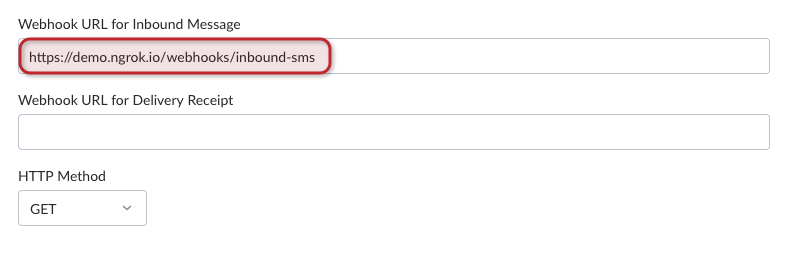
コード・スニペットでは、ウェブフックは次の場所にあります。 /webhooks/inbound-sms.Ngrok を使用している場合、Webhook を設定する必要があります。 Vonage Dashboard API 設定ページ という形式である。 https://demo.ngrok.io/webhooks/inbound-sms.交換 demo というフィールドにエンドポイントを入力します。 インバウンドメッセージ用Webhook URL:
試してみる
これで、Vonage番号にSMSを送信すると、コンソールにログが記録されるはずです。メッセージオブジェクトには以下のプロパティが含まれています:
{
  "msisdn": "447700900001",
  "to": "447700900000",
  "messageId": "0A0000000123ABCD1",
  "text": "Hello world",
  "type": "text",
  "keyword": "Hello",
  "message-timestamp": "2020-01-01T12:00:00.000+00:00",
  "timestamp": "1578787200",
  "nonce": "aaaaaaaa-bbbb-cccc-dddd-0123456789ab",
  "concat": "true",
  "concat-ref": "1",
  "concat-total": "3",
  "concat-part": "2",
  "data": "abc123",
  "udh": "abc123"
}