Technical Details
The Vonage MCP Server allows AI agents and developer tools to interact with Vonage APIs through the Model Context Protocol (MCP) — an open standard that defines how large language models (LLMs) discover, describe, and use external tools and APIs.
By implementing MCP, Vonage makes its communication capabilities (Voice, Messaging, Video, and more) discoverable and usable in agentic environments such as Claude Desktop, Cursor, VS Code, and other MCP-enabled clients.
Overview
MCP defines a structured interface between an AI model (the MCP client) and a service exposing standardized tools (the MCP server), enabling natural-language-driven access to Vonage APIs.
In practice:
- The agent (such as Claude) receives a prompt from the user, such as “Send an SMS to John”.
- It queries the Vonage MCP Server to find the right tool (e.g.
send_sms). - The server executes the corresponding Vonage API call and returns the result.
This architecture allows developers to integrate Vonage’s communication APIs into AI-assisted workflows — without writing glue code or custom integrations.
Key Features
- Tool Discovery – MCP clients can automatically detect and describe available Vonage tools.
- Secure Access – Each tool runs within a defined scope using Vonage API credentials.
- Agent Integration – Works with AI-powered tools like Claude, Cursor, Windsurf, and VS Code.
- Extensibility – Developers can add or customize tools for specific Vonage APIs.
Architecture
The MCP model consists of three main components:
| Component | Role |
|---|---|
| AI Agent (LLM) | Understands user intent and determines when to use a tool. |
| MCP Client | A local connector or plugin (e.g. in Claude or VS Code) that communicates with MCP servers. |
| MCP Server | Exposes tools and schemas that describe what actions are possible (e.g., sending messages, querying docs). |
Request Flow Example
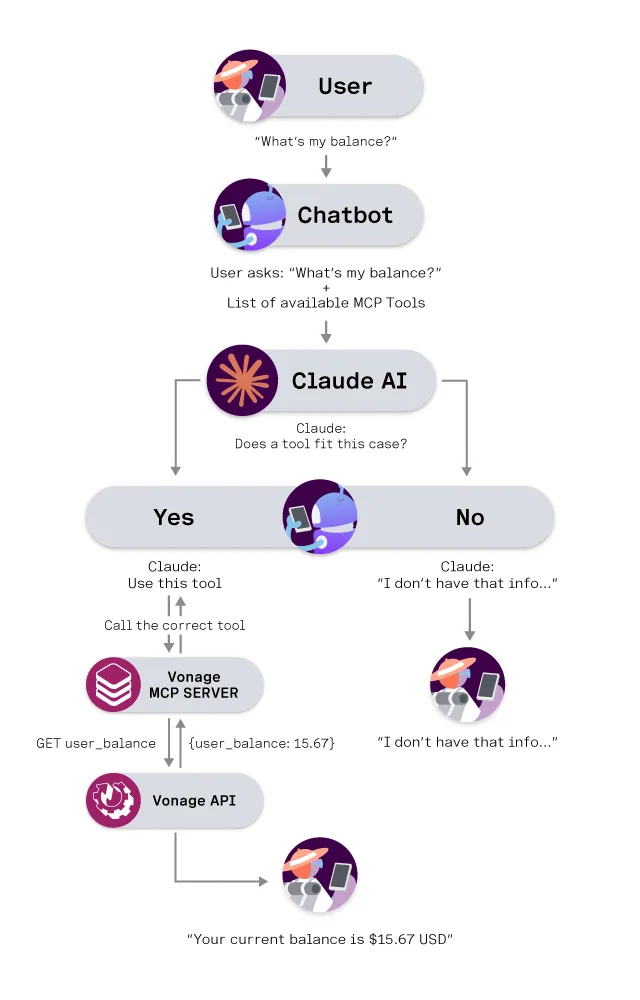
- User: “Send an SMS to +1-202-555-0183 saying I’ll be 10 minutes late.”
- LLM identifies this as a telephony action.
- MCP Client queries the Vonage Telephony MCP Server for available tools.
- Server exposes the
send_smstool and executes it using Vonage APIs. - The LLM receives confirmation and reports success to the user.
Getting Started
See the Introduction to the Vonage MCP Servers guide for more information on the different MCP servers Vonage provides.
Then, follow our installation guides for instructions on how to install your chosen MCP server in your development environment:
If you have any questions, you can reach out to us on the Vonage Community Slack.