Share:
)
Liz Acosta is a Developer Advocate at Vonage. While her career path from film student to marketer to engineer to Developer Advocate might seem unconventional, it’s pretty typical for Developer Relations! Liz loves pizza, plants, pugs, and Python.
Silent Network Authentication: Fraud-Proof Login With FastAPI + Kotlin
Time to read: 21 minutes
Fraud-proof your Python checkout in FastAPI.
Fraud is no longer a back-office cleanup job. It is a runtime decision your auth code makes in 200 milliseconds, or attackers make for you. This tutorial walks a Python backend engineer through the two carrier-side signals that close the gap SMS OTP left open: SIM Swap detection and silent network authentication, both wired into a working FastAPI app you can take to your tech lead the same day. Read on to learn more about about fraud and account takeover or skip right to getting the code up and running using the README.
Why it matters: Account takeover fraud is now an eight-figure annual loss for mid-market fintechs and a double-digit-percentage support burden for the engineering teams behind them. The two highest-signal defenses you can wire into a Python login flow today are SIM Swap detection (did the SIM under this number change in the last 7 days?) and silent network authentication (is this the actual SIM on the actual mobile network for this number, right now?). Both run carrier-side. Both are accessible through Vonage Network APIs. Neither requires the user to type anything.
What is next: After this tutorial your FastAPI backend stacks SIM Swap and Silent Auth in one login route, falls back to a Verify SMS OTP only when the network path cannot complete, and comes with the production guardrails (timeout fallback, fail-closed defaults, observability hooks) you need before you point real traffic at it. End-to-end fraud prevention is no longer a separate system to integrate, it is two API calls inside the auth flow you already have.
Need to check your bank account? No problem! Just log into the banking online portal with your email address and password. And then -- just to make sure it's actually you -- a text message containing a One-Time Password (OTP) is sent to your phone number on file. If it's actually you trying to sign in, the assumption is that you will have that phone in your hand. If the code you enter matches what the verification workflow generated, you are authenticated and permitted access to your money.
But what if the person who receives that text message isn’t you? What if someone stole your phone? What if someone hacked into your email? What if the login attempt was initiated by someone with a bot and a list of compromised account usernames and passwords they’re credential stuffing?
Account takeover is a type of fraud that occurs when an attacker gains access to an account they are not the rightful owner of. An account takeover is usually the result of authentication failure. Authentication failure occurs when an attacker deceives a system into recognizing an invalid or incorrect user as legitimate. Authentication failure remains one of Open Worldwide Application Security Project’s (OWASP) top ten application security risks for the fifth year in a row.
Account takeover fraud resulted in nearly $13 billion in losses in 2023, an increase from $11 billion in 2022. Financial cost alone isn’t the only danger of fraud and application authentication vulnerability; the damage to brand trust and reputation is even more expensive.
 Fraud is no longer a back-office cleanup job.
While fraud probably won’t ever be eliminated completely, there are strategies you can implement to provide additional levels of verification and security and help prevent account takeover. In this blog post, we’ll discuss these strategies and then explore a sample application (Android client with FastAPI server) and code snippets to demonstrate how Vonage Verify can fortify your authentication workflows with SIM swap checks, silent authentication, and fallback to alternative verification methods.
You can check out the code for the demo application included in this blog post and get it up and running following the README.
Have you been hacked? Odds are you have been. In December 2025, the United States Federal Bureau of Investigations uncovered 630 million compromised passwords from multiple devices belonging to a single hacker. The implications of this are far-reaching, but most importantly, this exemplifies just how insecure the username and password protocol has become.
Multifactor authentication (MFA) and two-factor authentication (2FA) offer a layer of protection against stolen login credentials by requiring presentation of more than one type of evidence of your identity to gain access to a system. One-time passcodes (OTP) via SMS are a form of 2FA that leverages the “Something you have” possession-based evidence that can prove you are who you say you are. Because of the ubiquity of cell phones, SMS OTP is one of the most popularly implemented methods of MFA.
Unfortunately, because of the widespread use of SMS OTP, fraudsters have developed strategies to circumvent and undermine this method of MFA such as:
Signaling System 7 (SS7) network interception: A carrier-level protocol flaw that enables attackers to route SMS messages to themselves
SIM Swap: An attacker social engineers the carrier to reassign the victim's number to a new SIM
Phishing: The user is tricked into entering the OTP on a fraudulent login page
Silent network authentication (SNA) -- or “silent authentication” for short -- is a carrier-side possession-based check that redirects a phone's mobile data session through the operator's network without the need for you to enter a code. This removes the dependency on an external factor (like an attacker) to verify your identity.
Silent network authentication verifies that the device currently using the mobile data session owns the phone number -- without sending a code. It works by redirecting a carrier-verified HTTP request through the operator. Unlike SMS OTP, it closes the SS7 attack vector; however, it does not protect against SIM Swap attacks on its own -- a SIM Swap check should be used alongside silent authentication to address that risk. With the Vonage Verify API, you can use a Python FastAPI backend and a mobile client to implement silent authentication and further secure your applications.
A SIM swap attack is a type of account takeover fraud that targets some of the weaknesses inherent to MFA via SMS OTP. This kind of attack tricks a mobile carrier into activating a new SIM card that the carrier's network then associates with the victim's phone number. Ownership of the number does not change; the attacker gains interception access to inbound SMS and voice traffic tied to that number for as long as the swap goes undetected. In order to execute a SIM swap attack, an attacker collects personal details about you either with phishing scams, black market lists of stolen data, or social engineering. The attacker then contacts your mobile provider and uses your personal data to convince the customer service representative to activate a new SIM card mapped to your number. Their device now receives your inbound SMS and voice traffic. The attacker never becomes the number's owner (billing, contract, and account all stay with you); they just gain interception access at the network layer until you or your carrier notice.
The most prominent example of a successful SIM swap attack occurred in 2019 when the account of Twitter CEO Jack Dorsey was hacked via fraudulent SMS OTP 2FA. The incident was a stark reminder that no one is immune to fraud. Moreover, the group behind the hack had a history of successful account takeovers using similar methods of socially engineered SIM swaps. In other words, humans remain the weakest link in any security chain.
Apart from practical steps you can take to avoid a swapped SIM like using PINs, strong unique passwords, and minding which details you share publicly, when developing authentication workflows that require some kind of mobile interaction, you can include a quick check on the status of a device’s SIM. The outcome of such a check can then inform the rest of your authentication workflow such as falling back to another form of 2FA.
Checking whether a SIM has been swapped within a configured amount of time can help flag a suspicious device and trigger alternative methods of authentication and deflect this common attack. Using the Vonage Identity Insights API, you can retrieve information about a SIM such as when it was last swapped, and from there determine how to proceed with your authentication flow.
Vonage Identity Insights API delivers real-time phone number intelligence directly from mobile carrier infrastructure -- passive, frictionless, and impossible to spoof. Specifically, it exposes carrier-level signals about a phone number, including whether its format is valid, whether its SIM card has recently been swapped, and other fraud risk indicators. These signals can be used to assess the level of risk behind a specific action -- such as login, onboarding, account recovery, or financial transaction -- enabling adaptive security that steps up protection precisely when and where it's needed. For this blog post, we'll be using the SIM Swap insight.
The SIM Swap insight allows you to determine if the SIM card linked to a given phone number has recently changed. It is designed to mitigate the impact of account takeover (SIM Swap attack), giving you the assurance that the phone number can be used for multiple use cases, such as the ability to proceed with SMS 2FA or as a secure communications channel.
A typical call to the Identity Insights endpoint for SIM Swap includes the following payload:
{
    "phone_number": "14040000000",
    "purpose": "FraudPreventionAndDetection",
    "insights": {
        "sim_swap": {
            "period": 240
        }
    }
}Which is explained more in-depth below:
Key | Description |
|---|---|
purpose | Specifies the reason for the request |
insights | A list of objects representing the insight(s) requested for the phone number |
period | Specifies the time window (in hours) used to determine the |
To learn more about the API and how it works, refer to the Vonage Identity Insights documentation.
A successful request responds with a 200 OK and a collection of the requested insights. The response will also include a request_id:
{
    "request_id": "aaaaaaaa-bbbb-cccc-dddd-0123456789ab",
    "insights": {
        "sim_swap": {
            "latest_sim_swap_at": "2024-07-08T09:30:27.504Z",
            "is_swapped": true,
            "status": {
                "code": "OK",
                "message": "Success"
            }
        }
    }
}With this response, you can determine how you want your verification workflow to proceed.
Verify API is Vonage’s next generation two-factor authentication (2FA) product. With Verify API, you can authenticate your users and prevent fraud with a simple, easy-to-use API that abstracts away the complexity of 2FA at a global scale.
It expands traditional authentication methods by supporting a wider range of channels, including over-the-top (OTT) channels like WhatsApp, as well as SMS, voice, and email. The API supports both JSON web tokens (JWT) and Basic authentication. Basic authentication is easier to get started with but does not support advanced features such as ACLs. You can use either JWT or Basic authentication, but not both at the same time. You can read more about authentication in the documentation.
At a high level, the Verify API follows this workflow:
An end-user triggers a 2FA request in an application
On the backend, this 2FA request initiates a Verify API request
The Verify API sends a one-time passcode (OTP) to the end-user via whichever channel — or sequence of channels — you configure for your authentication journey (SMS, voice, WhatsApp, email, and more), giving you full flexibility to define the verification flow that best fits your use case
The end-user provides the OTP to the application
This initiates a Verify request to check the OTP provided by the end-user against the OTP generated by Vonage
The result of that check then determines what happens next (the end-user is authenticated, etc)
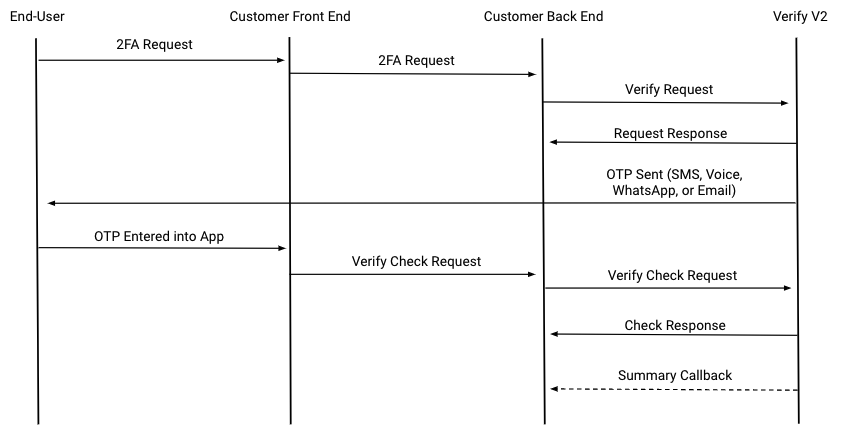 A visual representation of a Verify request flow with summary callbacks.A typical initial verification request includes the following payload where each
 channel in the workflow list defines where the OTP is to be sent:
{"locale": "es-es",
   "channel_timeout": 180,
   "client_ref": "myPersonalRef",
   "code_length": 4,
   "code": "e4dR1Qz",
   "brand": "ACME",
   "template_id": "4ed3027d-8762-44a0-aa3f-c393717413a4",
   "workflow": [
      { "channel": "sms",
         "to": "44770090000"},
      { "channel": "voice",
         "to": "44770090000" }
] } Which is explained more in-depth below:
Key | Description | Required or optional |
|---|---|---|
locale | The locale to use for the verification message | Optional, defaults to |
channel_timeout | The time in seconds to wait between attempts to deliver the verification code | Optional, defaults to 180 seconds |
client_ref | A unique identifier for the verification request | Optional |
code_length | The length of the verification code to generate | Optional, defaults to 4 |
code | An optional alphanumeric custom code to use, if you don't want Vonage to generate the code | Optional |
brand | The name of the company or service that is sending the verification request – this will appear in the body of the SMS or TTS message | Required, maximum length of 16 characters |
To learn more about the API and how it works, refer to the Vonage Verify documentation.
A successful request responds with a 202 OK to indicate that the verification request has been initiated. The response will also include a request_id which is required to complete the verification process:
{ "request_id": "c11236f4-00bf-4b89-84ba-88b25df97315"} At the same time, Vonage sends an OTP to the end-user via the configured workflow, attempting each channel in the order in which they are defined.
Once the end-user receives and provides the OTP to the application, another request to the verify endpoint with the request_id as a path parameter (https://api.nexmo.com/v2/verify/:request_id) and the OTP in the request body for the code key in the payload.
If the code provided matches the code generated and sent by Vonage, a 200 OK response is returned.
Silent Authentication uses a mobile phone's Subscriber Identity Module (SIM) to verify a user's identity without any user input. It checks the user's phone number against their carrier's records to confirm that it is active and legitimate.
Once a request is verified, you can continuously authenticate the user until the request either expires or is canceled by the user.
To include Silent Authentication as part of your verification process, add it as a channel to the workflow list in your request payload. Please note that silent_auth must be listed first since the workflow executes in the order it is defined:
"workflow": [
    {
        "channel": "silent_auth",
        "to": "44770090000",
        "redirect_url": "https://acme-app.com/sa/redirect",
        "check_coverage": "true"
    },
    {
        "channel": "sms",
        "to": "44770090000"
    },
    {
        "channel": "voice",
        "to": "44770090000"
    }
]When the silent_auth channel is included, the response contains a check_url in addition to the request_id:
{
    "request_id": "c11236f4-00bf-4b89-84ba-88b25df97315",
    "check_url": "https://api.nexmo.com/v2/verify/c11236f4-00bf-4b89-84ba-88b25df97315/silent-auth/redirect"
}The value for check_url is the URL a GET is then performed on over cellular data on the client side. It is important to note that silent authentication relies on a verified GSM response from the device to prove its credentials, which is not sent if the user is connected to Wi-Fi. The user must therefore trigger the authentication request using cellular data. (We’ll take a closer look at how the Vonage Android SDK can force a mobile connection when we get to the client side.)
If the client is able to successfully perform a GET request on the URL, Vonage responds with the request_id and a code.
This code is then checked in a call to the verify endpoint and if matches the OTP generated by Vonage, then a 200 OK is returned with "status": "complete".
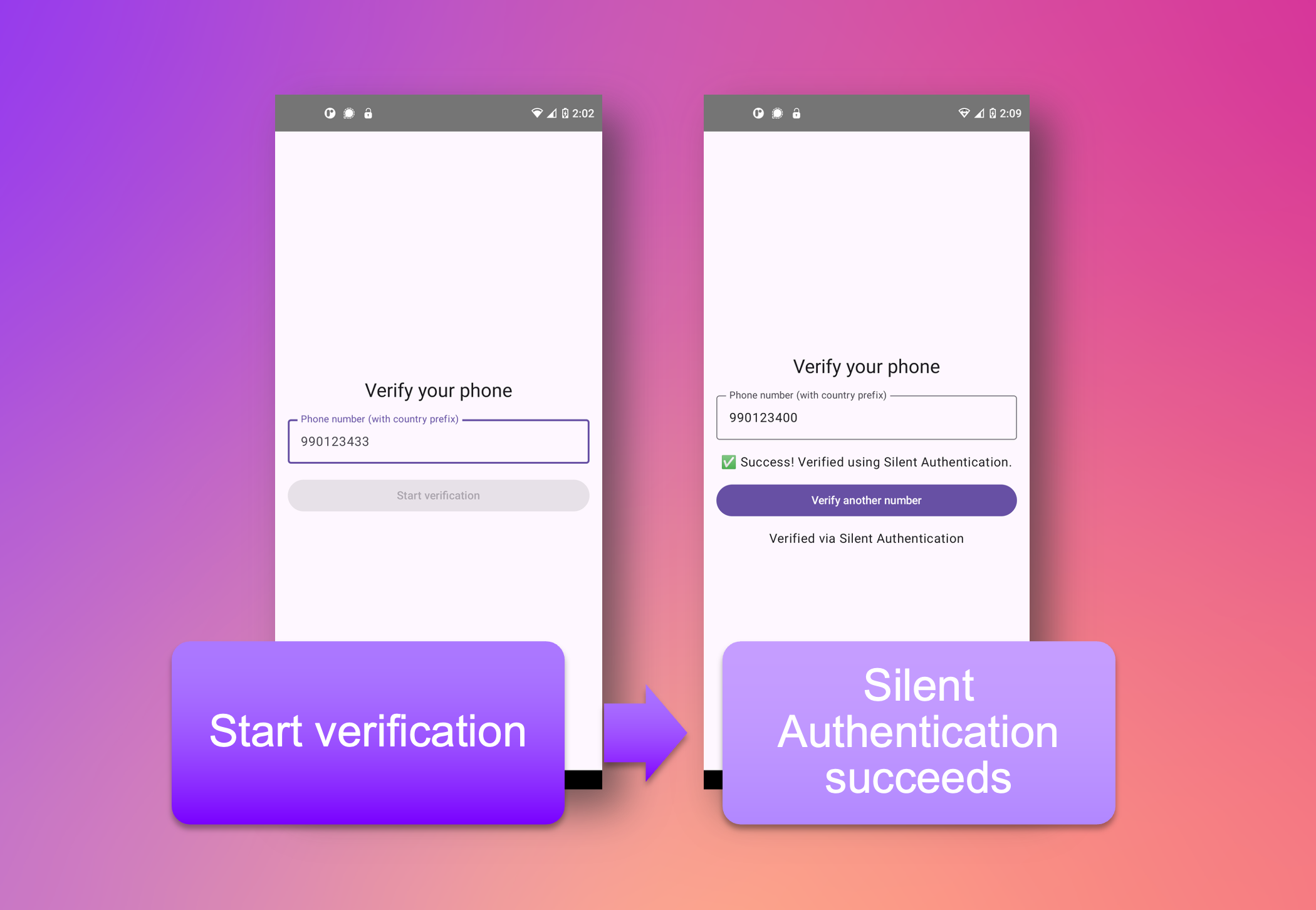
The example application in this blog post demonstrates a minimal authentication flow that could be used as an additional step for MFA. You can find the code on the Vonage Community GitHub. The Android Kotlin-based client interacts with a backend server written with FastAPI using the Vonage Insights and Verify APIs to define and execute an authentication workflow.
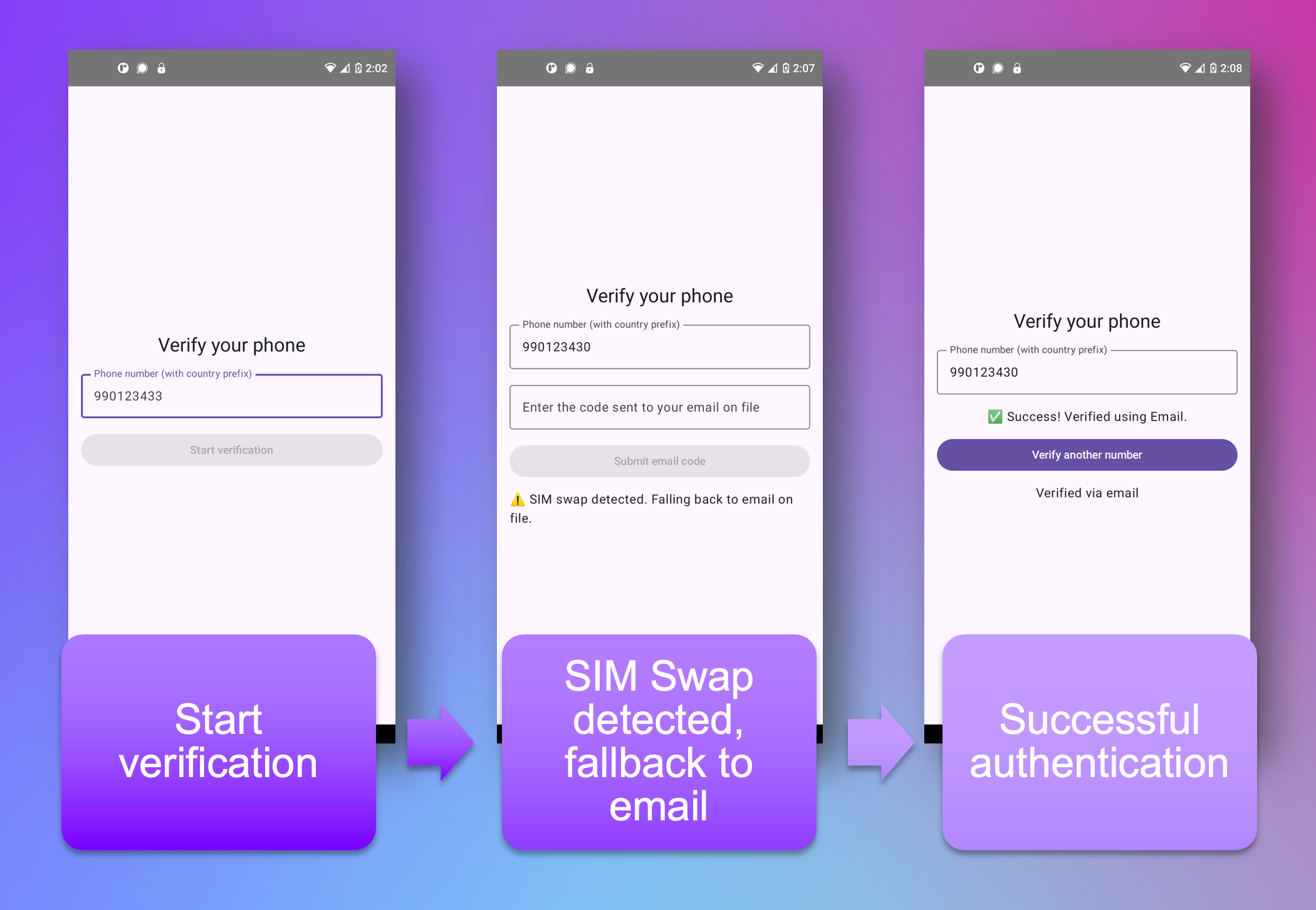
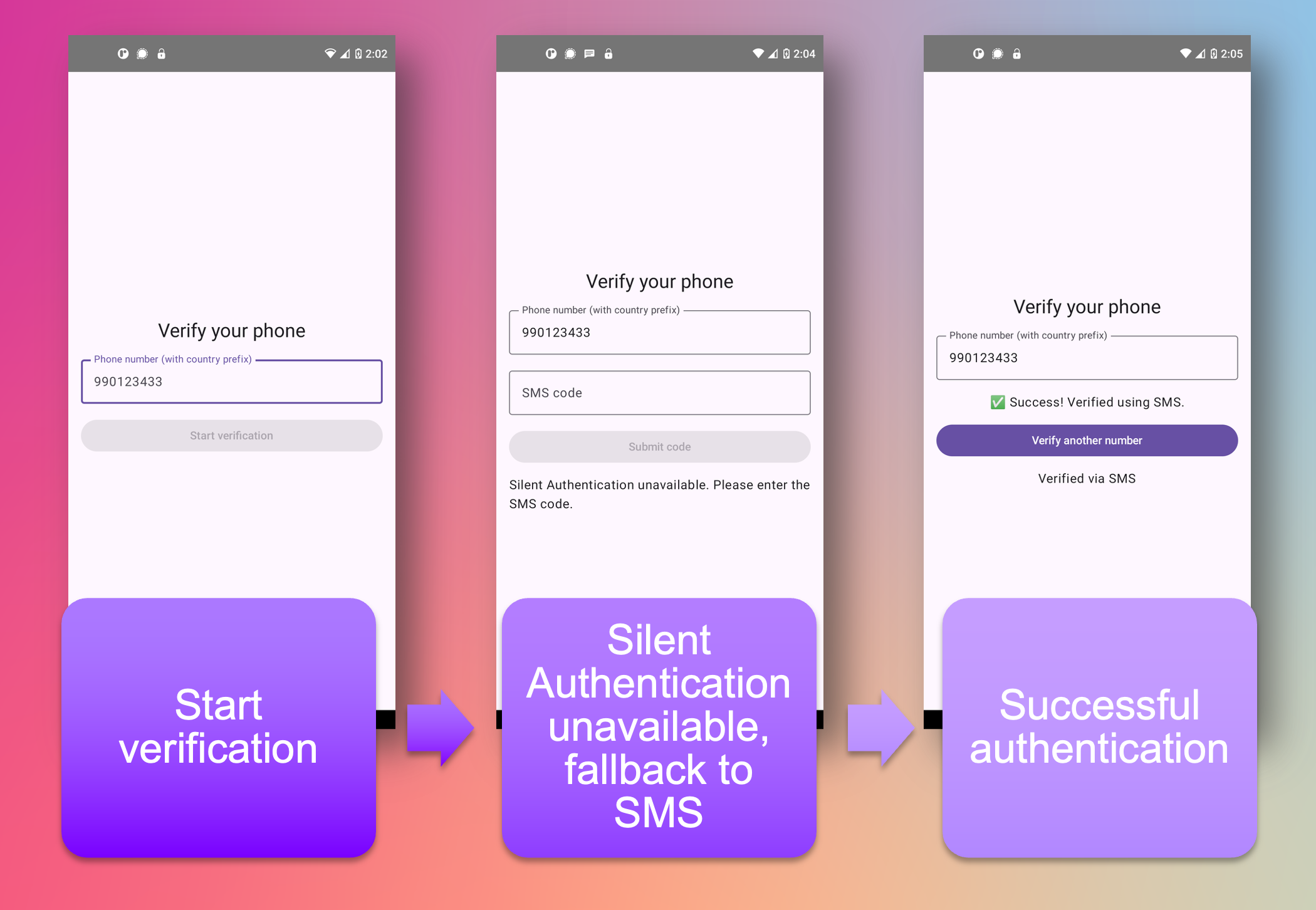
The application executes the following sequence:
The end user is greeted with a verification screen prompting them for their phone number.
Submitting a phone number triggers a post to the backend server, initiating a sequence of verification steps.
The backend makes a call to the Insights endpoint to check if the SIM has been swapped within a certain threshold.
If the SIM has been swapped recently or such insights cannot be determined, it is flagged.
A flagged SIM may indicate that a device is compromised. This impacts the trustworthiness of other forms of mobile device-based verification, so the application falls back to an email address on file for the provided phone number and sends an OTP there with the Verify API.
If the end user receives and provides an OTP matching the OTP generated by Vonage, then they are verified; if there is no match, the end user is not verified.
If the SIM hasn’t been swapped recently, the workflow proceeds with silent authentication.
If silent authentication fails or is not supported by the mobile carrier network, then the application falls back to SMS OTP.
If the end user receives and provides an OTP matching the OTP generated by Vonage, then they are verified; if there is no match, the end user is not verified.
If silent authentication completes successfully, the end user is verified.
The prerequisites, environment setup, and steps to run this code can be found in the README on GitHub. We will discuss notable parts of the code in-depth below.
To help create a separation of responsibilities, we define a group of functions that interact with Vonage in a file called vonage_handlers.py.
In this sample application, we use both Identity Insights and Verify APIs. They have slightly different endpoints, so we’ll create two clients to handle this. In both cases, VONAGE_APPLICATION_ID and VONAGE_PRIVATE_KEY_PATH are provided by Vonage when you create an application. The complete setup for this application is covered in the repo README.
verify_client = Vonage(
    Auth(
        application_id=os.environ["VONAGE_APPLICATION_ID"],
        private_key=os.environ["VONAGE_PRIVATE_KEY_PATH"],
    )
)

identity_insights_client = Vonage(
    Auth(
        application_id=os.environ["VONAGE_APPLICATION_ID"],
        private_key=os.environ["VONAGE_PRIVATE_KEY_PATH"],
    ),
    http_client_options={"api_host": "api-eu.vonage.com"},
)
First we check the status of the SIM associated with the number provided by the end user to the client and return True, False, or None:
def check_sim_swap(phone: str) -> bool | None:
    """
    Returns True if SIM was swapped, False if not, None if carrier doesn't permit check.
    """
    insights_request = IdentityInsightsRequest(
        phone_number=phone,
        purpose="FraudPreventionAndDetection",
        insights=InsightsRequest(
            format=EmptyInsight(), sim_swap=SimSwapInsight(period=240)
        ),
    )
    return identity_insights_client.identity_insights.requests(
        insights_request
).insights.sim_swap.is_swappedThis function makes a call to the Identity Insights endpoint and returns the SIM Swap insight for the number provided by the end user to the client.
We initialize the verification workflow with the start_silent_auth function:
def start_silent_auth(phone: str) -> dict:
    """
    Starts Silent Auth verification.
    Returns channel, request_id, and check_url.
    Raises HttpRequestError with 412 if Silent Auth unavailable.
    """
    request = VerifyRequest(
        brand="DemoApp", workflow=[SilentAuthChannel(to=phone)], coverage_check=True
    )
    response: StartVerificationResponse = verify_client.verify.start_verification(
        request
    )
    return {
        "channel": "silent_auth",
        "request_id": response.request_id,
        "check_url": response.check_url,
}We include the coverage_check parameter to synchronously check if the end user’s destination network is supported by Silent Authentication. If it is not supported, Vonage returns a 4xx response. This initial check prevents any lag that might result from unnecessary redirection flows. Instead of making multiple GET attempts, your application can fallback to another verification method if Silent Authentication does not support the end user’s carrier network. This can result in a better user experience.
If the end user’s network is supported by Silent Authentication and the GET request on the check_url provided by Vonage is successful, then a request_id and code is returned. This code is checked in another function.
Depending on the outcomes of the SIM Swap check and silent authentication attempt, you may want to fall back to an alternative OTP method.
In the case of a swapped SIM, you may want to fall back to an OTP method that doesn’t rely solely on a mobile device. If a SIM has been swapped fraudulently, then silent authentication may no longer be trustworthy. A swapped SIM isn’t always the result of an account takeover, but it’s better to be safe than sorry, so you may want to send an OTP somewhere else.
In the start_email function, we use the Verify API to begin a verification process using email:
def start_email(phone: str, email: str) -> dict:
    """
    Starts email OTP verification.
    Returns request_id.
    """
    request = VerifyRequest(
        brand="DemoApp",
        workflow=[EmailChannel(to=email)],
    )
    response = verify_client.verify.start_verification(request)
return {"request_id": response.request_id}If the SIM has not been swapped, but the end user’s carrier either is not supported or Silent Authentication fails, then we fallback to SMS OTP:
def start_sms(phone: str) -> dict:
    """
    Starts SMS OTP verification.
    Returns channel and request_id.
    """
    logger.info(f"Starting SMS fallback with: {phone}")
    request = VerifyRequest(
        brand="DemoApp",
        workflow=[SmsChannel(to=phone)],
    )
    response = verify_client.verify.start_verification(request)
    return {"channel": "sms_otp", "request_id": response.request_id}
Finally we make a call to the verify endpoint using the request_id and supplying the code provided by either the end user as an email or SMS OTP or from the client side as a result of Silent Authentication:
def check_code(request_id: str, code: str) -> bool:
    """
    Validates OTP code with Vonage. Returns True if verified.
    """
    response = verify_client.verify.check_code(request_id, code)
    return {"verified": True, "status": response.status}
FastAPI is a high-performance web framework for building HTTP-based service APIs in Python. What makes FastAPI different from other Python web frameworks is its close alignment with Pydantic, a data validation library for Python. This coupling enables FastAPI to validate, serialize, and deserialize data. This provides a more declarative method of specifying the structure and types of data for incoming requests such as HTTP bodies and outgoing responses. FastAPI also automatically generates OpenAPI specs. All of these features combined make it especially suited for modern REST APIs, microservices development, and applications that require real-time functionality.
The file main.py contains our FastAPI routes.
In the sample application, we fallback to an email OTP in the case of a swapped SIM. In a production deployable application, this email is provided by the end user when they registered their account and stored in a database. In our minimal example application, you provide a test email that is stored in memory. This in-memory storage simulates a database using environment variables you supply in the .env file:
USER_EMAIL_STORE = {os.environ["USER_PHONE_NUMBER"]: os.environ["USER_EMAIL"]}The /verification route does a SIM Swap check and depending on the SIM’s status, begins a Silent Authentication verification workflow. If sim_swapped is False but Silent Authentication results in a 412 (meaning that the end user’s network is not supported), then we fall back to SMS OTP:
@app.post("/verification")
async def start_verification(req: VerificationRequest):
    """
    Starts the verification process:
    - Check if SIM is swapped-- if sim_swapped: True, fallback to email
    - If sim_swapped: False, begin Silent Authentication
    """
    phone = req.phone
    logger.info(f"Beginning authentication process for: {phone}")

    try:
        sim_swapped = check_sim_swap(phone)
        logger.info(f"Swap status for {phone}: {sim_swapped}")

        if sim_swapped or sim_swapped is None:
            logger.info("SIM swap flagged, stepping up to email")
            return {"channel": "email_stepup", "request_id": None}

        return start_silent_auth(phone)

    except Exception as e:
        raise HTTPException(status_code=500, detail=str(e))

@app.post("/fallback-sms")
async def fallback_sms(req: VerificationRequest):

    phone = req.phone
    # Uncomment the line below and comment out the line above
    # to test this app with a Virtual Operator number and receive an OTP
    # to a real phone number
    # phone = os.environ["USER_PHONE_NUMBER"]

    logger.info(f"SMS fallback requested, sending to: {phone}")
    try:
        return start_sms(phone)
    except Exception as e:
raise HTTPException(status_code=500, detail=str(e))If sim_swapped is True, we return {"channel": "email_stepup", "request_id": None} which will direct the client to call the /send-email-otp:
@app.post("/send-email-otp")
async def send_email_otp(req: VerificationRequest):
    """
    Starts the verification process via email:
    - Check if there is a stored email -- if no email, raise exception
    - If there is an email, begin verification
    """
    phone = req.phone

    logger.info(f"Stepping up to email for verification process for: {phone}")
    email = USER_EMAIL_STORE.get(phone)
    logger.info(f"Getting email address from simulated user database: {email}")

    if not email:
        raise HTTPException(status_code=404, detail="No email on file for this number")

    logger.info(f"Beginning email verification for: {email}")
    try:
        return start_email(phone, email)
    except Exception as e:
raise HTTPException(status_code=500, detail=str(e))Finally, we use the /check-code route to complete the authentication process:
@app.post("/check-code")
async def verify_code(req: CheckCodeRequest):
    request_id = req.request_id
    code = req.code
    logger.info(f"Checking code for request_id: {request_id} with code: {code}")
    try:
        response = check_code(request_id, code)
        logger.info("Verification success!")
        return response
    except Exception as e:
        logger.info("Verification failure")
        return {"verified": False, "status": str(e)}
The client for this sample application is built with Kotlin and utilizes modern libraries such as OkHttp and Kotlin Coroutines along with Jetpack Compose for the UI. The full code can be found in the GitHub repository. The client provides a minimal mobile interface.
It also uses the Vonage Android SDK to perform the Silent Authentication portion of the verification workflow in the ApiClient.kt file:
    suspend fun checkSilentAuth(url: String): String = withContext(Dispatchers.IO) {
        val params = VGCellularRequestParameters(
            url = url,
            headers = mapOf(),
            queryParameters = mapOf(),
            maxRedirectCount = 10
        )

        Log.d("DemoApp", "Attempting Silent Authentication ...")

        val response = VGCellularRequestClient.getInstance()
            .startCellularGetRequest(params, false)

        val sdkError = response.optString("error", "")
        if (sdkError.isNotEmpty()) {
            throw SilentAuthUnavailableException("SDK error: $sdkError")
        }

        val httpStatus = response.optInt("http_status", -1)
        if (httpStatus !in 200..299) {
            throw SilentAuthUnavailableException("HTTP $httpStatus")
        }

        val code = response.optJSONObject("response_body")?.optString("code", null)
        if (code.isNullOrBlank()) throw SilentAuthUnavailableException("Silent auth response missing 'code'")

        code
    }
This line uses the Vonage Android Client Library to force a mobile connection to make a GET request on the check_url generated by Vonage when we started the verification process:
val response = VGCellularRequestClient.getInstance()
.startCellularGetRequest(params, false)If the GET request is successful, a code is returned and passed to the backend to check.
Follow the README for the code to get the sample application up and running and try it out. Make sure to configure the Network Registry Playground so you can begin testing Network Features right away. This sample application works best with a live device, however, there are a couple of caveats to keep in mind: Depending on your mobile service provider, the Identity Insights API and Silent Authentication verification channel may not work. Check the Vonage converage documentation to see if your provider is supported. You can also use the Vonage Virtual Operator to test different scenarios.
Fraud and account takeover are expensive problems -- not just financially, but in terms of the brand trust and developer credibility that takes years to build. While widely adopted, traditional SMS OTP has well-documented vulnerabilities: SS7 protocol flaws, SIM Swap attacks, and phishing all undermine its reliability as a standalone second factor.
In this blog post, we explored a layered approach to authentication that addresses these weaknesses head-on:
SIM Swap detection: Using the Vonage Identity Insights API, you can query whether a phone number has recently been reassigned to a new SIM card and use that signal to make smarter decisions about how to proceed with authentication. A recent reassignment is a red flag that warrants stepping up to a more trustworthy verification channel.
Silent Authentication: Rather than relying on a user to receive and enter a code, the Vonage Verify API's silent authentication channel verifies a device's identity directly through the carrier network. No code, no user input, no opportunity for interception.
Graceful fallbacks: No single method works in every scenario. When silent authentication isn't supported by a carrier, the application falls back to SMS OTP. When a SIM Swap is detected, the application steps up to email OTP -- a channel that isn't tied to the potentially compromised device.
The sample application demonstrates how these three strategies can be combined into a cohesive, real-world authentication workflow using the Vonage Python SDK and the Vonage Android SDK.
Fraud probably won't ever be eliminated entirely, but with the right tools and a thoughtful, layered approach, you can make it significantly harder for attackers to succeed -- and significantly easier for legitimate users to get through.
Vonage Verify API documentation: The Verify API is our next generation two-factor authentication (2FA) product.
Vonage Identity Insights API documentation: Vonage's Number Insight API delivers real-time intelligence about the validity, reachability and roaming status of a phone number and tells you how to format the number correctly in your application.
Network Registry Playground: The Playground allows developers to start using the Network Features while waiting for approval of their business profile by the operators.
Banking Digital Onboarding with Silent Authentication: Reduce friction and drop-offs during digital onboarding by prioritizing Verify API Silent Authentication over OTP.
Q1. What is silent network authentication?
Silent network authentication (SNA) is a carrier-side method that verifies a user's phone number by routing the device's mobile data session through the operator's network. No code is sent to the user and no input is required. It closes the SS7 interception and SIM Swap attack vectors that SMS OTP leaves open.
Q2. What is the difference between silent network authentication and SIM Swap detection?
Silent network authentication verifies that the SIM currently active on the mobile data session is the one the carrier associates with the phone number being checked. SIM Swap detection checks whether a new SIM (physical or eSIM) card was recently activated and mapped to that number at the carrier. Ownership of the number itself (billing, contract, account) doesn't change in a SIM Swap; the attacker gains interception access at the network routing layer, not legal ownership. SNA confirms the current SIM-to-number binding is unchanged, and SIM Swap detection flags whether that binding was recently updated. Stacking both in the same login flow catches attackers who have already convinced a carrier to issue them a SIM mapped to the victim's number before they trigger a login.
Q3. Does silent network authentication work on Wi-Fi?
No. Silent network authentication requires an active mobile data session because the CAMARA flow routes through the carrier network, not the internet. Devices on Wi-Fi only, tablets without a SIM, and desktops cannot complete the mobile data redirect. You must implement a fallback - the Vonage Verify API with SMS or voice OTP is the standard fallback and can be triggered from the same Vonage Python SDK client.
Q4. What Python libraries do I need for silent network authentication with Vonage?
You need Vonage (the Vonage Python SDK on PyPI), fastapi, uvicorn, and python-dotenv. For production, add redis-py to store auth_request_ids between the initiation and callback routes, and slowapi or a custom middleware for rate limiting the auth endpoint.
Have a question or want to share what you're building?
Subscribe to the Developer Newsletter
Follow us on X (formerly Twitter) for updates
Prefer video? Watch tutorials on our YouTube channel
Connect with us on the Vonage Developer page on LinkedIn
Help us improve our developer experience by filling out our Voice of the Developer Feedback
Stay connected and keep up with the latest developer news, tips, and events.