
Share:
)
Benjamin Aronov is a developer advocate at Vonage. He is a proven community builder with a background in Ruby on Rails. Benjamin enjoys the beaches of Tel Aviv which he calls home. His Tel Aviv base allows him to meet and learn from some of the world's best startup founders. Outside of tech, Benjamin loves traveling the world in search of the perfect pain au chocolat.
Secure Your Rails App with Rails Credentials: A Practical Guide
Time to read: 12 minutes
Securely store API keys in Rails using Rails Credentials, then send RCS messages with Vonage in this step-by-step Rails app guide.
When you build any Rails application that touches external services, the question of where to store sensitive configuration eventually comes up. API keys, private tokens, identifiers for third-party integrations — all the small but critical pieces that don’t belong in your source code. In our previous article, Working with Environment Variables in Ruby, we looked at the broader landscape of environment variables and why developers rely on them so heavily.
Rails offers another option: Rails Credentials, an encrypted, application-native way to manage secrets. They’re designed to give you a secure place to store sensitive data while still allowing that data to move through your development and deployment workflow without friction. Once you understand how they work, they become a natural part of building a Rails app, particularly when integrating APIs like those provided by Vonage.
In this article, we’ll walk through how Rails Credentials fit into the picture, how they differ from environment variables, and how you can use them to securely load Vonage API keys inside a Rails application. By the end, you’ll have a working example wired into a simple Rails app to send RCS text messages.
Let’s get started.
Rails Credentials are Rails’ built-in, encrypted storage mechanism for sensitive things like API keys, service tokens, private certificates, and other configurations that shouldn’t live in plain text. They were introduced in Rails 5.2 to address a common tension in application development: teams need a reliable way to manage secrets alongside their code, but without exposing those values in version control.
This is where Rails Credentials differ fundamentally from environment variables. Environment variables are never stored in your repository at all. Each developer, server, or deployment environment needs its own copy, usually configured through shell profiles, hosting dashboards, or CI systems. That approach works, but it comes with overhead. When a value changes, it has to be redistributed everywhere it’s used, and it’s up to the team to keep those values in sync.
Rails Credentials take a different approach. Secrets are stored in an encrypted file that does live in the repository. The file itself is safe to commit because it can only be decrypted with the matching master key. Access to the secrets is controlled by access to that key, not by manually sharing individual values.
In practice, this simplifies team workflows. Imagine you need to rotate a Vonage API secret or regenerate a private key. With environment variables, you’d need to securely distribute that new value to every developer and every environment that depends on it. With Rails Credentials, you update the encrypted credentials file once, commit the change, and push it. Anyone who already has the master key can pull the update and continue working without any additional setup.
The key idea is that Rails Credentials centralize secret changes while keeping secret access restricted. You version the encrypted data, not the plaintext values, which makes it easier to manage updates over time without scattering configuration across machines, shells, or inboxes.
Once you know what Rails is trying to achieve, the workflow starts to make more sense. When you run:
rails credentials:editYou don’t get a normal YAML file. Rails opens a decrypted copy of your credentials in memory inside your text editor. On disk, the real file remains fully encrypted. When you save and close the editor, Rails re-encrypts the updated contents automatically. It’s a secure little loop: decrypt temporarily, edit safely, encrypt again.
The result is a lockbox built directly into Rails. It’s predictable, versioned, encrypted by default, and ready to hold anything you’d prefer not to leak into logs or accidentally paste into Slack with “does this work for anyone else?” attached. It keeps your secrets reliable and your configuration tidy, which is especially useful when deploying from a repository-based workflow (Heroku, Render, Fly.io, etc) where your code and your infrastructure move together.
Once you understand the idea behind Rails Credentials, the mechanics fall into place quickly. Everything centers around an encrypted file: config/credentials.yml.enc. If it doesn’t exist yet, Rails generates it the first time you edit credentials. It remains encrypted on disk until you add values to it.
Paired with that file is the master key, usually stored at config/master.key. Rails uses this key to decrypt credentials when you edit them and to read them at runtime. It’s intentionally ignored by Git, since access to the master key effectively grants access to every secret you store. Rails assumes you’ll provide that key through your deployment environment or another secure channel.
When you run:
EDITOR="code --wait" rails credentials:editRails decrypts the credentials file using the master key, opens a temporary decrypted copy in your editor, and re-encrypts the contents as soon as you save and close. That decrypted version exists only in memory, never touching the disk, which keeps the process safe and developer-friendly.
>>Note: Using bin/rails ensures the command runs against your project’s exact Rails version, and the --wait flag is required for VS Code so Rails doesn’t re-encrypt the credentials file before you finish editing.
The main rule to remember is simple: the encrypted file can be committed to your repository, but the master key cannot. The system relies on keeping those two pieces separate.
Rails also supports environment-specific credentials. You can maintain fully separate encrypted files and keys by running:
rails credentials:edit --environment productionThis opens config/credentials/production.yml.enc instead of the default file. Each environment keeps its own key and its own set of secrets, which is important because production credentials should stay isolated from anything used locally.
In day-to-day development, much of this fades into the background. You write YAML, Rails encrypts it, and your application reads it at runtime without extra ceremony. It’s a simple approach: one encrypted file, one key. And because it’s Rails, most of the complexity is handled for you with a single command.
To show how easy and powerful Rails Credentials are, we’re going to create a simple Rails application to send an RCS text message.
If you don’t have RCS enabled in your Vonage account or don’t have an RCS-enabled phone for testing, you can substitute RCS for SMS or WhatsApp with almost identical flows.
A Vonage API account
An RCS-enabled phone number and RCS-enabled account (or fallback to SMS/WhatsApp)
Before we can use Rails Credentials to store anything, we need the values themselves. For RCS messaging, that means creating a Vonage Application with the Messages API.
Create your app in the Vonage Dashboard. Give the app a name and turn on the Messages capability.
To create an application, go to the Create an Application page on the Vonage Dashboard, and define a Name for your Application.
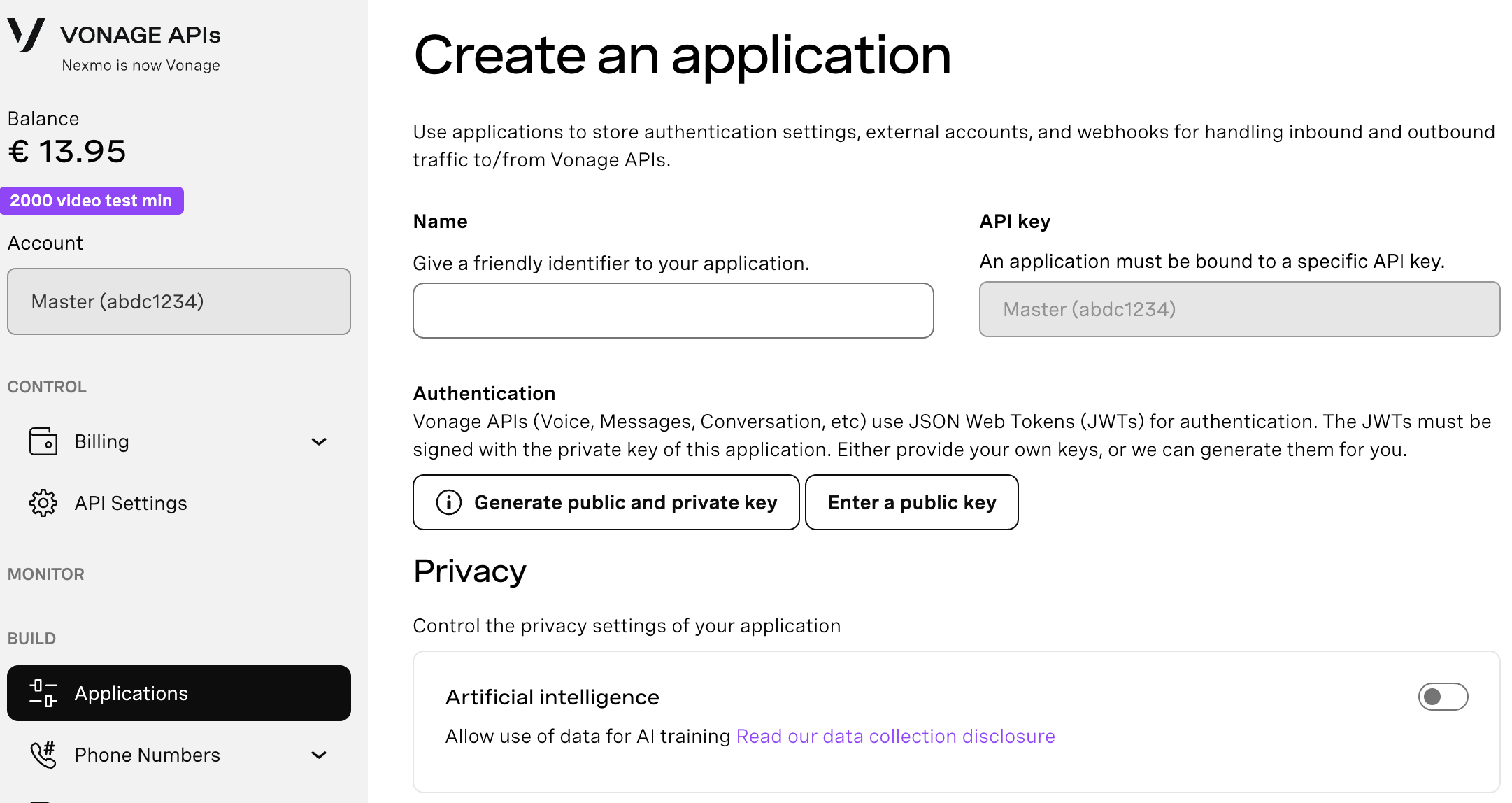
If you intend to use an API that uses Webhooks, you will need a private key. Click “Generate public and private key”, your download should start automatically. Store it securely; this key cannot be re-downloaded if lost. It will follow the naming convention private_<your app id>.key. This key can now be used to authenticate API calls. Note: Your key will not work until your application is saved.
Choose the capabilities you need (e.g., Voice, Messages, RTC, etc.) and provide the required webhooks (e.g., event URLs, answer URLs, or inbound message URLs). These will be described in the tutorial.
To save and deploy, click "Generate new application" to finalize the setup. Your application is now ready to use with Vonage APIs.
Requirements for your RCS App
Set the Inbound and Status URLs to a placeholder endpoint
Generate a public and private key by clicking the button
Save the changes
Then, link your RCS Agent by clicking the "Link external accounts" tab.
At this point, you should have three values ready for your Rails project:
Application ID
Private key file
RCS Sender ID
 Vonage Dashboard showing an application configured for RCS messaging, including linked external RCS accounts and application credentials.
With your Vonage Application set up and your keys in hand, we can shift to the Rails portion of the tutorial. The goal here is to show how Rails Credentials fit naturally into a real application workflow. To keep things simple, we’ll create a minimal Rails app with a single endpoint that sends an RCS text message to a phone number you pass in a POST request.
Start by generating a new Rails application and adding the Vonage SDK:
rails new rails_credentials_rcs_demo --api

cd rails_credentials_rcs_demobundle add vonage(Using the --api flag keeps the project lightweight, but it’s optional if you prefer a full-stack Rails environment.)
Next, we’ll load the Vonage credentials into Rails. Open your encrypted credentials file:
EDITOR="code --wait" bin/rails credentials:editUpdate the YAML to your Vonage Application values from the Dashboard:
vonage:
  application_id: "<YOUR_APPLICATION_ID>"
  private_key: |
    -----BEGIN PRIVATE KEY-----
    <contents of private_<app-id>.key here>
    -----END PRIVATE KEY-----
rcs_sender_id: "<YOUR_RCS_SENDER_ID>"Save and close the editor. Rails will re-encrypt everything automatically, and your credentials will now be available through Rails.application.credentials.
>>Note: When adding the private key to credentials, make sure each line of the key is indented consistently beneath private_key: -incorrect indentation will cause YAML parsing errors.
With the secrets in place, we can create a single route and controller to send RCS messages.
Add a route for the endpoint:
# config/routes.rb
post "/rcs_messages", to: "rcs_messages#create"Now generate the controller:
rails generate controller RcsMessages --no-helper --no-assets --skip-routesAnd update it with the logic for sending an RCS message using the Vonage Ruby SDK:
# app/controllers/rcs_messages_controller.rb

class RcsMessagesController < ApplicationController
  def create
    to   = params[:to]
    text = params[:text] || "Hello from Rails + RCS"

    client = Vonage::Client.new(
      application_id: Rails.application.credentials.dig(:vonage, :application_id),
      private_key:    Rails.application.credentials.dig(:vonage, :private_key)
    )

    client.messaging.send(
        message_type: "text",
        channel:      "rcs",
        to:           to,
        from:         Rails.application.credentials.dig(:vonage, :rcs_sender_id),
        text:         text
    )

    head :ok
  end
end
>>Note: For RCS, the rcs_sender_id is usually a branded name (such as "Vonage") rather than a phone number.
This controller stays intentionally minimal so that the focus remains on the credentials workflow rather than on Rails structure or message persistence. You pass a phone number and an optional text string in a POST request, and the endpoint sends an authenticated RCS message using the values you encrypted inside Rails Credentials. The dig method is very useful here for accessing nested data.
Start your Rails application:
rails sTo test, in your terminal, open a new tab. Then trigger it with a simple curl request to an RCS-enabled phone number:
curl -X POST http://localhost:3000/rcs_messages \
  -d 'to=447700900000' \
  -d 'text=Hello from Rails!'
Behind the scenes, Rails decrypts your credentials at startup, the Vonage Ruby SDK uses your application ID and private key to create a JWT, and the Messages API sends the RCS message to the number you provided.
This small example captures the entire lifecycle: securely storing secrets, loading them in a Rails environment, and using them in a real integration without exposing sensitive values in source code or configuration files.
Eventually, every Rails developer reaches the point where local configuration isn’t enough and the application needs to run in a real environment. This is usually when Rails Credentials resurface because production requires its own encrypted file and its own master key.
To edit production credentials, run:
rails credentials:edit --environment productionRails will create (or open) an encrypted file at: config/credentials/production.yml.enc
and it will expect the corresponding master key at:
config/credentials/production.key
In development, Rails can read this key automatically from the file system. In production, however, you must provide the master key through your hosting environment so the application can decrypt the credentials at boot.
The exact method depends on your platform:
Render: set RAILS_MASTER_KEY in the dashboard
Fly.io: fly secrets set RAILS_MASTER_KEY=...
Heroku: add it to the app’s config vars
VPS or custom server: export it in the environment or your systemd unit
Rails won’t start without the correct key, so it’s important to make sure it’s present wherever your application runs.
One guideline is worth emphasizing: each environment needs its own master key. Development, staging, and production should remain isolated from one another, both for safety and for clarity. Keeping these keys separate ensures that configuration stays scoped to the environment it belongs to, and prevents accidental cross-environment access to sensitive values.
Once the production master key is set, Rails handles the rest; it decrypts the credentials at boot and makes them available to your application in the same way they were available in development.
Rails Credentials take care of most of the complexity for you, but there are a few issues that developers run into from time to time. These are the most common ones and how to address them.
Accidentally committing the master key
If the master key makes its way into Git, treat it as exposed. Rotate the affected secrets, generate a new key, and ensure the original is removed from version control history. The encrypted file is only safe if the master key remains private.
Merge conflicts in the encrypted file
Because encrypted files don’t contain meaningful structure, Git can’t resolve conflicts inside them. If multiple people need to edit credentials, coordinate those changes or rely on environment-specific credentials or an external secrets manager to avoid collisions.
Credentials not loading in production
This usually indicates that the RAILS_MASTER_KEY environment variable is missing or doesn’t match the key used to encrypt the credentials file. Confirm that the correct key has been set in your hosting environment and that it corresponds to the correct encrypted file.
A corrupted encrypted file
While rare, an encrypted credentials file can become unreadable. You can regenerate it using:
rm config/credentials.yml.enc

rails credentials:editBe sure to re-enter your values after regenerating the file, since the previous contents can’t be recovered without the original data and key.
Rails Credentials are a strong fit for many applications, but they’re not the universal answer to secret management. In some environments, traditional environment variables remain the more appropriate choice.
Environment variables work well when you’re deploying to container-based or multi-service architectures, where configuration needs to be injected at runtime rather than stored in the repository. They’re also the standard option when working with orchestration systems such as Kubernetes, ECS, or Nomad, or when running CI/CD pipelines that need access to secrets during builds or test runs. And if several non-Rails services share the same configuration values, using environment variables keeps that setup consistent across the stack.
Rails Credentials, on the other hand, fit naturally into applications that remain within the Rails ecosystem. They provide encrypted, versioned storage for sensitive data without the overhead of managing multiple .env files or external secret stores. They also integrate smoothly with platforms that deploy directly from a Git repository and expect the application to provide its own configuration.
Many production setups combine both approaches—using environment variables for infrastructure-level concerns and Rails Credentials for application-specific secrets. The right choice depends on how your system is structured and where the configuration needs to live.
Rails Credentials offer a straightforward way to handle sensitive configuration while keeping security and maintainability in mind. By storing encrypted values alongside your application and relying on environment-specific keys, you gain a reliable pattern for managing secrets without scattering configuration across multiple files or systems.
In combination with the Vonage Ruby SDK, this approach fits neatly into real-world Rails workflows. Your application can authenticate securely, send RCS messages, and interact with the Messages API without exposing API keys or private keys in source code or shell environments. The result is a setup that’s both practical and secure, and one that scales well as your application grows.
Have a question or want to share what you're building?
Subscribe to the Developer Newsletter
Follow us on X (formerly Twitter) for updates
Watch tutorials on our YouTube channel
Connect with us on the Vonage Developer page on LinkedIn
Help us improve our developer experience by filling out our Voice of the Developer Feedback
Stay connected and keep up with the latest developer news, tips, and events.
Share:
Benjamin Aronov is a developer advocate at Vonage. He is a proven community builder with a background in Ruby on Rails. Benjamin enjoys the beaches of Tel Aviv which he calls home. His Tel Aviv base allows him to meet and learn from some of the world's best startup founders. Outside of tech, Benjamin loves traveling the world in search of the perfect pain au chocolat.