)
Introducing Video Connector SDK & Pipecat Transport for AI Video Apps
Time to read: 7 minutes
Real-time AI applications are transforming how developers build video experiences. Whether powering AI voice bots, video avatars, real-time transcription, emotion detection, or live language translation, modern applications increasingly require real-time access to raw audio and video streams, not just recordings after the fact.
Until now, integrating AI workflows into a live Vonage Video session required deep expertise in C++ and low-level media handling. That barrier is gone. Vonage has introduced two complementary Python-based tools designed specifically for developers building intelligent, media-aware applications: the Video Connector Server SDK and the Vonage Video Transport for Pipecat.
Together, they make it dramatically easier to stream audio and video between Vonage Video sessions and AI frameworks such as OpenAI, Deepgram, AWS Nova Sonic, HeyGen, and more. This blog post gives an overview of these tools, explains how they fit together, and provides references for deploying your first AI-powered video agent.
Many AI workflows, including speech-to-text, LLM-driven analysis, voice synthesis, facial expression tracking, and multimodal perception, depend on real-time media. Developers working with the Vonage Video API have long asked for a simple, reliable way to receive audio and video from an active session, process it with AI, and send responses back.
Previously, the only server-side option for accessing raw media from a Vonage Video session was the Linux C++ SDK. While powerful, its low-level nature created a steep learning curve that slowed innovation and limited adoption, particularly among Python developers who make up the majority of the AI/ML community.
The Vonage Video Connector SDK removes this friction.
The toolchain supports a wide range of real-time AI experiences, including:
Voice and video AI agents (bots): interactive assistants that see and hear participants
Real-time transcription and captions: live speech-to-text for accessibility and comprehension
Meeting summaries and notes: automated note-taking with speaker identification
Language translation: real-time audio translation across participants
Emotion and facial expression detection: sentiment analysis from video frames
Patient and exam monitoring: remote monitoring using live video feeds
Video avatars: AI-generated video responses synchronized with voice
Content moderation: detecting inappropriate audio or visual content in real time
The Video Connector Server SDK is a Python package (available on PyPI) that acts as a server-side WebRTC client for Vonage Video sessions. It is a Python wrapper around the Vonage Linux C++ SDK, enabling headless, cloud-deployable applications without requiring any C++ expertise.
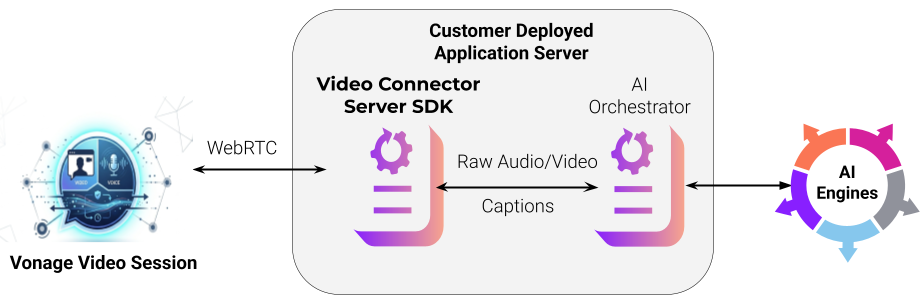 Topology of Video Connector Server SDK
Server-side WebRTC participation: join a Vonage Video session as a server-side client
Bidirectional audio and video: publish and subscribe to real-time audio and video streams
High-quality media formats: audio delivered as PCM 16-bit (up to 48 kHz); video as 8-bit raw frames up to FHD 1080p30
Automated media continuity: intelligently handles gaps in media delivery
Captions subscription (beta): receive auto-generated captions from the session
Individual audio stream identification (beta): differentiate and process audio packets per participant
Event-driven architecture: rich async callbacks for session and media events
Cloud and headless deployment: designed for server-side use in containerized environments
This lets developers focus entirely on what they want to build—AI pipelines, analysis tools, video bots—without needing to write any WebRTC or media infrastructure code.
The SDK can be installed from the Python Package Index, and is designed around an event-driven workflow: connect to a session, subscribe to participant streams, receive audio and video frames via callbacks, process them with your AI pipeline, and publish responses back into the session.
The Video Connector developer documentation provides a full reference for configuring sessions, setting up media handlers, and publishing audio and video back into a session.
Pipecat is an open-source Python framework for orchestrating complex AI workflows across audio, video, images, and text. It provides a modular, vendor-neutral platform for building real-time AI pipelines. It connects speech-to-text, LLMs, text-to-speech, video avatars, and more with minimal coding.
For video-focused applications, the new Vonage Video Transport for Pipecat acts as a bridge between a live Vonage Video session and a Pipecat processing pipeline. Unlike a serializer (which handles audio-only format conversion), a transport enables full bidirectional audio and video to flow between a Vonage WebRTC session and the Pipecat pipeline.
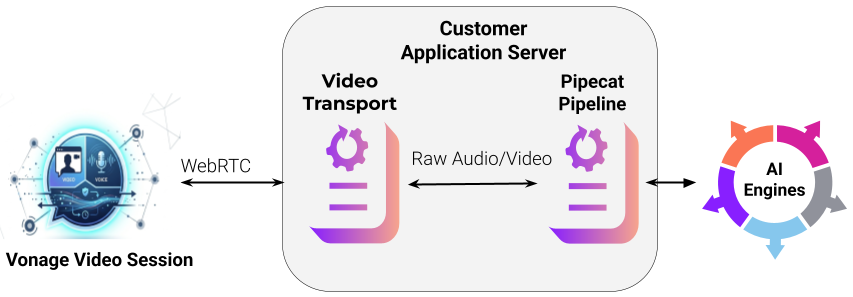
Connects a Vonage Video session to a Pipecat pipeline via the Video Connector SDK
Supports bidirectional audio and video streams
Inherits from Pipecat's
BaseTransport,BaseInputTransport, andBaseOutputTransportabstract classesInitializes using a Vonage session ID, token, and an optional list of stream IDs to subscribe
Enables access to the full Pipecat ecosystem of AI services
This means developers can use Pipecat's growing list of AI integrations—OpenAI Realtime, AWS Nova Sonic, Deepgram, ElevenLabs, HeyGen, Tavus, Simli, and more—without writing any media translation or WebRTC code.
Pipecat supports a rich and growing set of AI services out of the box:
Category | Supported Services | |
Speech-to-Text | Deepgram, OpenAI Whisper, AssemblyAI, Azure, Google, AWS Transcribe, and more | |
LLM | OpenAI, Anthropic, Gemini, Grok, Bedrock, Ollama, and more | |
Text-to-Speech | ElevenLabs, Cartesia, OpenAI, AWS Polly, Google, and more | |
Speech-to-Speech | AWS Nova Sonic, OpenAI Realtime, Gemini Live | |
Video Avatars | HeyGen, Simli, Tavus | |
For the latest list, see the Pipecat supported services page.
The Vonage Video Connector Pipecat Transport developer documentation provides a full reference for setting up the Vonage Transport and building your first Pipecat-powered video agent.
To help you get started quickly, Vonage provides sample applications demonstrating real-world use cases:
Echo Server: a simple app that echoes audio and video back to the session, useful for validating your setup
Video Avatar with Captions (Pipecat): a full pipeline using AWS Nova Sonic for speech-to-speech and HeyGen for AI-generated video avatar responses, with live captions
Audio Description of Video (Pipecat): uses Moondream AI for video recognition and text-to-speech to describe what is happening in the video stream in real time
Sample code is available in the releases repository. Getting started is straightforward:
Download and extract the SDK tarball from the releases repo
Install Docker
Open the
README.mdin the main directory and build the Docker imageCreate a Vonage Video session and a
session.jsonfile with your session credentialsRun the echo server or Pipecat examples following the
README.mdin each example directory
Vonage now offers a complete Python toolchain for integrating AI into both Voice and Video sessions:
Tool | Transport | Capabilities |
|---|---|---|
Audio Connector SDK | WebSocket | Audio only (Voice API and Video API sessions) |
Pipecat Serializer | WebSocket | Audio only (Voice API and Video API sessions) |
Video Connector SDK | WebRTC | Audio + Video (Video API sessions) |
Pipecat Transport | WebRTC | Audio + Video (Video API sessions) |
If your use case is audio-only, the Audio Connector SDK and Pipecat Serializer are the right starting point. If you need full audio and video access—for avatars, emotion detection, visual AI, or multimodal agents—the Video Connector SDK and Pipecat Transport are the tools for you.
The Vonage Video Connector SDK and Pipecat Transport offer a streamlined, modern, and Python-centric approach for creating real-time audio and video agents. These tools eliminate the need for developers to manage complex WebRTC internals, write C++ code, or manually construct media pipelines.
Whether you’re building a video avatar bot, integrating speech-to-text with an LLM, analyzing facial expressions in real time, or creating an AI-powered meeting assistant, these tools provide the foundations you need.
If you are ready to begin, explore:
You can now deploy your first AI video agent in minutes and build confidently toward fully intelligent, media-aware applications on the Vonage platform.
Have a question or want to share what you're building?
Subscribe to the Developer Newsletter
Follow us on X (formerly Twitter) for updates
Prefer video? Watch tutorials on our YouTube channel
Connect with us on the Vonage Developer page on LinkedIn
Help us improve our developer experience by filling out our Voice of the Developer Feedback
Stay connected and keep up with the latest developer news, tips, and events.