
Share:
)
Yukari is a Senior Support Engineer at Vonage, having joined the Video API Support Engineering team five years ago. Her background in server and application engineering helps her bridge technical depth with customer success.
Build Passwordless Video Login with Silent Auth and the Video API
Passwordless real-time video authentication reduces friction before a live session begins and improves onboarding conversion rates. Passwords and one-time codes can slow users down. This increases the risk of abandoned sessions.
Vonage Network APIs shift authentication to the mobile network layer, reducing friction. With Silent Authentication (Silent Auth)—available via the Vonage Verify API—the system can verify that the user owns the device automatically by analysing the device’s network traffic, allowing real-time experiences to start without interruption.
In this article, we’ll look at how Silent Auth can be combined with the Vonage Video API to create a passwordless onboarding flow for real-time video. This tutorial explores a reusable architecture pattern and includes focused code snippets that highlight key implementation decisions.
TL;DR: Skip ahead and find the working code for this sample on GitHub.
To follow along with this demo, you’ll need:
Python 3.9 or later.
Android Studio.
Physical Android device with a mobile data-enabled SIM.
To create an application, go to the Create an Application page on the Vonage Dashboard, and define a Name for your Application.
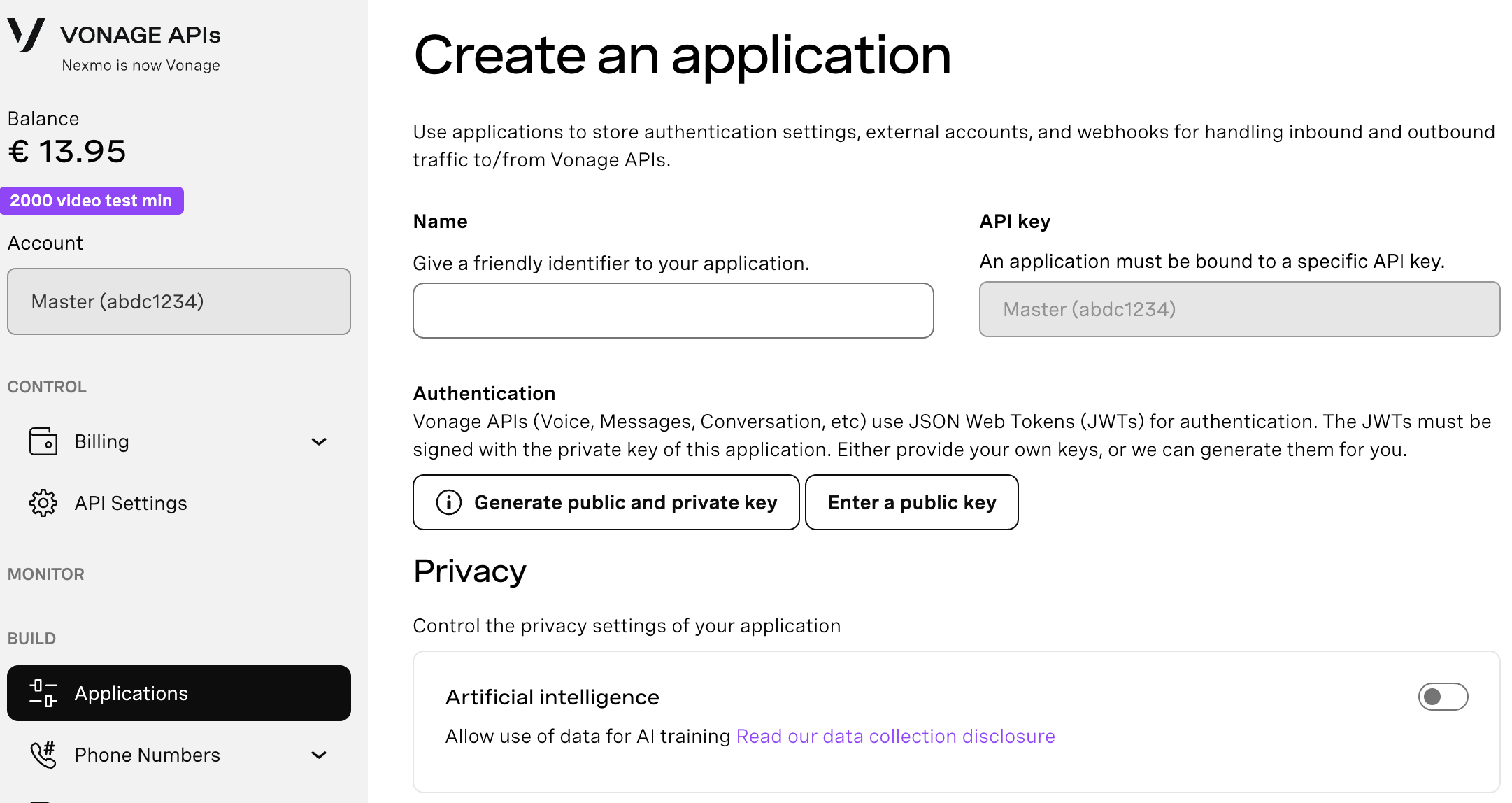
If you intend to use an API that uses Webhooks, you will need a private key. Click “Generate public and private key”, your download should start automatically. Store it securely; this key cannot be re-downloaded if lost. It will follow the naming convention private_<your app id>.key. This key can now be used to authenticate API calls. Note: Your key will not work until your application is saved.
Choose the capabilities you need (e.g., Voice, Messages, RTC, etc.) and provide the required webhooks (e.g., event URLs, answer URLs, or inbound message URLs). These will be described in the tutorial.
To save and deploy, click "Generate new application" to finalize the setup. Your application is now ready to use with Vonage APIs.
Here’s how network-based authentication and video onboarding can work together without being tightly coupled.
The app verifies a user’s phone number using Silent Auth when supported, with an automatic SMS fallback only when needed. Once verification succeeds, a video token is generated, and the user joins the session.
Authentication finishes before the video starts, so people get a consistent experience no matter how they were verified.
Here’s what that flow looks like in practice:
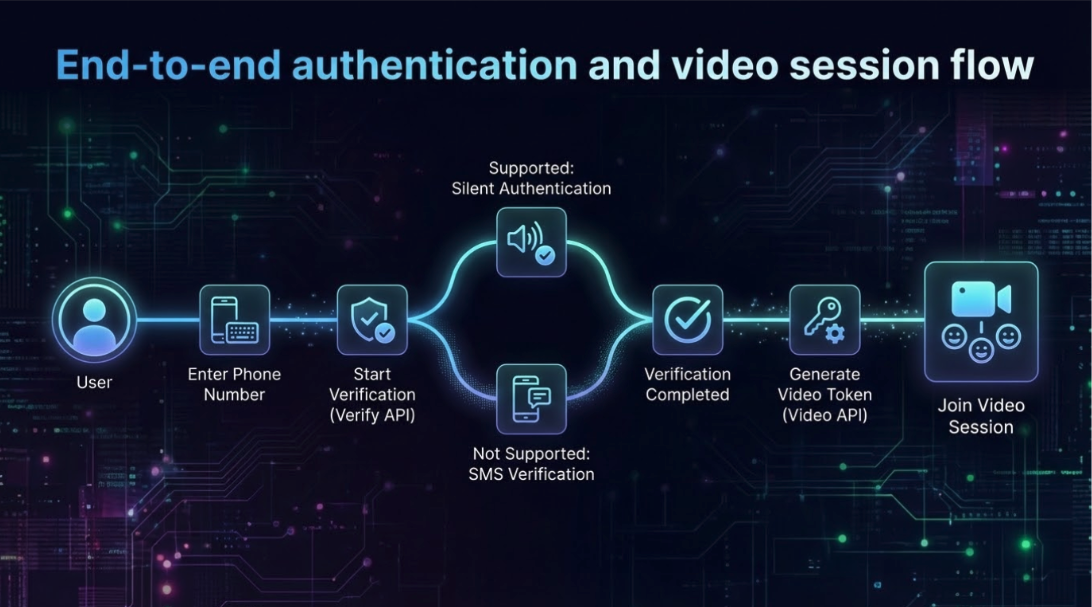
Silent Auth is operator-dependent. If the mobile operator does not support network-based verification, the Verify API returns HTTP 412. A list of supported mobile operators by country is available in the documentation. Supported operators vary by country and may change over time.
In this demo app, SMS fallback is implemented at the application level for unsupported numbers. In addition to SMS, other verification channels such as RCS and WhatsApp are also available.
For production use, registration with the Network Registry is required. In a test environment, you can use the Virtual Operator without a physical device, or register a supported number in the Network Registry Playground and use a physical device with it.
Several implementation details are important when working with Silent Auth. Together, these elements allow Silent Auth to be integrated in a predictable and UX-focused way.
Silent Auth only works when the verification request is sent over the mobile carrier network—not Wi-Fi. This typically involves integrating a client-side library capable of forcing the request over cellular data.
In this implementation, we rely on the default
coverage_check=truebehavior to determine the authentication path. This flag tells the Verify API to automatically evaluate whether Silent Auth is supported for the given number before starting verification. If the number is supported, the app proceeds with Silent Auth; otherwise, it gracefully falls back to SMS verification. See this Coverage Check documentation for details.This implementation uses Silent Auth synchronous flow. In this model, the backend receives the check_url directly from the Verify API response, so no frontend callback handling is required.
In this implementation, the Python backend owns the verification lifecycle using the Vonage Python SDK. The Android Kotlin client uses the Vonage Video Android SDK for the session, and a carrier-network Android library to execute Silent Auth’s check_url over the carrier network.
1. The Android client is configured with a backend base URL.
object ServerConfig {
    const val CHAT_SERVER_URL: String = "" // Replace with your backend URL
}2. Retrofit uses this base URL to call the backend verification endpoints.
retrofit = Retrofit.Builder()
    .baseUrl(ServerConfig.CHAT_SERVER_URL)
    .addConverterFactory(MoshiConverterFactory.create())
    .client(client)
    .build().also {
        apiService = it.create(APIService::class.java)
}3. The client can call and send a phone number to the backend.
apiService?.startVerify(StartVerifyRequest(phone_number = phoneNumber))4. The backend initiates verification. With coverage_check=true (default), the Verify API determines whether Silent Auth is supported for the destination operator.
If supported, a check_url is returned.
If not supported, the Verify API responds with HTTP 412, and the backend explicitly switches to the SMS channel.
def verify_start(body: StartVerifyIn):
    try:
        silent_req = VerifyRequest(
            brand="DemoApp",
            workflow=[SilentAuthChannel(to=body.phone_number)],
            coverage_check=True # Checks whether Silent Auth is supported
        )

        verify_resp = client.verify.start_verification(silent_req) # Initiates Silent Auth verification

        return {
            "request_id": verify_resp.request_id,
            "check_url": getattr(verify_resp, "check_url", None),
            "channel": "silent_auth",
        }

    except HttpRequestError as e:
        if e.response and e.response.status_code == 412:
            sms_req = VerifyRequest(
                brand="DemoApp",
                workflow=[SmsChannel(to=body.phone_number)],
            )

            verify_resp2 = client.verify.start_verification(sms_req) # Fallback to SMS verification

            return {
                "request_id": verify_resp2.request_id,
                "channel": "sms",
            }

raise5. Backend returns the selected channel along with the identifiers required by the client.
{
    "channel": "silent_auth",
    "request_id": "...",
    "check_url": "https://..."
}
channel tells the client which UI path to take (silent_auth or sms).
request_id is required later to confirm the verification result.
check_url is only present when silent_auth is selected.
6. If silent_auth, Android executes the check_url over the carrier network.
Silent Auth requires the redirect flow to run over the mobile carrier network, not Wi-Fi. The Android client uses the cellular request library to force this request over mobile data. The full implementation of runSilentAuthCheck() including carrier-network execution and response handling is available in the GitHub repository.
when (body.channel) {
    "silent_auth" -> runSilentAuthCheck()
    "sms" -> showSmsUi(true)
}7. Android sends the code to the backend to confirm verification
The client does not decide success on its own. Instead, it forwards the code to the backend, which confirms completion with the Verify API.
apiService?.confirmVerify(ConfirmVerifyRequest(request_id = rid, code = code))On the backend, this maps to a Verify API confirmation call. The backend returns a simple status so the client can proceed.
def verify_confirm_silent(body: ConfirmVerifyIn):
    verify_response = client.verify.check_code(body.request_id, body.code)
    if isinstance(verify_response, str):
        return {"status": verify_response}

return {"status": getattr(verify_response, "status", str(verify_response))}If the status is completed, verification is done. Otherwise, the app stays in the authentication flow (retry / re-enter code).
8. After verification completes, the backend issues a Video token.
token_options = TokenOptions(
    session_id=os.environ["VONAGE_VIDEO_SESSION_ID"], role="publisher"
)

token = client.video.generate_client_token(token_options)

return {
    "apiKey": os.environ["VONAGE_APPLICATION_ID"],
    "sessionId": os.environ["VONAGE_VIDEO_SESSION_ID"],
    "token": token,
}9. The Android client then initializes the Video Android SDK and joins the session using the issued credentials.
if (status == "completed") {
    initializeSession(apiKey, sessionId, token)
}
The implementation presented here uses a Python backend and Android to connect Silent Auth and the Video API features, but this architecture can be used for many other patterns.
Silent Auth is just one of several Network APIs. Other network signals —such as SIM Swap or Device Location — can be evaluated before granting access. You could require SIM Swap validation before allowing access to high-value video consultations. Each API provides a trust signal, while the application decides how to act on it.
Although this article demonstrates verification using the Vonage Verify Python SDK, the same Verify flow can be implemented using other supported server-side SDKs, including Node.js, PHP, and others. The architectural pattern remains unchanged. We also have a working example of Silent Auth within Laravel PHP's scaffolded workflow.
While this example uses Android for carrier-based network execution, it is also available on iOS. Silent Auth still requires the request to run over the mobile carrier network rather than Wi-Fi, regardless of platform.
The Video session layer is not Android-specific. The Vonage Video SDK is available across platforms, including iOS, allowing the same “verify first, then join” pattern to be applied consistently.
In this tutorial, you built a passwordless real-time video authentication flow using Silent Auth and the Vonage Video API. By separating verification from session initialization, you gain flexibility, security, and future-proof authentication design.
Have a question or want to share what you're building?
Subscribe to the Developer Newsletter
Follow us on X (formerly Twitter) for updates
Prefer video? Watch tutorials on our YouTube channel
Connect with us on the Vonage Developer page on LinkedIn
Help us improve our developer experience by filling out our Voice of the Developer Feedback
Stay connected and keep up with the latest developer news, tips, and events.