Share:
)
Benjamin Aronov is a developer advocate at Vonage. He is a proven community builder with a background in Ruby on Rails. Benjamin enjoys the beaches of Tel Aviv which he calls home. His Tel Aviv base allows him to meet and learn from some of the world's best startup founders. Outside of tech, Benjamin loves traveling the world in search of the perfect pain au chocolat.
Build Offline Agent Loops for a Vonage Voice Agent
Time to read: 15 minutes
Everyone in AI is talking about self-improving systems right now. Agents that learn from their mistakes, loops that make things better automatically, systems that improve themselves overnight while you sleep.
Most of that is either highly sophisticated AI lab research or marketing hype.
In Don’t Loop the Latency: Where Agent Loops Belong in Voice AI, Vince explained the unique architecture required for looping agents in a voice call: keep the live call path fast and bounded, and move the improvement work offline where it has time to do it properly.
And then, in Add Tools and Human Transfer to a Vonage + Deepgram Voice Agent, we built a voice agent with an SQLite database full of phone calls. That database tracks transcripts, tool results, timeouts, and handoffs. Real evidence of how your agent is behaving, but right now it’s just sitting there.
This tutorial combines the two to build that offline layer. It’s not autonomous self-improvement. No agent is rewriting itself overnight. It’s something simpler and more tangible: a way to look at your user call data, find what’s breaking or missing, and make a deliberate decision about what to fix next.
You won’t need to write code in this tutorial. You’ll clone the repo, run three commands, and watch a regression suite grow from real call data. Then we’ll walk through how it works under the hood.
TL;DR The complete project is available on GitHub.
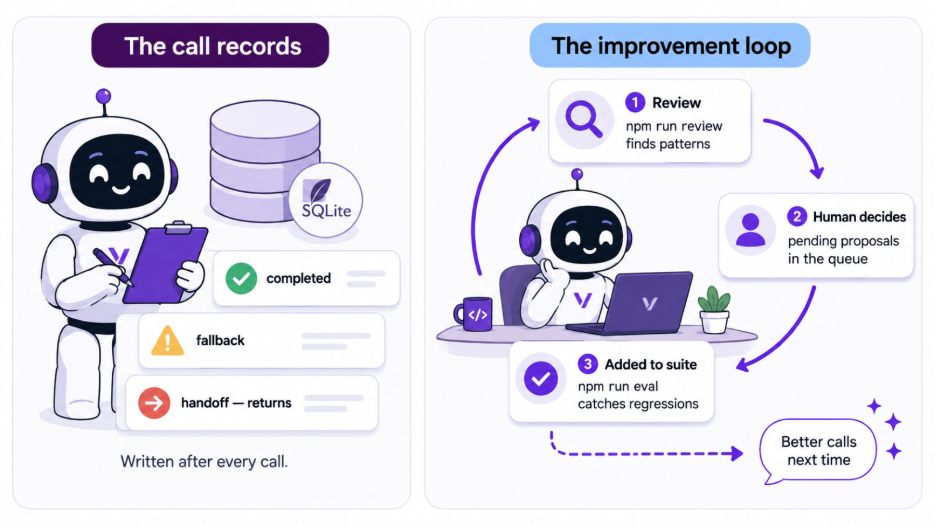 After every call, the agent writes a record to SQLite. The offline loop reads those records, finds patterns, and waits for a human to decide what to do next.
You will need:
Part 1 of this series set up and working (GitHub repo, tutorial). The loops read call records that the agent writes.
sqlite3 on your PATH for the approval commands.
Run
npm run evalagainst four pre-built seed cases and see a green baselineRun
npm run reviewagainst synthetic call records and watch the loop propose new test casesApprove a proposal and run
npm run evalagain. The suite grows by one case derived from real call data
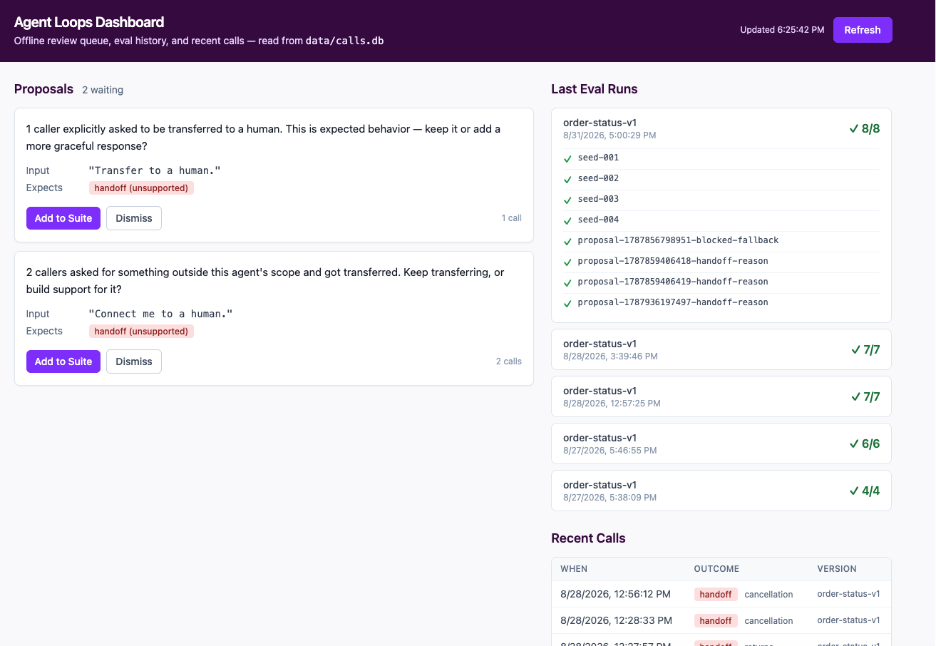 The optional local dashboard reads from the same SQLite database as the CLI scripts. Proposals waiting for review on the left, eval run history and recent calls on the right. Run npm run dashboard from the loops/ directory to start it.
Check out the bonus section after the conclusion to see how to run the dashboard UI.
The demo starts from inside the repo from part one. If you haven’t renamed it, it should be called blog-voice-node_deepgram_ai_tools.
cd loops
cp .env.example .env    # defaults are correct — no API keys needed
npm install
The repo ships with four hand-authored eval cases covering the agent’s core behaviors: a successful lookup, a timeout, a not_found result, and a billing handoff.
npm run eval
# Eval run — order-status-v1 — 2026-08-28T...
# ─────────────────────────────────────────────
# ✓ seed-001  Happy path — known order returns in_transit
# ✓ seed-002  Timeout path — mock returns timeout, fallback fires
# ✓ seed-003  not_found is a valid result, not a fallback
# ✓ seed-004  Billing keyword triggers handoff before tool runs
#
# 4 passed, 0 failedFour cases, all green. This is the baseline. Run it before every agent change.
Now load the synthetic call records and see what the review loop finds:
npm run seed-calls
# 10 inserted, 0 skipped — ../data/calls.db
npm run review
# Transcript Review — 2026-08-28T...
# ──────────────────────────────────
# Reviewed 10 calls (last 50 window)
#
# Patterns found: 4
#
# → returns handoff (3 calls)
#   Proposed eval case: proposal-xxx-handoff-reason
#   Input: "I want to return my order"
#   Expected: handoff (returns)
#
# → billing handoff (2 calls)
#   Proposed eval case: proposal-xxx-handoff-reason
#   ...
#
# 3 proposals writtenSee what is waiting:
sqlite3 ../data/calls.db \
"SELECT id, status, notes FROM eval_cases WHERE status = 'pending';"The notes are plain questions: “3 callers asked about returns and got transferred. Is transferring the right behavior, or should this agent handle returns?”
Approve one:
sqlite3 ../data/calls.db \
  "UPDATE eval_cases SET status = 'added' WHERE id = 'proposal-xxx';"

npm run eval
# 5 passed, 0 failed — the added proposal is now in the suiteThat’s the full review loop cycle. It finds a pattern in the data, then a human decides if it’s worth testing. And the regression suite grew by one case.
Run the seed script again:
npm run seed-calls
# 0 inserted, 10 skipped — idempotent, safe to re-runRun the review loop again:
npm run review
# → returns handoff (3 calls)
#   Skipped — already covered by added case proposal-xxx
# → billing handoff (2 calls)
#   Skipped — already proposed as proposal-xxx
#
# No new proposals written.The loop found the same four patterns. It wrote nothing. Every pattern is either already in the suite or already in the queue. This is what you want from a loop you run regularly. It should get quieter as you act on what it finds.
Dismissing a proposal shows the other path:
sqlite3 ../data/calls.db \
  "UPDATE eval_cases SET status = 'dismissed' WHERE id = 'proposal-xxx';"

npm run review
# → billing handoff (2 calls)
# Proposed eval case: proposal-yyy-handoff-reason ← new proposalDismissed means “not now.” If the same pattern keeps showing up in new calls, the loop asks again.
Run the agent from Part 1 and make three separate calls:
Call | What to say | What it generates |
|---|---|---|
1 | “Where is order A1001?” | outcome: completed — no proposal |
2 | “I want to return my order” | outcome: handoff, handoff_reason: returns |
3 | “I want to cancel my order” | outcome: handoff, handoff_reason: cancellation |
Make each one a separate call. Both calls 2 and 3 transfer you to a human on the defined number in the env file.
After the calls, inspect what was recorded:
sqlite3 ../data/calls.db \
  "SELECT call_id, outcome, handoff_reason
FROM call_records ORDER BY started_at DESC LIMIT 3;"Then run the review:
npm run review
# → returns handoff (4 calls)
#   Skipped — already covered by added case proposal-xxx
#
# → cancellation handoff (1 call)
# Not enough evidence yet (threshold: 2)Call 1 generated nothing. The returns pattern was already covered. The cancellation call was ignored: one data point isn’t a pattern.
Make a second cancellation call, then run the review again:
npm run review
# → cancellation handoff (2 calls)
#   Proposed eval case: proposal-yyy-handoff-reason
#   Input: "I wanna cancel my order."
# Expected: handoff (cancellation)Two calls, same outcome. The loop proposed.
sqlite3 ../data/calls.db \
  "UPDATE eval_cases SET status = 'added' WHERE id = 'proposal-yyy';"

npm run eval
# 6 passed, 0 failedThe eval suite now includes a cancellation case derived from a real phone call.
The most interesting moment in Run 3 was the first cancellation call being ignored. The loop found the pattern. It wrote nothing. That threshold is doing real work. It’s the difference between a signal and noise.
The proposal it eventually wrote didn’t suggest building a cancellation tool. It asked whether the current behavior is intentional. That is as far as it goes.
Approving locks in the current behavior. Dismissing signals you want to change something. When you eventually build a cancellation tool and deploy it, the next review run will surface the new pattern.
The loop finds things. You decide what they mean.
One more thing worth trying: ask about two different orders in the same phone call. The agent handles the first and falls back on the second. The one-lookup policy is working as designed, but a caller who doesn’t know that just hears a failure. That’s the kind of gap the loop surfaces over time, once enough callers hit it.
Previously, we built a bounded order-status voice agent. A caller dials in, asks about an order, and the agent looks it up. The agent has a 1500ms timeout, a deterministic fallback if the lookup fails, and a real phone transfer for requests the agent cannot handle.
The key thing Part 1 added was a database of call records. After every call, the agent writes one row to SQLite:
-- src/storage/db.ts (Part 1)

CREATE TABLE IF NOT EXISTS call_records (
  call_id           TEXT PRIMARY KEY,
  agent_version     TEXT NOT NULL,
  started_at        TEXT NOT NULL,
  ended_at          TEXT NOT NULL,
  transcript        TEXT NOT NULL,   -- JSON array of {speaker, text} objects
  tool_calls        TEXT NOT NULL,   -- JSON array of tool invocations and results
  latency           TEXT NOT NULL,   -- JSON object with per-stage timing
  fallback_used     INTEGER NOT NULL,
  handoff_requested INTEGER NOT NULL,
  handoff_reason    TEXT,
  outcome           TEXT NOT NULL    -- 'completed', 'fallback', 'handoff', 'error'
);Every interaction is recorded with the caller’s exact words. This tutorial uses that as a base to build on.
Three things:
A regression runner (
npm run eval). Think of this as a checklist that runs automatically. You define a set of test conversations: “if a caller says this, the agent should do that.” The runner replays each one through the agent’s logic and tells you if anything stopped working. Run it before changing the prompt, the tool, or anything else.A transcript review loop (
npm run review). It reads through your stored call records, spots patterns (callers repeatedly asking about returns, lookups timing out more than usual), and surfaces them as proposals for you to act on. It never changes anything automatically. It just tells you what it found and waits for a human decision.A seed script (
npm run seed-calls). It loads a set of realistic fake call records so you can run the full demo without making actual phone calls first.
The regression runner and review loop share one SQLite database with Part 1. Part 1 writes a record to it after every call. Part 2 reads from it whenever you run the scripts. Part 1 does not need to be running to use Part 2. You can run the eval suite or the review loop any time, against whatever calls are already stored.
A few things were deliberately left out of this application.
No LLM in the loops. The review loop finds patterns by counting and grouping data. It uses SQL queries, not model calls. This is intentional. An LLM-based reviewer could theoretically surface subtler patterns, but it would also behave differently on each run, cost money on every review, and potentially hallucinate suggestions that make no sense for your specific agent. The loops are deterministic. You can audit exactly what they found and why.
No cron jobs to run the loop. The review loop runs when you run it. A production setup would schedule it. You might want to run it weekly, after a model change, or whenever the fallback rate crosses a threshold. For a tutorial, a CLI command you control is easier to reason about and easier to extend.
The loop logic is nested in the agent project, not a separate app. The loops live in a loops/ directory inside the original agent repo. They have their own package.json and node_modules because they have different dependencies. But they share the Part 1 repo because they import the agent’s actual logic directly. That import is the whole point: the regression runner replays cases through the same classifyHandoffReason() and createToolPolicy() functions the live agent uses. A separate repo would require publishing Part 1 as a package, which adds complexity for no tutorial benefit.
No automatic approval. The review loop writes proposals. A human decides which ones to add to the regression suite. Every proposal starts as pending. Nothing becomes a test case without a deliberate UPDATE eval_cases SET status = 'added' command. That is the loop’s job boundary, and we’ll come back to why that boundary matters.
An eval case is the unit of work for the regression runner. It describes one thing the agent should do and gives the runner a fake tool result to inject, so the test never touches a real backend or a live phone call.
Eval cases come from two places. The first are the ones you write yourself before you have any real data. These live in loops/eval-cases/seed-cases.json.
The second source is the review loop. After enough real calls accumulate, it finds patterns and writes proposals. These proposals are eval cases with status: 'pending'. They sit in a queue until a human approves them. A single instance doesn’t produce a test case. The loop waits for a pattern across multiple calls before proposing anything, and a human has to approve it before the runner picks it up.
Here’s what one looks like (from loops/eval-cases/seed-cases.json, one of four hand-authored cases):
{
  "id": "seed-002",
  "description": "Timeout path — mock returns timeout, fallback fires",
  "input": "Where is order SLOW999?",
  "expected_outcome": "fallback",
  "expected_handoff_reason": null,
  "expected_fallback_used": true,
  "expected_tool_called": true,
  "mock_tool_result": "__timeout__",
  "status": "added"
}input is what the caller said. expected_* fields are what the agent should do in response. mock_tool_result is the fake answer the runner hands the agent instead of calling the real backend.
The agent has one tool: getOrderStatus. During a real call, it asks the backend for an order status and gets a result back. During a replay, the runner skips the backend entirely and injects whatever is in mock_tool_result directly.
Three cases show how this works:
Known order. The runner hands that result to the agent and checks that the call ended as
completedand the tool was called.Slow order. The runner simulates the 1500ms deadline firing. The agent should say “I’m having trouble retrieving that order right now” and end with
outcome: fallback. If it invents an answer instead, the test fails.Out-of-scope request. The tool should never run for a returns or billing request. The runner checks that the agent transferred to a human and
expected_tool_calledis false. If the agent calledgetOrderStatusanyway, the test catches it.
The expected_* fields only judge the result. If expected_tool_called decided whether to call the tool, the test would compare a field against itself and could never fail.
"__timeout__" is stored as a bare string rather than a JSON object because a timeout is the absence of a result. There is no OrderResult shape that means “the deadline fired.” It also reads cleanly in the terminal: sqlite3 ../data/calls.db "SELECT mock_tool_result FROM eval_cases WHERE id = 'seed-002';" returns __timeout__, not a JSON blob.
The schema also uses ON CONFLICT(id) DO NOTHING rather than INSERT OR IGNORE for idempotent seeding. The difference is small but real: INSERT OR IGNORE silently swallows any constraint violation, including a misspelled expected_outcome. ON CONFLICT(id) DO NOTHING names the conflict target precisely, so only a duplicate id is tolerated. Every other constraint stays loud.
The runner loads all the eval cases from the database and runs each one through the same decision code the live agent uses: scope check, tool policy, mock result injection. But it does so without opening a socket or making a phone call.
// loops/src/runner/replay.ts

// Imported from Part 1 and called directly — the suite replays the real
// agent logic, not a copy of it.
import {
  classifyHandoffReason,
  createToolPolicy,
} from "../../../src/agent/tool-policy.js";

function replayToObservation(evalCase: EvalCase): ReplayObservation {
  let fallbackUsed = false;
  let handoffReason: HandoffReason | null = null;
  let toolCalled = false;

  // 1. Out of scope — runs first, so the tool is never reached.
  const reason = classifyHandoffReason(evalCase.input);
  if (reason) {
    handoffReason = reason;
    return observation("handoff", handoffReason, fallbackUsed, toolCalled);
  }

  // No mock result: this case never calls the tool.
  if (evalCase.mockToolResult === null) {
    return observation("completed", handoffReason, fallbackUsed, toolCalled);
  }

  // 2. Tool policy — a fresh one per case, as the live path does per call.
  const policy = createToolPolicy();
  if (!policy.authorizeCall("getOrderStatus").allowed) {
    fallbackUsed = true;
    return observation("fallback", handoffReason, fallbackUsed, toolCalled);
  }
  policy.recordCall();
  toolCalled = true;

  // 3. The injected result stands in for `await lookupOrderStatus(...)`.
  const outcome = injectMockOutcome(evalCase.mockToolResult);

  // 4. not_found is a result, not a failure. Only a timeout falls back.
  if (outcome.kind === "result") {
    return observation("completed", handoffReason, fallbackUsed, toolCalled);
  }

  fallbackUsed = true;
  return observation("fallback", handoffReason, fallbackUsed, toolCalled);
}classifyHandoffReason and createToolPolicy are imported from Part 1 and called directly. So the function that runs during a test is the exact function that runs on a real call. If the eval suite created its own function, the tests would continue to pass even when the live classifier changed. We test the functions by changing the eval case instead.
One thing the eval suite cannot test: the error outcome. That only happens when Deepgram drops the connection mid-call, which requires a real socket. The transport-error retry path has the same problem.
The eval suite covers the decision logic: what the agent does with a result. Part 1’s tests cover the plumbing: what happens when the connection itself fails. Both are necessary.
The review loop reads call records and looks for four patterns, called detectors. Because it never calls an AI model or does any semantic matching, you get an honest report of exact behaviors. When a detector finds enough matching calls, the loop writes a proposal to the eval_cases table.
Before writing a detector, run this against your actual database:
sqlite3 ../data/calls.db \
  "SELECT DISTINCT json_extract(value, '$.result')
FROM call_records, json_each(call_records.tool_calls);"Remember the slow order example from the eval case schema: mock_tool_result: "__timeout__". That __timeout__ sentinel is what the TypeScript code uses in memory. But what actually gets stored in the call record is the bare string timeout, no underscores, no quotes around it as JSON.
If you write a detector that looks for "kind":"timeout" in the stored records, it will never find anything. The query runs fine, returns zero rows, and nothing tells you something is wrong. You end up with a detector that silently does nothing, and any tests written against the same assumption pass too.
Running the query first shows you exactly what is stored before you write a single line of detector code.
With the real data shapes confirmed, here are the four detectors. One query loads the last 50 calls, and every detector gets that same array. They filter and group in plain TypeScript, so you can test any of them against a handful of fixture records.
// loops/src/review/pattern-finder.ts

// Pure functions over one window of already-loaded calls. The only query
// lives in transcript-review.ts — ORDER BY started_at DESC LIMIT ? — where
// the window is a count of calls (default 50), not a date range.
export function findPatterns(records: CallRecord[]): Pattern[] {
  return [
    ...findRepeatedHandoffReasons(records),
    ...findTimeoutPattern(records),
    ...findUnansweredQuestions(records),
    ...findBlockedFallbacks(records),
  ];
}

export const THRESHOLDS = { handoffReason: 2, timeout: 3, blockedFallback: 2 } as const;

// 1. A handoff reason seen twice or more. Once is an incident; twice is a category.
function findRepeatedHandoffReasons(records: CallRecord[]): Pattern[] {
  const byReason = new Map<string, CallRecord[]>();
  for (const record of records) {
    if (!record.handoffReason) continue;
    const group = byReason.get(record.handoffReason) ?? [];
    group.push(record);
    byReason.set(record.handoffReason, group);
  }
  // Groups at or above THRESHOLDS.handoffReason become proposals.
}

// 2. Timeouts. Part 1 stores these as the bare string "timeout".
const timedOut = records.filter((r) => r.fallbackUsed && hasTimeout(r.toolCalls));

// 4. Fell back with no timeout — the policy refused a second lookup.
const blocked = records.filter((r) => r.fallbackUsed && !hasTimeout(r.toolCalls));

// 3. Recover the utterance by replaying Part 1's classifier over the caller's
// turns — not transcript[0], which is the agent's greeting.
function triggeringUtterance(record: CallRecord, reason: string): string | null {
  for (const entry of record.transcript) {
    if (entry.speaker !== "caller") continue;
    if (classifyHandoffReason(entry.text) === reason) return entry.text;
  }
  return null;
}Detector 3 groups by the caller’s exact words rather than trying to find similar phrases. An approach that groups by meaning would need either an LLM call or a custom similarity library, and it would be harder to verify that it’s working correctly. Knowing exactly what each detector finds is worth more than finding slightly more things.
When a detector finds enough matching calls, it writes a proposal to eval_cases with status: 'pending'. The proposal note is a plain-language question, not a diagnosis:
“3 callers asked about returns and got transferred. Is transferring the right behavior, or should this agent handle returns?”
“2 callers asked about a second order in the same call and hit the one-lookup limit. Should this agent support multiple lookups per call?”
The loop surfaces the pattern. The human decides what it means.
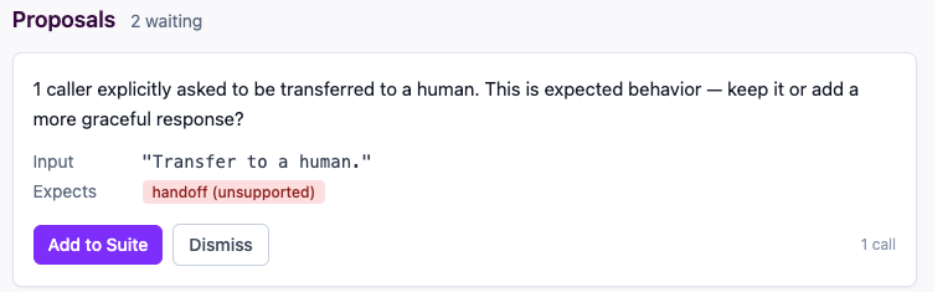 A proposal card from the review queue. The note is a plain-language question written by the detector, not a diagnosis. Add to Suite locks in the current behavior. Dismiss signals you want to change it.
Before writing a proposal, the review loop checks whether one already exists for the same input and expected outcome. If a proposal is already pending or added, the loop skips it. You can run npm run review every day against the same call records and the queue will not fill up with duplicates.
The one exception is a dismissed proposal. If you dismissed a pattern and the same thing keeps happening in new calls, the loop will propose it again. One “not now” does not silence a pattern that keeps recurring.
This also means the queue shrinks as you act on it. A loop that ignores what you have already done would train you to stop reading the output.
In a future blog post, we’ll cover what happens after the proposals: connecting real databases, adding tools one at a time, and using the eval suite as the safety net for every change.
A few things you could add to this setup before then:
Schedule the review loop. Right now it runs when you run it. A cron job that runs
npm run reviewevery Monday morning and sends you the output would make it part of your regular workflow without any extra infrastructure.Add
npm run evalto CI. The runner exits1on any failure. Drop it into your pull request checks and every agent change gets tested against the full eval suite automatically before merging.Use an LLM to annotate proposals, not generate them. The detectors are deterministic, which is the right property for the detection step. An LLM that reads a proposal and suggests a concrete next action (something like “consider adding a
getReturnStatus()tool”) would be additive without making the core loop unpredictable. The pattern detection stays auditable; the suggestions become optional context.Automate the approval step. Every proposal you approve or dismiss is a labeled example of what’s worth testing and what isn’t. Once you have enough of them, the approval decision itself becomes something an agent can learn. The loop you built here is already collecting the data for that. That’s a different tutorial.
Export proposals back to JSON for team review. The SQLite approval workflow works well for one developer. A team that wants to review proposals in a pull request would benefit from a script that exports pending proposals to a JSON file, lets reviewers comment and approve in the PR, and then imports the approvals back to the database.
The original Vonage and Deepgram tutorial got a conversational agent onto a phone call. Then we gave that agent a real job with failure handling and call records. This tutorial added two CLI scripts that read those records and turn them into something you can act on.
The regression runner makes sure what already works keeps working. The review loop finds the gaps in your agent’s coverage: the requests your agent keeps getting that it cannot handle well. Together they give you a way to improve the agent deliberately, one approved change at a time.
You’ve built a system to take real call records and find real user patterns. What to do about them is still a human judgment call. As it should be.
Have a question or want to share what you're building?
Subscribe to the Developer Newsletter
Follow us on X (formerly Twitter) for updates
Prefer video? Watch tutorials on our YouTube channel
Connect with us on the Vonage Developer page on LinkedIn
Help us improve our developer experience by filling out our Voice of the Developer Feedback
Stay connected and keep up with the latest developer news, tips, and events.
If you want a visual interface for the proposal queue and eval history, the repo includes an optional local dashboard. Run npm run dashboard from the loops/ directory and open http://localhost:4000/. It shows the same data as the sqlite3 commands: proposals waiting for a decision, eval run history, and recent calls. Nothing in the tutorial requires it.
The optional local dashboard reads from the same SQLite database as the CLI scripts. Proposals waiting for review on the left, eval run history and recent calls on the right. Run npm run dashboard from the loops/ directory to start it.
Share:
Benjamin Aronov is a developer advocate at Vonage. He is a proven community builder with a background in Ruby on Rails. Benjamin enjoys the beaches of Tel Aviv which he calls home. His Tel Aviv base allows him to meet and learn from some of the world's best startup founders. Outside of tech, Benjamin loves traveling the world in search of the perfect pain au chocolat.