Share:
)
Benjamin Aronov is a developer advocate at Vonage. He is a proven community builder with a background in Ruby on Rails. Benjamin enjoys the beaches of Tel Aviv which he calls home. His Tel Aviv base allows him to meet and learn from some of the world's best startup founders. Outside of tech, Benjamin loves traveling the world in search of the perfect pain au chocolat.
Add Tools and Human Transfer to a Vonage + Deepgram Voice Agent
Time to read: 8 minutes
The Vonage Voice API and Deepgram guide gets you pretty far. By the end of the guide, you can call a Vonage number, speak to an AI agent, interrupt it while it’s talking, and have a natural voice conversation powered by Deepgram’s Voice Agent API.
But the agent still can’t actually do much for you (it has no tools!).
Ask the agent to do an action, and unless that action information happens to be in the prompt, it has nowhere to look. Give it a task that depends on another system, and now you have another problem: the caller is waiting while that system responds.
Voice makes those details noticeable very quickly. A slow API call doesn’t look like a loading spinner, it sounds like dead air.
This audio specific problem for AI agents was introduced in Don’t Loop the Latency: Where Agent Loops Belong in Voice AI. One of the ideas in his post is to keep the work that happens during a live phone call small and predictable.
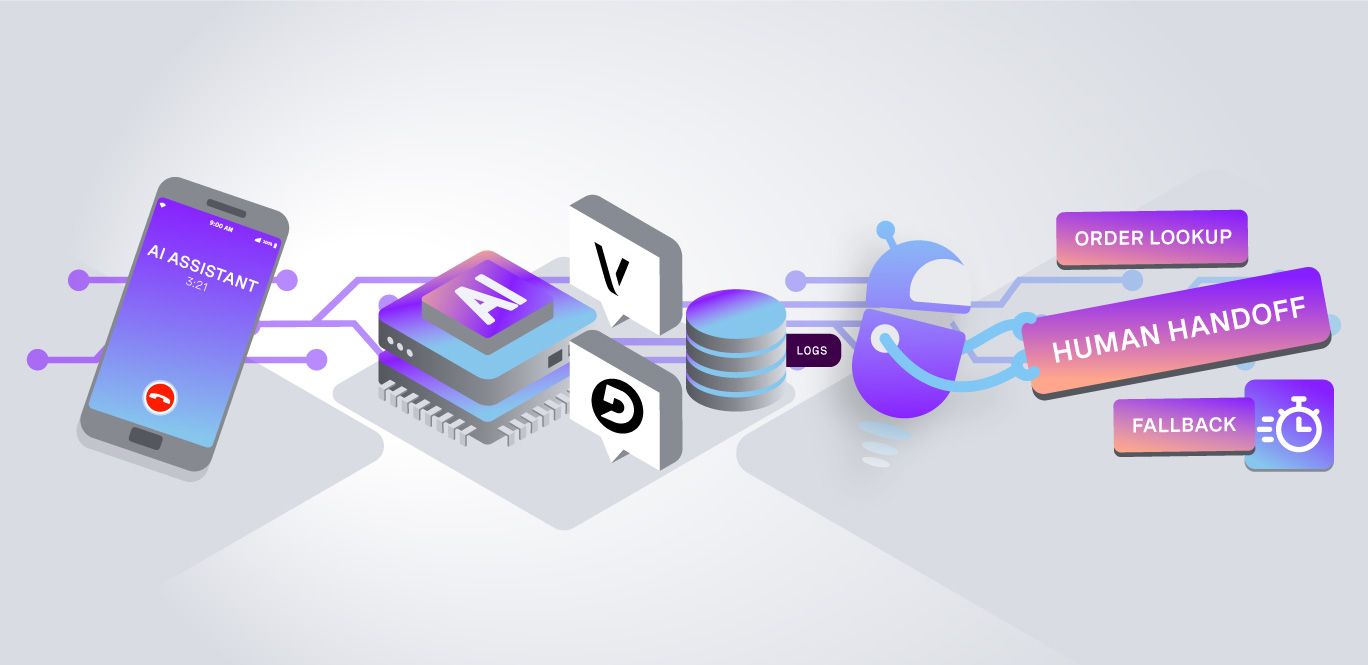
The goal in this post is to turn the conversational demo into an agent that can do useful jobs, fail predictably, and -- most importantly -- leave behind enough information to improve it later. In this tutorial, we'll expand on the existing Vonage + Deepgram agent so it can:
give the agent one tool for checking an order status
put a hard timeout around the lookup
handle failures without leaving the caller waiting
transfer requests the agent can’t handle to a real phone number
save a record of what happened during each call
TL;DR The quick start is available on GitHub.
You’ll need:
A Vonage application with Voice enabled
A Vonage phone number linked to that application
A second phone number you can use as the human support destination
A Deepgram account with Voice Agent access
We’ll keep the use case deliberately simple: checking an order status. The caller says:
“Where is order A1001?”
Deepgram recognizes that the agent needs outside information and asks our application to call:
getOrderStatus("A1001")
Our application runs the lookup and sends the result back to Deepgram. The model then turns that result into a natural spoken response.
For this tutorial, the order backend is mocked. You can replace it with your own database or API later; we just need a lookup that can succeed, fail, or take too long:
// src/tools/order-status.ts

type OrderResult =
  | { status: "in_transit"; estimatedDelivery: string }
  | { status: "delivered"; deliveredAt: string }
  | { status: "not_found" }
  | { status: "error"; reason: string };

const KNOWN_ORDERS: Record<string, OrderResult> = {
  A1001: {
    status: "in_transit",
    estimatedDelivery: "2026-07-29"
  },
  A1002: {
    status: "delivered",
    deliveredAt: "2026-07-24T16:42:00Z"
  }
};There are also a couple of special order IDs for testing:
IDs beginning with SLOW take two seconds to return.
IDs beginning with FAIL simulate a temporary network failure.
Anything else returns not_found.
That lets us reproduce the kinds of behavior we’d eventually get from a real database or external API without needing to build a full backend for this tutorial.
Deepgram’s Voice Agent API supports client-side function calling. We describe the function in the agent’s Settings message:
// src/agent/agent-config.ts
const GET_ORDER_STATUS_FUNCTION = {
  name: "getOrderStatus",
  description:
    "Look up the current shipping status of a single order by its order number.",
  parameters: {
    type: "object",
    properties: {
      orderId: {
        type: "string",
        description: 'The caller\'s order number, for example "A1001".'
      }
    },
    required: ["orderId"]
  }
};We don’t give Deepgram an HTTP endpoint for the function. Instead, Deepgram sends our WebSocket a FunctionCallRequest. That means our application stays in control of actually running the tool.
That’s useful because we can decide:
whether the tool is allowed
how long it can run
whether a failure should be retried
what the caller hears if it doesn’t work
The agent prompt stays narrow too:
// src/agent/agent-config.ts (SYSTEM_PROMPT constant)
You are an order-status voice agent for a live phone call.

You may ONLY help the caller check the status of an order.

Rules:
- Ask for the caller's order number if they have not provided it.
- Call getOrderStatus exactly once with the order number.
- You can look up only one order per call.
- If the result is clear, read it back in one or two natural spoken sentences.
- If the lookup fails or times out, use the fallback response.
- If the caller asks about billing, returns, disputes, or anything else,
  use the handoff response immediately.
- Do not answer general questions.
- Do not make up information.The prompt tells the model what to do, but we don’t rely on the prompt alone. Before running an order lookup, the application checks that the request is in scope and that the tool hasn’t already been used on that call. You can see how this works in the “Handle the Function Call” section.
This is where building for a phone call starts to differ from building a normal chatbot. Imagine the order service takes six seconds to respond. From the server’s point of view, that’s just a slow request.
From the caller’s point of view, they asked a question and then heard six seconds of silence.
So this example gives the lookup 1500 milliseconds:
// src/agent/tool-policy.ts
export const TOOL_TIMEOUT_MS = 1500; The wrapper races the backend call against that deadline:
// src/tools/order-status.ts
export async function lookupOrderStatus(
  orderId: string,
  timeoutMs: number = TOOL_TIMEOUT_MS
): Promise<OrderLookupOutcome> {
  const startedAt = Date.now();

  let timer: ReturnType<typeof setTimeout> | undefined;

  const timeout = new Promise<"__timeout__">((resolve) => {
    timer = setTimeout(() => resolve("__timeout__"), timeoutMs);
  });

  try {
    const raced = await Promise.race([
      getOrderStatus(orderId),
      timeout
    ]);

    if (raced === "__timeout__") {
      return {
        kind: "timeout",
        durationMs: Date.now() - startedAt
      };
    }

    return {
      kind: "result",
      result: raced,
      durationMs: Date.now() - startedAt
    };
  } catch (err) {
    return {
      kind: "transport_error",
      error: new TransportError(
        err instanceof Error ? err.message : "unknown tool failure"
      ),
      durationMs: Date.now() - startedAt
    };
  } finally {
    if (timer) clearTimeout(timer);
  }
}The important part is that there are three possible outcomes:
Outcome | What it means | What we do |
result | The backend answered | Return the result |
timeout | It didn’t answer within 1500 ms | Use the fallback |
transport_error | The connection failed | Retry once |
A not_found response is still a successful lookup. The backend answered; it just didn’t find the order.
That’s different from a timeout.
For this example, the rules are intentionally minimal:
// src/agent/tool-policy.ts
export const MAX_TOOL_CALLS = 1;
export const MAX_RETRIES = 1;
export const ALLOWED_TOOLS = ["getOrderStatus"] as const; Each phone call gets its own policy instance:
// src/agent/tool-policy.ts
export function createToolPolicy() {
  let callsMade = 0;
  let retriesUsed = 0;

  return {
    authorizeCall(toolName: string) {
      if (toolName !== "getOrderStatus") {
        return { allowed: false };
      }

      if (callsMade >= MAX_TOOL_CALLS) {
        return { allowed: false };
      }

      return { allowed: true };
    },

    recordCall() {
      callsMade += 1;
    },

    authorizeRetry(outcome: OrderLookupOutcome) {
      if (outcome.kind !== "transport_error") {
        return { allowed: false };
      }

      if (retriesUsed >= MAX_RETRIES) {
        return { allowed: false };
      }

      return { allowed: true };
    },

    recordRetry() {
      retriesUsed += 1;
    }
  };
}A timeout isn’t retried.
We’ve already waited 1.5 seconds. Starting the same slow request again could simply give us another 1.5 seconds of silence.
A transport failure gets one retry because a dropped connection or temporary upstream problem may recover immediately.
When Deepgram sends a FunctionCallRequest, the WebSocket handler applies those rules before running the tool.
The main flow is:
// src/voice/websocket-handler.ts
async function handleFunctionCall(fn: DeepgramFunctionCall) {
  // Is this request supported?
  const handoffReason =
    classifyHandoffReason(lastCallerUtterance);

  if (handoffReason) {
    requestHandoff(handoffReason);

    respondToFunction(
      fn,
      JSON.stringify({ status: "handoff" })
    );

    return;
  }

  // Has the tool already been called?
  const auth = policy.authorizeCall(fn.name);

  if (!auth.allowed) {
    fallbackUsed = true;
    inject(FALLBACK_RESPONSE);

    respondToFunction(
      fn,
      JSON.stringify({ status: "blocked" })
    );

    return;
  }

  policy.recordCall();

  // Run the lookup
  let outcome = await lookupOrderStatus(orderId);

  // Retry one transport failure
  if (
    outcome.kind === "transport_error" &&
    policy.authorizeRetry(outcome).allowed
  ) {
    policy.recordRetry();
    outcome = await lookupOrderStatus(orderId);
  }

  // Return a successful result
  if (outcome.kind === "result") {
    respondToFunction(
      fn,
      JSON.stringify(outcome.result)
    );
    return;
  }

  // Otherwise use the fallback
  fallbackUsed = true;
  inject(FALLBACK_RESPONSE);
}The actual handler also records the tool call and timing, but this is the part that controls what the caller experiences.
If the lookup fails, you don’t want the model inventing its own recovery plan.
The application injects a fixed response:
// src/agent/fallback-responses.ts

export const FALLBACK_RESPONSE =
  "I'm having trouble retrieving that order right now. " +
"Please try again later, or contact our support team and they can help.";Deepgram’s InjectAgentMessage lets us put that response directly into the conversation:
// src/voice/websocket-handler.ts
sendJson(dg, {
  type: "InjectAgentMessage",
  message: FALLBACK_RESPONSE,
  behavior: "interrupt"
}); The interrupt behavior matters here.
Using the default behavior can cause an injected message to be refused while the caller is speaking. That’s not something you want to discover when the injected message is your failure path.
Also note the field name: it’s message, not content.
Both are small details that can otherwise result in a call going quiet with very little indication of why.
An order-status agent shouldn’t try to answer everything.
If someone says:
“I want to dispute a charge.”
We classify that as a billing request:
// src/agent/tool-policy.ts

export type HandoffReason =
  | "billing"
  | "returns"
  | "cancellation"
  | "account"
| "unsupported"; For this demo, the classification is deliberately constrained and deterministic:
// src/agent/tool-policy.ts

const HANDOFF_KEYWORDS = [
  ["cancellation", ["cancel", "cancellation"]],
  ["returns", ["return", "returns", "refund", "exchange"]],
  [
    "billing",
    ["billing", "invoice", "charge", "payment", "dispute"]
  ],
  ["account", ["account", "password", "login", "access"]]
];There’s no second model call here.
If the caller asks for something outside the agent’s job, we know we want the same outcome every time: send the call to a person.
// src/voice/websocket-handler.ts

function requestHandoff(reason: HandoffReason): void {
  if (handoffRequested) return;

  handoffRequested = true;
  handoffReason = reason;

  void transferToHuman(callUuid, reason).catch((err) => {
    console.error[transfer] failed: ${String(err)});
  });
} transferToHuman() updates the active Vonage call with a new NCCO.
The NCCO first tells the caller what’s happening, then connects the call to the support number:
// src/voice/transfer-to-human.ts

const ncco = [
  {
    action: "talk",
    text: "That's something our support team handles directly. Let me connect you now.",
    language: "en-US"
  },
  {
    action: "connect",
    from: process.env.VONAGE_NUMBER,
    endpoint: [
      {
        type: "phone",
        number: process.env.SUPPORT_PHONE_NUMBER
      }
    ]
  }
];Then we transfer the active call:
// src/voice/transfer-to-human.ts
await fetch(
  https://api.nexmo.com/v1/calls/${callUuid},
  {
    method: "PUT",
    headers: {
      Authorization: Bearer ${jwt},
      "Content-Type": "application/json"
    },
    body: JSON.stringify({
      action: "transfer",
      destination: {
        type: "ncco",
        ncco
      }
    })
  }
);For local testing, SUPPORT_PHONE_NUMBER can simply be another phone you have nearby.
Call your Vonage number from one phone, ask to dispute a charge, and the other phone should ring.
That’s a much better fallback than having the AI pretend it can solve a billing problem it was never given access to.
To make the real handoff work, add these values to your environment:
# .env.example

VONAGE_APP_ID=your_application_id
VONAGE_PRIVATE_KEY_PATH=./vonage_private.key
VONAGE_NUMBER=15551234567
SUPPORT_PHONE_NUMBER=15557654321You’ll also need the existing configuration:
# .env.example

DEEPGRAM_API_KEY=your_deepgram_key
BASE_URL=https://your-ngrok-url.ngrok-free.app
DB_PATH=./calls.db
AGENT_VERSION=order-status-v1 Use E.164-format numbers for the Vonage and support numbers.
The application also writes a small record to SQLite when the call ends. This isn’t the order database. It’s a record of the voice interaction itself.
-- src/storage/db.ts

CREATE TABLE IF NOT EXISTS call_records (
  call_id            TEXT PRIMARY KEY,
  agent_version      TEXT NOT NULL,
  started_at         TEXT NOT NULL,
  ended_at           TEXT NOT NULL,
  transcript         TEXT NOT NULL,
  tool_calls         TEXT NOT NULL,
  latency            TEXT NOT NULL,
  fallback_used      INTEGER NOT NULL,
  handoff_requested  INTEGER NOT NULL,
  handoff_reason     TEXT,
  outcome            TEXT NOT NULL
);A record can tell us:
what the caller and agent said
which tool was called
how long it took
whether the fallback was used
whether the caller was transferred
why the transfer happened
how the call ended
For example, a billing call might end up roughly like:
{
  "agentVersion": "order-status-v1",
  "fallbackUsed": false,
  "handoffRequested": true,
  "handoffReason": "billing",
  "outcome": "handoff"
} That is useful even if you never build a complicated evaluation system around it.
If callers keep getting transferred for the same reason, you can see it. If timeouts start increasing, you can see that too. And if you change the prompt, model, or tools later, the agent_version field gives you a simple way to tell which version handled which calls.
Start ngrok first:
ngrok http 3000 Put that HTTPS URL into BASE_URL and into your Vonage application’s Answer and Event webhooks.
Then start the application:
npm run devYou can sanity-check the answer webhook before making a phone call:
curl "https://YOUR-NGROK-URL/answer?uuid=test123&from=15551234567" The returned NCCO should contain a WebSocket endpoint similar to:
wss://YOUR-NGROK-URL/socket?callUuid=test123
Try testing the main behaviors as separate phone calls.
Call | What to say | What should happen |
1 | “Where is order A1001?” | Agent reads back the delivery status |
2 | “Where is order SLOW999?” | Lookup times out and the fixed fallback plays |
3 | “Where is order XYZ123?” | Agent tells you the order couldn’t be found |
4 | “I want to dispute a charge.” | The call transfers to your support phone |
Make each one a fresh call. This example allows one order lookup per call.
Afterwards, inspect the records:
sqlite3 calls.db \
  "SELECT
     call_id,
     agent_version,
     outcome,
     fallback_used,
     handoff_requested,
     handoff_reason
   FROM call_records
   ORDER BY started_at DESC
LIMIT 4;" You should see the different paths represented in the data:
completed
fallback
completed
handoff
For the last call, handoff_reason should be billing.
The original Vonage + Deepgram tutorial gets a conversational AI agent onto a real phone call. Here, we gave that agent one useful job: look up an order, stop waiting when the backend is too slow, fall back cleanly when something fails, and transfer unsupported requests to a human.
The order backend is mocked, but the pattern is the same if you replace getOrderStatus() with your own database or API.
This is Vince's "don't loop the latency" idea in practice: while the caller is waiting, keep the work small, put deadlines around external calls, and provide a useful escape route.
After the call, those latency constraints disappear. That's where the records we saved, transcripts, tool calls, outcomes, handoff reasons, and agent versions, become useful.
If returns starts showing up repeatedly as a handoff reason, for example, we can use those calls to decide what to build next, add a returns capability to a candidate version, and test it against the saved calls before putting it in front of callers.
That's the beginning of a loop-engineering workflow. But that’s for the next post!
Have a question or want to share what you're building?
Subscribe to the Developer Newsletter
Follow us on X (formerly Twitter) for updates
Prefer video? Watch tutorials on our YouTube channel
Connect with us on the Vonage Developer page on LinkedIn
Help us improve our developer experience by filling out our Voice of the Developer Feedback
Stay connected and keep up with the latest developer news, tips, and events.
Share:
Benjamin Aronov is a developer advocate at Vonage. He is a proven community builder with a background in Ruby on Rails. Benjamin enjoys the beaches of Tel Aviv which he calls home. His Tel Aviv base allows him to meet and learn from some of the world's best startup founders. Outside of tech, Benjamin loves traveling the world in search of the perfect pain au chocolat.