Share:
)
Vince DiPaola runs teamvince, an AI enablement and product studio in Brooklyn. He builds practical agent systems and teaches teams how to turn repetitive tasks into AI workflows they can trust. When he's not building, you can find him throwing pots at BKLYN Clay, and on the mats at Marcelo Garcia Brazilian Jiu Jitsu.
Don’t Loop the Latency: Where Agent Loops Belong in Voice AI
Time to read: 6 minutes
It can feel like there’s a new must-learn AI workflow or best practice every week. “Loop engineering” is one of the latest, but the idea itself is straightforward.
Think about using a lint roller. You make a pass over your shirt, check whether the lint is gone, and either stop or go again. You also decide that you are not going to stand there rolling forever.
An agent loop follows the same pattern. Give the agent a job, define how success will be measured, and automate the cycle of acting, checking, and deciding whether to continue. The loop stops when the result passes that check or when the time, cost, or attempt limit is reached.
That matters especially in voice AI. A live conversation rewards speed, while evaluation and improvement require time. How do you design for both?
This article explains how to draw that boundary in a Vonage voice-agent architecture, where agent loops fit, and where they do not.
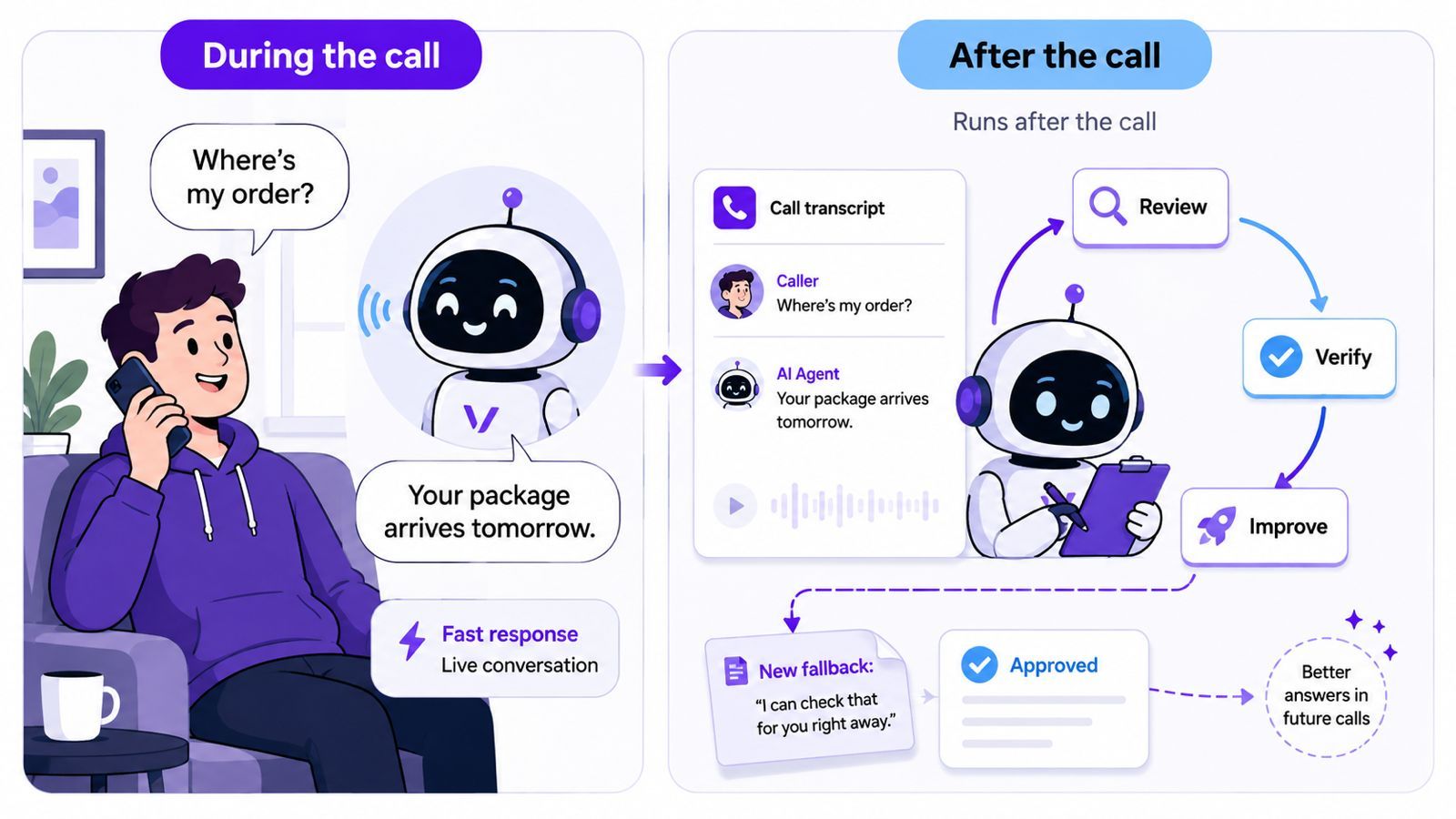 The voice agent responds quickly during the live call, while an offline loop reviews the interaction, verifies proposed changes, and improves future responses.
Voice latency is the delay between the caller finishing a turn and hearing the agent respond.
On a website, a slow action can show a spinner or update part of the page. During a phone call, delay sounds like silence. The caller cannot skim ahead, switch tabs, or see that the system is still working. Even a short pause can feel like confusion, a dropped connection, or a failed request.
The delay also builds in sequence. The system may need to:
Understand the caller’s speech.
Determine what they need.
Call any required external systems.
Generate and return a spoken response.
A slow tool call, model retry, or delayed text-to-speech response affects everything that follows.
Loops make the delay harder to predict. The system may not know in advance whether it will need one pass, three passes, or several tool calls before the result can be verified.
That leads to the key design question:
What needs to happen while the caller is waiting, and what can happen later?
The answer is to treat the voice agent as two parts running on different clocks.
The live workflow handles the current conversation. It receives the caller’s audio, understands the request, calls an approved tool when needed, and returns a spoken answer. Every additional step adds delay, so this path should be easy to explain and behave predictably.
The offline loop starts after the call. It can review evidence, replay failures, compare knowledge with a source system, and propose a change. Nobody is listening to dead air while that work happens.
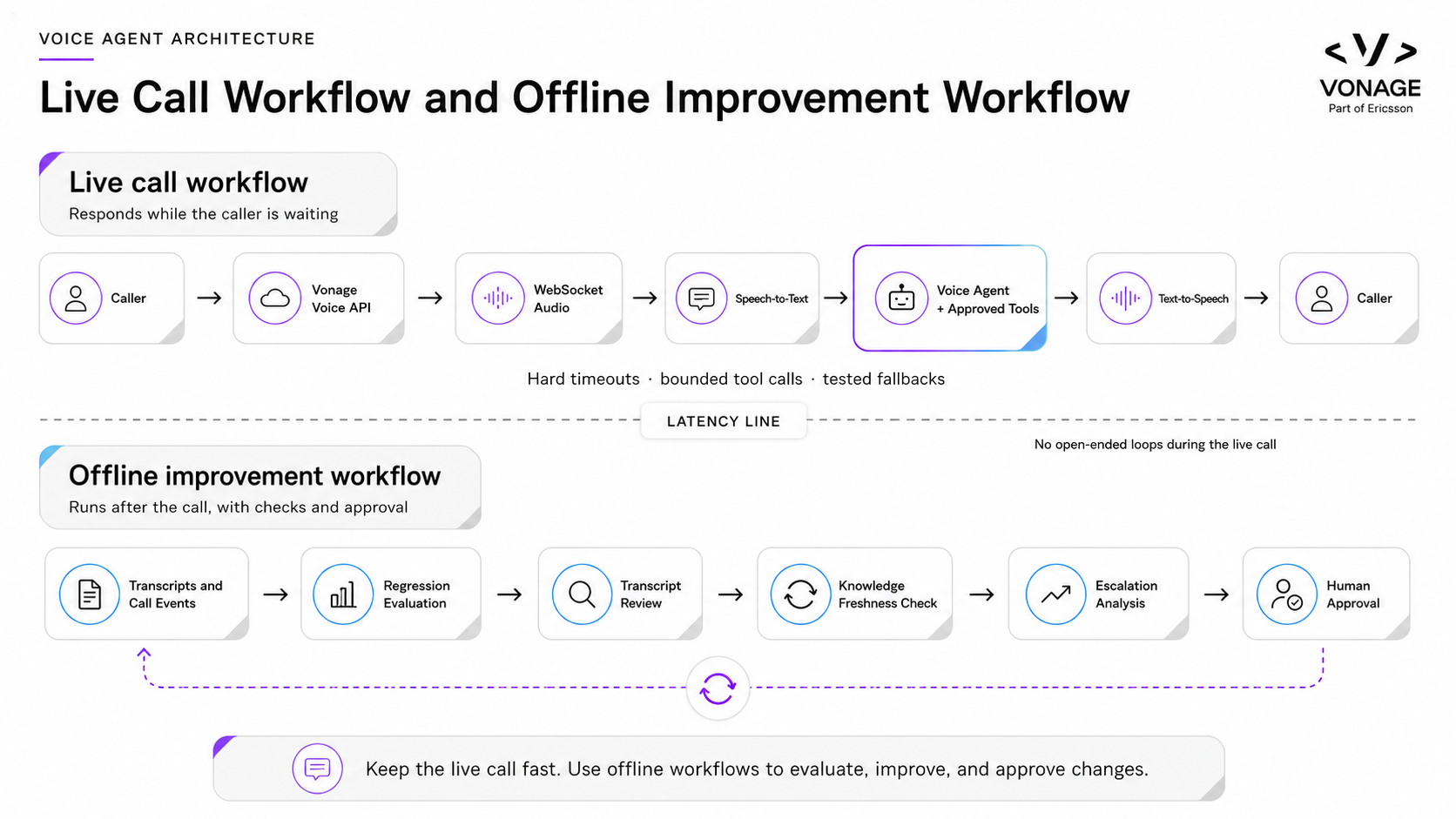 The live workflow handles the caller’s request with bounded steps and tested fallbacks, while the offline workflow evaluates results and improves future calls.Keep the Live Path Bounded
A useful live workflow does not try to solve everything. It completes the safest useful action within the caller’s time budget.
Three tactics help keep that path predictable:
Limit the work. Give the agent access only to the tools required for the current task, and limit how often it can call them. Prefer a single, well-defined lookup over an open-ended chain of searches. Treat reads and writes differently: reads can usually time out and fall back, while writes should confirm the caller’s intent and avoid blind retries when the final state is unclear.
Set hard deadlines. Put a time limit around individual tool calls and the full conversational turn. Allow only predefined retries for temporary failures, and log transcription, model, tool, and speech timing separately so you can identify the real bottleneck.
Write the fallback before launch. If a dependency is slow or fails, use a tested response that tells the truth and gives the caller a next step instead of asking the model to improvise. For example: “I can’t retrieve that update right now. I can connect you to support or send a follow-up message.”
These rules change depending on the task. An order-status lookup is a read, so the agent can perform one lookup and fall back if it times out. An appointment change is a write, so the agent should confirm the request and avoid claiming success if the final state is unclear. A billing dispute may be better handled by collecting the relevant details and handing the issue to a person.
The goal is not maximum autonomy. It is choosing the safest useful action the system can complete within the caller’s time budget.
Once the call ends, the strict latency limits relax. An offline loop can review evidence without making the caller wait, but it should produce something actionable rather than simply summarize the call.
Vonage gives developers several ways to collect that evidence. A WebSocket connection can carry audio between the Voice API and the agent in real time. The answer webhook returns the NCCO that controls the call, while the event webhook receives status and lifecycle updates. When recording is appropriate, the NCCO record action can capture audio and send recording metadata to an event URL.
Those inputs can support several useful loops:
Regression loop. Replay reviewed failures against the next prompt, model, knowledge, or routing change. The loop should produce a clear pass-or-fail result and block regressions before higher-impact changes ship.
Freshness loop. Compare answers or knowledge entries with their source of truth. If the information has drifted, prepare a proposed update for verification rather than changing production automatically.
Handoff loop. Review transfers and failed calls to find missing intake questions, required fields, routing changes, or tasks that should always go to a person. The output should be a concrete proposal for the next version of the system.
Call evidence can improve the system, but it may contain personal or sensitive information. Store only what the review process needs, redact sensitive data, define a retention period, restrict access, and reuse the live speech-to-text transcript when appropriate.
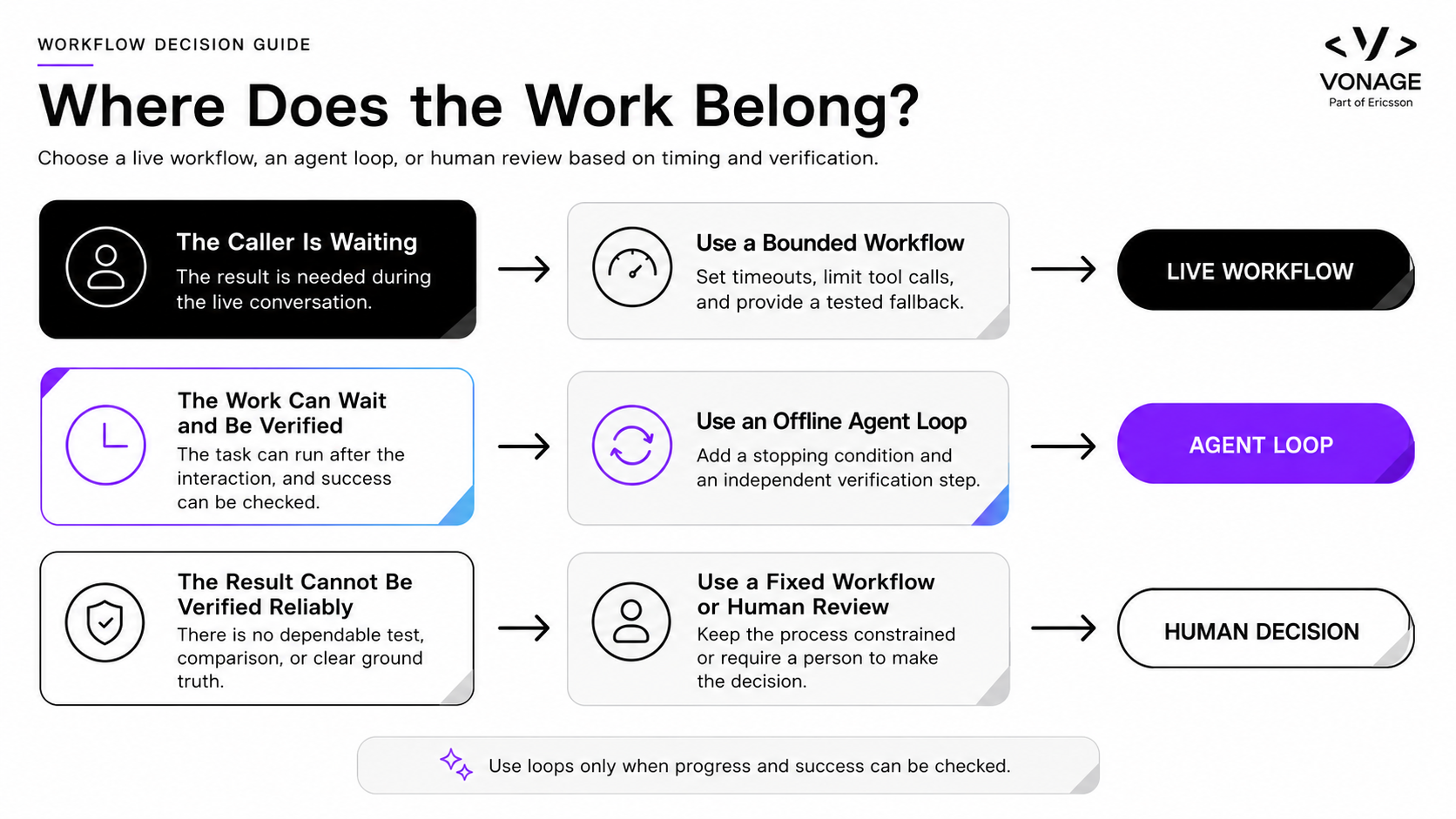 Use a live workflow when the caller is waiting, an agent loop when the work can wait and be verified, and human review when success cannot be checked reliably.If the caller is waiting, use a bounded workflow. Limit the tool calls, set the timeout, and write the fallback before launch.
If the work can wait and the result can be checked, use a loop. Save the evidence, verify the output independently, and require approval before high-impact changes ship.
If nobody can define what success looks like, do not force the task into an autonomous loop. Keep the workflow fixed or keep a person in charge.
The key question is not whether a task can be automated. It is whether the system can tell when the task has been completed correctly.
Don’t loop the latency.
Let the caller-facing workflow finish quickly. Let the evidence from that call feed a slower loop that can evaluate, verify, and improve future behavior.
That separation gives you both outcomes: a responsive experience for the caller and a system that becomes more reliable over time.
Have a question or want to share what you're building?
Subscribe to the Developer Newsletter
Follow us on X (formerly Twitter) for updates
Prefer video? Watch tutorials on our YouTube channel
Connect with us on the Vonage Developer page on LinkedIn
Help us improve our developer experience by filling out our Voice of the Developer Feedback
Stay connected and keep up with the latest developer news, tips, and events.
About Vince DiPaola
Vince DiPaola runs teamvince, an AI enablement and product studio in Brooklyn. He builds practical agent systems and teaches teams how to turn repetitive tasks into AI workflows they can trust.
Share:
Vince DiPaola runs teamvince, an AI enablement and product studio in Brooklyn. He builds practical agent systems and teaches teams how to turn repetitive tasks into AI workflows they can trust. When he's not building, you can find him throwing pots at BKLYN Clay, and on the mats at Marcelo Garcia Brazilian Jiu Jitsu.