Share:
)
Benjamin Aronov is a developer advocate at Vonage. He is a proven community builder with a background in Ruby on Rails. Benjamin enjoys the beaches of Tel Aviv which he calls home. His Tel Aviv base allows him to meet and learn from some of the world's best startup founders. Outside of tech, Benjamin loves traveling the world in search of the perfect pain au chocolat.
Beyond Vibe Coding: Best Practices in 2026
Time to read: 15 minutes
In this post, you'll learn the AI coding best practices, workflows, and agentic engineering patterns that real teams are using in 2026.
Over the last eight months, I gradually moved from Tel Aviv to New York. The transition was worth it, but I couldn’t keep up with the weekly whirlwind of AI coding trends.
And in AI coding, eight months feels like a decade.
The last time I seriously updated my workflow was around December 2025. I was using Windsurf with Cascade (now called Devin), switched to Claude models, and the key finding back then was to implement a very opinionated CLAUDE.md file: plan first, keep changes simple, write tests, run tests, do not skip root-cause analysis.
The most useful rule was also the least glamorous:
First think through the problem, read the relevant files, and write a checklist plan to tasks/todo.md before coding.
That one change really supercharged my development. My sessions stayed focused, agent hallucinations went way down, and I was knocking out tickets much faster.
So I wanted to know, “What new superpowers have emerged in the last 6 months?”
I spent a day doing what most developers probably do now when they need to catch up quickly: I asked Claude, Grok, and ChatGPT to research the latest AI coding trends, then had them argue against each other. But I wasn’t looking for the newest demo. I wanted to know what actually stuck.
Then I sanity-checked the results with about 15 people whose judgment I trust: CTOs, startup founders, AI researchers, backend leads, team leads, and senior engineers using these tools on real codebases.
This is what I found.
 Share the AI coding workflows and practices that have proven useful in production.I’d love to hear about your coding workflow. Please answer in this LinkedIn post.
Every day, there are new slick demos on social media. “This framework will 10x your agent!” “If you’re not using this new tool, you’re already behind!” But it’s hard to tell what’s real from what’s hype.
"Vibe coding," the phrase Andrej Karpathy popularized in early 2025, has revolutionized software development: coding by describing intent, accepting generated changes, and nudging the model until the app works. It’s hard to believe we ever did anything different.Collins Dictionary named it the 2025 Word of the Year. But serious production teams have separated two ideas that used to get bundled together: using AI to generate code, and accepting AI-generated code without enough structure or verification.
The first is here to stay. The second is the problem. A CodeRabbit analysis of 470 real-world GitHub pull requests found that AI-co-authored code contained roughly 1.7x more issues than human-written code, with security vulnerabilities up to 2.7x higher. The code works. But it requires more scrutiny than ever.
That is the shift from vibe coding to what can be called agentic engineering. The agent can inspect files, write code, run commands, generate tests, debug failures, and critique its own output. But you still need an engineering process around it. Especially if you care about production.
The social media hype cycle makes it sound like everyone is constantly updating their workflow: spec-driven, multi-agent, cloud-orchestrated, MCP-wired, autonomous-everything pipelines.
So I asked a small but strong sample of friends with serious responsibilities what they were doing. They were mostly doing something simpler than the internet would have you believe: one strong coding agent, a planning step, a repo instruction file, tests, manual review, occasional model switching, and sometimes a second model for red-teaming.
One CTO put it this way:
"Always plan first. Never just say 'do this,' even for small tasks, or they miss things."
A team lead said:
"Plan until it looks perfect, then build. Nothing fancy."
And a senior full-stack engineer described her zero-trust approach:
"I have it write tests, then I have it test its test. Then I have another agent red team. And finally, I test manually. If it touches money or lifecycle, manual always."
It’s become pretty clear that most of the human’s responsibility is now working with the agent to create a perfect plan. My manual tasks/todo.md habit now has fancier names.
Spec-driven development is the clean version: start with intent, turn it into a spec, produce an implementation plan, split that into tasks, and only then let the agent code. GitHub's Spec Kit formalized this as spec.md, plan.md, and tasks.md. AWS Kiro uses specs as structured artifacts for tracking and accountability.
The same idea is showing up inside tools. Claude Code has /goal, which tells Claude to keep working until a verifiable completion condition holds: all tests pass, every TypeScript error is resolved, and the migration is complete. Under the hood, a lightweight evaluator model checks after each iteration whether the goal is objectively met, so the agent loops autonomously until it converges or hits a budget. Codex shipped the same concept, with states like pursuing, paused, achieved, and budget-limited that persist across session restarts.
That is the productized version of a tasks/todo.md: a durable objective the agent can return to, now with more autonomy around it.
It is also the place where autonomy gets expensive. If the done condition is fuzzy, the agent can loop for a long time and still not do the right thing. Autonomy without guardrails is just a faster way to waste money.
For non-trivial work, the agent should answer three questions before editing code: What are we changing? What files and behaviors are involved? How will we know it worked?
Test-driven development (TDD) was always preached as gospel, but put into practice much less frequently. Now with agentic coding, investing in tests is one of the primary jobs of the developer. An early adopter CTO told me, "I go back and forth a bit just formulating the plan. Any feature I develop, I have it write very extensive tests. So I know it'll work when it finishes."
If the agent cannot write that down, it is not ready to code.
My old workflow relied on a big CLAUDE.md file. I filled it with rules and emphasis: DO NOT BE LAZY. NEVER SKIP TESTS. MAKE EVERYTHING AS SIMPLE AS POSSIBLE. The intent was to make sure the agent stayed disciplined and didn’t cut corners.
And this type of guidance worked. By 2025, every agentic provider had some version of repo-level instructions: Claude Code, Codex, Cursor, Copilot, Windsurf. The industry started standardizing around AGENTS.md: a repo-level guide that tells the agent the basic rules of the project.
But people started stuffing their Claude files, and that came at a cost. A February 2026 ETH Zurich study tested repository instruction files against real GitHub issues and found that bloated context files often did not improve task success, and could increase inference cost by more than 20%.
It turns out that the agent does not become more disciplined because you yell the same instruction three times. You mostly just waste tokens and bury the rules that actually matter.
The new failure mode is context rot. A bad AGENTS.md is worse than no AGENTS.md because the agent will confidently obey stale instructions.
So the industry split the concept into two. AGENTS.md should stay lean. It answers: what are the rules and conventions specific to this project?
For everything else, there are Skills. A Skill is a load-on-demand reference for a specific task: how to add a new API endpoint, how to do a database migration, how to write a release checklist. The Skill only loads when the agent recognizes the pattern and needs it.
In practice, it looks like this:
Your AGENTS.md says:
Run tests with npm test. Always review code before merging. Use the webhook Skill when adding new integrations.
The webhook Skill says:
Create the route, add types, write the handler, cover success and failure cases, and update the docs.
The agent does not need to carry every procedure in an always-on context. It stays in the Skill. Your AGENTS.md stays short. And if the webhook procedure changes, you update the Skill once.
The rule of thumb: keep AGENTS.md boring and short. Make a Skill when you have a repeatable procedure that you find yourself explaining over and over. And treat repo instructions like code: review them, delete stale rules, and don’t let them rot.
The Model Context Protocol (MCP) was probably the number one hyped term in the developer world in 2025. The idea was solid: one standardized way to plug in integrations instead of custom glue code for every tool.
So of course in 2026, “MCP is dead”. Not true. But MCP use has become more nuanced.
One CTO I surveyed put it bluntly:
“The models barely lean on MCP anymore. They got terrifyingly good at just using the CLI.”
The core issue is overhead. A standard MCP server can dump a lot of tool schema into context before the agent does anything useful. CLI tools are local, composable, and models are already very good at Unix-shaped workflows: commands, flags, pipes, JSON output, logs.
But agents do not magically discover CLIs. They need instruction, just lighter instruction.
If it is a well-known CLI like aws, gh, gcloud, or docker, the agent probably knows it from training. You can tell it: “This project uses the AWS CLI. You have credentials. Use it for infrastructure.” And the agent usually figures out the rest.
If it is a custom or internal CLI, write a Skill. One paragraph explaining the command, the flags, and the shape of the output is often enough.
The mature MCP conversation is not “is MCP dead?” It is “what permissions did you just hand to a probabilistic tool caller?”
MCP makes sense when the agent needs governed access to external systems: docs, tickets, observability, databases, APIs. But if a CLI safely does the job, start there. If the same CLI procedure repeats, turn it into a Skill. Reach for MCP when neither option is enough, and treat every MCP server like production infrastructure: least privilege, approvals, logging, and security review.
 A popular meme highlighting how AI agents have changed the day-to-day experience of software engineering, often shifting the role from implementation toward orchestration and oversight.
The bigger 2026 shift is that coding agents are no longer just chat windows attached to an editor. They are becoming control planes.
Claude Code has /goal, hooks, subagents, background sessions, and agent views. Codex has CLI, cloud, app, worktrees, code review, and mobile supervision. GitHub Copilot can work issues into PRs and review code. Google Antigravity is built around managing agents across workspaces.
The interface is changing from “chat with a model” to “manage a queue of semi-trusted workers.”
That sounds futuristic, but the practical lesson is boring: every agent needs a clear task, a small blast radius, a way to prove it worked, and a human who owns the merge.
This is where long-running agents become useful.
Imagine you have a list of 30 dependencies that need updating. Normally, you’d sit with the agent, prompt it for each one, review each change, and approve each merge. That takes hours and ties you up.
A long-running agent can work through the list: update one dependency, run tests, fix failures, move to the next one, and stop when all tests pass.
That is a good use case because “done” is objectively testable.
Examples when long-running agents actually work: dependency updates, test cleanup, docs generation, SDK examples, research tasks, or backlog items with crystal-clear acceptance criteria like “all tests pass,” “lint clean,” or “migration complete.”
When they fail spectacularly: billing, authentication, permissions, migrations, deletion, compliance, or anything touching customer data or lifecycle. These require judgment calls. “Is this migration safe?” is not a yes/no question. Neither is “should we delete this?”
The rule: only use long-running agents for work where “done” is objectively testable and the blast radius if it breaks is small. Everything else stays human-paced.
If you are running agents yourself, tmux is still the boring trick that saves you. Long-running agents die when your SSH connection drops. A terminal multiplexer keeps the session alive, survives disconnects, and gives you a scrollback of what happened.
But tmux is the DIY fallback, not the headline. The actual trend is that the tools are productizing this pattern: background sessions, agent dashboards, isolated worktrees, remote approvals, and review queues.
Persistent agents without testable success criteria are just longer, more expensive hallucinations.
There is also a parallel category of always-on personal agent runtimes like OpenClaw and Hermes. They are interesting as control planes around coding work: routing messages, monitoring sessions, sending alerts, and maybe dispatching tasks. But they are not the core coding workflow yet. Worth watching and experimenting with, but don’t feel like the whole world has its own OpenClaw agent. None of the 15 early adopters I asked had set one up.
The first question a principal AI research manager asked me when I brought up my workflow was not about tools or frameworks. It was:
"What's your token budget?"
This is what separates engineering from coding. Sure, with AI agents, if you throw enough money and time at a problem, you can probably build it. So now, every workflow decision is largely downstream of budget. And different agents affect the budget.
Some people I spoke to are all-in on Codex. Others prefer Claude. Cursor users like being able to swap models. Some people use Copilot because it is what their company provides.
One founder told me he was "one-shotting features like an animal" with Codex. Another had a more nuanced take:
"Codex is crazy strong at anything computational. Claude still has more taste."
But the calmer advice from a CTO was more useful:
"Don't get stuck with a model. Every two weeks, one degrades, and another one is better."
The durable pattern is model hygiene: use a strong model for planning and hard reasoning, cheaper models for straightforward edits, a second model for high-risk review, and portable instructions so another model or session can pick up the work.
This matters even more as pricing moves toward usage-based billing. The workflow that wins is not “use the fanciest model for everything.” It is knowing when the expensive reasoning is worth it.
When code gets cheap, checking that it works and is good gets expensive. That’s not an argument against using AI to code. It’s an argument against shipping code you can’t explain.
Thankfully, the tools are catching up. Hooks are deterministic scripts that fire on agent events. These allow teams to make specific verification non-optional. A PostToolUse hook can auto-run lint or typecheck after every file edit, catching issues mid-run instead of at the end. A Stop hook can block the agent from prematurely declaring victory. These are guardrails that do not depend on the model's judgment, and for long-running or autonomous work, that distinction matters.
A good review loop might look like:
Have the agent write or update tests.
Have the agent run the relevant suite.
Use a second model to red-team important diffs.
Manually test high-risk paths.
A useful prompt before human review:
Review your own changes.
Find likely bugs, missing tests, edge cases, security concerns, or unnecessary complexity.
Do not modify files yet. Report findings first.
The security version of this is even more important. Once agents can comment on PRs, run workflows, call tools, and touch credentials, prompt injection stops being a chatbot problem and becomes a CI/CD problem.
That is the part I think a lot of teams still underestimate. If the agent reads an issue, a PR description, a code comment, or a dependency changelog, it is reading untrusted input. If it also has permission to run commands or access secrets, you now have an attack surface.
So the boring rules matter even more: least privilege, sandboxing, approvals, small diffs, deterministic checks, audit logs, and human ownership.
Create a lean AGENTS.md with install, test, and typecheck commands, workflow rules, and a definition of done. Keep it short. Add rules only when the agent actually fails at something, not preemptively.
Require persistent planning for non-trivial work. Before coding, the agent writes a checklist plan to tasks/todo.md with the goal, relevant files, steps, and risks.
Archive completed plans under tasks/archive/. These become the history of what the agent thought it was doing and why.
One task per prompt, one concern per diff. Small diffs are reviewable. Large diffs hide bugs.
No behavior change ships without a test. If the agent says “no test needed,” push back.
Write a Skill the third time you explain something. The first time you walk the agent through a procedure, just explain it. The second time, notice the repetition. The third time, write a SKILL.md.
Default to CLI. Add MCP only when the agent needs governed access to an external system, and the CLI path is not enough.
Use long-running agents only for work where “done” is objectively testable. Dependency updates, test cleanup, docs, lint fixes? Sure. Billing, auth, migrations, deletion? No.
Red-team high-risk diffs with a second model. Before merging anything that touches security, payments, permissions, or data lifecycle, ask a different model to find problems.
Do the human part. Review the diff yourself. Run the app. Test the risky paths manually. The agent proposes. You decide.
Doing this research calmed my nerves. The best practices are just different iterations of what’s always been true: follow SOLID principles, aim for TDD, write detailed specs before building.
The best AI coding workflow is not a replacement for software engineering. It is software engineering with a much faster junior developer who never gets tired, sometimes hallucinates, occasionally breaks everything, and needs very clear instructions.
Treat it that way and the tools are incredible. Treat it like magic and you will eventually have to debug the magic.
This is my first pass at catching up. Now I want to hear from people actually building with these tools. What does your AI coding workflow look like right now?
Are you using Cursor, Claude Code, Codex, Copilot, or something else? Have you tried Skills, MCP, subagents, worktrees, /goal, hooks, or long-running agents? What stuck? What did you abandon?
Please let me know on this LinkedIn post.
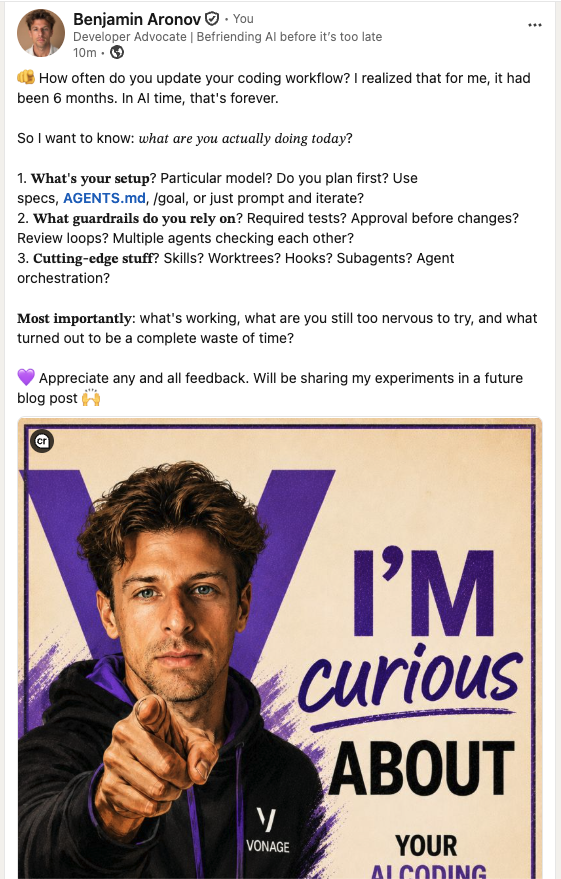 A LinkedIn post asking developers how their AI coding workflows have evolved in 2026, including questions about planning, guardrails, and emerging agentic practices.I’m going to use the best responses to shape a follow-up post where I test the workflows that matter most on real Vonage API projects: parallel agents, spec-first planning, lean AGENTS.md plus Skills, MCP vs. CLI, and verification loops that catch real bugs.
I’ll share the results in the follow-up.
Have a question or want to share what you're building?
Subscribe to the Developer Newsletter
Follow us on X (formerly Twitter) for updates
Prefer video? Watch tutorials on our YouTube channel
Connect with us on the Vonage Developer page on LinkedIn
Help us improve our developer experience by filling out our Voice of the Developer Feedback
Stay connected and keep up with the latest developer news, tips, and events.
Share:
Benjamin Aronov is a developer advocate at Vonage. He is a proven community builder with a background in Ruby on Rails. Benjamin enjoys the beaches of Tel Aviv which he calls home. His Tel Aviv base allows him to meet and learn from some of the world's best startup founders. Outside of tech, Benjamin loves traveling the world in search of the perfect pain au chocolat.