Recevoir un appel entrant
Cet extrait de code montre comment recevoir un appel entrant sur votre Smart Number.
Conditions préalables
Créer une application
Aller à la page Applicationssur le tableau de bord, et définissez une page Name pour votre Applications.
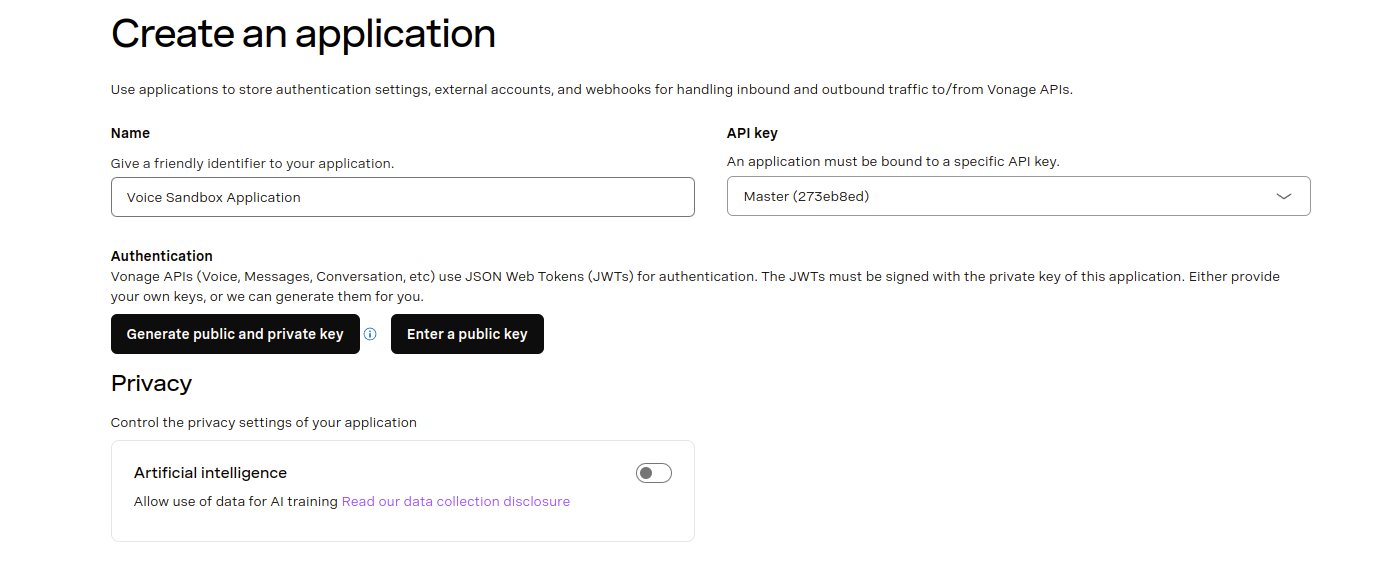
Veillez à cliquer sur le bouton Générer une clé publique et une clé privée et conserver le fichier private.key autour.
Ensuite, activez l'option Voix capacité. Pour l'instant, laissez tout par défaut.
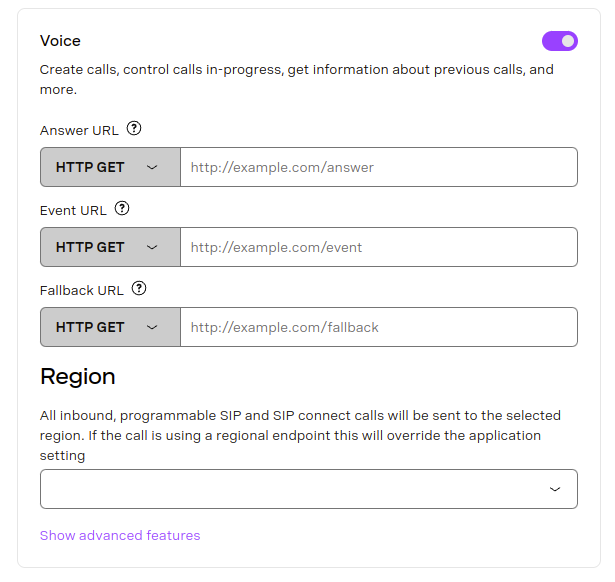
Enfin, cliquez sur Générer une nouvelle application au bas de la page.
Vérifier Démarrer avec l'interface de programmation de Vonage pour plus d'informations sur l'installation et la configuration de la CLI.
Utilisez la commande suivante pour créer une application Vonage :
vonage apps create 'Your application'

✅ Creating Application
Saving private key ... Done!
Application created

Name: Your application
Application ID: 00000000-0000-0000-0000-000000000000
Improve AI: Off
Private/Public Key: Set

Capabilities:
  None Enabled
vonage apps create 'Your application'

✅ Creating Application
Saving private key ... Done!
Application created

Name: Your application
Application ID: 00000000-0000-0000-0000-000000000000
Improve AI: Off
Private/Public Key: Set

Capabilities:
  None Enabled
Une fois que vous avez l'application, vous devez ajouter l'élément voice veillez à remplacer les URL des webhooks par les vôtres :
vonage apps capabilities update 00000000-0000-0000-0000-000000000000 voice `
  --voice-answer-url='https://example.com/webhooks/voice/answer' `
  --voice-event-url='https://example.com/webhooks/voice/event' `
  --voice-fallback-url='https://example.com/webhooks/voice/fallback'

✅ Fetching Application
✅ Adding voice capability to application 00000000-0000-0000-0000-000000000000

Name: Your application
Application ID: 00000000-0000-0000-0000-000000000000
Improve AI: Off
Private/Public Key: Set

Capabilities:
 VOICE:
    Uses Signed callbacks: On
    Conversation TTL: 41 hours
    Leg Persistence Time: 6 days
    Event URL: [POST] https://example.com/webhooks/voice/event
    Answer URL: [POST] https://example.com/webhooks/voice/answer
    Fallback URL: [POST] https://example.com/webhooks/voice/fallback
vonage apps capabilities update 00000000-0000-0000-0000-000000000000 voice ^
  --voice-answer-url='https://example.com/webhooks/voice/answer' ^
  --voice-event-url='https://example.com/webhooks/voice/event' ^
  --voice-fallback-url='https://example.com/webhooks/voice/fallback'

✅ Fetching Application
✅ Adding voice capability to application 00000000-0000-0000-0000-000000000000

Name: Your application
Application ID: 00000000-0000-0000-0000-000000000000
Improve AI: Off
Private/Public Key: Set

Capabilities:
 VOICE:
    Uses Signed callbacks: On
    Conversation TTL: 41 hours
    Leg Persistence Time: 6 days
    Event URL: [POST] https://example.com/webhooks/voice/event
    Answer URL: [POST] https://example.com/webhooks/voice/answer
    Fallback URL: [POST] https://example.com/webhooks/voice/fallback
L'application est alors créée et dotée des capacités requises. La création d'une application et l'ajout de capacités d'application sont traités en détail dans la section Documentation relative à l'application.
Installer les dépendances
Initialiser vos dépendances
Créer un fichier nommé receive-an-inbound-call.js et ajoutez le code suivant :
const app = require('express')()
Rédiger le code
Ajouter ce qui suit à receive-an-inbound-call.js:
const onInboundCall = (request, response) => {
  const from = request.query.from
  const fromSplitIntoCharacters = from.split('').join(' ')

  const ncco = [{
    action: 'talk',
    text: `Thank you for calling from ${fromSplitIntoCharacters}`
  }]

  response.json(ncco)
}

app.get('/webhooks/answer', onInboundCall)
Essayez-le
Enregistrez le fichier sur votre machine et exécutez-le à l'aide de la commande suivante :
Lorsque vous appelez votre Smart Number, vous entendez un message en synthèse vocale.