Ejecuta el servidor Flask
Antes de poder iniciar el servidor, tendrás que especificar la configuración en un .env archivo. Empieza con lo siguiente y rellena tus datos:
Copia
# Do not use this in production:
FLASK_DEBUG=true

# Replace the following with any random value you like:
FLASK_SECRET_KEY=RANDOM-STRING_CHANGE-THIS-Ea359

# Get from ${CUSTOMER_DASHBOARD_URL}/your-numbers
NEXMO_NUMBER=447700900025

# Get the following from ${CUSTOMER_DASHBOARD_URL}/settings
NEXMO_API_KEY=abcd1234
NEXMO_API_SECRET=abcdef12345678
Ahora inicia tu aplicación con:
Copia
# You may need to change the path below if your Flask app is in a different Python file:
$ FLASK_APP=smsweb/server.py flask run
* Serving Flask app "smsweb.server"
* Running on http://127.0.0.1:5000/ (Press CTRL+C to quit)
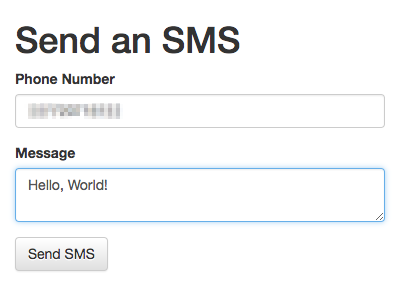
Ahora bien, si cargas http://localhost:5000/, deberías ver algo como esto:
Cómo enviar mensajes SMS con Python, Flask y Nexmo
Este tutorial te enseña a enviar SMS con Python, utilizando la biblioteca Nexmo para Python. Empieza mostrando cómo enviar SMS desde el REPL y, a continuación, te explica cómo crear una sencilla aplicación con Flask que permita enviar SMS.
Pasos
1
Introducción a este tutorial2
Prerequisites3
Instala el SDK de servidor de Python de Vonage4
Enviar un SMS desde Python REPL5
Configurar una aplicación Flask de envío de SMS6
Añadir una vista Enviar SMS7
Ejecuta el servidor Flask8
Gestionar la entrada del formulario9
¿Y ahora qué?