WhatsApp Carousel Templates
Media card carousel templates let you showcase multiple products in a single marketing template message on WhatsApp. Each product appears as a horizontally scrollable card, allowing users to browse, compare, and act on offers without being overwhelmed by multiple messages.
This format is especially effective for promotions and seasonal campaigns.
A media card carousel template is a WhatsApp marketing template that combines:
- A single message body text, and
- A horizontally scrollable carousel of up to 10 product media cards
Each card represents a product or offer and is designed to drive users to an external purchase or information page.
Carousel cards are only supported for marketing template messages and are not available for utility or authentication templates.
Components of a Carousel
Each carousel card can contain the following components:
Header (required)
An image or video asset representing the product.
Body text (optional)
Short descriptive text, such as a product name, price, or promotion.
Buttons (optional, up to two per card)
Supported button types include:
- URL buttons
- Phone number buttons
- Quick reply buttons
You can mix button types within a card (for example, one URL button and one quick reply button).
Consistency requirement
All cards in a single carousel template must use the same set of components.
For example, if one card includes a body text and two buttons, all cards must include a body text and two buttons as well.
Create a WhatsApp Carousel Template
Media card carousels must be created as marketing templates using the Template Management API.
Each template consists of:
- A
BODYcomponent (applies to the whole message) - A
CAROUSELcomponent containing up to 10 cards - Each card must define the same components
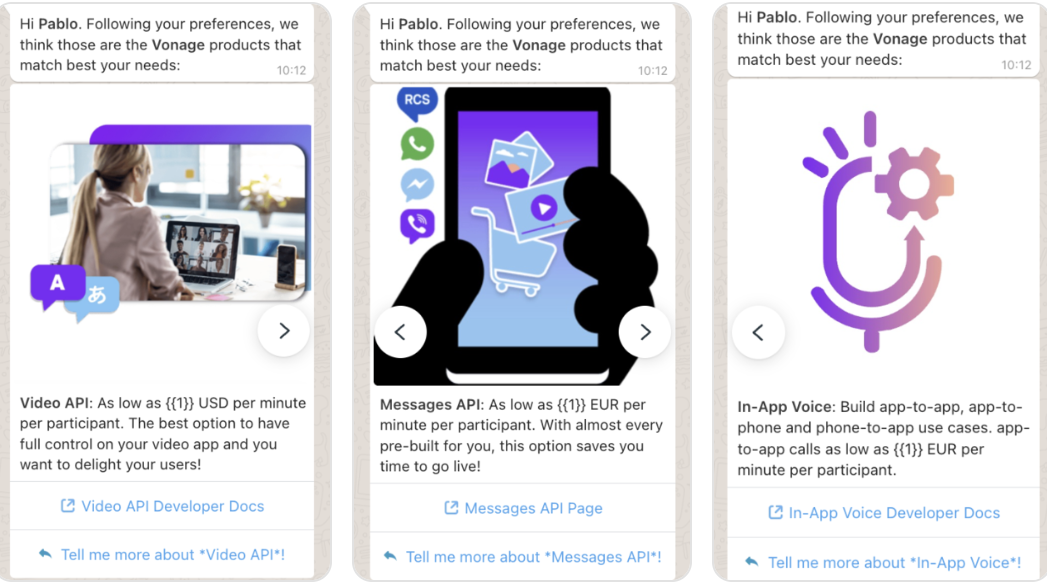
Product Recommendation Carousel
This example creates a carousel template with three product cards, each including:
- An image header
- A body with a dynamic price parameter
- A URL button and a quick reply button
{
    "name": "sample_carousel_template10",
    "language": "en",
    "category": "MARKETING",
    "allow_category_change": true,
    "components": [
        {
            "type": "BODY",
            "text": "Hi *{{1}}*. Following your preferences, we think those are the *Vonage* products that match best your needs:",
            "example": {
                "body_text": "[['Pablo']]"
            }
        },
        {
            "type": "CAROUSEL",
            "cards": [
                {
                    "components": [
                        {
                            "type": "HEADER",
                            "format": "IMAGE",
                            "example": {
                                "header_handle": ["4::aW1hZ2UvanBn:ARYMX_ceB7hy4UrocTFGovCrheY7VIeEc0Lxc2fAn_SNsWN5icskgixQ1viE8pPoiiQ6S6Smv6RpaWHNb5mJaUQI4Y7zB6L87QvnTNs3NeVmfg:e:1775210982:1767162543555562:100040931896219:ARYyiV3YGhM1uOFNyKw"]
                            }
                        },
                        {
                            "type": "BODY",
                            "text": "*Video API*: As low as {{1}} USD per minute per participant. The best option to have full control on your video app and you want to delight your users!",
                            "example": {
                                "body_text": "[['0.00395']]"
                            }
                        },
                        {
                            "type": "BUTTONS",
                            "buttons": [
                                {
                                    "type": "URL",
                                    "text": "Video API Developer Docs",
                                    "url": "https://tokbox.com/developer/"
                                },
                                {
                                    "type": "QUICK_REPLY",
                                    "text": "Tell me more about *Video API*!"
                                }
                            ]
                        }
                    ]
                },
                {
                    "components": [
                        {
                            "type": "HEADER",
                            "format": "IMAGE",
                            "example": {
                                "header_handle": ["4::aW1hZ2UvanBn:ARYfk5Coa-tyuiaGtJIGbbZpadRtRf6_DRGx1eC4COq2TBS9jESnifBwlvBesVPYsJoJG0vlF8DcQ-SAoynD7_V4AKoVcAbO_fS9tVesGgb-Aw:e:1775210995:1767162543555562:100040931896219:ARYPxK9WzQSw_RPhWnI"]
                            }
                        },
                        {
                            "type": "BODY",
                            "text": "*Messages API*: As low as {{1}} EUR per minute per participant. With almost every pre-built for you, this option saves you time to go live!",
                            "example": {
                                "body_text": "[['0.00475']]"
                            }
                        },
                        {
                            "type": "BUTTONS",
                            "buttons": [
                                {
                                    "type": "URL",
                                    "text": "Messages API Page",
                                    "url": "https://www.vonage.com/communications-apis/messages/"
                                },
                                {
                                    "type": "QUICK_REPLY",
                                    "text": "Tell me more about *Messages API*!"
                                }
                            ]
                        }
                    ]
                },
                {
                    "components": [
                        {
                            "type": "HEADER",
                            "format": "IMAGE",
                            "example": {
                                "header_handle": ["4::aW1hZ2UvanBn:ARZWziKvjbUO_8_-zr3gi45fXqs_4kI8A24lPhI1QvREJuojcAEspv6iHMjBvAOJ23j2sT8Y11xn1oFNm_vUsQHNwGTlpodB1Q8OxonGUrmFDw:e:1775211007:1767162543555562:100040931896219:ARa3BLIlI4stgYj9Hzo"]
                            }
                        },
                        {
                            "type": "BODY",
                            "text": "*In-App Voice*: Build app-to-app, app-to-phone and phone-to-app use cases. app-to-app calls as low as {{1}} EUR per minute per participant.",
                            "example": {
                                "body_text": "[['0.0040']]"
                            }
                        },
                        {
                            "type": "BUTTONS",
                            "buttons": [
                                {
                                    "type": "URL",
                                    "text": "In-App Voice Developer Docs",
                                    "url": "https://developer.vonage.com/en/vonage-client-sdk/in-app-voice/overview"
                                },
                                {
                                    "type": "QUICK_REPLY",
                                    "text": "Tell me more about *In-App Voice*!"
                                }
                            ]
                        }
                    ]
                }

            ]
        }
    ]
}
Response
Status 202 ACCEPTED
{
    "id": "1477582267072231",
    "status": "PENDING",
    "category": "MARKETING"
}
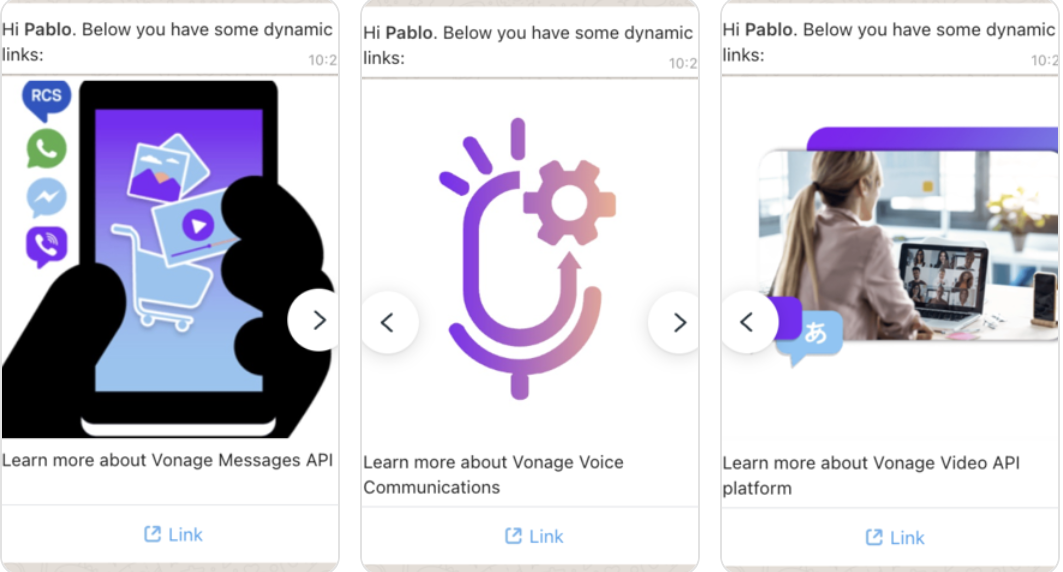
Carousel with Dynamic URL Parameters
This template demonstrates dynamic URL buttons, where part of the URL is provided at send time.
{
    "name": "sample_carousel_dynamic_links10",
    "language": "en",
    "category": "MARKETING",
    "allow_category_change": true,
    "components": [
        {
            "type": "BODY",
            "text": "Hi *{{1}}*. Below you have some dynamic links:",
            "example": {
                "body_text": "[['Pablo']]"
            }
        },
        {
            "type": "CAROUSEL",
            "cards": [
                {
                    "components": [
                        {
                            "type": "HEADER",
                            "format": "IMAGE",
                            "example": {
                                "header_handle": ["4::aW1hZ2UvanBn:ARYfk5Coa-tyuiaGtJIGbbZpadRtRf6_DRGx1eC4COq2TBS9jESnifBwlvBesVPYsJoJG0vlF8DcQ-SAoynD7_V4AKoVcAbO_fS9tVesGgb-Aw:e:1775210995:1767162543555562:100040931896219:ARYPxK9WzQSw_RPhWnI"]
                            }
                        },
                        {
                            "type": "BODY",
                            "text": "Learn more about Vonage Messages API"
                        },
                        {
                            "type": "BUTTONS",
                            "buttons": [
                                {
                                    "type": "URL",
                                    "text": "Link",
                                    "url": "https://vonage.com/{{1}}",
                                    "example": [
                                        "https://www.vonage.com/communications-apis/messages/"
                                    ]
                                }
                            ]
                        }
                    ]
                },
                {
                    "components": [
                        {
                            "type": "HEADER",
                            "format": "IMAGE",
                            "example": {
                                "header_handle": ["4::aW1hZ2UvanBn:ARZWziKvjbUO_8_-zr3gi45fXqs_4kI8A24lPhI1QvREJuojcAEspv6iHMjBvAOJ23j2sT8Y11xn1oFNm_vUsQHNwGTlpodB1Q8OxonGUrmFDw:e:1775211007:1767162543555562:100040931896219:ARa3BLIlI4stgYj9Hzo"]
                            }
                        },
                        {
                            "type": "BODY",
                            "text": "Learn more about Vonage Voice Communications"
                        },
                        {
                            "type": "BUTTONS",
                            "buttons": [
                                {
                                    "type": "URL",
                                    "text": "Link",
                                    "url": "https://vonage.com/{{1}}",
                                    "example": [
                                        "https://www.vonage.com/communications-apis/voice/"
                                    ]
                                }
                            ]
                        }
                    ]
                },
                {
                    "components": [
                        {
                            "type": "HEADER",
                            "format": "IMAGE",
                            "example": {
                                "header_handle": ["4::aW1hZ2UvanBn:ARYMX_ceB7hy4UrocTFGovCrheY7VIeEc0Lxc2fAn_SNsWN5icskgixQ1viE8pPoiiQ6S6Smv6RpaWHNb5mJaUQI4Y7zB6L87QvnTNs3NeVmfg:e:1775210982:1767162543555562:100040931896219:ARYyiV3YGhM1uOFNyKw"]
                            }
                        },
                        {
                            "type": "BODY",
                            "text": "Learn more about Vonage Video API platform"
                        },
                        {
                            "type": "BUTTONS",
                            "buttons": [
                                {
                                    "type": "URL",
                                    "text": "Link",
                                    "url": "https://vonage.com/{{1}}",
                                    "example": [
                                        "https://www.vonage.com/communications-apis/video/"
                                    ]
                                }
                            ]
                        }
                    ]
                }

            ]
        }
    ]
}
Response
Status 202 Accepted
{
    "id": "1635112524349526",
    "status": "PENDING",
    "category": "MARKETING"
}
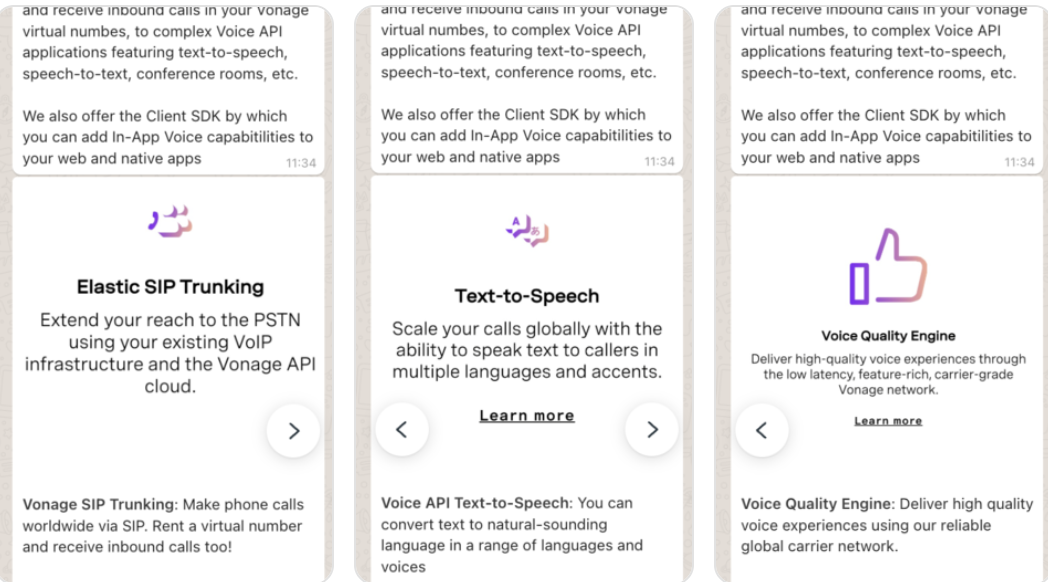
Informational Carousel Without Parameters
This template uses static body text and buttons, with no parameters required when sending.
{
    "name": "sample_carousel_quick_reply10",
    "language": "en",
    "category": "MARKETING",
    "allow_category_change": true,
    "components": [
        {
            "type": "BODY",
            "text": "With *Vonage* you can implement any type of Voice application.\n\nGoing from basic SIP trunks to make calls and receive inbound calls in your Vonage virtual numbes, to complex Voice API applications featuring text-to-speech, speech-to-text, conference rooms, etc.\n\nWe also offer the Client SDK by which you can add In-App Voice capabitilities to your web and native apps"
        },
        {
            "type": "CAROUSEL",
            "cards": [
                {
                    "components": [
                        {
                            "type": "HEADER",
                            "format": "IMAGE",
                            "example": {
                                "header_handle": ["4::aW1hZ2UvanBn:ARYvt342aYJNXghr96KCAaJrEjtBQ1V2MK2AGhspduZc0ALIvV_Ti2Ec3Fr09SyJQAlmLb8OEnymiA25n-RzwVA8qUpXrHozR28OHkVhfCz9vA:e:1775215593:1767162543555562:100040931896219:ARYOpAnR6U-6cAGW8YM"]
                            }
                        },
                        {
                            "type": "BODY",
                            "text": "*Vonage SIP Trunking*: Make phone calls worldwide via SIP. Rent a virtual number and receive inbound calls too!"
                        },
                        {
                            "type": "BUTTONS",
                            "buttons": [
                                {
                                    "type": "URL",
                                    "text": "Vonage SIP Trunking Docs",
                                    "url": "https://developer.vonage.com/en/sip/overview"
                                },
                                {
                                    "type": "QUICK_REPLY",
                                    "text": "Tell me more about SIP Trunking!"
                                }
                            ]
                        }
                    ]
                },
                {
                    "components": [
                        {
                            "type": "HEADER",
                            "format": "IMAGE",
                            "example": {
                                "header_handle": ["4::aW1hZ2UvanBn:ARYXBRY83hHNm6fcsll3p7zJsxepaZIuAuKM1YYbbkix--aE3w41wTdGMXY_rN8hYA4etKSS-a6xCygPGETN4C3ZBLBywyE93IFa4mx1Za1q7A:e:1775215701:1767162543555562:100040931896219:ARY6_ZRadoHSHQHYUuU"]
                            }
                        },
                        {
                            "type": "BODY",
                            "text": "*Voice API Text-to-Speech*: You can convert text to natural-sounding language in a range of languages and voices"
                        },
                        {
                            "type": "BUTTONS",
                            "buttons": [
                                {
                                    "type": "URL",
                                    "text": "Vonage Voice API TTS Docs",
                                    "url": "https://www.vonage.com/communications-apis/voice/features/tts/"
                                },
                                {
                                    "type": "QUICK_REPLY",
                                    "text": "Tell me more about Voice API Text-to-Speech!"
                                }
                            ]
                        }
                    ]
                },
                {
                    "components": [
                        {
                            "type": "HEADER",
                            "format": "IMAGE",
                            "example": {
                                "header_handle": ["4::aW1hZ2UvanBn:ARZtdQZsf61x1CHZuzu9hHpxkny9sBr7JDwg92UEPIgjOkUZdC1_ua19bGNzePg5oig83AbYWDX_itrGormlSiqiU8Pz71jUxpPqTrTnHQGB6Q:e:1775215569:1767162543555562:100040931896219:ARb4jYhguGyuCUukgcE"]
                            }
                        },
                        {
                            "type": "BODY",
                            "text": "*Voice Quality Engine*: Deliver high quality voice experiences using our reliable global carrier network."
                        },
                        {
                            "type": "BUTTONS",
                            "buttons": [
                                {
                                    "type": "URL",
                                    "text": "Vonage Voice Quality Engine Docs",
                                    "url": "https://www.vonage.com/communications-apis/platform/voice-quality/"
                                },
                                {
                                    "type": "QUICK_REPLY",
                                    "text": "Tell me more about Voice Quality Engine!"
                                }
                            ]
                        }
                    ]
                }

            ]
        }
    ]
}
Response
Status 202 ACCEPTED
{
    "id": "1214481130497745",
    "status": "PENDING",
    "category": "MARKETING"
}
User Experience When Receiving a Carousel
When a user taps a URL button on a carousel card:
- The mapped URL opens in the device’s default web browser
- The user is taken out of the WhatsApp client experience
Because purchases happen outside WhatsApp:
- No WhatsApp webhooks are triggered for orders
- Order details are not available within WhatsApp APIs
Upload Media Files
Before sending carousel templates with media, you may need to upload your media files to obtain media handles. Upload your media files using the Media Upload API to get media handles.
Upload Media Request:
curl --location 'https://api.nexmo.com/v2/whatsapp-manager/media/uploads?file_type=image%2Fjpg' \
  --header 'Authorization: Basic xxxxxxxxxxx' \
  --form 'mediafile=@"/Users/pcristobaldelrio/Desktop/client-sdk.png"'