Your Numbers
The Your Numbers page allows you to manage your virtual phone numbers and configure their settings.
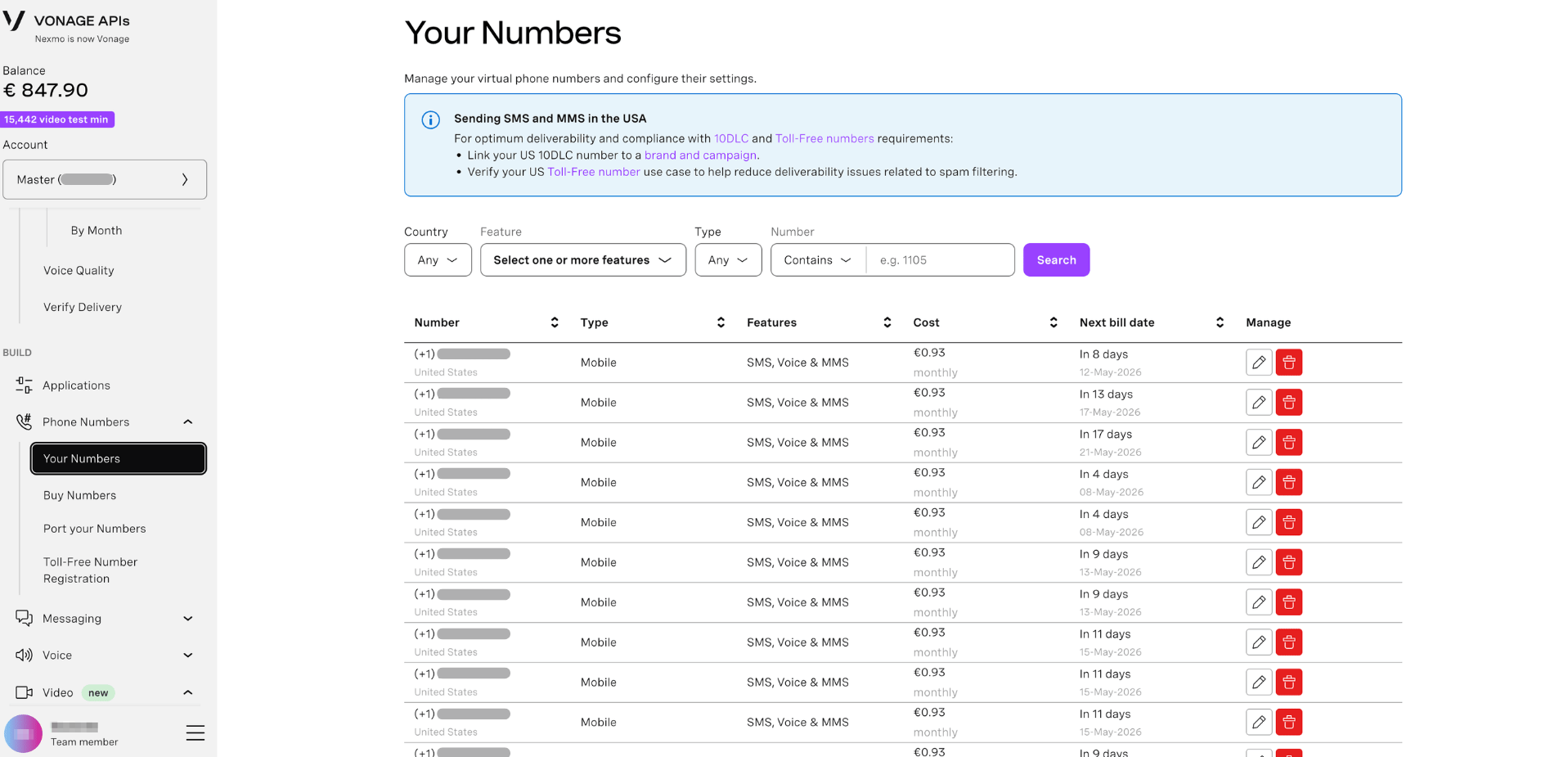
View Your Numbers
To view all virtual numbers on your account:
- Sign in to the Dashboard.
- Navigate to Your Numbers.
Each number is listed in a table with the following columns:
- Number - The virtual phone number and its country.
- Type - The number type, e.g. Mobile or Tollfree.
- Features - The capabilities enabled on the number, e.g. SMS, Voice & MMS.
- Cost - The monthly rental cost of the number in euros.
- Next bill date - The date the number will next be charged to your account balance.
- Manage - Actions to edit or cancel the number.
Search Your Numbers
To filter the numbers shown in the table:
- Use the search filters at the top of the page:
- Country - Filter by the country the number is based in.
- Feature - Filter by one or more capabilities: SMS, Voice, or MMS.
- Type - Filter by number type: Any, Landline, Mobile, or Toll-Free.
- Number - Search by a digit pattern. Use the Contains dropdown to match numbers that start with, contain, or end with the pattern
- Click Search to apply the filters.
Manage a Number
To edit the configuration of a number:
- In the left-hand navigation, click Your Numbers.
- Find the number you want to configure.
- Click the edit (pencil) icon in the Manage column.
- Update the number's settings as required and save your changes.
Cancel a Number
To cancel a number and remove it from your account:
- In the left-hand navigation, click Your Numbers.
- Find the number you want to cancel.
- Click the delete (trash) icon in the Manage column.
- Confirm the cancellation when prompted.
Note: Cancelling a number removes it from your account immediately. The number may become available for purchase by other customers.
Download Your Numbers
To export a list of all numbers on your account:
- In the left-hand navigation, click Your Numbers.
- Click the Download button at the bottom of the page. The button displays your current API key, e.g. Download (13ba7bf9).
A file containing your number inventory will be downloaded to your machine.
Sending SMS and MMS in the USA
For optimum deliverability and compliance with US messaging requirements:
- 10DLC numbers — Link your US 10DLC number to a brand and campaign to meet carrier requirements and improve SMS deliverability.
- Toll-Free numbers — Verify your US Toll-Free number use case to help reduce deliverability issues related to spam filtering.
For more information, see the 10DLC documentation and Toll-Free number documentation.