
Share:
)
A trained actor with a dissertation on standup comedy, I came into PHP development via the meetup scene. You can find me speaking and writing on tech, or playing/buying odd records from my vinyl collection.
Managing PHP Extensions Is As Easy As PIE
Time to read: 8 minutes
I think there’s never been a better time to be a PHP Developer. Maybe I have rose-tinted glasses on, or perhaps I’ve simply not experienced enough historic pain, but FrankenPHP has given the language a new lightning-quick runtime, and PHP applications can now be natively built for Android and iOS devices for free with NativePHP.
In this article, we’re going to look at the PHP Installer for Extensions (PIE) and create a custom PHP extension.
I often experience knowing nods when the subject of Composer comes up. This is usually accompanied by the statement that “PHP has the best package manager”. Because of Composer’s robust features, I don’t think I’ve ever experienced difficulty with it. I thought, “What ecosystem circumstances give us tools like this?” Not to put down the immense amount of work from Nils and Jordi that made it possible, but I’ve also noticed that PHP tends to have a lot of de facto tooling, that less is more. Composer is our de facto package manager. Compare that with, say, Node or Python, where developers have to have their finger on the pulse to see what comes next and what the community decides “is the best”. New tooling appears in an attempt to fix the limitations of the current situation.
 Which JavaScript manager is it this week?Composer replaced PEAR. But for C extensions on PHP, that has always been PECL. In the same lifecycle, it appears that we now have our new “de-facto extension manager” in the form of the PIE. Before diving into how to use it and what it can do, I thought it best to ask some burning questions I had to its author, James Titcumb.
PECL and PEAR have a somewhat confusing relationship. How and when did PECL come about?
PEAR - the PHP Extension and Application Repository was founded in 1999 as both a tool and distribution system for PHP code. Functionally, it does what Composer now does, but in a slightly different approach. PECL was an offshoot of that; a standalone tool to connect to PEAR channels and build extensions. This stuff is extremely archaic, and whilst PEAR has been all but overshadowed by Composer, PECL has, until recently, still been the standard way to install PHP extensions.
Given that PECL has been around forever, why here and now for PIE?
The PIE project is in part funded by the Sovereign Tech Agency, a program from the German government to promote and ensure the long-term sustainability of open source technologies. PECL has been historically difficult to maintain, is far inferior in terms of dependency management when compared to Composer, and requires infrastructure maintenance. The number of people who know how that infrastructure works is worryingly small. So, in line with the PHP Foundation's goal of reducing the "bus factor" for PECL and its associated infrastructure, PIE was born, with an aim to solve these issues.
My confidential sources inform me you work for "The PHP Foundation". What is that, and what work do you do there?
The PHP Foundation is an organisation set up initially because a group of people got together, realising the number of people who were actively working on PHP was so low, two, and then down to one at one point. The goal is to ensure the long-term sustainability of the PHP programming language, which is important when you consider how much of the web is running on PHP systems! One of the remits of the foundation is to employ developers to work on PHP and its close ecosystem - and as such, the foundation is always looking for sponsors.
What new features can we expect to see in 2026?
A big push in the current in-development PIE 1.4 series is to ensure PIE works better with existing extension installer systems that previously wrapped PECL or had their own way of doing things (such as in Docker), as well as to take away some of the pain of end users needing to install prerequisites (such as build tools, system libraries, etc.). We'll also be experimentally providing pre-built executable binaries of PIE itself using a tool called Static PHP. There's a lot more on the horizon too. The end goal is to have PIE completely replace PECL, and we're working our way towards that.
So, this tutorial comes in two parts. Firstly, we’ll install PIE and use it to fetch an example extension. Then we get onto the more complex stuff by writing our own extension and getting PIE to compile it.
That’s right. C. I’ve spoken to developers in other language communities many a time, and they are often quite surprised to learn for the first time that Rasmus Lerdorf built PHP as a language compiled from C. So, to write a PHP extension that will be used by PIE? Yep, it’s going to be in C.
PIE comes as an executable PHAR (Shoutout to Davey Shafik from back in the day for his amazing work in bringing this to PHP). You can download the PHAR from here, and then put it into your command-line executable PATH for whichever operating system you are using.
Once you have either set an alias in your shell RC file or added PIE to your path, you can use it to install an example extension. We’ll do this first, before creating our own.
pie install asgrim/example_pie_extension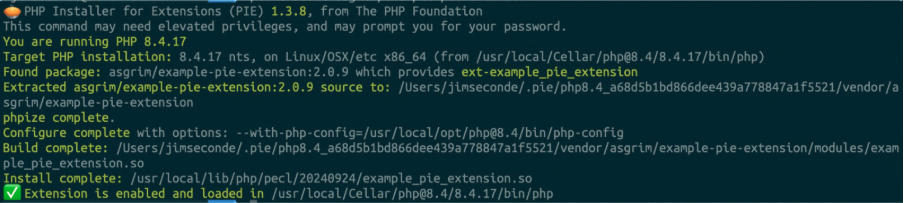 Composer, but slightly different!Fantastic, it’s installed. Time to check if it works: create a new PHP file and add the following:
test.php

<?php
    example_pie_extension_test();
Outputs:
php test.php

Hello, world!
Ah, the old classic. We’re cooking now.
Those familiar with the Laravel world will know the infamous dd() helper. It runs both var_dump()and then die(). This code sits in the Laravel core, but what if we decided to actually code our own extension to natively have this function at PHP runtime? That’s exactly what we’re going to do!
Start by setting up a project folder. For example:
mkdir native_dd
cd native_dd && touch native_dd.cI hope you’ve got your C language extensions installed on your IDE!
We’ve created native_dd.c. As we’re now in C-land, it’s time to start coding with the Zend engine!
#include "php.h"
#include <ext/standard/php_var.h>
#include "php_native_dd.h"

PHP_FUNCTION(native_dd)
{
   zval *value;

   ZEND_PARSE_PARAMETERS_START(1, 1)
       Z_PARAM_ZVAL(value)
   ZEND_PARSE_PARAMETERS_END();

   php_var_dump(value, 0);

   php_printf("\n");
   php_output_flush();

   zend_bailout();
}

ZEND_BEGIN_ARG_INFO(arginfo_native_dd_test, 0)
ZEND_END_ARG_INFO()

static const zend_function_entry native_dd_functions[] = {
   PHP_FE(native_dd, arginfo_native_dd_test)
   PHP_FE_END
};

zend_module_entry native_dd_module_entry = {
   STANDARD_MODULE_HEADER,
   "native_dd",
   native_dd_functions,
   NULL,
   NULL,
   NULL,
   NULL,
   NULL,
   "0.1.0",
   STANDARD_MODULE_PROPERTIES
};

ZEND_GET_MODULE(native_dd)
There are several things to note here. Firstly, to code a PHP Function, you need to adhere to the structure that is used by the Zend Engine. You can read more about these requirements here: https://www.phpinternalsbook.com/php5/build_system/building_extensions.html.
By the time we’ve got all the files we need, your project’s file structure should look like this:
pietest/
  composer.json
  composer.lock
  config.m4
  native_dd.c
  php_native_dd.h
  test.php
Don’t worry if you’re missing files at this point; we’ll get to them.
The TLDR here is this:
You must include PHP first, as the include order in C is important
This module uses part of the standard library (
php_var_dump()) so that needs to be imported:#include <ext/standard/php_var.h>You need to include a header file for the function, more on that shortly
The naming used for the API layer of PHP in C is
PHP_FUNCTION()for the definition,ZEND_BEGIN_ARG_INFO()andZEND_END_ARG_INFO()for more detail in the arguments.zend_function_entry <your-module-name>with suffix<your-module-name>_functions[]is used with a Macro,PHP_FE, which compiles your function to a Zend Internal Function. The last steps are defining the function as a module withzend_module_entryandZEND_GET_MODULE.php_var_dump, the same underlying function used by PHP’svar_dumpis imported and usedAn equivalent of
die()is used, which iszend_bailout()
Understandably, most of this might look alien to PHP developers such as myself. Getting to grips with Zend Engine quirks and API definitions is not for the faint of heart, but the really nice bit comes with PIE.
The module requires a header file and a config file, so create a config.m4 file and a php_native_dd.h file.
config.m4

PHP_ARG_ENABLE(native_dd, whether to enable native_dd,
[  --enable-native-dd   Enable native_dd])

if test "$PHP_NATIVE_DD" != "no"; then
    PHP_NEW_EXTENSION(native_dd, native_dd.c, $ext_shared)
fi


php_native_dd.h

#ifndef PHP_NATIVE_DD_H
#define PHP_NATIVE_DD_H

extern zend_module_entry native_dd_module_entry;
#define phpext_native_dd_ptr &native_dd_module_entry

#endifYears ago, I seem to remember trying to compile my own module and failing miserably with the platform I was attempting to build it on. I don’t think back then I even knew how things like GCC and MAKEFILEs worked.
So, guess what we’re going to do now? That’s right, use PIE to get it to do all of the hard work.
… if you have everything set up correctly.
PIE requires various libraries at Operating System level, so make sure you have everything needed.
For extension authors, you treat your C code like any other dependency - using Composer. Our code’s composer.json looks like so:
{
   "name": "jimseconde/nativedd",
   "description": "A Native dd() helper for core PHP to be installed with PIE",
   "authors": [
       {
           "name": "jimseconde",
           "email": "jim.seconde@googlemail.com"
       }
   ],
   "require": {
       "php": "^8.3"
   },
   "type": "php-ext",
   "php-ext": {
       "extension-name": "native_dd"
   },
   "license": "MIT"
}
The important part here is type, which tells Composer that this isn’t a PHP dependency, but php-ext defines it as an extension. You must accompany that with the php-ext key, which defines the extension-name. When running PIE with pie install, the PIE code will look at the composer.json and then build it from there:
pie install Built, enabled, and loaded!Now, create a test PHP file and use it.
<?php

$myVariable = "test string";
native_dd($myVariable);Run it, and:
php test.php

string(11) "test string"Done.
I’ll admit that I never thought I’d see the day when I could actually code my own PHP Functions. You’ll see from the build process when running PIE (you can add verbosity filters to the command line with -v -vv etc to get more logs) that it takes care of a lot of things to make it this easy to either pull down existing extensions or build your own. For other exciting uses, I can see (for example) custom extensions used for NativePHP builds that will enable access to all kinds of native API’s within a device or machine.
Have a question or want to share what you're building?
Subscribe to the Developer Newsletter
Follow us on X (formerly Twitter) for updates
Prefer video? Watch tutorials on our YouTube channel
Connect with us on the Vonage Developer page on LinkedIn
Help us improve our developer experience by filling out our Voice of the Developer Feedback
Stay connected and keep up with the latest developer news, tips, and events.