)
Introducing Audio Connector SDK & Pipecat Serializer for AI Audio Apps
Time to read: 5 minutes
Real-time AI applications are transforming how developers build voice and video experiences. Whether powering transcription services, conversational agents, real-time translation, or sentiment analysis, modern applications increasingly require access to raw audio in motion—not just at the end of a recording or after a file upload.
Pipecat, an open-source framework, enhances the integration of Vonage's Video and Voice APIs with audio connectors by providing a modular, vendor-neutral platform for orchestrating AI workflows. With features like ultra-low latency, advanced voice activity detection, and multimodal support, Pipecat enables developers to create highly responsive and natural conversational AI experiences. Its flexibility enables seamless integration with a range of AI models and services, making it an ideal choice for building rich, real-time audio and video applications.
To support this next generation of intelligent applications, Vonage has introduced two complementary tools designed specifically for developers: the Vonage Audio Connector Python Server SDK and the Vonage Serializer for Pipecat. Together, they make it dramatically easier to stream audio between Vonage Video and Voice sessions, WebSocket servers, and AI frameworks such as OpenAI, Deepgram, or AWS Nova Sonic.
This blog gives an overview of these tools, explains how they fit together, and provides references for deploying your first AI-powered agent.
Many AI workflows—speech-to-text, LLM-driven analysis, voice synthesis, and multimodal perception—depend on real-time audio. Developers working with the Vonage Voice and Video APIs have long asked for a simple, reliable way to receive audio from an active session, process it, and send responses back.
The Vonage Audio Connector for the Video API and Voice API WebSocket integration enables developers to build WebSocket servers that bridge Vonage Sessions to AI workflows.
However, building low-latency WebSocket servers, managing binary audio frames, coordinating sample rates, and maintaining stateful connections can be complex and error-prone. This complexity often slows down experimentation, proof-of-concept development, and production deployments.
The Vonage Audio Connector SDK removes this friction.
The toolchain supports a wide range of real-time AI experiences, including:
Speech-to-text transcription
LLM-based meeting assistants
Sentiment or intent analysis in live calls
Interactive voice bots
Real-time language translation
Automated note-taking or summarization
Audio moderation and compliance detection
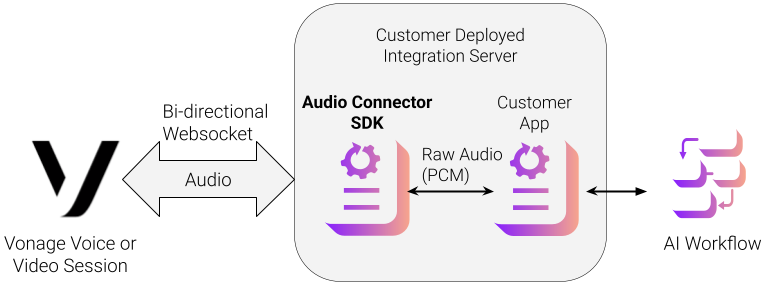
The following diagram shows an architecture of a video session or voice conversation integrated with the Audio Connector SDK via a WebSocket. The SDK is a Python package (available on PyPI) that abstracts away the complexity of managing WebSocket audio streams from Vonage sessions.
Event-driven WebSocket server for receiving and sending PCM audio
Support for 8 kHz, 16 kHz and 24kHz samples with automatic frame handling
Clean async callbacks for connect, disconnect, message, and error events
Built-in buffering and timing control for smooth playback
Multiple concurrent connections for multi-agent or multi-participant workflows
TLS support for secure production deployments
This lets developers focus entirely on what they want to build—transcription pipelines, analysis tools, voice assistants—without needing to write any WebSocket infrastructure.
The SDK can be installed from the Python Package Index using a Python package manager.
pip install vonage-audio-connector-server
The SDK developer guide provides a basic reference for configuring/starting the WebSocket server, setting up asynchronous handlers for session and audio management, and injecting audio back into the Video Session via the WebSocket.
Information on opening a WebSocket connection from a Video Session to a server using the SDK is available on the Audio Connector developer page. Information on opening a WebSocket connection from a Voice Conversation to a server using the SDK is available on the Voice WebSockets developer page.
You can clone the sample code for using the Audio Connector SDK from the GitHub repository
Pipecat is an open-source framework for orchestrating complex AI workflows across audio, video, images, and text. For audio-focused applications, the new Vonage Serializer for Pipecat acts as a bridge between the Vonage Voice and Video sessions and a Pipecat processing pipeline.
Converts inbound Vonage audio frames into Pipecat’s internal frame format
Aligns sample rates and audio encodings
Supports DTMF and other metadata
Converts outbound Pipecat audio frames back into Vonage WebSocket frames
This means developers can use Pipecat’s growing list of AI nodes—OpenAI Realtime, Deepgram, Whisper, ElevenLabs, etc.—without writing any media translation code.
The serializer provides a direct line between a live participant’s audio and a fully programmable AI workflow.
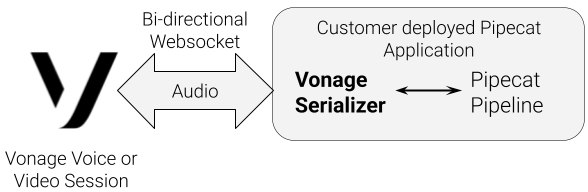
The Serializer guide provides a basic reference for setting up the Vonage Serializer with Pipecat.
Using the Vonage Audio Connector SDK or Pipecat Serializer gives developers a clean, modern, Python-friendly way to build real-time audio agents—without needing to reinvent WebSocket servers or media pipelines.
Whether you want to build a voice bot, integrate speech-to-text with an LLM, generate real-time synthesized responses, or analyze call behavior, these tools provide the foundations you need.
If you are ready to begin, explore:
The PyPI package for the Audio Connector SDK
Sample applications for the SDK
Vonage examples in the Pipecat repo
With these tools, you can deploy your first AI agent in minutes—and build confidently toward fully intelligent, media-aware applications on the Vonage platform.
Have a question or want to share what you're building?
Subscribe to the Developer Newsletter
Follow us on X (formerly Twitter) for updates
Prefer video? Watch tutorials on our YouTube channel
Connect with us on the Vonage Developer page on LinkedIn
Help us improve our developer experience by filling out our Voice of the Developer Feedback
Stay connected and keep up with the latest developer news, tips, and events.