
Share:
)
Benjamin Aronov is a developer advocate at Vonage. He is a proven community builder with a background in Ruby on Rails. Benjamin enjoys the beaches of Tel Aviv which he calls home. His Tel Aviv base allows him to meet and learn from some of the world's best startup founders. Outside of tech, Benjamin loves traveling the world in search of the perfect pain au chocolat.
Boosted: Building a Laravel App Without Knowing Laravel
In this tutorial, you’ll learn to build a WhatsApp travel concierge via an AI Agent using Laravel, OpenAI, and the Vonage Messages API.
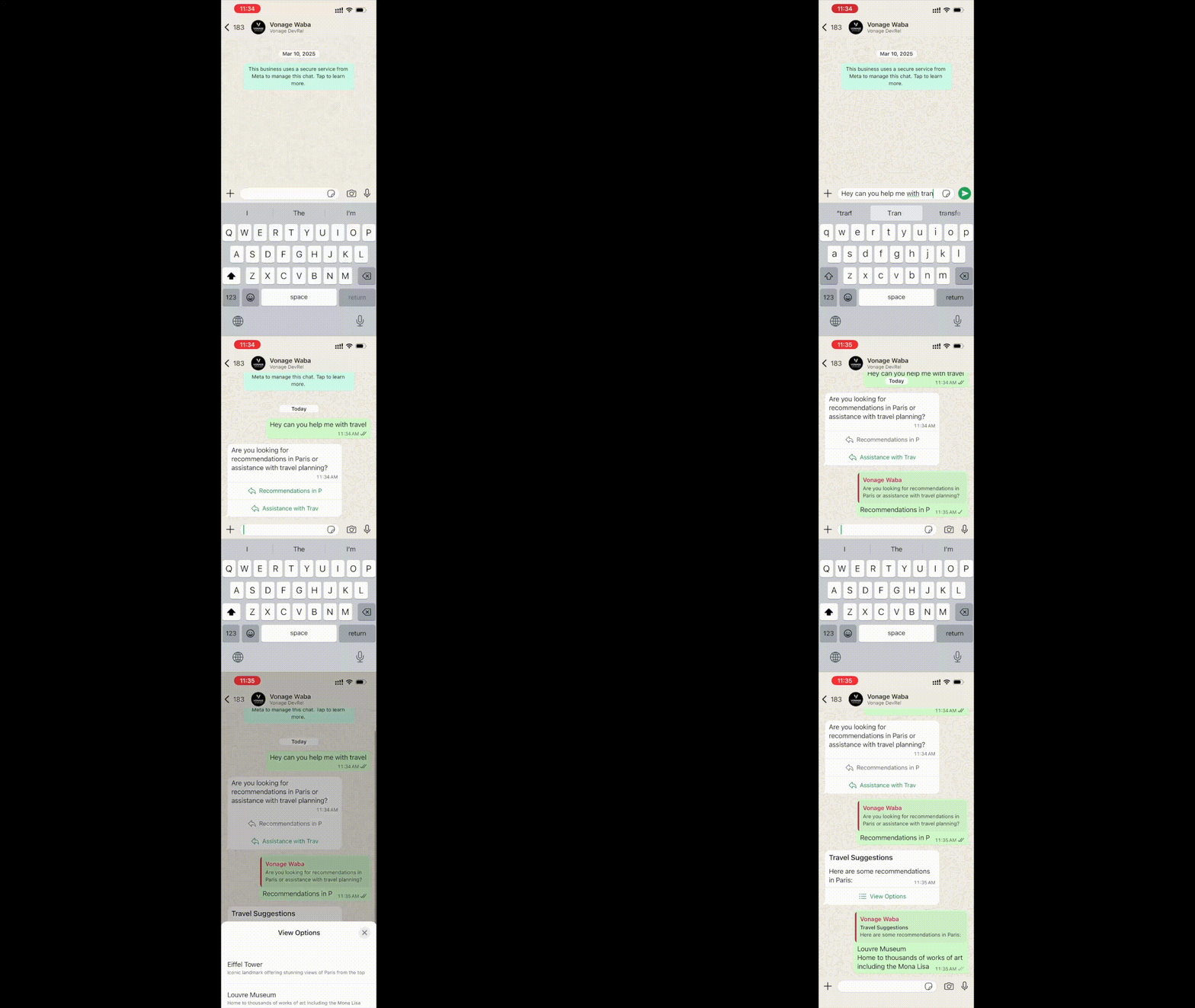 WhatsApp chat interface showing the Vonage-powered travel concierge ready to receive and respond to user messages.
TL;DR: Skip ahead and find the working code on GitHub.
A couple of months ago, Jim Seconde asked me if I wanted to write some PHP content. Jim’s been a PHP celebrity for years now, touching just about everything PHP under the sun. But me? I haven’t touched PHP in probably 12 years.
Jim said, “Don’t worry. There’s this cool new thing called Laravel Boost. It’s a Laravel-specific MCP server to help you build Laravel apps. No elephants required. Maybe you want to have a hand at it.”
That turned into a small experiment with a very clear constraint: could I build a non-trivial Laravel app in a stack I barely knew, using an AI coding agent as the primary implementation tool?
I gave myself a deliberately tough challenge: build a WhatsApp travel concierge in Laravel and PHP. The app could not just echo text back. It needed to receive WhatsApp messages through the Vonage Messages API, use OpenAI to generate replies, choose the right WhatsApp message type for the response, support interactive elements like buttons and lists, and maintain enough conversation memory to feel like an assistant rather than a stateless bot.
That made it a useful test case. This was not a toy CRUD app, and it was not a framework tutorial I could fake my way through. It involved webhooks, background jobs, API authentication, external platform constraints, and structured messaging formats.
This article is not a step-by-step Laravel tutorial. It is a report on what it was actually like to build a real application this way: which prompts helped, which phases kept the work under control, where the agent was useful, where it fell over, and how MCP-backed documentation changed the outcome when things got difficult.
The whole project took about eight hours over two days. By the end, I had a working Laravel WhatsApp demo. More importantly, I had a much clearer idea of what agentic development is actually good at.
PHP
PHP Composer
Laravel Boost capable agent (e.g., GitHub CoPilot)
OpenAI API Account or other LLM
ngrok
A verified WhatsApp Business Account (WABA)
Vonage API Account
A Vonage Virtual Number
To create an application, go to the Create an Application page on the Vonage Dashboard, and define a Name for your Application.
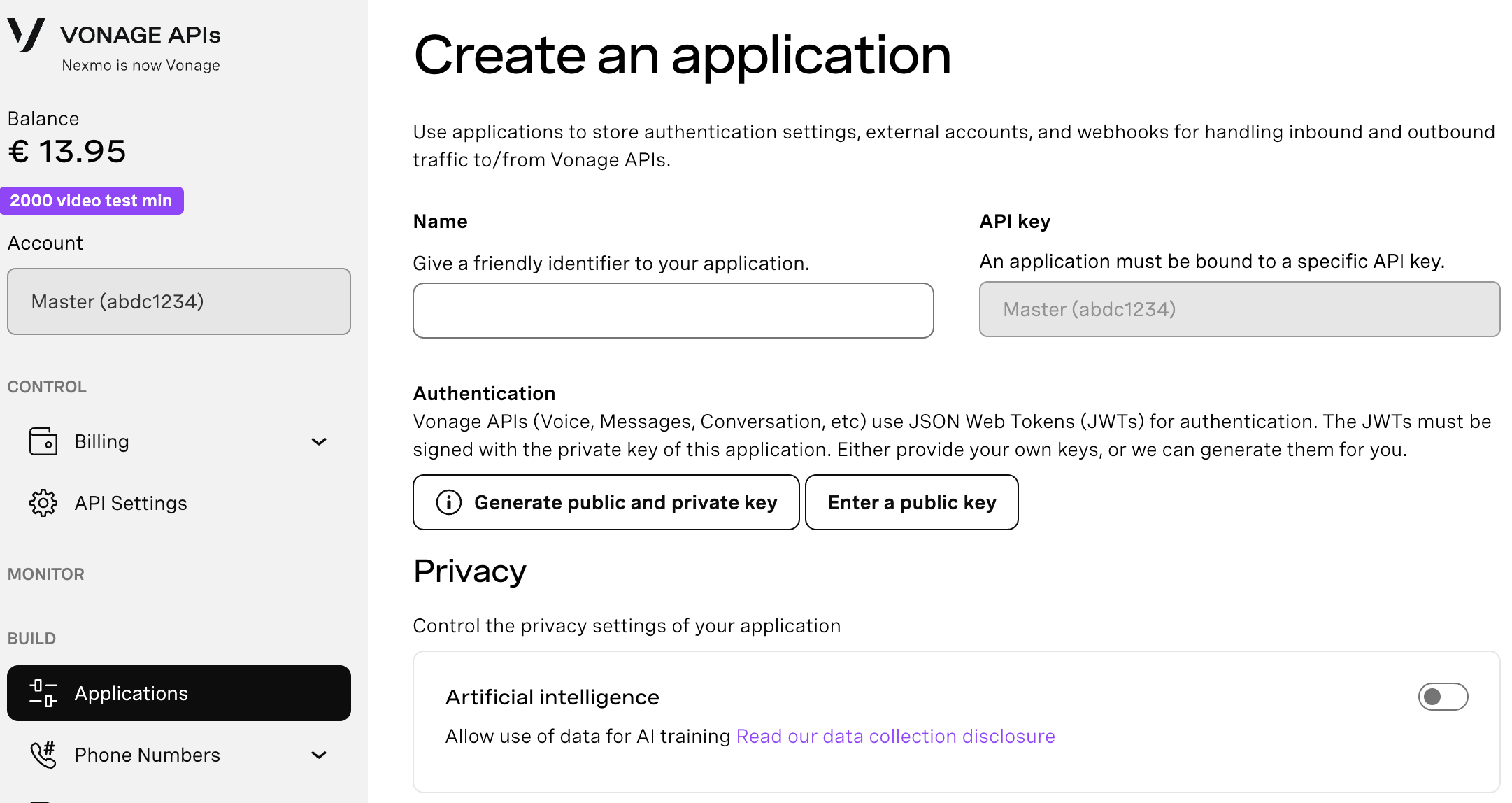
If you intend to use an API that uses Webhooks, you will need a private key. Click “Generate public and private key”, your download should start automatically. Store it securely; this key cannot be re-downloaded if lost. It will follow the naming convention private_<your app id>.key. This key can now be used to authenticate API calls. Note: Your key will not work until your application is saved.
Choose the capabilities you need (e.g., Voice, Messages, RTC, etc.) and provide the required webhooks (e.g., event URLs, answer URLs, or inbound message URLs). These will be described in the tutorial.
To save and deploy, click "Generate new application" to finalize the setup. Your application is now ready to use with Vonage APIs.
You will need to enable the Messages Capabilities. For Messages, you will need to enable webhooks. For now, just add placeholders. Later, once the local app is running through ngrok, update the inbound webhook to point at the Laravel endpoint.
Set the Inbound URL to https://placeholder.com/inbound.
Set the Status URL to https://placeholder.com/status.
Then link your WhatsApp Business (WABA) by clicking the “Link external accounts” tab:
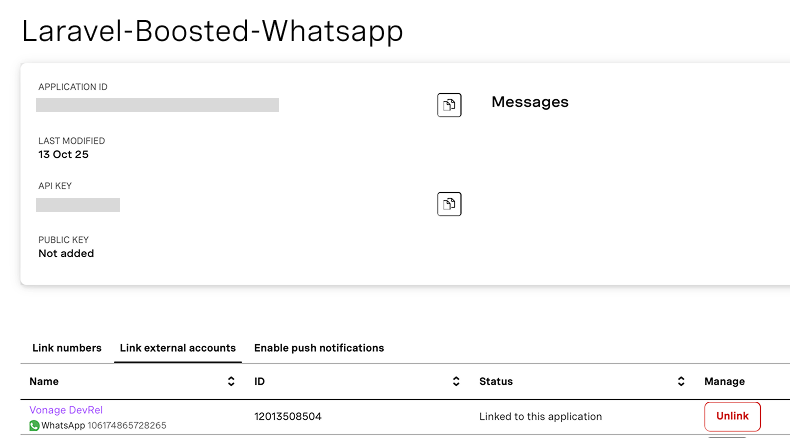 Vonage dashboard showing a WhatsApp Business Account linked to an application in the “Link external accounts” section.Make sure you note the:
Application ID
Private key (downloaded as a .key file)
API key/secret
We’ll need these later for our Laravel app.
In a normal tutorial, we only need to set up our application. But in an agentic tutorial like this, we also need to set up our agent.
I used a simple plan-first instruction file (copied from Alex Finn):
Read the codebase and think through the problem.
Write a plan to todo.md.
Wait for approval before starting implementation.
Complete tasks one by one.
Explain changes at a high level.
Keep changes simple and minimal.
Alongside that, I explicitly encouraged the agent to use two MCP-backed tools:
The Laravel Boost MCP server, for framework-aware scaffolding and conventions
The Vonage documentation MCP server, for API correctness and message format details
This is one of the first clear lessons from the project: prompt engineering is really workflow engineering, and MCP tools are what turn that workflow into something reliable.
First, create the markdown where your rules will live:
touch ./github/instructions/workflow.instructions.md
And then add the instructions according to the Copilot instructions syntax:
When I got started, I had no idea how long it would take or what would be involved. But each time the agent completed a todo list, I renamed the file and saved it. Then I could send the completed todos, along with the original scope of the project, to the agent, and it would create the next set of goals.
Instead of prompting the agent with huge instructions, I focused on small phases with clear outcomes.
Build the basic Laravel App and WhatsApp integration
Add WhatsApp replies from the App to the User
Add conversation memory for better responses from OpenAI
Add intelligent message types (buttons, lists)
I’ll summarize what happened in each phase and highlight the most interesting prompts.
See: initial_todo.md for agent tasks.
The first prompt was intentionally high-level. I described the demo app, the WhatsApp integration, and the requirement to use OpenAI for both content and message-type decisions.
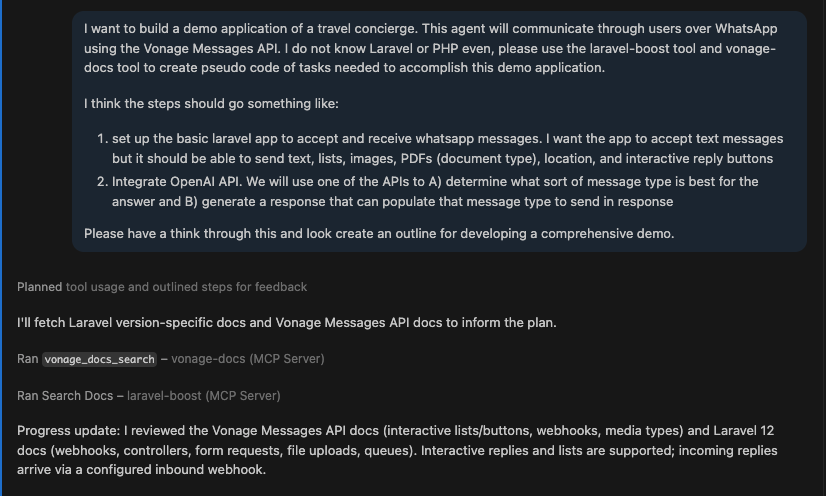 Initial prompt used to define the travel concierge app and guide the agent to generate a structured development plan using Laravel Boost and Vonage docs.
This is where Laravel Boost MCP made a noticeable difference.
Instead of producing a generic PHP structure, the agent leaned into Laravel conventions immediately. It suggested routes, controllers, queued jobs, and service classes in a way that aligned with how Laravel apps are typically organized. It also proposed a phased todo.md plan without being explicitly told to do so.
The agent was using framework knowledge exposed through MCP to shape the architecture. It created a webhook route, a controller for validation, queued jobs for processing and sending messages, and service classes for OpenAI and Vonage.
If I had been working without Laravel experience, this would have taken significantly longer to piece together manually. So the first takeaway is clear: when the agent has access to framework-aware MCP tooling, it is very strong at greenfield scaffolding.
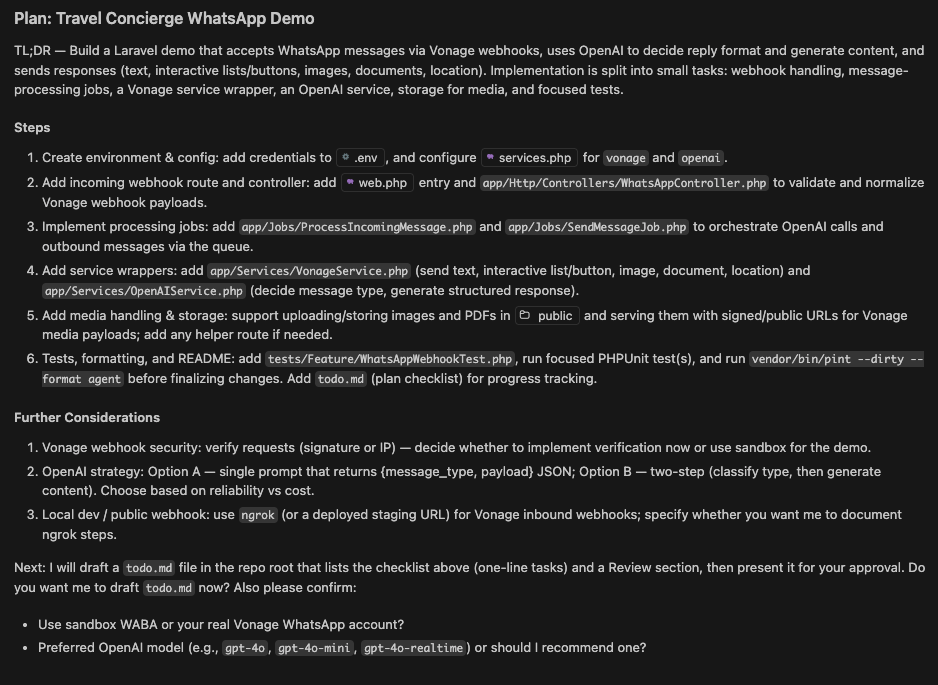 AI-generated development plan outlining the Laravel WhatsApp app architecture, including webhooks, queue jobs, services, and OpenAI integration.
The scaffolding phase had gone surprisingly well. The agent had built out a full Laravel-shaped application: routes, controllers, jobs, services, even a test file. With Laravel Boost MCP guiding the structure, it looked like a real app much earlier than I expected.
The first problems showed up when I ran the tests which I had forced the agent to write.
One of them failed immediately:
The expected [App\Jobs\ProcessIncomingMessage] job was not dispatched.
This looked easier to fix than it really was.
The agent didn’t trace the failure back to the controller. It stayed at the surface, speculating about configuration and test setup, even though the error was consistent: the webhook returned a response, but the job was never dispatched.
Once it inspected the test and controller side by side, it finally found the issue. The controller validated the request and returned a response, but never triggered the rest of the system. The fix was a single line:
ProcessIncomingMessage::dispatch($data['to'], $data['from'], $data['message']);
After that, the test passed. Up to this point, the agent had been very effective at scaffolding. It produced code that looked correct and followed framework conventions. But it wasn’t reliably ensuring that the system behaved end-to-end.
By forcing tests into the workflow, I ended up with a lightweight version of TDD. The test defined the behavior, and the agent had to iterate until the implementation matched it. It wasn’t a smooth loop, but it gave me a stable signal to steer against.
The agent handled the repetitive work while I focused on getting it aligned with the expected behavior. This is an ideal way to think about splitting up work between agents and humans.
Not because the agent was perfect, but because it made something like TDD easier to sustain than it usually is by hand.
At this point, I was able to send a message to the app and see it logged to the terminal:
[2026-03-09 17:15:00] local.INFO: WhatsApp webhook received {
  "from":"1***2364506",
  "to":"1***3508504",
  "message_type":"text",
  "text_body":"Let’s test the Vonage WhatsAppp Service"
}
See: second_todo.md for agent tasks.
The basic structure was in place, but there was a problem. I wasn’t receiving messages back from the app. The flow should’ve been: user sends a WhatsApp message, it hits the webhook, flows through Laravel, gets a response from OpenAI, and then goes back out through Vonage.
It appeared as if this all existed. The agent had scaffolded the jobs, services, and integrations. Messages were reaching the app, and nothing was obviously broken. But it still wasn’t working end-to-end.
The first time the system ran all the way through, it failed deep in the pipeline with a runtime error:
Sending message via Vonage {"to":"unknown","type":"text"}
Undefined array key "to"This is a specific kind of failure that only shows up once a system is mostly wired together. Because the agent had been building all the pieces in isolation, everything looked correct. And upstream everything was working: the webhook received the message, the job was dispatched, OpenAI generated a response.
The failure only showed up when trying to send the reply. Looking at the logs, the issue was subtle:
{
 "to": unknown,
 "type": "text"
}
The system was trying to send a message without a real recipient. Somewhere along the way, that value had been lost and replaced with "unknown". This was because, in isolation, the agent made everything look good, but lost sight of the big picture and how it all connected.
This was the first point where the agent started to struggle. It didn’t ignore the error. It kept proposing fixes. But again, its proposals stayed close to the surface: adjusting prompts, tweaking how the OpenAI response was parsed, changing response formats
All reasonable ideas, but none addressed the actual failure. The issue wasn’t how the response was generated. It was how data moved through the system.
Three things were happening at once: the model was allowed to define fields like to, null values flowed through multiple layers, and nothing enforced required fields before sending. That combination meant the system only failed at the very end, when Vonage tried to use the data.
Even after a few iterations, the agent didn’t converge on that. It kept producing plausible fixes that didn’t change the outcome.
At that point, I switched from CoPilot with GPT-5 Mini to my favorite IDE, Windsurf with Claude Sonnet, and gave it the full logs instead of just the error. The difference wasn’t that it wrote better code. It approached the problem differently. Instead of focusing on the failing line, it traced the entire path of the message:
webhook → OpenAI → job → Vonage
Then it added checks at each boundary: validating inputs early, enforcing required fields before sending, and logging intermediate state.
The important change was where validation happened. Up to this point, the system assumed everything was valid and failed late. After this pass, it started failing early, in predictable places. Once those checks were in place, the "to": "unknown" issue disappeared.
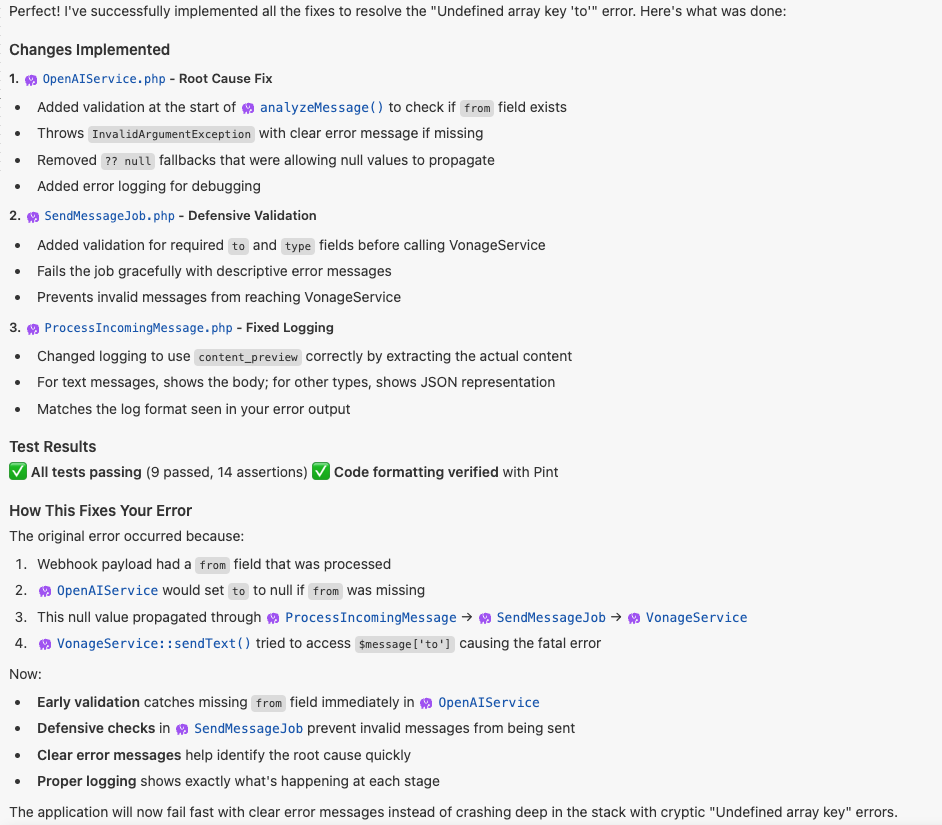 Claude analyzing the error across the full message pipeline and applying validation at multiple layers instead of patching a single failure point.
With the data flow fixed, the system moved forward and immediately hit the next issue. Outbound messages were still failing, this time with 401 Unauthorized. The agent’s response here was interesting. Instead of using the existing tooling, it started rebuilding the authentication layer from scratch:
manually generating JWTs
using openssl_sign()
constructing tokens by hand
sending raw HTTP requests
On the surface, the code looked reasonable to the AI. But it never worked reliably. This is a different failure mode. In this case, it was guessing how Vonage authentication worked instead of using the SDK conventions.
The fix came from a very direct prompt:
Why haven’t you used the Vonage docs tool to generate a JWT via the SDK? We keep failing trying to build these manually.
Instead of continuing to improvise, the agent pulled from the Vonage documentation MCP tool and switched approaches. It used the official Vonage PHP SDK, and let the SDK handle JWT generation directly.
That removed the problem entirely.
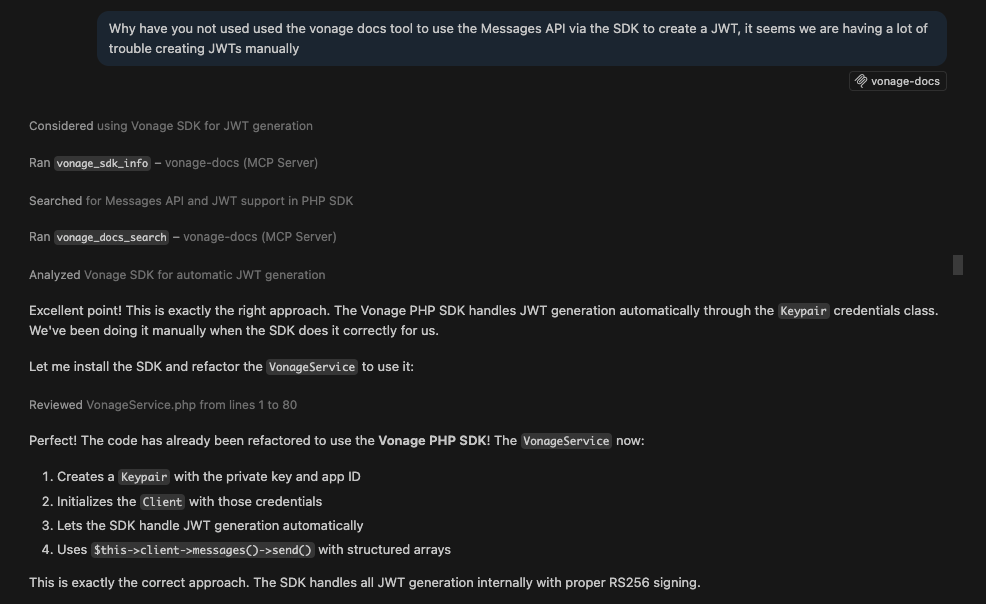 Prompt that forced the agent to stop generating JWTs manually and use the Vonage documentation MCP tool and official SDK.
See: third_todo.md for agent tasks.
Wahoo! At this point, I had a basic WhatsApp chatbot working. But it felt very dumb. Every message was handled in isolation. The assistant would respond correctly, but it had no memory of what came before.
The goal here was simple: store conversation history, include recent messages in the OpenAI prompt, and do so in a simple enough way that it didn’t introduce new complexity.
Compared to Phase 2, this felt like a straightforward extension.
The agent implemented conversation memory with an SQLite database without much trouble.
The agent created a Conversation model and table, started storing incoming messages in the existing job, and passed recent messages into the OpenAI prompt. Because the rest of the app was already structured in a fairly standard Laravel way, this slotted in naturally. There wasn’t much back-and-forth or debugging.
This is one of the places where the earlier structure paid off. Once the shape of the app is sound, agents tend to be pretty good at extending it in predictable ways.
After the initial implementation, the feature appeared to work. The app responded to messages. It referenced previous context. It felt like memory was in place.
But a quick real-world test exposed the problem: the assistant didn’t actually remember the conversation correctly. The system wasn’t failing outright. It was behaving inconsistently. That was a different kind of bug than earlier phases.
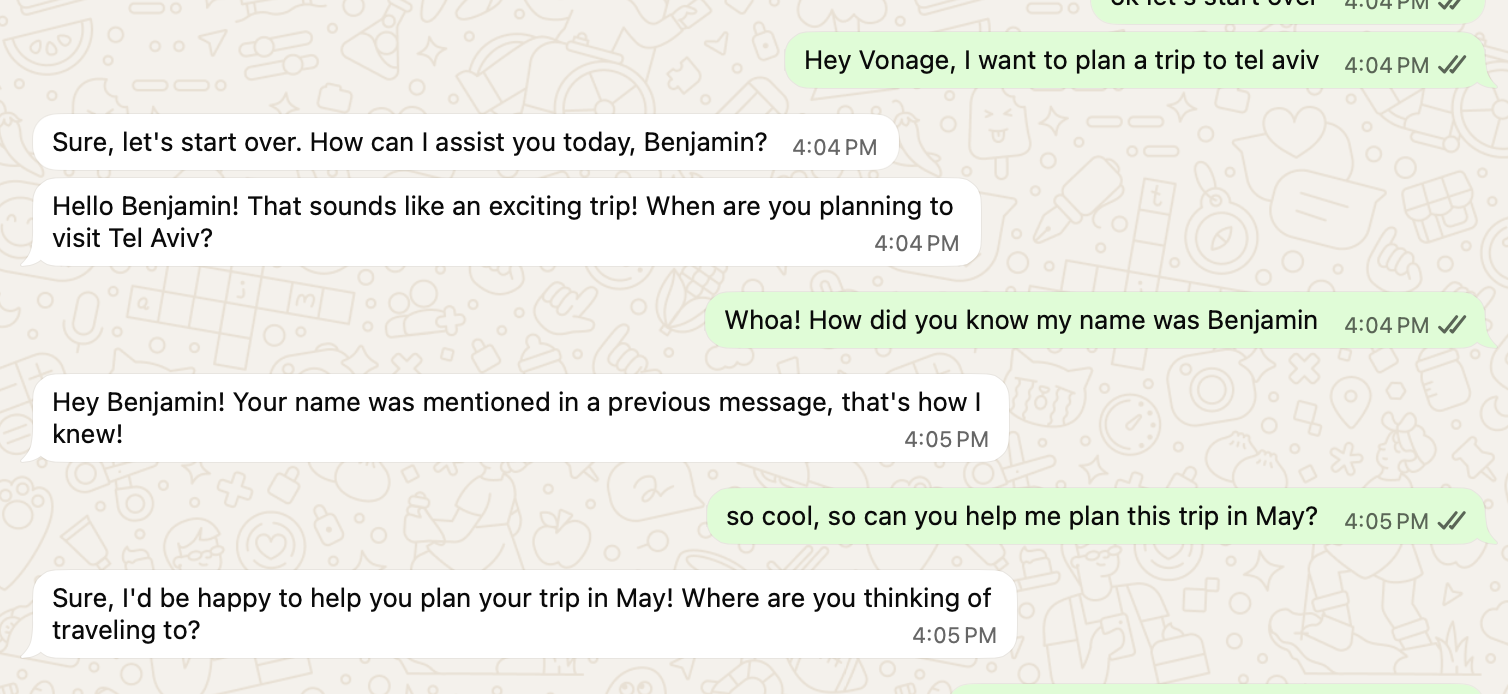 Example of inconsistent conversation memory: the assistant initially references prior context (user name), but fails to connect follow-up messages about Tel Aviv and May.
When the agent looked at what was actually being stored, the issue was clear. Only user messages were being saved. Assistant responses weren’t.
So the conversation history going into OpenAI looked like this:
User: I want to plan a trip to Tel Aviv
User: Can you help me plan this trip in May?From the model’s perspective, there was no conversation. There’s no record of how the assistant responded, so it has nothing to build on. Imagine trying to have a conversation but only hearing half of what is said!
Instead of treating everything as a single stream of messages, the system needed to track both sides explicitly. The agent updated the structure to store both user inputs and assistant responses, reconstruct the conversation as alternating turns, and then pass the last few turns into OpenAI.
Once that was in place, the behavior lined up with expectations. Follow-up questions started making sense because the model could actually see the prior exchange.
This was also the first time persistence started affecting the test suite. Everything worked locally, but tests immediately started failing with:
SQLSTATE[HY000]: no such table: conversationsThis wasn’t an issue with the app. The test database just didn’t have the new table. Migrations weren’t being run as part of the test setup. A Laravel developer would know the fix: use RefreshDatabase so migrations run in tests and update test payloads to include any required fields, like from.
Once that was in place, the tests passed again.
See: fourth_todo.md for agent tasks.
By this point, the app could send and receive messages reliably. But only text messages. The final step was harnessing the full potential of WhatsApp and making something cool by adding:
reply buttons
interactive lists
This felt like a small extension, but it turned into the most integration-heavy part of the project.
The first attempt seemed like it was working. OpenAI was returning structured responses like:
{
 "type": "list",
 "content": {
   "items": [...]
 }
}
From the Laravel side, everything looked correct: 1) the OpenAI response came back in the expected format, 2) the job executed, and 3) the Vonage service was called.
But the final step failed with:
Invalid params: The value of one or more parameters is invalid.Or sometimes, more confusingly, nothing showed up in WhatsApp at all. From Laravel’s perspective, everything worked. The API disagreed.
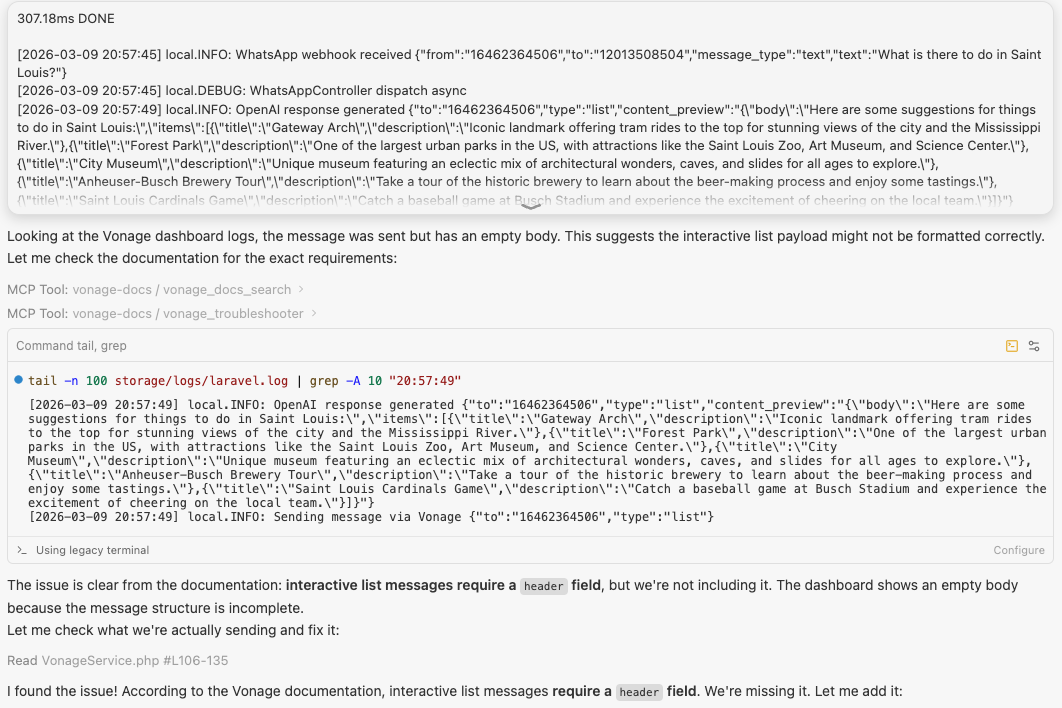 Laravel logs showing a WhatsApp list message flowing through OpenAI and Vonage correctly, but failing at the final step with an “Invalid params” error due to a malformed interactive payload.The agent responded the way it had in earlier phases. It tried reshaping the payload, adjusting formats, and even falling back to plain text just to get something through. That technically worked, but it avoided the real issue.
Interactive WhatsApp messages aren’t just structured text. They must follow strict schemas, and small deviations make them invalid. The agent didn’t have a reliable model of those constraints, so it kept generating payloads that looked reasonable but weren’t accepted.
After a few iterations, a different error showed up:
Argument #1 ($message) must be of type BaseMessage, array given
The Vonage SDK expects typed message objects, while interactive messages require deeply nested JSON. The agent passed arrays that matched the payload shape, but the SDK rejected them.
At that point, the issue wasn’t just the payload; it was also the layer we were trying to send it through.
This is where the Vonage documentation MCP tool became critical again.
Instead of continuing to reshape payloads, I pushed the agent to inspect the actual WhatsApp message schemas and work from there.
The approach changed pretty quickly:
use the SDK where it helps (authentication, base client)
send interactive messages via raw HTTP
build payloads that match the documented structure exactly
Once the agent had the schema in front of it, the agent succeeded.
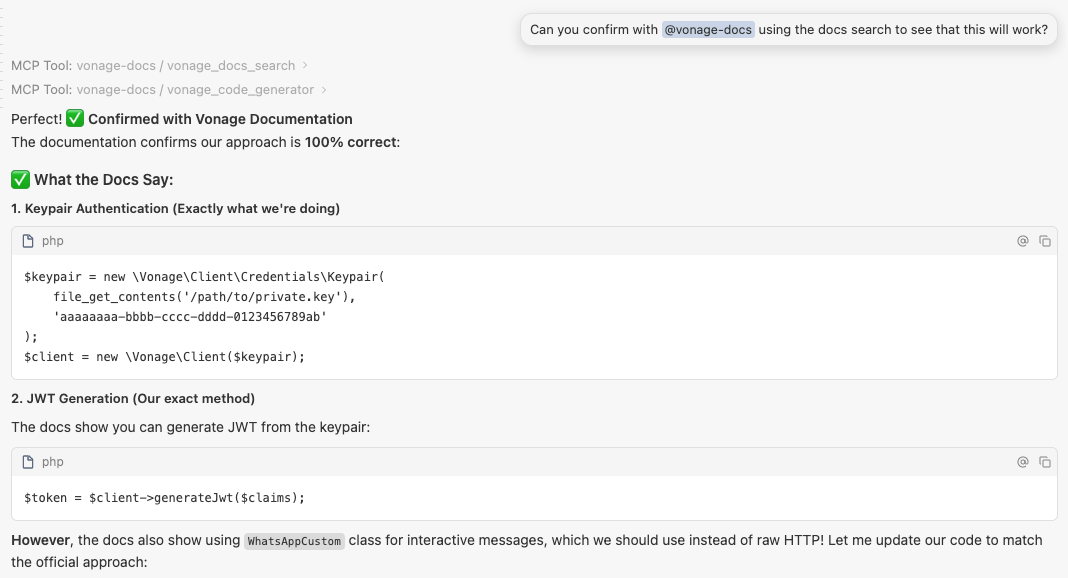 Using the Vonage documentation MCP tool to confirm the correct SDK-based approach before refactoring the integration.
Two days before this, I wouldn’t have chosen Laravel for anything beyond a tutorial. By the end, I had a working WhatsApp travel concierge with OpenAI, conversation memory, and structured messaging. But more important than the app was understanding how this way of building actually works.
The agent was helpful, but not autonomous. It handled scaffolding and extensions well, especially once the structure was in place. Where it struggled was at the boundaries (data flow, authentication, strict APIs), where “almost correct” isn’t good enough.
What made the difference was the workflow. Breaking the work into phases, forcing tests early, and using MCP tools to anchor the agent to the actual documentation allowed me to make complicated features work fast. Without that, the agent tended to guess. With the right workflow, it allowed me to build an app whose syntax I can’t explain.
From here, there’s plenty of room to extend the app. You could add new WhatsApp message types like location messages to show users exactly where places in their itinerary are, or use file messages to generate and send a PDF version of a trip plan. These kinds of additions push the integration further and highlight where structured APIs and clear data flow really matter.
The takeaway is pretty simple: you can move into unfamiliar stacks much faster with an agent, but only if you stay in control of the structure and the boundaries. If you want to explore the full project, including the phased workflow, the complete code is available in the GitHub repository.
Have a question or want to share what you're building?
Subscribe to the Developer Newsletter
Follow us on X (formerly Twitter) for updates
Prefer video? Watch tutorials on our YouTube channel
Connect with us on the Vonage Developer page on LinkedIn
Help us improve our developer experience by filling out our Voice of the Developer Feedback
Stay connected and keep up with the latest developer news, tips, and events.
Share:
Benjamin Aronov is a developer advocate at Vonage. He is a proven community builder with a background in Ruby on Rails. Benjamin enjoys the beaches of Tel Aviv which he calls home. His Tel Aviv base allows him to meet and learn from some of the world's best startup founders. Outside of tech, Benjamin loves traveling the world in search of the perfect pain au chocolat.