Objective-C
Aufbau der Anmeldeschnittstelle
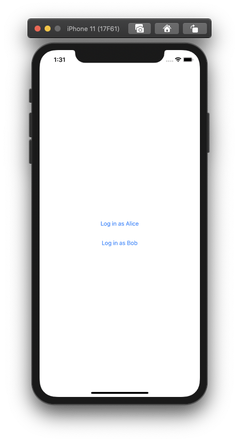
Um sich anmelden zu können, müssen Sie dem Bildschirm drei Elemente hinzufügen:
- A
UIButtonum sich bei Alice anzumelden - A
UIButtonzum Anmelden von Bob - A
UILabelum den Verbindungsstatus anzuzeigen.
Öffnen Sie ViewController.m und fügen Sie es programmatisch hinzu:
@interface ViewController ()

@property UIButton *loginAliceButton;
@property UIButton *loginBobButton;
@property UILabel *statusLabel;

@end

@implementation ViewController

- (void)viewDidLoad {
    [super viewDidLoad];
    // Do any additional setup after loading the view.

    self.client = NXMClient.shared;

    self.loginAliceButton = [UIButton buttonWithType:UIButtonTypeSystem];
    [self.loginAliceButton setTitle:@"Log in as Alice" forState:UIControlStateNormal];
    self.loginAliceButton.translatesAutoresizingMaskIntoConstraints = NO;
    [self.view addSubview:self.loginAliceButton];

    self.loginBobButton = [UIButton buttonWithType:UIButtonTypeSystem];
    [self.loginBobButton setTitle:@"Log in as Bob" forState:UIControlStateNormal];
    self.loginBobButton.translatesAutoresizingMaskIntoConstraints = NO;
    [self.view addSubview:self.loginBobButton];

    self.statusLabel = [[UILabel alloc] init];
    self.statusLabel.text = @"";
    self.statusLabel.textAlignment = NSTextAlignmentCenter;
    self.statusLabel.translatesAutoresizingMaskIntoConstraints = NO;
    [self.view addSubview:self.statusLabel];


    [NSLayoutConstraint activateConstraints:@[
        [self.loginAliceButton.centerYAnchor constraintEqualToAnchor:self.view.centerYAnchor],
        [self.loginAliceButton.centerXAnchor constraintEqualToAnchor:self.view.centerXAnchor],
        [self.loginAliceButton.leadingAnchor constraintEqualToAnchor:self.view.leadingAnchor constant:20.0],
        [self.loginAliceButton.trailingAnchor constraintEqualToAnchor:self.view.trailingAnchor constant:-20.0],

        [self.loginBobButton.centerXAnchor constraintEqualToAnchor:self.view.centerXAnchor],
        [self.loginBobButton.topAnchor constraintEqualToAnchor:self.loginAliceButton.bottomAnchor constant:20.0],
        [self.loginBobButton.leadingAnchor constraintEqualToAnchor:self.view.leadingAnchor constant:20.0],
        [self.loginBobButton.trailingAnchor constraintEqualToAnchor:self.view.trailingAnchor constant:-20.0],

        [self.statusLabel.centerXAnchor constraintEqualToAnchor:self.view.centerXAnchor],
        [self.statusLabel.topAnchor constraintEqualToAnchor:self.loginBobButton.bottomAnchor constant:20.0],
        [self.loginBobButton.leadingAnchor constraintEqualToAnchor:self.view.leadingAnchor constant:20.0],
        [self.loginBobButton.trailingAnchor constraintEqualToAnchor:self.view.trailingAnchor constant:-20.0]
    ]];
}

@end
Bauen und Ausführen
Führen Sie das Projekt erneut aus (Cmd + R), um sie im Simulator zu starten.
Erstellen einer iOS-Chat-App
Erstellen einer iOS-Anwendung, mit der sich Benutzer gegenseitig Nachrichten schicken können
Schritte
1
Einleitung zu dieser Aufgabe2
Prerequisites3
Erstellen einer Vonage-Applikation4
Ein Gespräch führen5
Erstellen Sie die Benutzer6
Benutzer zur Konversation hinzufügen7
JWTs generieren8
Xcode-Projekt und Arbeitsbereich9
Aufbau der Anmeldeschnittstelle10
Erstellung des Benutzermodells11
NXMClient12
Aufbau der Chat-Schnittstelle13
Chat-Ereignisse14
Senden einer Nachricht15
Was kommt als Nächstes?