ロガーを使用する
Vonage Cloud Runtimeセッションには、アプリケーションから詳細なイベントを生成するロガーが装備されています。ログは クラウド・ランタイム・ダッシュボード.
メソッド署名
log(level: LogLevels, message: string, context?: LogContext)
種類
この関数は LogLevels をログの重要度に、そして LogContext ログに追加情報を添付する:
LogLevels文字列) ログレベル。error,warn,infoあるいはdebug.LogContext:actionName: (文字列)payload: (文字列)result: (文字列)
ロガーの使用
ロガーには、ニーズに応じて使用できる複数のログレベルがあり、ログへのコンテキストの添付をサポートしています:
const session = vcr.createSession();
session.log("info", "test info");
session.log("debug", "test debug");
session.log("warn", "test warn");
session.log("error", "test error");
session.log("error", "test error with context", { actionName: "creating user", payload: "{ user: Alice }", result: "fail" });
session = vcr.createSession()
await session.log('info', 'test info')
await session.log('debug', 'test debug')
await session.log('warn', 'test warn')
await session.log('error', 'test error')
await session.log('error', 'test error with context', {'actionName': 'creating user', 'payload': '{ user: Alice }', 'result': 'fail'})
以下はログの例である:
{
id: '4f7db707-6ef5-442c-845c-3c3e4a80fd3a',
session_id: '961fc231-b15c-4137-99a2-b0586ad46da3',
instance_id: 'debug',
api_application_id: 'f29538e1-db58-4211-aa4c-adc6dcc83fa0',
api_account_id: 'abcd1234',
timestamp: '2022-05-03T11:31:40.560Z',
log_level: 'error',
message: 'test error with context',
source_type: 'application',
source_id: 'neru-abcd1234-debug-5a590',
context: {
actionName: 'creating user',
payload: '{ user: Alice }',
result: 'fail'
}
}
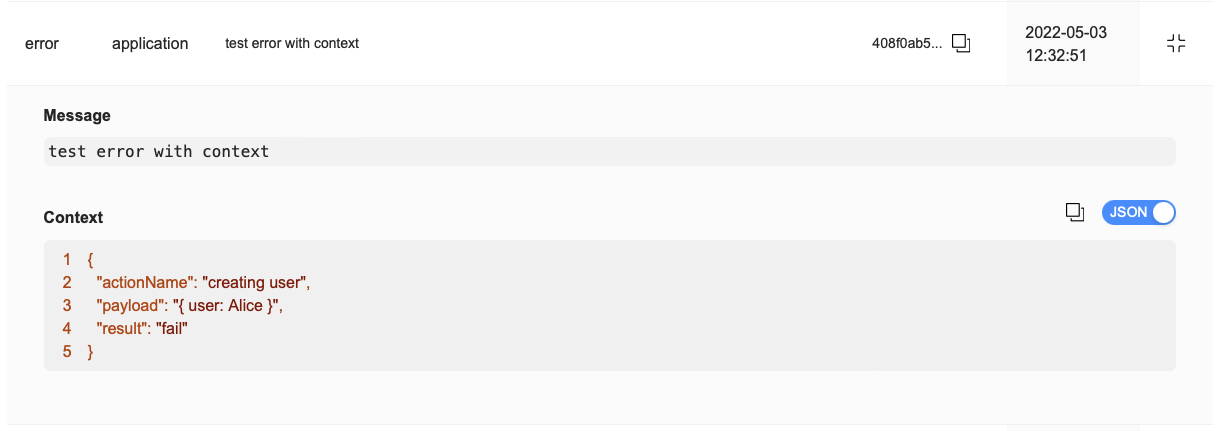
これはダッシュボード上の同じログである:

様々なログレベルを使用することで、ダッシュボード上で関心のある重大度レベルに特化してフィルタリングすることができます。