シェア:
)
Phil is Head of Developer Relations at Hookdeck, an asynchronous messaging platform, and a proud Vonage alumni.
SMSとVoiceプログラマブル通信を始めよう
所要時間:1 分
私たちは最近、ウェビナーを開催した。 デビッド・リアリーの IntuitデベロッパーのDavid Leary氏をお招きし、Nexmo SMS APIとVoice APIの基本的な使い方を説明するウェビナーを開催しました。今度のIntuit スモールビジネスハックこのウェビナーでは、SMSの送信、SMSの受信、電話の発信、電話の着信について直接説明しています。すべての例には、コード・スニペットと、さらに詳しい情報へのリンクも付いています。
このセクションでは、SMSの送信方法について説明します。このセクションでは、英数字の送信者を使用する方法と、Nexmoから購入した番号を番号として使用する方法について説明します。 from番号として使用する方法について説明します。
const Nexmo = require('nexmo');

const nexmo = new Nexmo({
apiKey: API_KEY,
apiSecret: API_SECRET,
}, {debug: true});

nexmo.message.sendSms(
FROM_NUMBER,
TO_NUMBER,
'Hello from @leggetter', (error, result) => {
if(error) {
console.error(error);
}
else {
console.log(result);
}
});SMS送信の詳細については、以下の投稿をご覧ください。 Node.JSでSMSを送信するまた SMS APIガイドおよび SMS APIリファレンス.SMSを送信する際、メッセージが届いたかどうかを知りたい場合もあるでしょう。そのためには SMS配信レシート.に関するブログ記事もあります。 Node.JSでSMSを受信する.
このパートでは、受信SMS情報を含む受信Webhookの受信について説明します。
const Nexmo = require('nexmo');

const app = require('express')();
app.set('port', (process.env.PORT || 5000));
app.use(require('body-parser').urlencoded({ extended: false }));

app.listen(app.get('port'), () => {
console.log('Example app listening on port', app.get('port'));
});

app.post('/sms', (request, response) => {
console.log('Received message text "%s"', request.body.text);

response.sendStatus(200);
});SMSの受信に関する詳細は、以下の投稿を参照してください。 Node.JSでSMSを受信するや SMS API ガイドおよび SMS APIリファレンス.
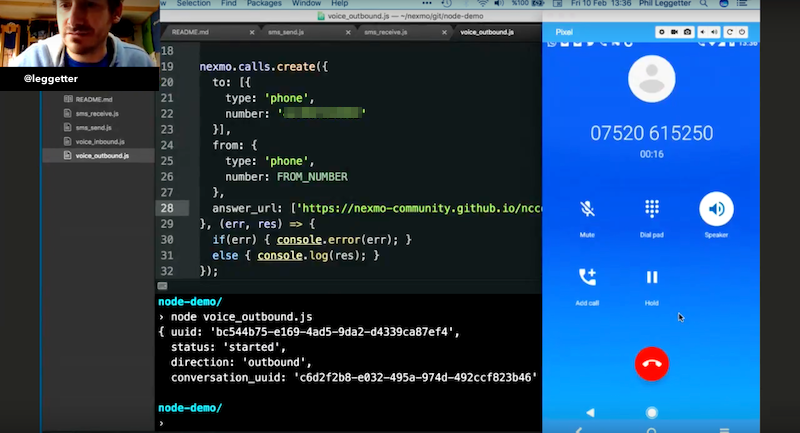
Nexmo Voice APIを使った発信電話のかけ方です。
const Nexmo = require('nexmo');

const nexmo = new Nexmo({
apiKey: API_KEY,
apiSecret: API_SECRET,
applicationId: APPLICATION_ID,
privateKey: PRIVATE_KEY
});

nexmo.calls.create({
to: [{
type: 'phone',
number: TO_NUMBER
}],
from: {
type: 'phone',
number: FROM_NUMBER
},
answer_url: ['https://nexmo-community.github.io/ncco-examples/conference.json']
}, (err, res) => {
if(err) { console.error(err); }
else { console.log(res); }
});以下のブログ記事があります。 Node.JSで発信電話をかけるまた Voice 発信電話 API ガイドそしてもちろん Voice APIリファレンス.また NCCOリファレンスで使用されているNexmoの会話と通話の制御に関する情報も参照してください。 answer_urlを参照してください。
最後に、着信電話を受信してコントロールする方法を紹介します。ここでは Nexmo会話コントロールオブジェクト(NCCO).
const Nexmo = require('nexmo');

const nexmo = new Nexmo({
apiKey: API_KEY,
apiSecret: API_SECRET,
applicationId: APPLICATION_ID,
privateKey: PRIVATE_KEY
});

const app = require('express')();
const bodyParser = require('body-parser');
app.set('port', (process.env.PORT || 5000));
app.use(bodyParser.urlencoded({ extended: false }));
app.use(bodyParser.json());

app.listen(app.get('port'), () => {
console.log('Example app listening on port', app.get('port'));
});

app.get('/answer', (request, response) => {
console.log('Incoming call from "%s"', request.query.from);

// record - All or part of a Call No
// conversation - A conference.
// connect - To a connectable endpoint such as a phone number
// talk - Send synthesized speech to a call
// stream - Send audio files to a call
var ncco = [
// {
// action: 'talk',
// text: 'hello from me',
// loop: 3,
// bargeIn: true
// },
{
action: 'stream',
streamUrl: ['http://www.ladyofthecake.com/rdmp3/theme.mp3'],
loop: 3,
bargeIn: true
},
{
action: 'input',
eventUrl: ['https://nexmo.ngrok.io/event']
}
];

response.json(ncco);
});

app.post('/event', (request, response) => {
console.log('Received event', request.body);

response.sendStatus(200);
});着信電話の受信に関する詳細は、次の投稿を参照してください。 Node.JSで着信電話を受けるの Voice 着信電話 API ガイドおよび Voice APIリファレンス.上記の例では record, talk, streamなどのNCCOのアクションについても触れている。そこで NCCOリファレンスを参照してください。
NexmoのAPIについては、上記で紹介した以外にもたくさんの情報がドキュメントにあります。例えば Verify APIは2FAとワンタイムパスワードのためのもので ナンバーインサイト電話番号の情報を調べるためのNumber Insightなどです。また プログラム可能な通信チュートリアルをご用意しています。 プライベート音声通信, SMSカスタマーサポート, 双方向音声応答など、Nexmo APIを使用しています。
スモールビジネスハックに参加される方、頑張ってください。プログラマブル通信について学ぶために立ち寄られたのなら、この記事がお役に立つことを願っています。いずれにせよ、お気軽に NexmoコミュニティSlackにご参加ください。