
シェア:
)
Shreyas Sreenivas is a High School Student currently residing in Bangalore, India. He has experience in building applications in JavaScript, TypeScript, Python and PHP. He's also a huge fan of React, GraphQL, Graph Databases and Serverless.
病院のベッドを検索するWhatsAppとMessengerのGraphQLボットを構築する
所要時間:4 分
COVIDは私たち全員に影響を与えたが、他の人たち以上に影響を与えた人もいる。人々が直面し、現在も直面し続けている大きな問題のひとつは、病院のベッド不足である。数ヶ月前、私は GraphQLAPIを作った。を作成した。データは公式ウェブサイトからスクレイピングされ、統一されたフォーマットに正規化された後、GraphQL APIの形で公開される。
なお、このデータはインドの一部の都市でのみ入手可能である。
また GraphQLプレイグラウンド.
Bedav API と Vonage Messages API を使って、JavaScript を使って WhatsApp と Facebook Messenger で動作するチャットボットを作成します。このチャットボットの機能は、ユーザーが都市で病院を検索し、空床がある病院を見つけ、病院の電話番号や住所などの追加情報を提供することです。また、ユーザーが病院までの道順を知ることができるコマンドも作成します。
Vonageアカウント
このコードは GitHub リポジトリにありますが、このチュートリアルにしたがって、リポジトリは参考程度に使うことをお勧めします。
新しいフォルダを作成し、npmを初期化して、その中に srcフォルダを作成します:
Expressを使ってウェブフックとサーバーを作成します。 AxiosはMessages APIへのリクエスト送信に使用し graphql-requestはBedav GraphQL APIへのリクエスト送信に使用します。以下のコマンドを実行することで、追加ユーティリティとともにこれらをインストールできる:
そして最後に、Nodemonをdev依存としてインストールし、変更を加えるたびにnodeサーバーを再起動する必要がないようにする:
また、スクリプトを package.jsonにスクリプトを追加しましょう:
// package.json

{
  "scripts": {
    "dev": "nodemon src/app.js"
  }
}
コードに入る前に、ウェブフックとは何か?Webhookは基本的に、特定のアクションやイベントが実行されるたびに呼び出されるURLである。Webhookはコールバックと似ていると言えますが、独立したアプリケーション間でやりとりするために使われることがほとんどです。私たちのケースでは、2つのWebhookを公開する必要があります。1つはユーザーがメッセージを送信したときにトリガーされるもので、もう1つはAPIからメッセージのステータスが更新されたとき(例えば、ユーザーが送信したメッセージを読んだとき)です。
まず、Expressを src/app.jsここにメインのExpressアプリケーションと、コマンドを処理する主要な関数がある:
// src/app.js

const express = require("express")

const app = express()
app.use(express.json())次に、2つのエンドポイントを追加しましょう。1つはメッセージウェブフック用、もう1つはステータスウェブフック用です:
// src/app.js

const { fixedMessages, sendMessage } = require("./utils")

app.post("/webhooks/inbound", (request, response) => {
  console.log(request.body)
)

app.post("/webhooks/status", (request, response) => {
  console.log(request.body)
  response.status(200).end()
})

app.listen(3000, () => {
  console.log("Listening on port 3000")
})
Ngrokを使えば、一時的なURLを使ってウェブフックをインターネットに公開し、テストすることができる。ngrokを使い始めるには、彼らのサイトに行き、アカウントを作成する。 アカウントを作成する.ログインすると、ダッシュボードにアカウントをインストールして接続する手順が表示されます。
ngrokをインストールして設定したので、開発サーバーを起動しよう。 npm run dev.ngrokを使ってローカルサーバーの公開URLを作成します。 ./ngrok http 3000.このコマンドは、ngrokにHTTPプロキシを作成するよう指示します。 localhost:3000.
Vonage Dashboardにログインし、次の場所に移動します。 サンドボックスセクションに移動します。 メッセージとディスパッチ.
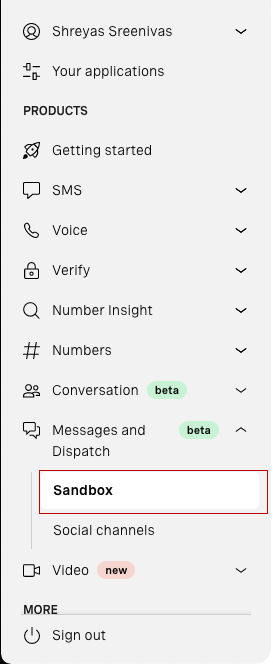
WhatsAppサンドボックスを作成するには サンドボックスに追加をクリック。Vonage Sandboxは本人確認を必要としますので、ダッシュボードの手順に従って下さい。同様の手順でFacebook Messenger用サンドボックスも作成できます。
これでWhatsAppサンドボックスの有効化は完了です!しかしまだ終わっていません。Webhooksが存在するURLをVonageに提供する必要があります。サンドボックスページを下にスクロールすると、下記のようなWebhooksセクションが表示されます:
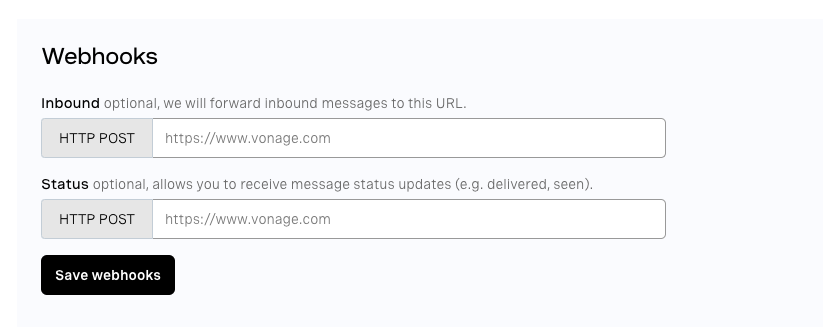
最初は inboundルートにあるウェブフックです。 webhooks/inboundになるので、そのフィールドを https://<your-ngrok-https-url>/webhooks/inbound.同様に statusのURLを https://<your-ngrok-https-url>/webhooks/status.これでサンドボックスとテスト環境の設定は完了だ!
注:ngrokを再起動するたびに、新しい別のURLが提供されますので、Vonageダッシュボードで手動で変更する必要があります。
ユーザーにメッセージを送り返すヘルパー関数が必要だ。
まず、Messages APIを利用できるように、Vonage APIの認証情報を設定する必要がある。これらの認証情報は環境変数に格納される。フォルダのルートに .envファイルを作成します。環境変数をノード環境にロードするには dotenvパッケージを使用します。以下のようにフィールドを追加します:
VONAGE_API_KEY = // Your Vonage API key
VONAGE_API_SECRET = // Your Vonage API Secret
WHATSAPP_NUMBER = // The from number in the case of the WhatsApp Sandbox
MESSENGER_ID = // The from ID of the Messenger Sandboxそれが終わったら、次のコードを app.jsを追加して環境変数を追加する:
// src/app.js
require("dotenv").config()という名前の新しいファイルを utils.jsという名前の新しいファイルを srcフォルダに作成します。このファイルには、書式設定やユーザーへのメッセージ送信などのユーティリティ機能が含まれます。
メッセージを送信するために、Messages REST APIにリクエストをします。Messages Sandboxの場合、APIのURLは次のようになる。 https://messages-sandbox.nexmo.com/v0.1/messages.リクエストの送信にはAxiosを使います。リクエストの送信には authオプションを使用して、以下のようにAPI認証情報を追加します:
// src/utils.js

const axios = require("axios")

// default message type will be `text`
const sendMessage = async (to, message, type = "text") => {  let from = {
    // either 'WhatsApp' or 'messenger'
    type: to.type,
  }

  if (to.type === "whatsapp") {
    // the WhatsApp Sandbox number
    from.number = proccess.env.WHATSAPP_NUMBER
  } else if (to.type === "messenger") {
    // the Messenger Sandbox ID
    from.id = process.env.MESSENGER_ID
  }

  await axios.post(
    "https://messages-sandbox.nexmo.com/v0.1/messages",
    {
      to,
      from,
      message: {
        content: {
          type,
          [type]: message,
        },
      },
    },
    {
      auth: {
        username: process.env.VONAGE_API_KEY,
        password: process.env.VONAGE_API_SECRET,
      },
    }
  )
}

module.exports = {
  sendMessage,
}
メッセージ・タイプは動的である。 locationタイプのメッセージを送信します。WhatsAppでは locationのメッセージにはGoogleマップ上の場所のサムネイルと名前、住所が添付されます。
これでコマンドの作成に取りかかることができる:
help- 使用可能なすべてのコマンドのメニューを取得するcities- 利用可能な全都市のリストを入手search <hospital-name> in <location>- 特定の場所の病院を検索します。例えばsearch sakra in bangaloreはバンガロールのサクラという名前の病院を検索します。get directions to <hospital-id>- 特定のIDを持つ病院への道順を知る。例えばget directions to 87はID87の病院の場所を送信します。
へのリクエストを処理する関数を作りましょう。 inboundへのリクエストを処理する関数を作りましょう。 /webhooks/inbound.この関数は、ユーザーから送られたメッセージを解析し、ユーザーが使おうとしているコマンドのハンドラにメッセージを渡します。適切なメッセージを送り返し、ステータスコード200を返します。
さもなければ、Messages APIは200のレスポンスを得るまでリクエストを送り続ける。
正規表現を使って、ユーザーが searchまたは directionsコマンドを使おうとしているかどうかを正規表現を使ってチェックし、そのメッセージを適切なハンドラに渡す。メッセージが help, hiまたは helloであれば、ヘルプ・メッセージがユーザーに送られる。メッセージが citiesであれば、利用可能な都市のリストがユーザーに送られる。最後に、メッセージがどのコマンドにもマッチしない場合、無効なメッセージがユーザーに送られる。
// src/app.js

const handleInbound = async (request, response) => {
  const content = request.body.message.content

  const text = content.text.toLowerCase().trim()

  // whom we have to reply to
  const to = request.body.from

  const searchRegex = /^search .* in .*$/i
  const directionsRegex = /^get directions to .*/i

  if (text.match(searchRegex)) {
    handleSearch(text, to)
  } else if (text.match(directionsRegex)) {
    handleDirections(text, to)
  } else if (["help", "hi", "hello"].includes(text)) {
    sendMessage(to, fixedMessages.help)
  } else if (text === "cities") {
    sendMessage(to, fixedMessages.cities)
  } else {
    sendMessage(to, `Sorry, invalid message. Type *help* to get a list of all commands.`)
  }

  response.status(200).end()
}
では、受信ウェブフック・エンドポイント・ハンドラーを修正して handleInbound関数を使うように修正しましょう。
// src/app.js
app.post("/webhooks/inbound", handleInbound)
ユーザーが最初に私たちのサービスにメッセージを送るとき、私たちは彼らに挨拶するメッセージが必要です。このメッセージには、私たちのボットが何をするのか、どのようなコマンドを使用できるのかといった情報を含める必要があります。また、ユーザーが何をすればいいのかわからず、次のように入力したときに送信されるヘルプメッセージも必要です。 help.これらのメッセージは似たようなものになります。
Bedav APIは特定の地域の病院情報しか持っていません。情報が利用可能な地域のリストを与えるメッセージも必要だ。
で実装されているように handleInbound関数で実装されているように、ヘルプメッセージはユーザーが ハイ, こんにちはまたは ヘルプと入力すると、利用可能な都市に関するメッセージが送信されます。 都市.
これらのメッセージはいずれも定数であるため、トップ・レベルに定数オブジェクトを作成し、すべての固定メッセージを定義することができる。また outdentを使って文字列の余分なスペースを削除する。コードを utils.js:
// src/utils.js

const outdent = require("outdent")

const fixedMessages = {
  help: outdent`
    The Bedav Bot gives you information on the availability of beds in hospitals and the contact information and location of those hospitals as well.

    You can use the following commands:
    1. *help* - Get this menu and all the commands you can use
    2. *cities* - Get a list of all the cities available
    2. *search* _<hospital-name>_ *in* _<location>_ - Search for a hospital in a particular location. For example, "search sakra in bangalore" searches for hospitals with the name Sakra in Bangalore
    3. *get directions to* _<hospital-id>_ - Get directions to a hospital with a particular ID. You can get the hospital ID from the search results. The serial number preceding the Hospital name is the Hospital ID. For example, if the search result has _(87) Sakra Hospital_, send _get directions to 87_ to get directions to Sakra Hospital.
  `,
  cities: outdent`
    The cities/districts currently available are:

    *Karnataka*
      1. Bangalore/Bengaluru

    *Maharashtra*
      2. Pune
      3. Kohlapur
      4. Sangli
      5. Satara
      6. Solapur

    *Andhra Pradesh*
      7. Anantapur
      8. Chittoor
      9. East Godavari
      10. Guntur
      11. Krishna
      12. Kurnool
      13. Prakasam
      14. Nellore
      15. Srikakulam
      16. Vishakapatanam
      17. Vizianagaram
      18. West Godavari
      19. Kadapa
  `,
}

module.exports = {
  ...
  fixedMessages,
}
GraphQL APIへのクエリーを簡単にするため、ここでは graphql-requestライブラリを使用します。GraphQLクライアントをセットアップするには、以下のインスタンスを作成します。 GraphQLClientのインスタンスを作成し、GraphQL APIのURLを指定します。
// app.js

const { GraphQLClient } = require("graphql-request")
const client = new GraphQLClient("https://bedav.org/graphql")
APIドキュメントの hospitalIdフィールドの説明にあるように、これはBase64でエンコードされた文字列である。 Hospital:<hospitalId>ここで hospitalIdは病院固有の整数である。次のセクションで説明する理由から、2つのユーティリティ関数を作成しましょう。1つは病院IDの番号を取得するもので、もう1つは整数をBase64文字列にエンコードするものです。 Hospital:<hospitalId>.先ほどプロジェクトに追加した js-base64ライブラリを使うことにする。 base64エンコードされた文字列を使用する。
// src/utils.js

const { encode, decode } = require("js-base64")

const getHospitalId = (encodedId) => {
  return decode(encodedId).slice(9)
}

const getEncodedString = (hospitalId) => {
  return encode(`Hospital:${hospitalId}`)
}

module.exports = {
  ...
  getEncodedString,
}
個々の病院をフォーマットする関数と、その関数を使用して病院グループをフォーマットする関数です。
// src/utils.js

const getFormattedHospital = (hospital) => {
  const index = getHospitalId(hospital.id)

  const roundedString = (occupied, total) => {
    return `${Math.floor((occupied * 100) / total)}% Occupied`
  }

  const h = hospital

  // Percentages of beds available
  const percentages = {
    icu: roundedString(h.icuOccupied, h.icuTotal),
    hdu: roundedString(h.hduOccupied, h.icuTotal),
    oxygen: roundedString(h.oxygenOccupied, h.icuTotal),
    general: roundedString(h.generalOccupied, h.icuTotal),
    ventilators: roundedString(h.ventilatorsOccupied, h.icuTotal),
  }

  const formatted = outdent`
    *(${index}) ${hospital.name}*
      ${h.icuTotal !== 0 && h.icuAvailable !== null ? `_ICU Available_: ${h.icuAvailable} (${percentages.icu})` : ""}
      ${h.hduTotal !== 0 && h.icuAvailable !== null ? `_HDU Avalable_: ${h.hduAvailable} (${percentages.hdu})` : ""}
      ${h.oxygenTotal !== 0 && h.oxygenAvailable !== null ? `_Oxygen Available_: ${h.oxygenAvailable} (${percentages.oxygen}})` : ""}
      ${h.generalTotal !== 0 && h.generalAvailable !== null ? `_General Available_: ${h.generalAvailable} (${percentages.general})` : ""}
      ${
        h.ventilatorsTotal !== 0 && h.ventilatorsAvailable !== null
          ? `_Ventilators Available_: ${h.ventilatorsAvailable} (${percentages.ventilators})`
          : ""
      }
      ${h.phone !== null ? `_Phone_: ${h.phone}` : ""}
      ${h.phone !== null ? `_Website_: ${h.website}` : ""}
  `

  return removeEmptyLines(formatted)
}
すべての病院にICU、HDU、一般病棟のベッドがあるとは限りませんし、すべての病院に酸素吸入器や人工呼吸器があるとは限りません。もしその病院に利用可能なベッドがない場合は、メッセージからその情報を省略することができます。利用可能な合計が0であるか、利用可能フィールドの値がNULLである場合、病院は特定の種類のベッド、酸素または人工呼吸器を利用できません。
また、get directionsコマンドでユーザーが病院のIDを入力する必要があるため、病院のIDも表示しています。また、括弧の中にベッドの占有率を表示しています。
ベッド、人工呼吸器、酸素が利用できない場合は、空行が残る。これを解決するために、この空白行を削除する別のヘルパー関数を作ります。
空行をチェックするには、その行にスペースが1文字以上あるかどうかをチェックする短い正規表現を使う:
// src/utils.js

const removeEmptyLines = (string) => {
  const lines = string.split("\n")
  const newLines = []

  for (const line of lines) {
    // Continue if the line is a blank line
    if (line.match(/^\s*$/)) continue
    newLines.push(line)
  }

  return newLines.join("\n")
}
次に、すべての病院をループし、その病院のフォーマットされた文字列を取得し、各病院の間に空行を追加することで、病院のリストをフォーマットする関数を作成します:
// src/utils.js

const getFormattedHospitals = (hospitals) => {
  let message = ""

  for (const hospital of hospitals) {
    const formattedHospital = getFormattedHospital(hospital)
    message += formattedHospital + "\n\n"
  }

  return message
}

module.exports = {
  ...
  getFormattedHospitals,
}
すべてのGraphQLクエリは queries.jsファイルに格納されます。 srcフォルダに保存されます。
以下のGraphQLクエリを使用して、特定の場所にある病院を検索し、必要なデータを取得します。locityフィールドの nameフィールドの引数は、どの場所のデータを照会しているかをAPIに伝えるために使用します。フィールドの firstフィールドの hospitalsフィールドの引数は、APIが返したい病院の数を指定します。 searchQuery引数は検索クエリを提供する。
// src/queries.js

const searchGraphQLQuery = gql`
  query($location: String, $query: String) {
    # get hospitals from a city named Bengaluru in the state of Karnataka
    locality(name: $location) {
      hospitals(first: 5, searchQuery: $query) {
        edges {
          node {
            id
            name
            phone
            website
            address
            latitude
            longitude

            icuAvailable
            hduAvailable
            oxygenAvailable
            generalAvailable
            ventilatorsAvailable

            icuOccupied
            hduOccupied
            oxygenOccupied
            generalOccupied
            ventilatorsOccupied

            icuTotal
            hduTotal
            oxygenTotal
            generalTotal
            ventilatorsTotal
          }
        }
      }
    }
  }
`

module.exports = {
  searchGraphQLQuery,
}
`GraphQLクエリを
gqlタグで囲む必要はない。しかし、適切な拡張機能とツールを使えば、シンタックスハイライトとタイプチェックを行うことができる。
次に、ロケーション名を nameフィールドの localityフィールドの引数にマッピングする必要がある。 <city/district_name>-<state_name>. のマッピングの city/districtへのマッピングは nameのマッピングはJavaScriptで以下のオブジェクトに変換できます:
// src/utils.js

const locationKey = {
  bangalore: "bengaluru-karnataka",
  bengaluru: "bengaluru-karnataka",
  pune: "pune-maharashtra",
  kohlapur: "kohlapur-maharashtra",
  sangli: "sangli-maharashtra",
  satara: "satara-maharashtra",
  solapur: "solapur-maharashtra",
  anantapur: "anantapur-andhra pradesh",
  chittoor: "chittoor-andhra pradesh",
  "east godavari": "east godavari-andhra pradesh",
  guntur: "guntur-andhra pradesh",
  krishna: "krishna-andhra pradesh",
  kurnool: "kurnool-andhra pradesh",
  prakasam: "prakasam-andhra pradesh",
  nellore: "spsr nellore-andhra pradesh",
  srikakulam: "srikakulam-andhra pradesh",
  vishakapatanam: "vishakapatanam-andhra pradesh",
  vizianagaram: "vizianagaram-andhra pradesh",
  "west godavari": "west godavari-andhra pradesh",
  kadapa: "kadapa-andhra pradesh",
}

module.exports = {
  ...
  locationKey,
}ある場所の病院を検索するためにユーザーが入力するテキストは、次のような形式になる。 search <search-query> in <location>.では handleSearch関数を作成しましょう。この関数は、検索クエリを実行し、適切な応答をユーザーに送り返す役割を果たします:
// src/app.js

const { fixedMessages, sendMessage, locationKey, getFormattedHospitals } = require("./utils")

const handleSearch = async (message, to) => {
  // extract the search query and location from the message
  const searchRegex = /^search (?<searchQuery>[a-zA-Z0-9_ ]+) in (?<location>[a-zA-Z0-9_ ]+)$/i
  const match = searchRegex.exec(message)

  if (match === null) {
    sendMessage(to, "Please enter the hospital name you want to search for and the location")
    return
  }

  const { groups: { searchQuery, location } } = match

  if (!Object.keys(locationKey).includes(location)) {
    sendMessage(to, "Invalid location entered. Type *cities* to look at all the cities available")
    return
  }

  try {
    const data = await client.request(searchGraphQLQuery, {
      location: locationKey[location],
      query: searchQuery,
    })

   const { edges } = data.locality.hospitals
    const hospitals = edges.map((item) => item.node)

    if (edges.length === 0) {
      sendMessage(to, "Sorry, there were no hospitals that matched your search 🙁")
      return
    }

    const formattedMessage = getFormattedHospitals(hospitals)
    sendMessage(to, formattedMessage)
  } catch (error) {
    sendMessage(to, "Sorry, there were no hospitals that matched your search 🙁")
  }
}
最後のコマンドは、"get directions "コマンドである。コマンドのフォーマットは get directions to <hospital-id>.
まず、ユーザーに病院の場所を送信するために必要な病院の情報を取得するクエリを作成します:
// src/queries.js

const directionsGraphQLQuery = gql`
  query($id: ID!) {
    hospital(id: $id) {
      id
      longitude
      latitude
      name
      address
    }
  }
`

module.exports = {
  ...
  directionsGraphQLQuery,
}では、ユーザーがリクエストした病院までの道順を送信する handleDirections関数を作成しよう。ユーザーがWhatsAppを使っている場合、病院名と住所を含む location型のメッセージを送信する。メッセンジャーには locationのメッセージはないので、病院の名前と住所を含む textのメッセージを送信する:
// src/app.js

const handleDirections = async (message, to) => {
  const directionsRegex = /^get directions to (?<hospitalId>\d+)$/i
  const match = directionsRegex.exec(message)

  if (match === null) {
    sendMessage(to, "Please enter a valid Hospital ID")
    return
  }

  const hospitalId = getEncodedString(parseInt(match.groups.hospitalId))

  try {
    const { hospital } = await client.request(directionsGraphQLQuery, {
      id: hospitalId,
    })

    if (to.type === "whatsapp") {
      sendMessage(
        to,
        {
          type: "location",
          location: {
            longitude: hospital.longitude,
            latitude: hospital.latitude,
            name: hospital.name,
            address: hospital.address,
          },
        },
        "custom"
      )
    } else {
      const link = `https://maps.google.com/maps?q=${hospital.latitude},${hospital.longitude}`
      const message = `${link}\n*${hospital.name}*\n${hospital.address}\n`

      sendMessage(to, message)
    }
  } catch (error) {
    sendMessage(to, "Please enter a valid Hospital ID")
  }
}これで完了だ!サンドボックスで全てのコマンドを試してみると、以下のようになるはずだ!
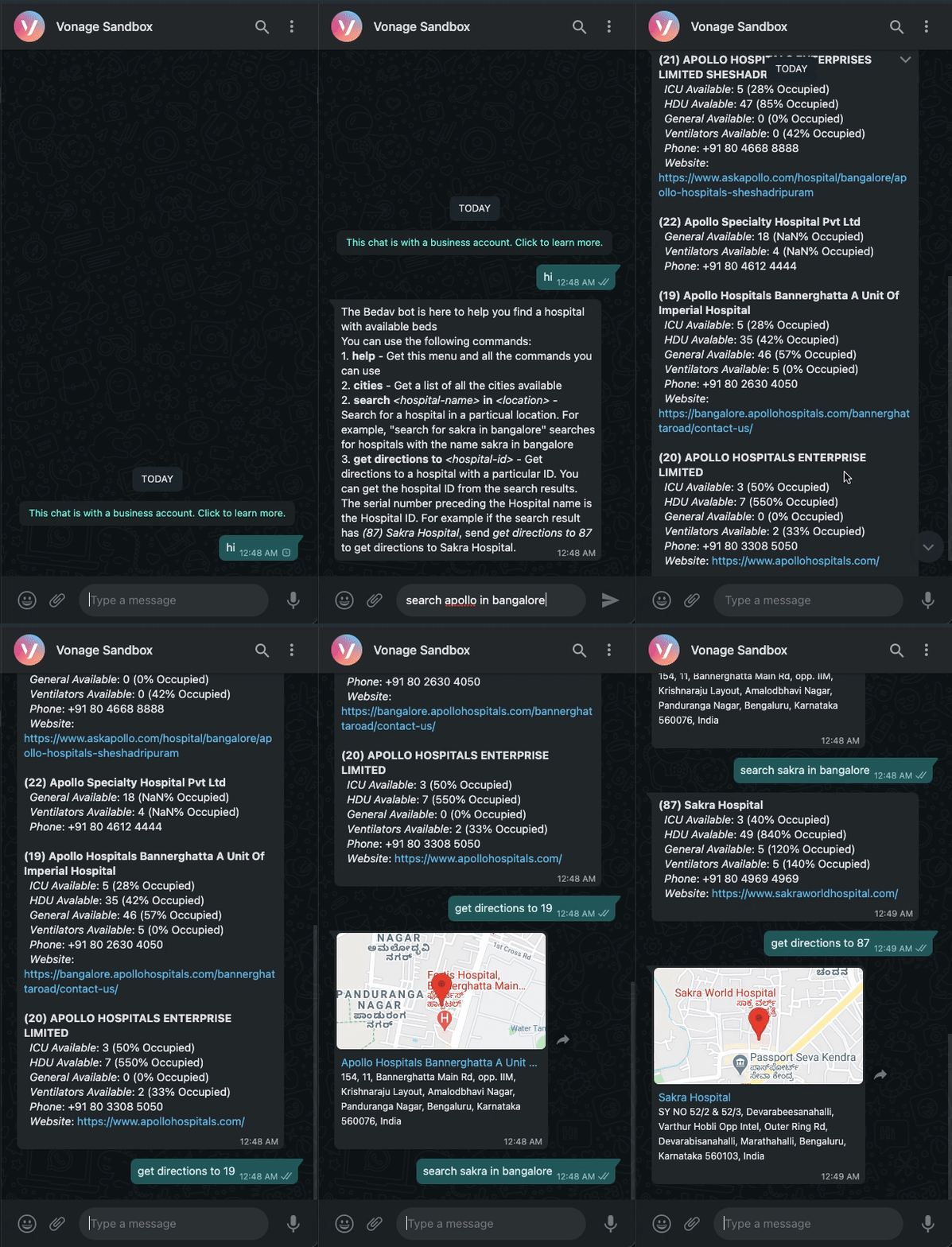
現在、私たちのウェブフックはインターネット全体に公開されています。Vonage Messages APIだけがエンドポイントにアクセスできるようにする方法が必要です。詳しくは JWT トークンを使ってアクセスを制限する.
機械学習がお好きなら、自然言語処理を使ってボットをより自然なものにすることもできる。 より自然ににすることができます。
道順取得コマンドに病院IDを使用することは、最良のユーザーエクスペリエンスではありません。代わりに、ユーザが道順を知りたい病院の名前を入力するコマンドを実装してみてください。もし似たような名前の病院が複数ある場合は、IDとともに病院のリストを返し、ユーザーに行き先を知りたい病院のIDを入力するように求めます。
チュートリアルの最終的なコードは GitHub.