Traffic Rules
Traffic Rules are a powerful way to protect your Vonage account against abuse. We recommend reviewing and setting up these rules in advance.
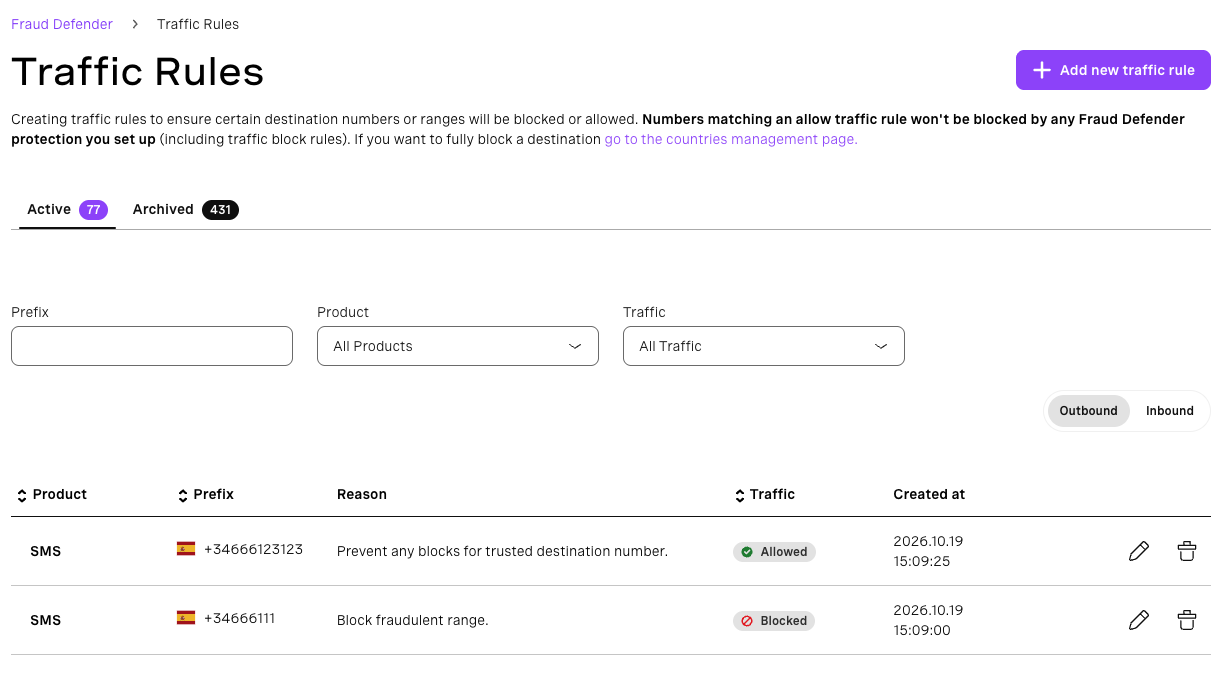
Overview
Traffic Rules let you allow or block calls and messages based on country codes, number prefixes, or exact phone numbers. Rules apply to both Voice and SMS traffic, regardless of which Vonage product generates that traffic (Voice API, SMS API, Messaging API, and Verify).
You can create rules for two traffic directions:
- Outbound rules: apply to traffic your account sends (e.g. outbound calls or SMS to a destination number).
- Inbound rules: apply to traffic your account receives (e.g. inbound calls or messages to your virtual numbers).
Country-level blocks are managed separately in the Countries section of the Fraud Defender dashboard.
Rule types
Block rules
Block rules prevent traffic to or from a matching number or prefix. You can create block rules based on:
- A country code or phone number prefix, e.g.
44(UK) or447(UK Mobile). Note: blocking an entire country by its code is not recommended here. Use the Countries feature instead, which is purpose-built for country-level blocks. - An individual phone number, e.g.
447970123456. - A narrower range such as a network prefix, e.g.
447970.
Allow rules
Allow rules override block rules and grant traffic through for a matching number or prefix.
Today, an allow rule that exactly matches a destination number will also bypass AIT Protection blocks. If your goal is to prevent Fraud Defender from blocking a specific trusted number, we recommend using the Trusted Numbers feature instead, as it is designed specifically for that purpose and gives you cleaner control over which numbers are exempted from Fraud Defender protections.
Important: upcoming behavior change. In a future release, allow rules will act as a whitelist: any traffic matching an allow rule will bypass all Fraud Defender protections, including other block rules, country blocks, and any automated fraud detection. Because of this, we strongly recommend using allow rules only for exact phone number matches, not for broad prefixes.
How block and allow rules interact
Rules are evaluated by specificity: the more specific the match, the higher its priority. When two rules have equal specificity, allow rules take precedence over block rules.
This means you can use allow rules to carve out exceptions from a broader block rule. For example:
| Priority | Rule type | Value | Effect |
|---|---|---|---|
| 1 (most specific) | Allow | 10 |
Traffic to numbers starting with 10 is allowed |
| 2 | Block | 1 |
All other traffic starting with 1 is blocked |
In this configuration, all traffic to numbers starting with 1 is blocked except numbers starting with 10, which are explicitly allowed.
Why this approach is not recommended:
Although layering a broad block with a narrower allow rule works today, it will become increasingly risky as the whitelist behavior is introduced. Once allow rules act as a full whitelist, any number matching an allow rule will bypass every Fraud Defender protection, not just the block rule you intended to override. To avoid unintended exposure, prefer exact number matches for allow rules rather than prefix-based overrides.
Example: block all traffic to Spain except mobile numbers
Spain's country code is 34. Spanish mobile numbers use the prefixes 346 (numbers starting with 6) and 347 (numbers starting with 7). To block all Spanish traffic while still allowing calls and messages to Spanish mobile numbers, set up the following rules:
| Priority | Rule type | Value | Effect |
|---|---|---|---|
| 1 (most specific) | Allow | 347 |
Spanish mobile numbers starting with 7 are allowed |
| 1 (most specific) | Allow | 346 |
Spanish mobile numbers starting with 6 are allowed |
| 2 | Block | 34 |
All other Spanish numbers are blocked |
Because the allow rules are more specific than the block rule, mobile numbers pass through while all other Spanish destinations are blocked.
Keep in mind: as allow rules will become a full whitelist in a future release, any number matching 346 or 347 will bypass all Fraud Defender protections. Instead, we recommend blocking each non-mobile prefix individually: 340, 341, 342, 343, 344, 345, 348, and 349. This avoids the need for allow rules entirely and keeps your Fraud Defender protections fully in effect.
Recommended layering example
If you need to allow a specific trusted number while keeping a broad prefix blocked, use an exact number allow rule:
| Priority | Rule type | Value | Effect |
|---|---|---|---|
| 1 (most specific) | Allow | 447970123456 |
This exact number is always allowed |
| 2 | Block | 44797 |
All other numbers on this network prefix are blocked |
| 3 | Block | 44 |
All other UK numbers are blocked |
Creating traffic rules
- Go to Fraud Defender → Traffic Rules.
- Select the direction: Inbound or Outbound.
- Select the channel: Voice or SMS.
- Choose the rule type: Block or Allow.
- Enter the phone number or prefix to match.
- Save the rule.