Add AI to Vonage Video API Applications
The Vonage Video API provides several ways to add AI and media processing to a video application. You can use Vonage features for captions and post-call transcription, transform media in a client application, or connect live session media to an AI service that you manage.
Use this page to choose an approach and find the corresponding documentation and examples.
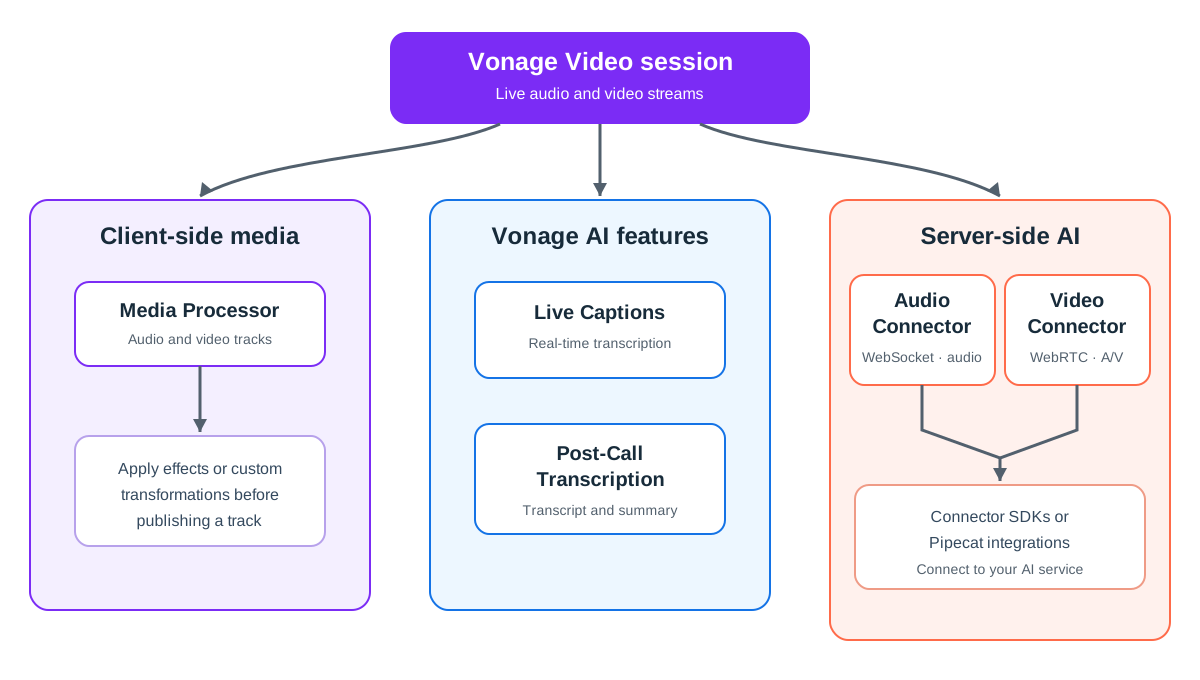
Choose an Approach
| If you want to... | Use | How it works |
|---|---|---|
| Display captions during a session | Live Captions | Vonage transcribes selected audio streams from a routed session and sends caption events to subscribed clients. |
| Create a transcript or summary after a session | Post-Call Transcription | Vonage creates a transcript, with an optional summary, from an individual-stream archive. |
| Transform audio or video in a client application | Media Processor | A Video client SDK applies a transformation to an individual media track. |
| Send live audio to a server and return processed audio | Audio Connector | A bidirectional WebSocket carries raw audio between the Video session and your server. |
| Process or generate live audio and video on a server | Video Connector | A server-side application joins the Video session as a WebRTC participant and can publish and subscribe to media. |
Connect a Video Session to AI Services
Vonage AI Connectors provide libraries and integrations for connecting live Voice and Video media to AI services. They support two development approaches:
- Use the Connector SDKs when you want to write the application that exchanges media with your AI service.
- Use the Pipecat integrations when your application uses a Pipecat pipeline to coordinate speech-to-text, language model, text-to-speech, or multimodal services.
Choose the transport based on the media your application needs:
| Media | Connector SDK | Pipecat integration |
|---|---|---|
| Audio | Audio Connector Server SDK uses a WebSocket and works with Video API and Voice API. | Vonage Audio Serializer for Pipecat connects a Pipecat audio pipeline through Audio Connector or a Voice WebSocket. |
| Audio and video | Video Connector Server SDK uses WebRTC and joins a Video API session as a server-side participant. | Vonage Video Transport for Pipecat connects a Pipecat audio and video pipeline to a Video API session. |
See the AI Connectors overview for a detailed comparison of the transports, supported APIs, media formats, and pricing.
Examples and Next Steps
| Goal | Documentation | Example |
|---|---|---|
| Add real-time captions | Live Captions | Basic Captions sample |
| Generate a post-call transcript and summary | Post-Call Transcription | Post-Call Transcription sample |
| Apply a client-side media transformation | Media Processor | Background Blur sample |
| Connect audio to a custom processing service | Set up the Audio Connector Server SDK | Audio Connector Server SDK samples |
| Add a Pipecat voice agent to a Video session | Connect Pipecat to a Vonage session | Vonage Audio Bot sample |
| Build an audio and video AI pipeline | Vonage Video Transport for Pipecat | Vonage Pipecat integration |
Related Resources
- AI Connectors overview: Compare the Connector SDKs and Pipecat integrations for audio and video applications.
- Media Processor: Apply custom transformations to media tracks in a client application.
- Video API Web samples: Explore sample applications for Video API features.
- Video and AI blog posts: Find additional tutorials and use cases.