Technical Details
Looking for AI?
Build Video + AI experiences with Video + AI overview, Live Captions, and Post-Call Transcription.
The Vonage Video API lets you embed fully managed real-time sessions in web and mobile apps. Client SDKs capture and distribute media while handling signalling and layout events, and Server SDKs or REST endpoints create sessions, create tokens, and manage archives, broadcasts, SIP interconnect, and callbacks.
Architecture at a glance
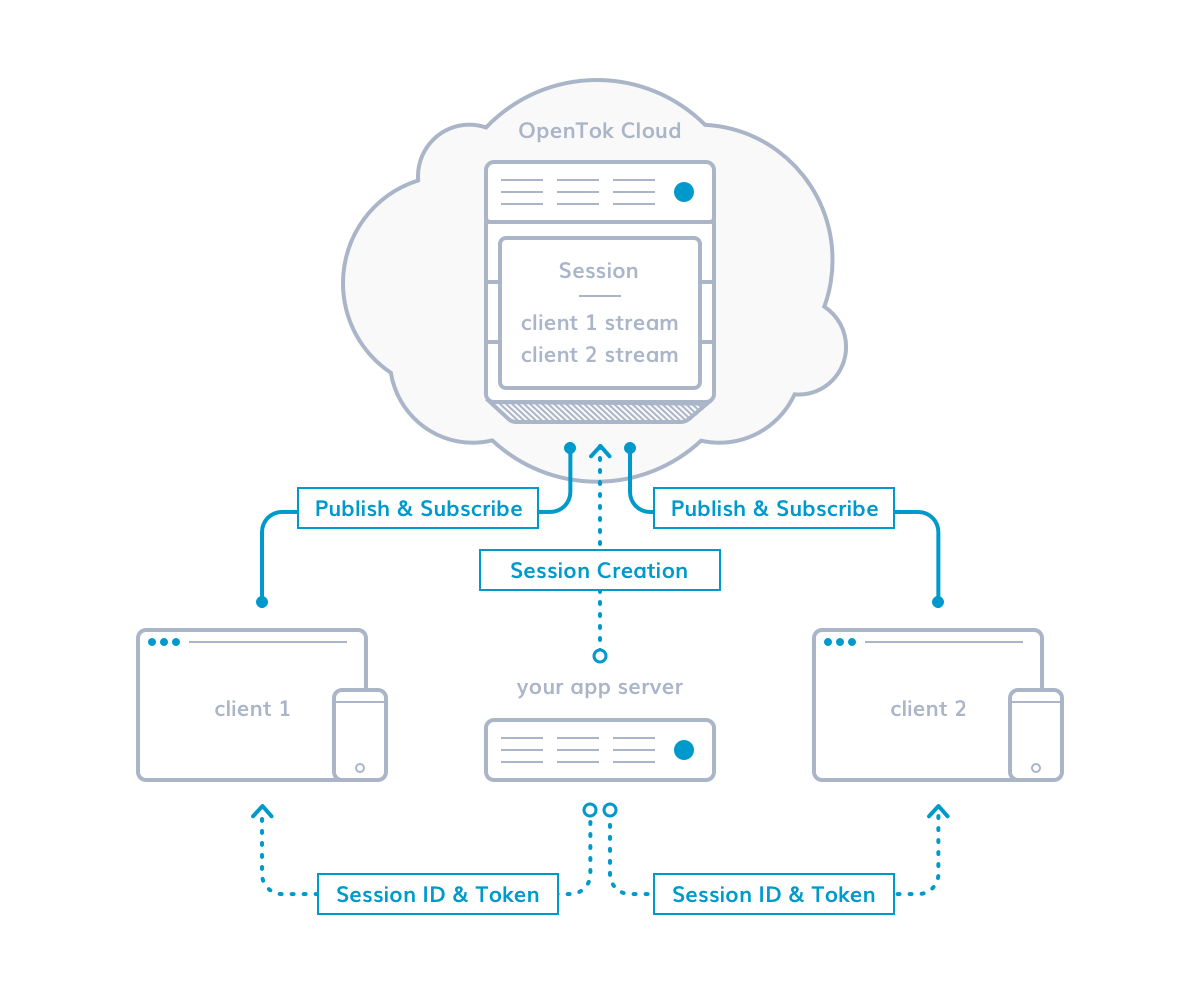
Every Vonage Video app has a client, an app server, and runs inside a session in the Vonage cloud.
Client
- Uses the client SDK (Web/iOS/Android/Desktop)
- Obtains sessionId + token from your server
- Connects to the session, publishes local A/V
- Subscribes to remote streams, handles events
App Server
- Uses a Server SDK / REST API
- Creates sessions; generates tokens and roles
- Implements business logic & webhooks/callbacks
- Controls recording, broadcast, moderation, storage
Session
- “Room” hosted in Vonage Video Cloud
- Signaling, events, media routing
- Publish/subscribe of streams
Authentication and session flow
- Create your account and application: generate your Vonage Video Application ID and Private Key.
- Create a session: generate a
sessionIdwith a Server SDK or REST. - Issue a token: create a token with the appropriate role and TTL.
- Join a session: frontend fetches
{apiKey, sessionId, token}from your endpoint and connects with the client SDK.
Server-side controls
- Sessions and tokens: Create sessions; issue tokens with roles and expiry.
- Archiving (recording): Start/stop archives; store/retrieve recordings.
- Broadcasting (HLS/RTMP): Stream a session to CDNs or RTMP endpoints.
- SIP interconnect: Bridge PSTN/SIP into a session.
- Callbacks/webhooks: Receive archive/broadcast status and connection events.
- Live Captions: Enable real-time transcription and caption overlays.
- Audio Connector: Stream raw audio out to AI services or feed synthesized audio back in.
- Experience Composer: Render branded layouts for recording, broadcast, or large-scale viewing.
- Applications API: Manage which Vonage applications have Video features enabled via
videoCapabilities.
Feature overview
Real-time collaboration
- Sessions & publish/subscribe for multi-party audio/video with adaptive routing.
- Screen sharing to capture windows, browser tabs, or entire displays.
- Signaling & messaging for chat, reactions, and in-session controls.
Recording & production
- Archiving to capture, store, and retrieve full session recordings.
- Experience Composer to render a branded web layout into a composite stream for archives, broadcasts, or large-scale viewing.
- Audio Connector to stream raw audio to AI pipelines or bring synthesized audio back into the session.
AI Integrations
- Live Captions for real-time transcription and caption overlays.
- Audio Connector + AI workflows to power speech-to-text, translation, or agent experiences.
Distribution
- Broadcasting to stream HLS/RTMP to CDNs and social destinations.
- SIP interconnect and Audio Connector to bridge telephony, bots, or compliance capture solutions.
Tools
Debugging
- Inspector to trace participants, streams, and quality events.
- Archive Inspector for archive timelines, expected durations, and error states.
Diagnostic tools
- Pre-Call Test to verify camera, microphone, bandwidth, and firewall readiness before a session.
Insights & analytics
- Insights GraphiQL Explorer to query usage data via the Insights and Advanced Insights GraphQL APIs.
- Insights API guide for integrating GraphQL queries into your tooling.
Explore capabilities
- Video Playground to prototype sessions, captions, experience composer, and more without writing code.
Starter guides & samples
- Explore the Video sample repos on GitHub — Web, iOS, and Android — for ready-to-run projects covering captions, SIP, multi-party layouts, and more.
- Fork the Video Reference Apps (Web, Android, iOS) to get production-ready meeting UX, CI, and testing workflows.
Note: TokBox is now Vonage Video.
Reporting
The Reports API is a central way to retrieve usage and reporting data across Vonage products, giving developers and businesses a consistent way to track activity and billing. It simplifies reporting by bringing usage and billing data from multiple Vonage APIs into one consistent format. You can use the Reports API in a wide variety of use cases, including:
- Customer billing - Download transactions related to all your sub-accounts and use the included price data to determine what to bill your customers.
- Invoice reconciliation - Compare your usage data with the invoice you have received.
- Monitoring and analytics - Add real-time CDR data to your business intelligence or analytics system to correlate it with other events.
See the Reports API documentation for more information, including guides, code snippets, best practices, and pricing.