Verify API Webhooks
Introduction
Webhooks are an extension of an API - instead of your code requesting data from our API platform, Vonage sends the data to you via a web request to your application. The Verify API webhook receives status updates on your requests, and will be the result of an earlier API call - this type of webhook is also called a "callback".
Receiving webhooks
To allow the Vonage servers to send data to your application via webhooks, you need to set up a webserver to receive the incoming HTTP requests. You also need to specify the URL of each webhook on your webserver so that data can be sent to each one.
To start using Verify webhooks:
- Create a Vonage account.
- Write scripts to handle the information sent or requested by Vonage. Your server must respond with a
200or204HTTP response, as anything other than a2xxcode will cause the Vonage servers to re-attempt callback delivery. - Publish your scripts by deploying to a server. For local development, try Ngrok.
- Configure your Verify webhook endpoint.
- Take an action (such as sending an SMS verification request) that will trigger that webhook.
Information about your request is then sent to your webhook endpoint.
Configure your Verify webhook URLs
The Verify API supports a Status webhook, which is configured in your application settings in the developer dashboard:
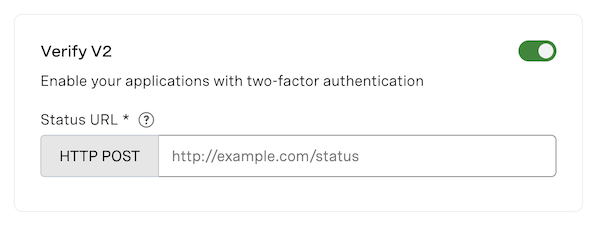
This is used to send status updates (for example, progress or completion events) for your Verify requests.
Testing webhooks locally
In order to test the correct functioning of webhooks on your locally running application, you will need to create a secure tunnel between Vonage and your application. You can do this with a secure tunnel application such as Ngrok. See Testing with Ngrok for more information.
Signed Webhooks
Verify webhooks are signed by default. Signed webhooks allow your application to verify a request is coming from Vonage and its payload has not been tampered with during transit. When receiving a request, the incoming webhook will include a JWT token in the authorization header which is signed with your signature secret.
More information on decoding signed webhooks can be found here.
Types of Callback
Verify sends two types of callbacks to your webhook URL:
- Event callback (
"type": "event") — sent for each channel attempt in the workflow. Requires an account-level capability, except for Silent Authentication which sends event callbacks by default. - Summary callback (
"type": "summary") — sent once per request upon completion of the overall workflow.
Events Callback
An inbound events webhook sent for each channel attempt within a Verify workflow. Event callbacks are available for SMS, Voice, WhatsApp, RCS, Email, Silent Authentication, and Silent Authentication Advanced.
Event callbacks are enabled via account-level capability. Silent Authentication continues generating event callbacks regardless of this capability. All other channels require the account capability to be enabled. To enable event callbacks for your account, contact your Account Manager or the Support team.
This will show the current state of a channel using the status field:
blocked- the request was blocked. This can happen, for example, due to velocity rules, or if the number provided is a VOIP.failed- the request failed. This can happen, for example, if the number given was not a valid number.expired- the request was not completed within the given time limit.action_pending- the user has not taken any action to start the authentication procedure. Applicable to Silent Authentication and Silent Authentication Advanced only. For example, thecheck_urlthat the user is given to begin silent authentication has not been called yet.
{
   "request_id": "c11236f4-00bf-4b89-84ba-88b25df97315",
   "triggered_at": "2020-01-01T14:00:00.000Z",
   "type": "event",
   "channel": "sms",
   "channel_order": 2,
   "status": "expired",
   "channel_initiated_at": "2020-01-01T14:00:05.000Z",
   "channel_finalized_at": "2020-01-01T14:00:10.000Z",
   "client_ref": "my-personal-ref"
}
| Field | Type | Description |
|---|---|---|
request_id |
string | The verify request UUID |
triggered_at |
ISO 8601 | When the event callback was generated |
type |
string | Always "event" for event callbacks |
channel |
string | Channel that this event relates to (sms, voice, whatsapp, email, silent_auth, rcs) |
channel_order |
integer | 1-indexed position of this channel in the workflow. Required, not nullable |
status |
string | One of: failed, expired, blocked, action_pending (should only be generated for the Silent Authentication & Silent Authentication Advanced channels) |
channel_initiated_at |
ISO 8601 | When the channel action started processing. Not required, not nullable |
channel_finalized_at |
ISO 8601 | When the channel action reached its terminal state. Not required, not nullable |
client_ref |
string | Customer-provided reference, if set on the request |
Silent Authentication & Silent Authentication Advanced
For Silent Authentication & Silent Authentication Advanced, the initial events callback includes an action_pending status and an action object containing the check_url the user's device must call to complete the check:
{
   "request_id": "c11236f4-00bf-4b89-84ba-88b25df97315",
   "triggered_at": "2020-01-01T14:00:00.000Z",
   "type": "event",
   "channel": "silent_auth",
   "status": "action_pending",
   "mode": "advanced",
   "action": {
      "type": "check",
      "check_url": "https://api.nexmo.com/v2/verify/:request_id/silent-auth/redirect"
   }
}
Summary Callback
Summary callbacks contain an inbound status update for a particular request. As you can see in the below example, there are two Status fields - the first is the status of the overall request, and the others show the result of each channel used in the workflow.
For the request, there are six different Status values you may see:
completed- the request was completed and the user was successfully verified.failed- the request failed as the number given was not a valid number or not a mobile IP.expired- the request was not completed within the given time.user_rejected- the user entered an incorrect pin three times, which terminated the workflow.blocked- the request was blocked due to velocity rules, or the number provided is a VOIP.cancelled- the user canceled the request before completing the authentication process.
In the workflow, there are seven different Status values you may see when using the API:
unused- the channel was not used as the request was converted by a previous channel in the workflow.completed- the channel was used, and resulted in a successful verification.failed- any channel defined in the workflow failed because the number given was not a valid number or not a mobile IP, or the country the user was located in is not covered by Verify.expired- any channel defined in the workflow expired as the OTP was not entered within the given time limit.blocked- SMS/Voice channel has been blocked due to velocity rules.user_rejected- the user entered an incorrect pin three times, which terminated the workflow for the channel used.cancelled- a specific channel's authentication process defined in the workflow was cancelled while it was still in progress.
This example shows an update for a completed verification request. Silent Authentication was attempted first but was cancelled before completion. SMS was then attempted but expired. Next, WhatsApp was used and the user was verified successfully. As the Voice channel was not attempted, the status shows as unused.
{
   "request_id": "c11236f4-00bf-4b89-84ba-88b25df97315",
   "submitted_at": "2020-01-01T14:00:00.000Z",
   "status": "completed",
   "type": "summary",
   "channel_timeout": 300,
   "workflow": [
      {
         "channel": "silent_auth",
         "initiated_at": "2020-01-01T14:00:00.000Z",
         "status": "cancelled",
         "mode": "advanced"
      },
      {
         "channel": "sms",
         "initiated_at": "2020-01-01T14:05:00.000Z",
         "status": "expired"
      },
      {
         "channel": "whatsapp",
         "initiated_at": "2020-01-01T14:10:00.000Z",
         "status": "completed"
      },
      {
         "channel": "voice",
         "initiated_at": "2020-01-01T14:15:00.000Z",
         "status": "unused"
      }
   ],
   "client_ref": "my-personal-ref"
}
The mode field indicates which Silent Authentication method was used for the silent_auth workflow step. Possible values are standard (Silent Authentication) and advanced (Silent Authentication Advanced).
To complete the silent authentication request, you will need to read the check_url and pass it to the client to authenticate.