Post-Call Transcriptions
You can get a text transcription for a Video API archive.
This page includes the following sections:
- Feature overview
- Enabling transcription and summary when starting an archive
- Getting transcription status
- Transcription format
- Download transcriptions
- Limitations/Known issues
- FAQs
Feature overview
Vonage Video API servers generate post-call transcriptions using artificial intelligence and other state-of-the-art technology.
You enable transcriptions when you start an archive using the REST API.
After the archive recording completes, the transcription will be available as a JSON file.
Enabling transcription and summary when starting an archive
When you use the Vonage Video REST API start an archive, set the hasAudio and hasTranscription properties to true in the JSON properties you sent to the start archive REST method:
Also, you can include an optional transcriptionProperties object with a hasSummary (Boolean) and/or primaryLanguageCode (String) properties. When setting hasSummary to true, it will include an AI-generated summary in the transcription. If set to false or missing (default value is false), the transcription summary will not be included. If the transcription is for another language than the "en-US" (default), configure the property primaryLanguageCode with a supported language code.
Set outputMode (in the POST data) to "individual". Transcriptions are available for individual stream archives only.
Set the value for api_key to your OpenTok project API key. Set the value for json_web_token to a JSON web token (see the REST API Authentication documentation).
For other archive options, see the documentation for the start archive REST method.
The response for a call to the start archive REST method will include hasTranscription and transcription properties in addition to the other documented properties of the response:
{
  "createdAt" : 1384221730555,
  "duration" : 0,
  "hasAudio" : true,
  "hasVideo" : true,
  "id" : "b40ef09b-3811-4726-b508-e41a0f96c68f",
  "name" : "The archive name you supplied",
  "outputMode" : "individual",
  "projectId" : 123456,
  "reason" : "",
  "resolution" : "640x480",
  "sessionId" : "flR1ZSBPY3QgMjkgMTI6MTM6MjMgUERUIDIwMTN",
  "size" : 0,
  "status" : "started",
  "streamMode" : "auto",
  "hasTranscription" : true,
  "transcription" : {
    "hasSummary": true,
    "primaryLanguageCode": "ja-JP",
    "reason": "",
    "status": "requested",
    "url": ""
  }
}
See Getting transcription status for information on dynamically getting the transcription details.
In an automatically archived session, the transcription won't be started automatically. You should start a second archive, using the multiArchiveTag option, for the transcription (see Simultaneous archives).
Support for transcriptions is currently available with the Vonage Video REST API. It is not supported in the Vonage Video server SDKs.
Getting transcription status
The response for the REST methods for listing archives and retrieving archive information will include hasTranscription and transcription properties:
{
    "id" : "b40ef09b-3811-4726-b508-e41a0f96c68f",
    "event": "archive",
    "createdAt" : 1723584124,
    "duration" : 328,
    "name" : "the archive name",
    "projectId" : 123456,
    "reason" : "",
    "sessionId" : "2_MX40NzIwMzJ-flR1ZSBPERUIDIwMTN-MC45NDQ2MzE2NH4",
    "size" : 18023312,
    "status" : "uploaded",
    "hasTranscription" : true,
    "transcription": {
      "status": "available",
      "url": "URL for downloading the transcription, if available",
      "reason": "The reason for failure, if status is set to failed",
      "hasSummary": true,
      "primaryLanguageCode": "The configured language code"
    }
}
The hasTranscription property is a Boolean, indicating whether transcription is enabled for the archive.
The transcription property an object with the following properties:
-
status(String) — The status of the transcription, which can be set to one of these:"requested"— ThehasTranscriptionproperty was set totrueduring the start archive call, but transcription has not started."failed"— The transcription failed. Check thereasonproperty for more information."started"— The transcription is in progress."available"— The transcription is available for download from OpenTok. Check theurlproperty."uploaded"— The transcription is available for download from the S3 bucket or Azure container you specified in your Video API account. Look for a transcription.zip in the archive ID folder in your archive storage target. See Archive storage.
-
url(String) — The URL for downloading the transcription, if thestatusis set to"available". -
reason(String) — The reason for transcription failure, if thestatusis set to"failed". -
hasSummary(Boolean) — Indicates whether an AI-generated summary is included in the transcription. -
primaryLanguageCode(String) — The language code configured for the transcription.
You can also set an archive status callback for your Video API account. See Archive status changes. The callback data will also include hasTranscription and transcription properties.
Transcription format
The transcription is provided as a compressed ZIP file. The uncompressed file is a text file with JSON data.
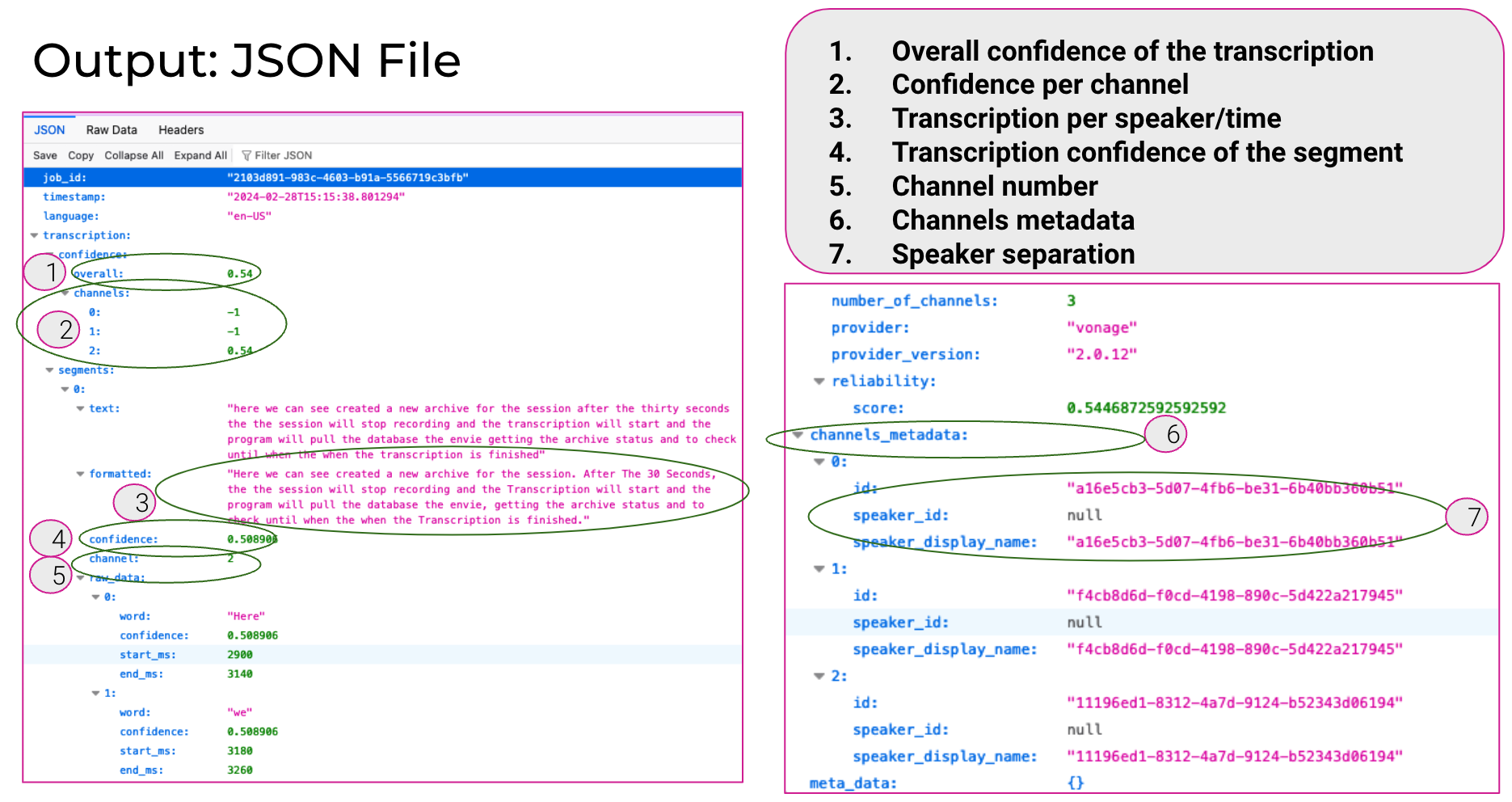
The transcription includes individual segments of text. Each segment corresponds to an individual audio channel (from one of the audio streams in the session).
The JSON has the following top-level properties:
-
job_id— A unique ID for the transcription. -
timestamp— An ISO 8601 date string for when the transcription file was created. -
language— This is set to"en-US". -
channels_metadata— An array of objects defining each audio channel. Each object anidproperty, which is the OpenTok stream ID. You can add identifying connection data when you create a client token for each user. You can use session monitoring callbacks to get the stream IDs and the connection data for each stream's connection. You can then use these to identify the stream's user in the transcription. -
transcription— An object containing the transcription details (see below).
The transcription object has the following properties:
-
number_of_channels— The number of individual audio channels in the archive included in the transcription. -
confidence— A object with two properties:overallandchannels. Theoverallproperty is the estimated confidence of the entire transcription (from 0 to 1.0). Thechannelsproperty is an array listing the estimated confidence of each channel in the transcription. -
reliability— An object with one property:score. Thescoreis a number indicating the estimated overall reliability of the transcription (from 0 to 1.0). -
summary— If you set thehasSummaryproperty of thetranscriptionPropertiesobject totruewhen starting the archive, this property is included. It is set to an AI-generated summary of the transcription. -
segments— An array of individual segments in the transcript.
Each object in the segments array has the following properties:
-
text— The transcribed text of the segment. -
formatted— The formatted text (with punctuation) of the segment. -
confidence— A number, from 0 to 1.0, representing the estimated confidence of the segment's transcription. -
channel— The integer identifying the audio channel for the segment. -
start_ms— The offset of the start of the segment from the start of the transcription, in milliseconds. -
end_ms— The offset of the end of the segment from the start of the transcription, in milliseconds. -
raw_data— An array objects for each word in the transcription segment.
Each raw_data object includes the following properties:
-
word— A word in the segment. -
confidence— A number, from 0 to 1.0, representing the estimated confidence of the transcribed word. -
start_ms— The offset of the start of the word from the start of the transcription, in milliseconds. -
end_ms— The offset of the end of the word from the start of the transcription, in milliseconds.
Download transcriptions
There are two ways to download the transcription file for an archive: via the REST API or via the Developer Dashboard.
Download via the REST API
You can download the transcription file for a specific archive by calling the retrieve archive information REST method and checking the transcription.url property in the response. If the transcription.status property is set to "available" or "uploaded", the transcription.url property contains a URL for downloading the transcription file.
Use an HTTP GET request to download the transcription file from the URL. For example:
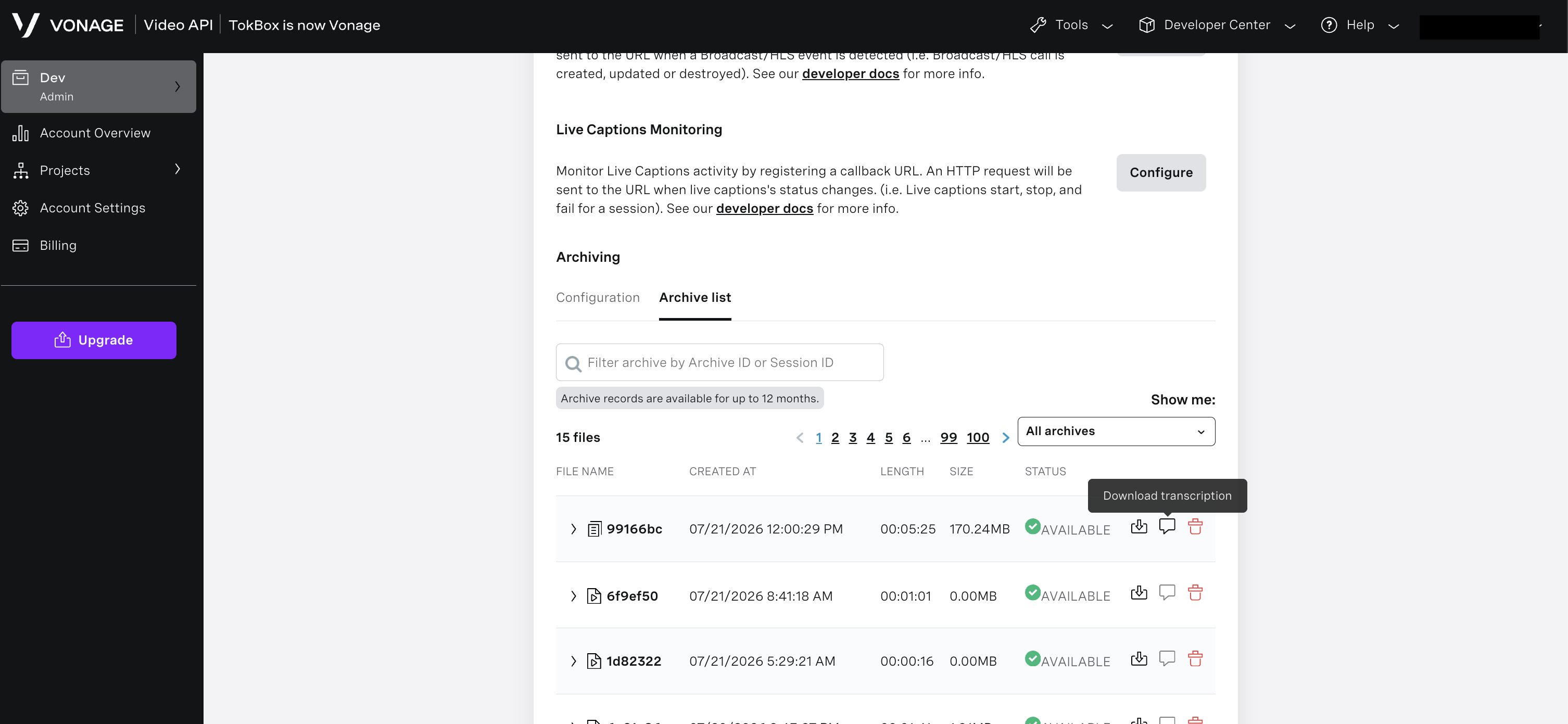
Download via the Developer Dashboard
You can download transcription for a specific call if the fallback storage option has been enabled by following these steps:
- Open the Developer Dashboard.
- Select a project from the projects list and navigate to the Archiving section. Click the Archive list button.
- Optionally, provide an Archive ID or Session ID to narrow down the results.
- In the results list, locate the relevant session.
- Hover the mouse over the Status column for that session and click the Download Transcription button.
Limitations/Known Issues
-
Transcriptions are only available for individual stream archives, not for composed archives.
-
Transcriptions are not compatible with encrypted archives.
-
This feature currently supported with the Vonage Video REST API, not with the Vonage Video server SDKs.
-
The maximum length of a transcription is 120 minutes.
-
Post-call transcription is not fully compliant with all Regional Media Zones (see below).
| Regional Media Zone Support | Available during alpha | Available when in GA |
|---|---|---|
| USA | Yes | Yes |
| EU | Yes | Yes |
| Canada | No | Based on requirement |
| Germany | No | Based on requirement |
| Australia | No | Based on requirement |
| Japan | No | Based on requirement |
| South Korea | No | Based on requirement |
FAQs
Frequently asked questions:
How many streams can be analyzed from a single session?
Up to 50 streams with a maximum of 120 transcribed minutes.
Does the post-call transcriptions feature work with both routed and relayed sessions?
The post-call transcriptions feature is intended for routed sessions (sessions that use the Vonage Media Router).
If the transcription uploads to a customer-configured S3 bucket fails, does the retry or fallback mechanism work similarly to the archive upload?
Yes, the retry mechanism for PCT operates exactly the same as for regular archive uploads.
In cases where the transcription falls back and is uploaded to the Vonage cloud, will the customer need to use an HTTP GET request to obtain the download link for the transcription?
When the transcription status changes, the customer should receive a callback that includes the download URL. If no callback is registered, the download link can only be retrieved through an HTTP GET request.
Once the transcription download link is received, it allows for a direct download. Are there any plans to introduce authentication for downloading the transcription?
There are no plans to introduce authentication for the link. The download link has a short expiration window. If not accessed within that timeframe, a new request must be made to obtain a fresh link.
Even though multiple users have joined in the session, the transcription file is a single JSON file. How do we differentiate between the users?
Each transcription entry in the file is associated with a specific channel number, assigned to each stream. The file also includes a channels_metadata property, which provides stream ID information corresponding to each channel ID.