WhatsApp Karussell-Vorlagen
Mit den Karussellvorlagen für Medienkarten können Sie mehrere Produkte in einer einzigen Marketingvorlage auf WhatsApp präsentieren. Jedes Produkt erscheint als horizontal scrollbare Karte, so dass die Nutzer die Angebote durchsuchen, vergleichen und darauf reagieren können, ohne von mehreren Nachrichten überwältigt zu werden.
Dieses Format eignet sich besonders für Werbeaktionen und saisonale Kampagnen.
Eine Medienkarten-Karussellvorlage ist eine WhatsApp-Marketingvorlage, die eine Kombination aus beiden darstellt:
- ein einziger Nachrichtentext, und
- Ein horizontal scrollbares Karussell mit bis zu 10 Produktmedienkarten
Jede Karte steht für ein Produkt oder ein Angebot und soll den Nutzer zu einer externen Kauf- oder Informationsseite führen.
Karussellkarten werden nur für Marketingvorlagen unterstützt und sind nicht für Dienstprogramm- oder Authentifizierungsvorlagen verfügbar.
Bestandteile eines Karussells
Jede Karussellkarte kann die folgenden Komponenten enthalten:
Kopfzeile (erforderlich)
Ein Bild- oder Video-Asset, das das Produkt darstellt.
Textkörper (optional)
Kurzer beschreibender Text, z. B. ein Produktname, ein Preis oder eine Werbeaktion.
Buttons (optional, bis zu zwei pro Karte)
Unterstützt werden folgende Schaltflächentypen:
- URL-Schaltflächen
- Tasten für Telefonnummern
- Schnellantwort-Tasten
Sie können die Schaltflächentypen innerhalb einer Karte mischen (z. B. eine URL-Schaltfläche und eine Schnellantwort-Schaltfläche).
Erfordernis der Konsistenz
Alle Karten in einer einzigen Karussellvorlage müssen den gleichen Satz von Komponenten verwenden.
Wenn zum Beispiel eine Karte einen Text und zwei Schaltflächen enthält, müssen alle Karten ebenfalls einen Text und zwei Schaltflächen enthalten.
Eine WhatsApp-Karussell-Vorlage erstellen
Medienkarten-Karussells müssen als Marketingvorlagen mit der Vorlagenverwaltungs-API erstellt werden.
Jede Vorlage besteht aus:
- A
BODYKomponente (gilt für die gesamte Nachricht) - A
CAROUSELKomponente mit bis zu 10 Karten - Jede Karte muss die gleichen Komponenten definieren
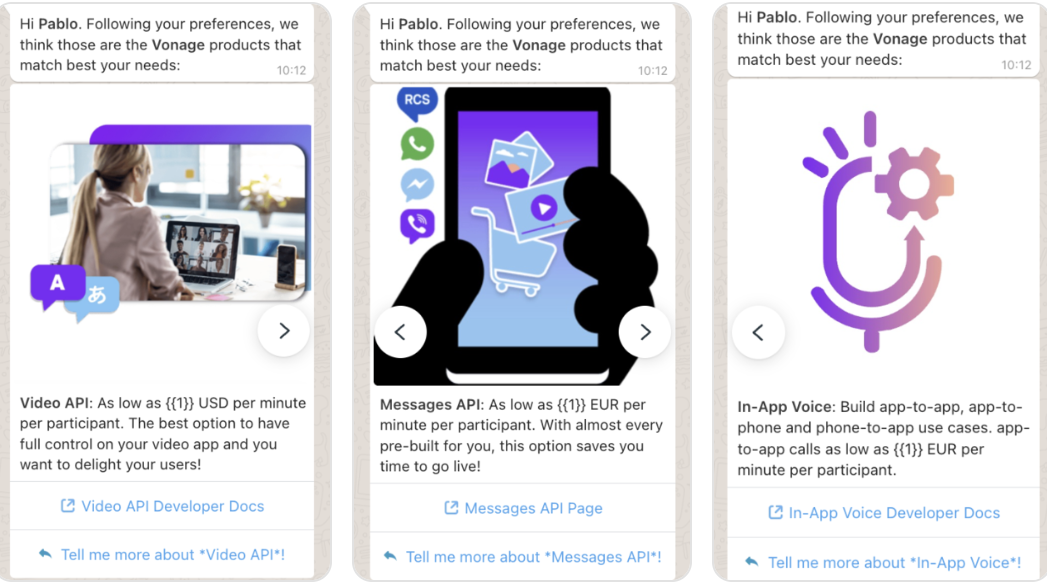
Produktempfehlungskarussell
In diesem Beispiel wird eine Karussellvorlage mit drei Produktkarten erstellt, die jeweils ein Produkt enthalten:
- Eine Bildüberschrift
- Ein Körper mit einem dynamischen Preisparameter
- Eine URL-Schaltfläche und eine Schaltfläche für schnelle Antworten
{
    "name": "sample_carousel_template10",
    "language": "en",
    "category": "MARKETING",
    "allow_category_change": true,
    "components": [
        {
            "type": "BODY",
            "text": "Hi *{{1}}*. Following your preferences, we think those are the *Vonage* products that match best your needs:",
            "example": {
                "body_text": "[['Pablo']]"
            }
        },
        {
            "type": "CAROUSEL",
            "cards": [
                {
                    "components": [
                        {
                            "type": "HEADER",
                            "format": "IMAGE",
                            "example": {
                                "header_handle": ["4::aW1hZ2UvanBn:ARYMX_ceB7hy4UrocTFGovCrheY7VIeEc0Lxc2fAn_SNsWN5icskgixQ1viE8pPoiiQ6S6Smv6RpaWHNb5mJaUQI4Y7zB6L87QvnTNs3NeVmfg:e:1775210982:1767162543555562:100040931896219:ARYyiV3YGhM1uOFNyKw"]
                            }
                        },
                        {
                            "type": "BODY",
                            "text": "*Video API*: As low as {{1}} USD per minute per participant. The best option to have full control on your video app and you want to delight your users!",
                            "example": {
                                "body_text": "[['0.00395']]"
                            }
                        },
                        {
                            "type": "BUTTONS",
                            "buttons": [
                                {
                                    "type": "URL",
                                    "text": "Video API Developer Docs",
                                    "url": "https://tokbox.com/developer/"
                                },
                                {
                                    "type": "QUICK_REPLY",
                                    "text": "Tell me more about *Video API*!"
                                }
                            ]
                        }
                    ]
                },
                {
                    "components": [
                        {
                            "type": "HEADER",
                            "format": "IMAGE",
                            "example": {
                                "header_handle": ["4::aW1hZ2UvanBn:ARYfk5Coa-tyuiaGtJIGbbZpadRtRf6_DRGx1eC4COq2TBS9jESnifBwlvBesVPYsJoJG0vlF8DcQ-SAoynD7_V4AKoVcAbO_fS9tVesGgb-Aw:e:1775210995:1767162543555562:100040931896219:ARYPxK9WzQSw_RPhWnI"]
                            }
                        },
                        {
                            "type": "BODY",
                            "text": "*Messages API*: As low as {{1}} EUR per minute per participant. With almost every pre-built for you, this option saves you time to go live!",
                            "example": {
                                "body_text": "[['0.00475']]"
                            }
                        },
                        {
                            "type": "BUTTONS",
                            "buttons": [
                                {
                                    "type": "URL",
                                    "text": "Messages API Page",
                                    "url": "https://www.vonage.com/communications-apis/messages/"
                                },
                                {
                                    "type": "QUICK_REPLY",
                                    "text": "Tell me more about *Messages API*!"
                                }
                            ]
                        }
                    ]
                },
                {
                    "components": [
                        {
                            "type": "HEADER",
                            "format": "IMAGE",
                            "example": {
                                "header_handle": ["4::aW1hZ2UvanBn:ARZWziKvjbUO_8_-zr3gi45fXqs_4kI8A24lPhI1QvREJuojcAEspv6iHMjBvAOJ23j2sT8Y11xn1oFNm_vUsQHNwGTlpodB1Q8OxonGUrmFDw:e:1775211007:1767162543555562:100040931896219:ARa3BLIlI4stgYj9Hzo"]
                            }
                        },
                        {
                            "type": "BODY",
                            "text": "*In-App Voice*: Build app-to-app, app-to-phone and phone-to-app use cases. app-to-app calls as low as {{1}} EUR per minute per participant.",
                            "example": {
                                "body_text": "[['0.0040']]"
                            }
                        },
                        {
                            "type": "BUTTONS",
                            "buttons": [
                                {
                                    "type": "URL",
                                    "text": "In-App Voice Developer Docs",
                                    "url": "https://developer.vonage.com/en/vonage-client-sdk/in-app-voice/overview"
                                },
                                {
                                    "type": "QUICK_REPLY",
                                    "text": "Tell me more about *In-App Voice*!"
                                }
                            ]
                        }
                    ]
                }

            ]
        }
    ]
}
Antwort
Status 202 ACCEPTED
{
    "id": "1477582267072231",
    "status": "PENDING",
    "category": "MARKETING"
}
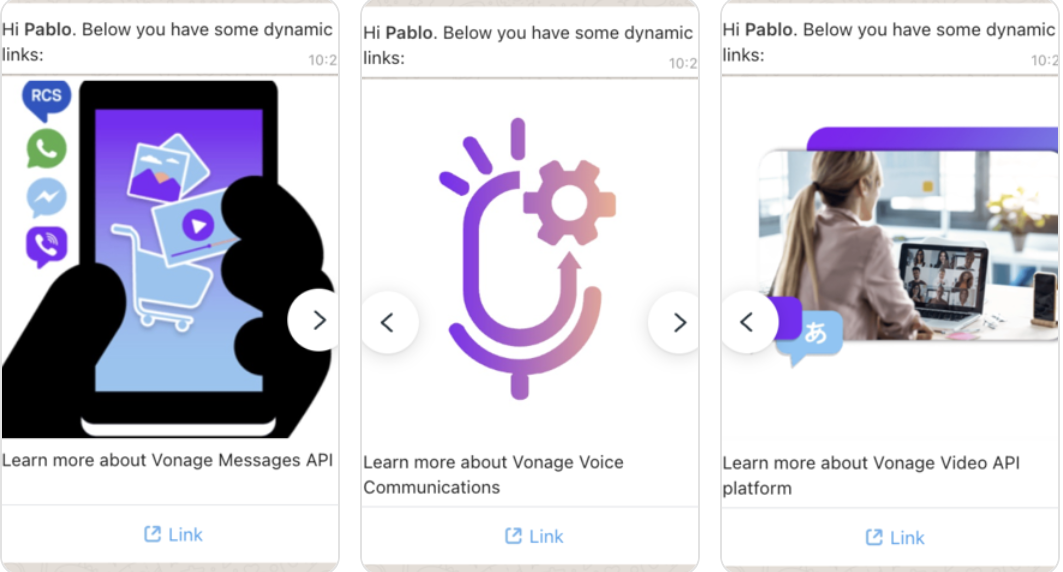
Karussell mit dynamischen URL-Parametern
Diese Vorlage veranschaulicht dynamische URL-Schaltflächen, bei denen ein Teil der URL zum Zeitpunkt des Sendens angegeben wird.
{
    "name": "sample_carousel_dynamic_links10",
    "language": "en",
    "category": "MARKETING",
    "allow_category_change": true,
    "components": [
        {
            "type": "BODY",
            "text": "Hi *{{1}}*. Below you have some dynamic links:",
            "example": {
                "body_text": "[['Pablo']]"
            }
        },
        {
            "type": "CAROUSEL",
            "cards": [
                {
                    "components": [
                        {
                            "type": "HEADER",
                            "format": "IMAGE",
                            "example": {
                                "header_handle": ["4::aW1hZ2UvanBn:ARYfk5Coa-tyuiaGtJIGbbZpadRtRf6_DRGx1eC4COq2TBS9jESnifBwlvBesVPYsJoJG0vlF8DcQ-SAoynD7_V4AKoVcAbO_fS9tVesGgb-Aw:e:1775210995:1767162543555562:100040931896219:ARYPxK9WzQSw_RPhWnI"]
                            }
                        },
                        {
                            "type": "BODY",
                            "text": "Learn more about Vonage Messages API"
                        },
                        {
                            "type": "BUTTONS",
                            "buttons": [
                                {
                                    "type": "URL",
                                    "text": "Link",
                                    "url": "https://vonage.com/{{1}}",
                                    "example": [
                                        "https://www.vonage.com/communications-apis/messages/"
                                    ]
                                }
                            ]
                        }
                    ]
                },
                {
                    "components": [
                        {
                            "type": "HEADER",
                            "format": "IMAGE",
                            "example": {
                                "header_handle": ["4::aW1hZ2UvanBn:ARZWziKvjbUO_8_-zr3gi45fXqs_4kI8A24lPhI1QvREJuojcAEspv6iHMjBvAOJ23j2sT8Y11xn1oFNm_vUsQHNwGTlpodB1Q8OxonGUrmFDw:e:1775211007:1767162543555562:100040931896219:ARa3BLIlI4stgYj9Hzo"]
                            }
                        },
                        {
                            "type": "BODY",
                            "text": "Learn more about Vonage Voice Communications"
                        },
                        {
                            "type": "BUTTONS",
                            "buttons": [
                                {
                                    "type": "URL",
                                    "text": "Link",
                                    "url": "https://vonage.com/{{1}}",
                                    "example": [
                                        "https://www.vonage.com/communications-apis/voice/"
                                    ]
                                }
                            ]
                        }
                    ]
                },
                {
                    "components": [
                        {
                            "type": "HEADER",
                            "format": "IMAGE",
                            "example": {
                                "header_handle": ["4::aW1hZ2UvanBn:ARYMX_ceB7hy4UrocTFGovCrheY7VIeEc0Lxc2fAn_SNsWN5icskgixQ1viE8pPoiiQ6S6Smv6RpaWHNb5mJaUQI4Y7zB6L87QvnTNs3NeVmfg:e:1775210982:1767162543555562:100040931896219:ARYyiV3YGhM1uOFNyKw"]
                            }
                        },
                        {
                            "type": "BODY",
                            "text": "Learn more about Vonage Video API platform"
                        },
                        {
                            "type": "BUTTONS",
                            "buttons": [
                                {
                                    "type": "URL",
                                    "text": "Link",
                                    "url": "https://vonage.com/{{1}}",
                                    "example": [
                                        "https://www.vonage.com/communications-apis/video/"
                                    ]
                                }
                            ]
                        }
                    ]
                }

            ]
        }
    ]
}
Antwort
Status 202 Accepted
{
    "id": "1635112524349526",
    "status": "PENDING",
    "category": "MARKETING"
}
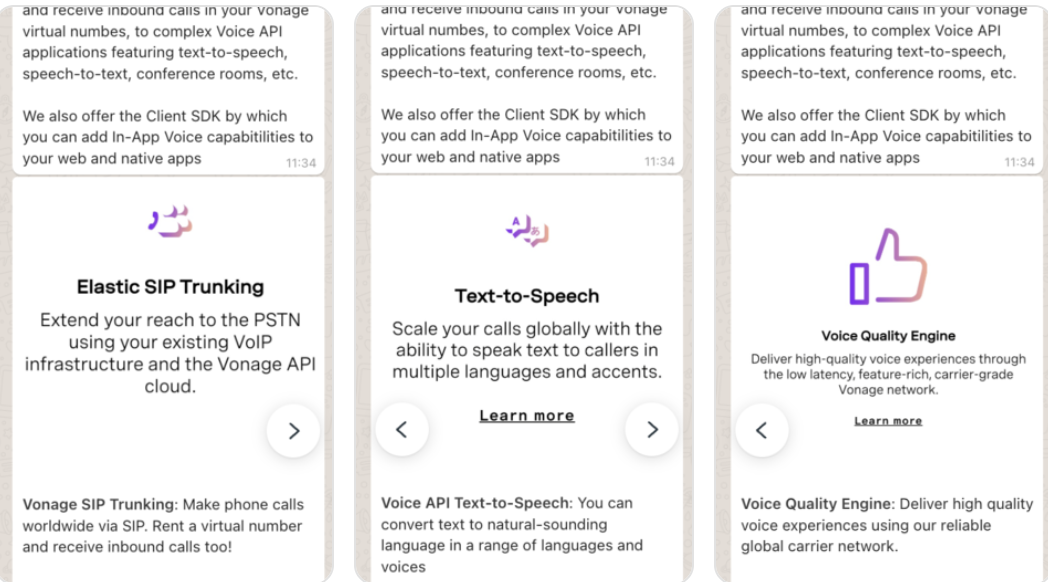
Informationskarussell ohne Parameter
Diese Vorlage verwendet statischen Text und Schaltflächen, wobei beim Senden keine Parameter erforderlich sind.
{
    "name": "sample_carousel_quick_reply10",
    "language": "en",
    "category": "MARKETING",
    "allow_category_change": true,
    "components": [
        {
            "type": "BODY",
            "text": "With *Vonage* you can implement any type of Voice application.\n\nGoing from basic SIP trunks to make calls and receive inbound calls in your Vonage virtual numbes, to complex Voice API applications featuring text-to-speech, speech-to-text, conference rooms, etc.\n\nWe also offer the Client SDK by which you can add In-App Voice capabitilities to your web and native apps"
        },
        {
            "type": "CAROUSEL",
            "cards": [
                {
                    "components": [
                        {
                            "type": "HEADER",
                            "format": "IMAGE",
                            "example": {
                                "header_handle": ["4::aW1hZ2UvanBn:ARYvt342aYJNXghr96KCAaJrEjtBQ1V2MK2AGhspduZc0ALIvV_Ti2Ec3Fr09SyJQAlmLb8OEnymiA25n-RzwVA8qUpXrHozR28OHkVhfCz9vA:e:1775215593:1767162543555562:100040931896219:ARYOpAnR6U-6cAGW8YM"]
                            }
                        },
                        {
                            "type": "BODY",
                            "text": "*Vonage SIP Trunking*: Make phone calls worldwide via SIP. Rent a virtual number and receive inbound calls too!"
                        },
                        {
                            "type": "BUTTONS",
                            "buttons": [
                                {
                                    "type": "URL",
                                    "text": "Vonage SIP Trunking Docs",
                                    "url": "https://developer.vonage.com/en/sip/overview"
                                },
                                {
                                    "type": "QUICK_REPLY",
                                    "text": "Tell me more about SIP Trunking!"
                                }
                            ]
                        }
                    ]
                },
                {
                    "components": [
                        {
                            "type": "HEADER",
                            "format": "IMAGE",
                            "example": {
                                "header_handle": ["4::aW1hZ2UvanBn:ARYXBRY83hHNm6fcsll3p7zJsxepaZIuAuKM1YYbbkix--aE3w41wTdGMXY_rN8hYA4etKSS-a6xCygPGETN4C3ZBLBywyE93IFa4mx1Za1q7A:e:1775215701:1767162543555562:100040931896219:ARY6_ZRadoHSHQHYUuU"]
                            }
                        },
                        {
                            "type": "BODY",
                            "text": "*Voice API Text-to-Speech*: You can convert text to natural-sounding language in a range of languages and voices"
                        },
                        {
                            "type": "BUTTONS",
                            "buttons": [
                                {
                                    "type": "URL",
                                    "text": "Vonage Voice API TTS Docs",
                                    "url": "https://www.vonage.com/communications-apis/voice/features/tts/"
                                },
                                {
                                    "type": "QUICK_REPLY",
                                    "text": "Tell me more about Voice API Text-to-Speech!"
                                }
                            ]
                        }
                    ]
                },
                {
                    "components": [
                        {
                            "type": "HEADER",
                            "format": "IMAGE",
                            "example": {
                                "header_handle": ["4::aW1hZ2UvanBn:ARZtdQZsf61x1CHZuzu9hHpxkny9sBr7JDwg92UEPIgjOkUZdC1_ua19bGNzePg5oig83AbYWDX_itrGormlSiqiU8Pz71jUxpPqTrTnHQGB6Q:e:1775215569:1767162543555562:100040931896219:ARb4jYhguGyuCUukgcE"]
                            }
                        },
                        {
                            "type": "BODY",
                            "text": "*Voice Quality Engine*: Deliver high quality voice experiences using our reliable global carrier network."
                        },
                        {
                            "type": "BUTTONS",
                            "buttons": [
                                {
                                    "type": "URL",
                                    "text": "Vonage Voice Quality Engine Docs",
                                    "url": "https://www.vonage.com/communications-apis/platform/voice-quality/"
                                },
                                {
                                    "type": "QUICK_REPLY",
                                    "text": "Tell me more about Voice Quality Engine!"
                                }
                            ]
                        }
                    ]
                }

            ]
        }
    ]
}
Antwort
Status 202 ACCEPTED
{
    "id": "1214481130497745",
    "status": "PENDING",
    "category": "MARKETING"
}
Benutzererfahrung beim Empfang eines Karussells
Wenn ein Benutzer eine URL-Schaltfläche auf einer Karussellkarte antippt:
- Die zugeordnete URL wird im Standard-Webbrowser des Geräts geöffnet
- Der Benutzer wird aus dem WhatsApp-Client herausgenommen
Denn Käufe finden außerhalb von WhatsApp statt:
- Es werden keine WhatsApp-Webhooks für Bestellungen ausgelöst
- Bestellungsdetails sind in WhatsApp APIs nicht verfügbar
Hochladen von Mediendateien
Bevor Sie Karussellvorlagen mit Medien senden, müssen Sie möglicherweise Ihre Mediendateien hochladen, um Medien-Handles zu erhalten. Laden Sie Ihre Mediendateien mit der Medien-Upload-API hoch, um Medien-Handles zu erhalten.
Medienanforderung hochladen:
curl --location 'https://api.nexmo.com/v2/whatsapp-manager/media/uploads?file_type=image%2Fjpg' \
  --header 'Authorization: Basic xxxxxxxxxxx' \
  --form 'mediafile=@"/Users/pcristobaldelrio/Desktop/client-sdk.png"'